
Shargeek STM2E-1
Shargeek STORM2 Slim Portable Charger User Manual
Modeli: STM2E-1
giriiş
This manual provides comprehensive instructions for the safe and efficient use of your Shargeek STORM2 Slim Portable Charger. Please read this manual thoroughly before operating the device and retain it for future reference.
The Shargeek STORM2 Slim is a high-capacity portable power bank featuring a unique transparent design and an IPS display screen. It offers 130W max output with 100W USB-C and 30W USB-A ports, suitable for charging various devices including laptops, tablets, and smartphones.

Image: The Shargeek STORM2 Slim portable charger, showcasing its transparent design that reveals internal components and the included yellow USB-C to USB-C cables.
Ürün Özellikleri
- Şeffaf Tasarım: The see-through casing reveals the internal battery and circuit layout, highlighting the device's engineering.
- IPS Display Screen: A clear screen provides real-time information on battery life, output distribution, temperature, operation hours, and active ports.
- Yüksek Kapasite: 20000mAh battery capacity, capable of multiple charges for various devices.
- Hızlı Şarj: Features a 100W USB-C PD port and a 30W USB-A port, supporting 130W max output for rapid charging.
- Evrensel Uyumluluk: Charges laptops, phones, tablets, and other devices with USB-C or USB ports.

Resim: Ayrıntılı view of the Shargeek STORM2 Slim's IPS LCD screen, showing various data points such as input/output wattage, cilttage, current, battery level, and temperatures.
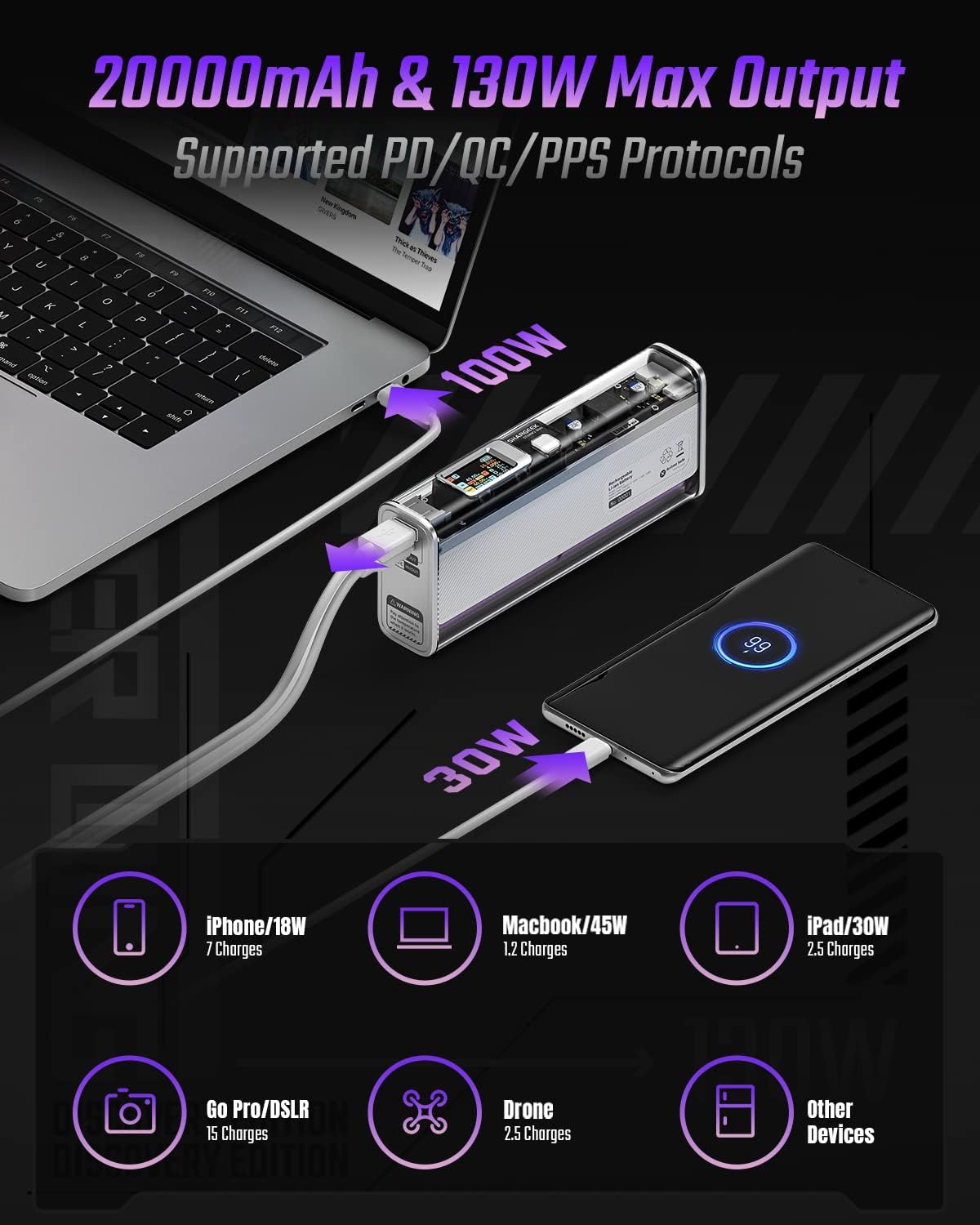
Image: The Shargeek STORM2 Slim connected via USB-C to a laptop for 100W charging and via USB-A to a smartphone for 30W charging, demonstrating its dual-port capability.
Kurulum ve İlk Kullanım
Paket İçeriği:
- Shargeek STORM2 Slim Portable Charger
- USB-C'den USB-C'ye Kablo
- Kullanım Kılavuzu (bu belge)
İlk Şarj:
- Before first use, fully charge your STORM2 Slim.
- Connect the provided USB-C to USB-C cable to the USB-C port on the STORM2 Slim.
- Connect the other end of the cable to a compatible USB-C power adapter (not included) with a minimum of 100W output for fastest charging.
- The IPS screen will display charging status and battery percentage. The device is fully charged when the screen indicates 100%.
- A full recharge typically takes approximately 90 minutes with a 100W power adapter.
Kullanım Talimatları
Şarj Cihazları:
- Identify the appropriate charging cable for your device (USB-C to USB-C or USB-A to device-specific cable).
- Connect one end of the cable to your device and the other end to the corresponding port (USB-C or USB-A) on the STORM2 Slim.
- The IPS screen will automatically activate and display the charging output (watts, volts, amps) for the connected device(s).
- The STORM2 Slim can charge two devices simultaneously using both the USB-C and USB-A ports.
Understanding the IPS Screen:
The IPS screen provides detailed real-time information. Use the physical button on the side of the power bank to navigate through different display modes or access settings.
- Input/Output Dashboard: Shows power input (IN) when charging the power bank and power output (OUT) when charging devices, including wattage, cilttage ve her port için akım.
- Pil Seviyesi: Kalan pil yüzdesini görüntülertage and a visual icon.
- Cilttage & Akım: Detailed readings for the internal battery cells.
- Sıcaklık: Shows the internal circuit board and battery temperatures.
- Çalışma Süresi: A resettable timer indicating the duration of current operation.
To access menus: Long-press the button. Gezinmek için: Short-press. Seçmek: Long-press.
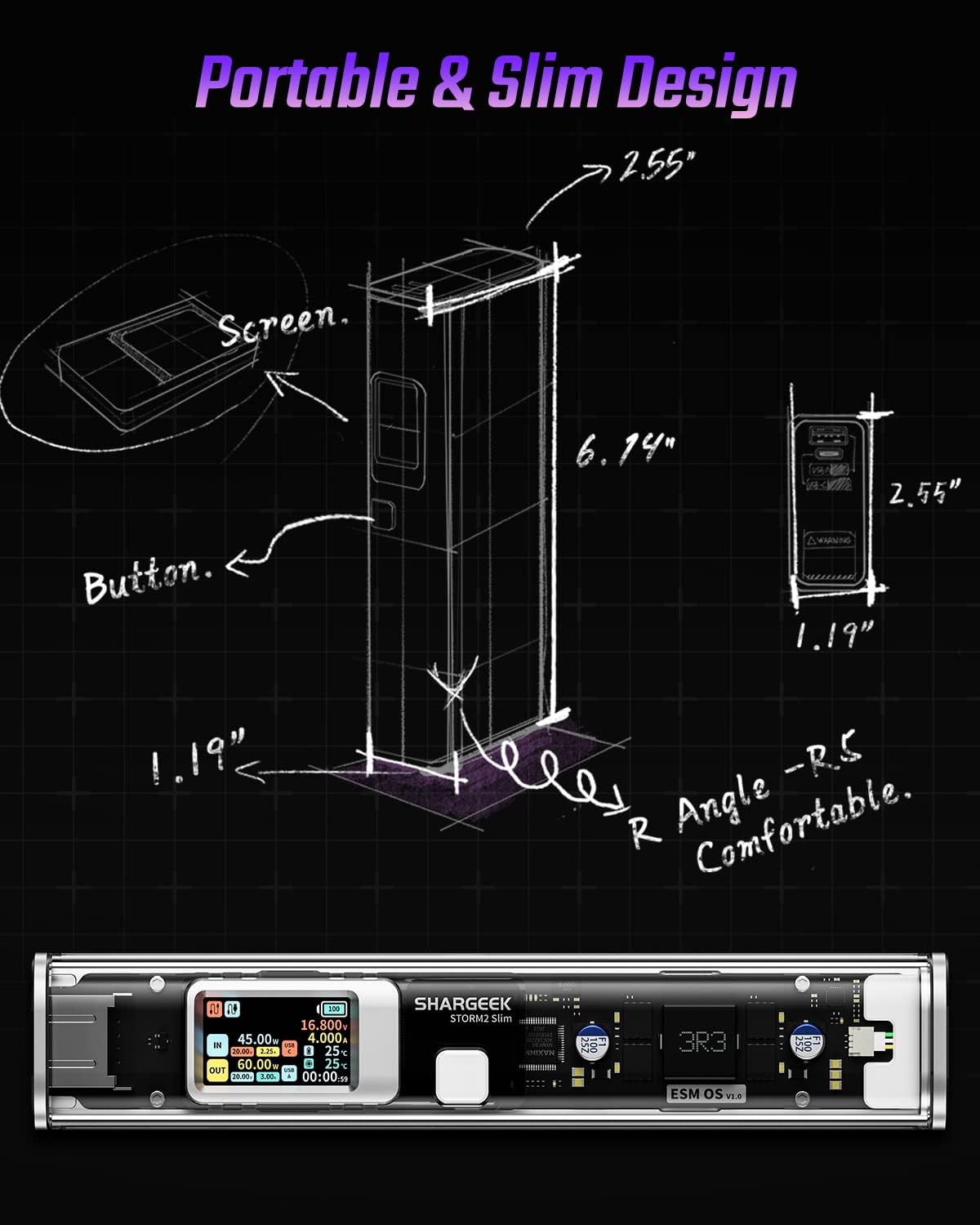
Image: A technical drawing illustrating the dimensions of the Shargeek STORM2 Slim and pointing out the screen and button locations.
Bakım
- Temizlik: Powerbank'in dış yüzeyini temizlemek için yumuşak ve kuru bir bez kullanın. Sert kimyasallar veya aşındırıcı malzemeler kullanmaktan kaçının.
- Depolamak: Cihazı serin, kuru ve doğrudan güneş ışığından, aşırı sıcaklıklardan ve yüksek nemden uzak bir yerde saklayın.
- Pil Bakım: To prolong battery life, avoid fully discharging the power bank frequently. Recharge it when the battery level is low. If storing for extended periods, charge it to approximately 50-70% every 3-6 months.
- Damlalardan Kaçının: While designed with an aluminum alloy frame for durability, avoid dropping the device as it may damage internal components or the transparent casing.
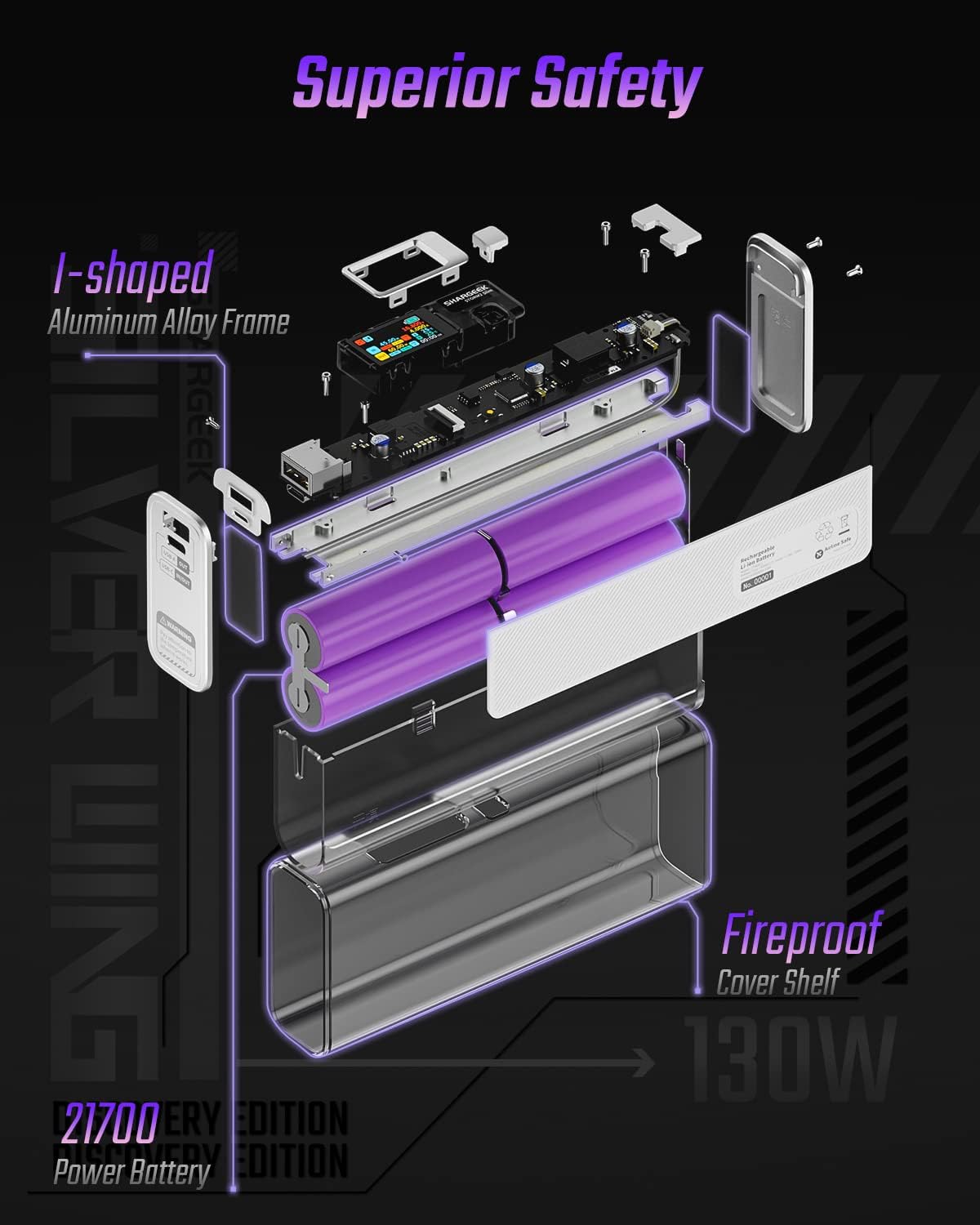
Image: An exploded diagram of the Shargeek STORM2 Slim, illustrating its internal structure including the I-shaped aluminum alloy frame, fireproof cover shelf, and 21700 power batteries, highlighting its robust construction.
Sorun giderme
| Sorun | Olası Neden | Çözüm |
|---|---|---|
| Cihaz, power bank'ten şarj olmuyor. | Low power bank battery; incompatible cable; device not properly connected; device requires more power than available. | Recharge the STORM2 Slim. Ensure cable is fully inserted and compatible. Check device power requirements against power bank output. Try a different cable or port. |
| Powerbank şarj olmuyor. | Charging cable or adapter faulty; power bank port damaged. | Try a different USB-C cable and power adapter. Ensure the adapter meets the recommended power output (e.g., 100W). If problem persists, contact support. |
| IPS screen is blank or unresponsive. | Power bank is off; temporary software glitch. | Press the button to activate the screen. If unresponsive, try connecting a device to charge or connecting the power bank to a charger to see if it activates. If problem persists, contact support. |
| Yavaş şarj. | Kablo hızlı şarjı desteklemiyor; cihaz hızlı şarjı desteklemiyor; birden fazla cihaz bağlı. | Ensure you are using a high-quality USB-C PD cable. Verify your device supports fast charging. Charging multiple devices simultaneously may reduce individual charging speeds. |
Özellikler
- Model Numarası: STM2E-1
- Pil Kapasitesi: 20000mAh
- Maksimum Çıkış: 130W
- USB-C Çıkışı: 100W'a kadar Güç Dağıtımı (PD)
- USB-A Çıkışı: 30W'a kadar
- Giriş: USB-C (up to 100W PD)
- Görüntülemek: IPS Ekranı
- Boyutlar: 3 x 6.5 x 15.59 cm (yaklaşık 1.18 x 2.56 x 6.14 inç)
- Ağırlık: Yaklaşık 689 gr (1.52 lbs)
- Pil Tipi: Lityum İyon
Garanti ve Destek
Garanti Bilgileri:
Shargeek products are covered by a limited warranty against defects in materials and workmanship. Please refer to the warranty card included with your purchase or visit the official Shargeek webAyrıntılı garanti şartları ve koşulları için siteyi ziyaret edin.
Müşteri Desteği:
For technical assistance, troubleshooting, or warranty claims, please contact Shargeek customer support through their official webLütfen web sitemizi veya ürün ambalajınızda belirtilen iletişim bilgilerini kullanın.
Official Shargeek Store Link: Shargeek Official Store
Güvenlik Bilgileri
- Cihazı suya, neme veya aşırı sıcaklıklara maruz bırakmayın.
- Do not disassemble, modify, or attempt to repair the device yourself. This will void the warranty and may cause damage or injury.
- Çocukların erişemeyeceği yerde saklayınız.
- Use only certified and compatible charging cables and adapters.
- Cihazı düşürmekten veya güçlü darbelere maruz bırakmaktan kaçının.
- Dispose of the device responsibly according to local regulations for electronic waste.
Ask a question about this manual
Ask about setup, troubleshooting, compatibility, parts, safety, or missing instructions. Manuals+ will review the question and use this page’s manual context to help answer it.