
1. Giriş
The ACT AC7049 Dual Monitor Docking Station transforms your laptop into a complete workstation. This versatile 11-in-1 docking station allows you to connect up to two Full HD displays (max. 2048 x 1152 resolution) to your laptop via HDMI, using a single USB-C/A cable. It expands your laptop's connectivity with a Gigabit LAN port, microphone and headphone jacks, and six additional USB ports. Featuring DisplayLink® technology, it ensures advanced screen display on both MacOS and Windows computers.
2. Temel Özellikler
- Çift Monitör Desteği: Connect up to two external displays with HDMI ports, supporting resolutions up to 2048x1152@60Hz.
- Evrensel Uyumluluk: Works with laptops featuring a USB-C or USB-A 3.2 Gen1 (USB 3.0) port, compatible with MacOS and Windows thanks to DisplayLink technology.
- Kapsamlı Bağlantı: Includes 2x HDMI, 1x Gigabit Ethernet, 3x USB-A 3.2 Gen 1 (one with fast charging), 4x USB-A 2.0, and 3.5mm audio jacks for microphone and headphones.
- Esnek Yerleştirme: Designed for both vertical and horizontal placement to optimize desk space and port accessibility.
- USB Şarj Noktası: Dedicated USB port for charging smartphones and tablets.
3. Paket İçeriği
Lütfen paketi aşağıdaki öğeler açısından kontrol edin:
- ACT AC7049 Docking Station
- USB-C/A 3.2 Gen1 Connection Cable (USB-A to USB-C)
- Güç Adaptörü
- Dikey standı
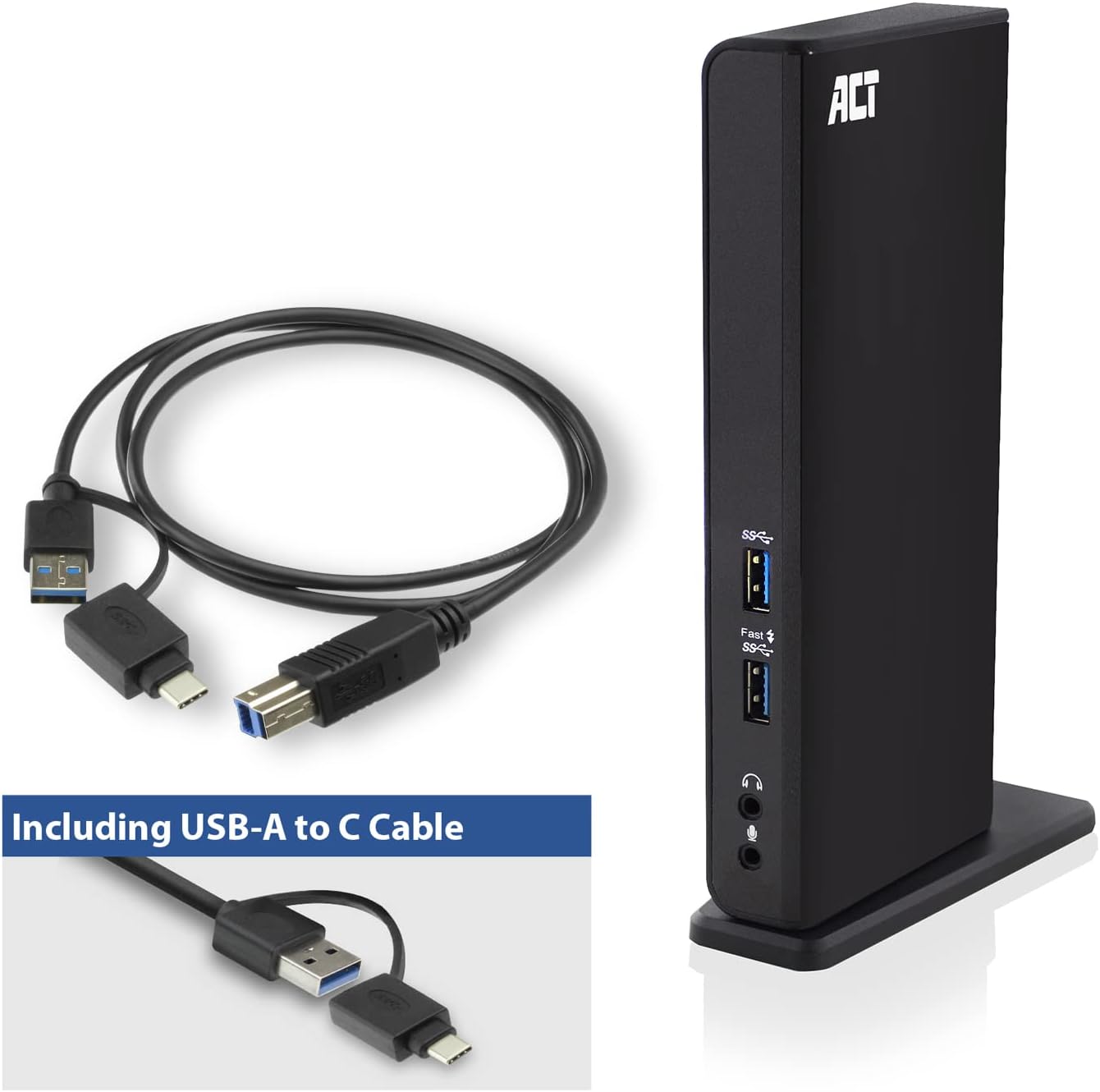
Image: The ACT AC7049 Docking Station shown with its included USB-A to USB-C connection cable and power adapter, highlighting the components provided in the package.
4. Kurulum Kılavuzu
4.1. Güç Adaptörünün Bağlanması
- Connect the power adapter to the DC 5V input port on the back of the AC7049 docking station.
- Plug the power adapter into a wall outlet. The docking station will power on.
4.2. Dizüstü Bilgisayarınıza Bağlanma
- Use the provided USB-C/A 3.2 Gen1 connection cable. Connect the USB-B end to the corresponding port on the docking station.
- Connect the other end (USB-A or USB-C, depending on your laptop's port) to an available USB 3.2 Gen1 (USB 3.0) or USB-C port on your laptop.
4.3. Driver Installation (DisplayLink)
The AC7049 utilizes DisplayLink technology for extended monitor functionality. Drivers are typically installed automatically on most operating systems. If not, please follow these steps:
- Resmi DisplayLink'i ziyaret edin webalan (www.displaylink.com/downloads) to download the latest drivers for your operating system (Windows or MacOS).
- Install the downloaded driver package and follow the on-screen instructions.
- İstendiğinde bilgisayarınızı yeniden başlatın.

Image: The official DisplayLink 'Plug and Display' logo, indicating the technology used for multi-monitor support.
5. Kullanım Talimatları
5.1. Harici Ekranların Bağlanması
- Connect your HDMI monitors to the two HDMI ports on the back of the docking station.
- Once connected, your operating system should detect the new displays. You can configure display settings (extend, mirror, primary display) through your computer's display settings.

Image: A visual representation of the docking station enabling both 'Mirror your content' and 'Extend your content' display modes across a laptop and two external monitors.
5.2. USB Çevre Birimlerinin Bağlanması
- Ön USB Bağlantı Noktaları: Two USB-A 3.2 Gen1 ports (one with fast charging capability) are located on the front for easy access to frequently used devices like USB drives, smartphones, or tablets.
- Rear USB Ports: Four USB-A 2.0 ports are located on the back for connecting peripherals such as keyboards, mice, printers, or other less frequently connected devices.
5.3. Ağ Bağlantısı
Connect an Ethernet cable from your router or network switch to the Gigabit Ethernet port on the docking station. Your laptop will automatically gain wired network access.
5.4. Ses Bağlantıları
Connect your headphones and/or microphone to the dedicated 3.5mm audio jacks on the front of the docking station.

Image: An isometric diagram showcasing the comprehensive connectivity of the ACT AC7049, demonstrating how a laptop, two monitors, a keyboard, mouse, network cable, headphones, and a smartphone can all be connected simultaneously.
6. Yerleştirme Seçenekleri
The ACT AC7049 docking station offers flexible placement options to suit your workspace:
- Dikey Yerleştirme: Use the included stand to position the docking station vertically. This saves desk space and provides easy access to all ports.
- Yatay Yerleştirme: The docking station can also be placed horizontally if preferred.

Image: The ACT AC7049 Docking Station positioned vertically on its stand, highlighting its compact design and accessible ports.
7. Bakım
To ensure optimal performance and longevity of your ACT AC7049 Docking Station, follow these maintenance guidelines:
- Temizlik: Use a soft, dry cloth to clean the exterior of the docking station. Avoid using liquid cleaners or aerosols, as they may damage the device.
- Havalandırma: Aşırı ısınmayı önlemek için şarj istasyonunun iyi havalandırılan bir alana yerleştirildiğinden emin olun. Havalandırma açıklıklarını hiçbir şekilde kapatmayın.
- Depolamak: Uzun süre kullanılmayacaksa, yerleştirme istasyonunu doğrudan güneş ışığından ve aşırı sıcaklıklardan uzak, serin ve kuru bir yerde saklayın.
- Kablo yönetimi: Kabloların hasar görmesini önlemek için kabloları düzenli tutun ve kıvrılmalardan veya aşırı bükülmelerden koruyun.
8. Sorun Giderme
If you encounter issues with your ACT AC7049 Docking Station, please refer to the following common troubleshooting steps:
- Görüntü Çıkışı Yok:
- Ensure the docking station is powered on and correctly connected to your laptop.
- Verify that the HDMI cables are securely connected to both the docking station and the monitors.
- Check your laptop's display settings to ensure the external monitors are detected and configured correctly (e.g., extended or mirrored).
- Reinstall or update the DisplayLink drivers from www.displaylink.com/downloads.
- Sorunu izole etmek için bir seferde bir monitörü bağlamayı deneyin.
- USB Aygıtları Çalışmıyor:
- Ensure the docking station is properly connected to your laptop and powered.
- Try connecting the USB device directly to your laptop to confirm it is functional.
- Connect the USB device to a different USB port on the docking station.
- Dizüstü bilgisayarınızı yeniden başlatın.
- Ağ Bağlantısı Yok:
- Ethernet kablosunun hem bağlantı istasyonuna hem de yönlendiricinize/anahtarınıza güvenli bir şekilde bağlı olduğundan emin olun.
- Check your laptop's network settings to ensure the wired connection is enabled.
- Mümkünse Ethernet kablosunu başka bir cihazla test edin.
- Ses Çalışmıyor:
- Ensure headphones/microphone are fully plugged into the correct 3.5mm jacks.
- Check your laptop's sound settings to ensure the docking station's audio output/input is selected as the default device.
9. Özellikler
| Özellik | Şartname |
|---|---|
| Model Numarası | AC7049 |
| Marka | DAVRANMAK |
| Renk | Siyah |
| Bağlantı Teknolojisi | USB-A, USB-C |
| Video Çıkışı | 2 x HDMI (Max. 2048 x 1152 @ 60Hz) |
| USB Bağlantı Noktaları | 3 x USB-A 3.2 Gen 1 (5Gbps, 1x Fast Charging), 4 x USB-A 2.0 (480Mbps) |
| Ağ Bağlantı Noktası | 1 x Gigabit Ethernet (RJ45) |
| Ses Bağlantı Noktaları | 1 x 3.5mm Headphone Jack, 1 x 3.5mm Microphone Jack |
| Uyumlu Cihazlar | Laptop, Computer (with USB 3.2 Gen1 / USB 3.0 or USB-C port) |
| İşletim Sistemi Desteği | Windows, MacOS (via DisplayLink) |
| Boyutlar (U x G x Y) | 10.9 x 6 x 18.1 cm (yaklaşık) |
| Ürün Ağırlığı | 317 Gram |
10. Garanti ve Destek
ACT products are designed for reliability and adhere to international standards and EU legislation. The ACT AC7049 Docking Station comes with a manufacturer's warranty, typically ranging from 2 to 5 years. For specific warranty details and support, please refer to the official ACT websitesine bakın veya satıcınızla iletişime geçin.
For technical support or further inquiries, please visit the official ACT connectivity webalan: www.act-connectivity.com