
Ürün Bittiview
The typecase Touch Keyboard Case is designed to enhance the functionality and protection of your iPad Air. It features a full-size keyboard with a multi-gesture trackpad, offering a laptop-like experience. The case boasts a 360° rotatable hinge, allowing for multiple viewing angles and usage modes. An adjustable 11-color RGB LED backlight provides comfortable typing in various lighting conditions. Integrated smart features like auto sleep/wake help conserve battery life, and a dedicated holder keeps your Apple Pencil secure.
Temel Özellikler:
- Uyumluluk: Specifically designed for iPad Air 11-inch (M3 2025 / M2 2024), iPad Air 5th Gen (2022, 10.9"), and iPad Air 4th Gen (2020, 10.9").
- Integrated Trackpad: Supports multi-gesture controls for precise navigation.
- Arkadan Aydınlatmalı Klavye: 11 adjustable RGB backlight colors with laser-etched keys and a full row of iPadOS shortcuts.
- Versatile Use Modes: 360° rotatable hinge for 7 different viewing modes (Laptop, Stand, Tent, Tablet, Corner, Share, Protect).
- Akıllı Koruma: Premium hardshell design protects all sides of your iPad, with auto sleep/wake function.
- Pencil Holder: Conveniently stores your Apple Pencil.
Paket İçeriği
Lütfen pakette tüm öğelerin mevcut olduğundan emin olun:
- 1 x typecase Touch Keyboard Case for iPad Air 5th/4th Gen (10.9 inch)
- 1 x USB-C Şarj Kablosu
- 1 x Kullanım Kılavuzu
Kurulum Kılavuzu
1. Charging the Keyboard Case
Before initial use, fully charge the keyboard case. Connect the provided USB-C charging cable to the charging port on the keyboard and to a USB power adapter (not included).
Charging indicator: The LED indicator will show charging status. Refer to the keyboard's specific LED behavior for full charge indication.
2. iPad'inizi Kılıfa Yerleştirme
Carefully align your iPad with the protective shell of the keyboard case. Gently press the iPad into place, ensuring all corners are securely seated. The case is designed to protect all sides of your iPad.
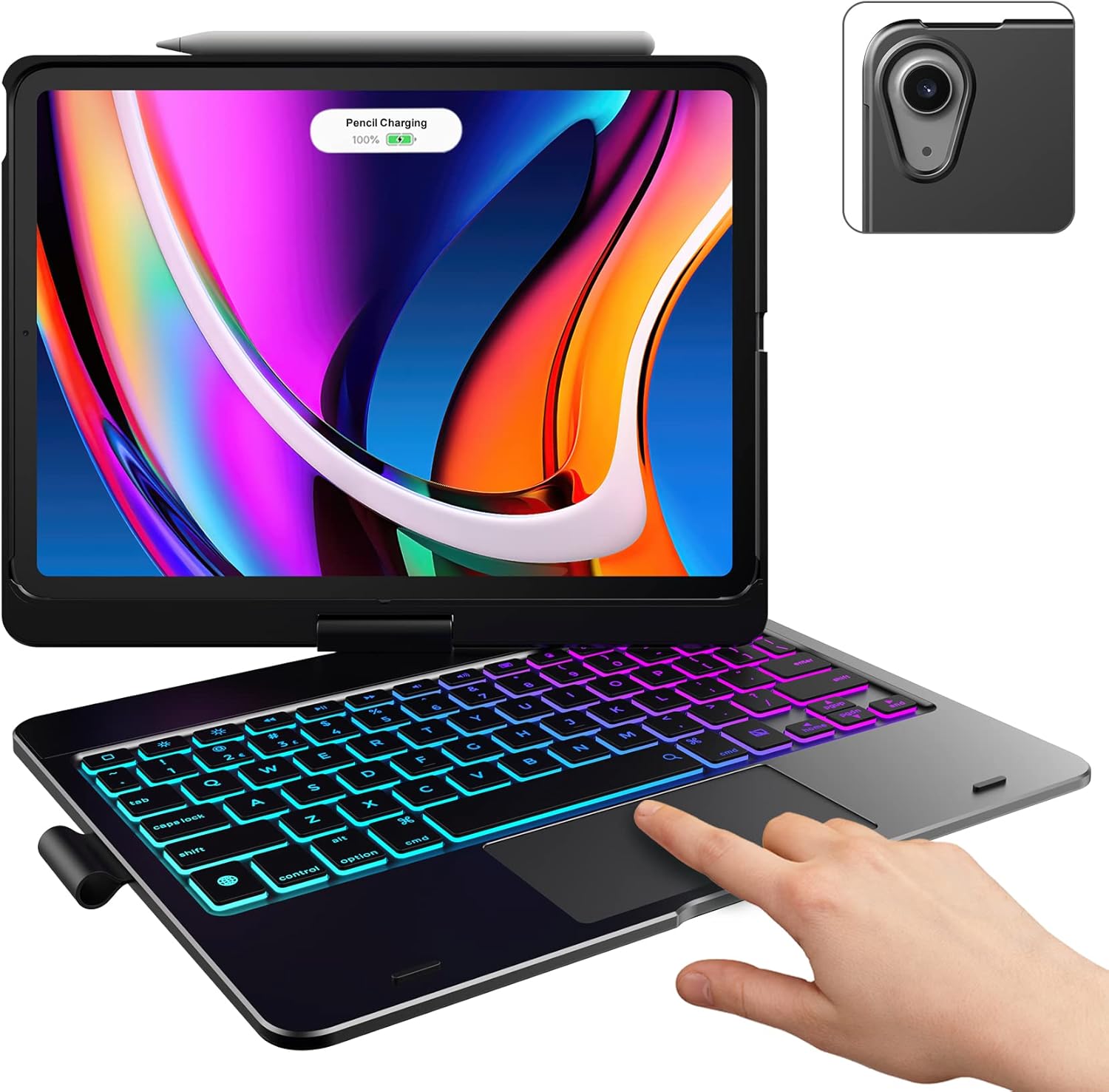
Image: The typecase keyboard case with an iPad securely inserted, ready for use. Note the integrated trackpad and backlit keys.

Image: Visual representation of the 7 versatile modes supported by the 360° rotatable hinge, including Laptop, Stand, and Tablet modes.
3. Pairing with Your iPad (Bluetooth)
- Güç anahtarını AÇIK konumuna getirerek klavyeyi açın.
- Basın Bağlamak button (or a similar Bluetooth pairing button, usually indicated by a Bluetooth icon) on the keyboard. The Bluetooth indicator light will start blinking.
- iPad'inizde şuraya gidin: Ayarlar > Bluetooth.
- Bluetooth'un açık olduğundan emin olun. On.
- Locate "typecase Keyboard" or a similar name in the "Other Devices" list and tap on it to pair.
- Once paired, the Bluetooth indicator light on the keyboard will stop blinking and remain solid, or turn off.
Note: The keyboard will automatically enter sleep mode after a period of inactivity to conserve battery. Press any key to wake it up.
Kullanım Talimatları
Klavye İşlevleri
The keyboard features a standard layout with 78 comfortably spaced keys and a dedicated row of iPadOS shortcut keys.

Resim: Ayrıntılı view of the backlit keyboard, highlighting the iPadOS shortcut keys and the vibrant 11-color RGB backlight.
iPadOS Kısayol Tuşları:
| Anahtar Simgesi | İşlev |
|---|---|
| Ev | Ana ekrana döner. |
| Parlaklık Aşağı | Ekran parlaklığını azaltır. |
| Parlaklık Yukarı | Ekran parlaklığını arttırır. |
| Keyboard Hide/Show | Ekran klavyesini açıp kapatır. |
| Ara | iPad arama özelliğini etkinleştirir. |
| Önceki Parça | Önceki medya parçasına atlar. |
| Oynat/Duraklat | Plays or pauses media. |
| Sonraki Parça | Sonraki medya parçasına atlar. |
| Sesini kapatmak | Sesi kapatır veya açar. |
| Sesi Azalt | Ses seviyesini azaltır. |
| Sesi Aç | Ses seviyesini artırır. |
| Kilit Ekranı | iPad ekranını kilitler. |
Dokunmatik Yüzey Kullanımı
The integrated multi-gesture trackpad allows for precise control and navigation of your iPad. Ensure the trackpad is enabled in your iPad's settings if you experience issues.
Sık Kullanılan Dokunmatik Yüzey Hareketleri:
- Tek Parmakla Dokunma: Click/Select.
- İki Parmak Kaydırma: Yukarı veya aşağı kaydırın.
- Yakınlaştırmak için sıkıştırın: İçeriği yakınlaştırın veya uzaklaştırın.
- Üç Parmakla Yukarı Kaydırma: Ana ekrana gidin.
- Üç Parmakla Sola/Sağa Kaydırma: Açık uygulamalar arasında geçiş yapın.
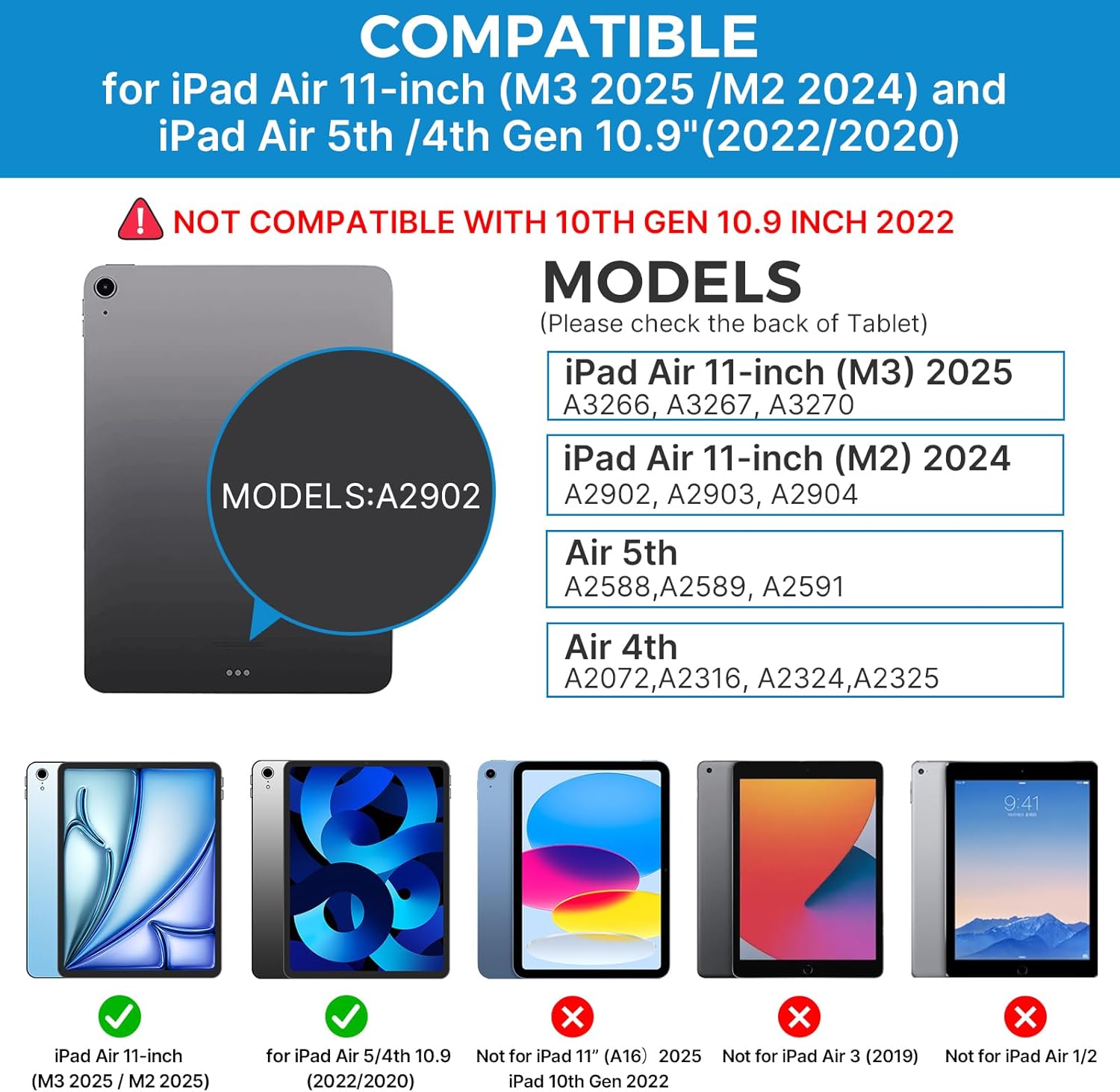
Image: A hand demonstrating the use of the multi-touch trackpad for precise cursor control on the iPad screen.
Adjusting Backlight
The keyboard features 11 adjustable RGB backlight colors and 3 levels of brightness. Use the dedicated backlight keys on the keyboard to cycle through colors and adjust brightness levels.
Video: This video demonstrates the 360-degree rotation feature of the typecase Touch Keyboard Case, showcasing its versatility in different viewmodlar.
Video: This video provides a step-by-step guide on how to properly install and remove your iPad from the typecase Touch Keyboard Case, ensuring a secure fit and preventing damage.
Bakım ve Özen
- Temizlik: Yumuşak bir d kullanınamp cloth to clean the exterior of the case and keyboard. Avoid harsh chemicals or abrasive materials.
- Depolamak: When not in use for extended periods, store the keyboard case in a cool, dry place. Ensure the iPad is removed if storing for very long durations.
- Pil Ömrü: To maximize battery life, turn off the keyboard when not in use. The auto sleep/wake function helps conserve power.
- Sıvılardan Kaçının: Do not expose the keyboard case to excessive moisture or liquids.
- Dikkatli Kullanın: While durable, avoid dropping the case or applying excessive force to the hinge or keyboard.
Sorun giderme
If you encounter any issues with your typecase Touch Keyboard Case, please refer to the following common solutions:
Keyboard Not Connecting/Typing:
- Klavyenin açık ve tamamen şarj edilmiş olduğundan emin olun.
- Check your iPad's Bluetooth settings to confirm the keyboard is paired and connected. If not, try re-pairing.
- Hem iPad'inizi hem de klavyenizi yeniden başlatın.
- Başka hiçbir Bluetooth cihazının bağlantıyı engellemediğinden emin olun.
Dokunmatik yüzey yanıt vermiyor:
- Klavyenin Bluetooth üzerinden bağlı olduğundan emin olun.
- iPad ayarlarını kontrol edin: Ayarlar > Erişilebilirlik > Dokunmak > YardımcıDokunmatik. Ensure "Mouse Keys" is off if it's causing interference.
- Dokunmatik yüzeydeki kalıntıları temizleyin.
Arka Işık Çalışmıyor:
- Klavyenin yeterince şarj olduğundan emin olun.
- Parlaklık seviyeleri ve renkler arasında geçiş yapmak için arka ışık ayar tuşlarına basın.
iPad Not Entering Sleep/Wake Mode:
- iPad'in kılıfa doğru şekilde yerleştirildiğinden emin olun.
- iPad ayarlarını kontrol edin: Ayarlar > Ekran ve Parlaklık > Kilitle/Kilidi Aç. Ensure this feature is enabled.
If problems persist, please contact typecase customer support for further assistance.
Özellikler
| Özellik | Detay |
|---|---|
| Örnek | B09WVRD5JD |
| Uyumluluk | iPad Air 11-inch (M3 2025 / M2 2024), iPad Air 5th Gen (2022, 10.9"), iPad Air 4th Gen (2020, 10.9") |
| Bağlantı | Bluetooth |
| Klavye Düzeni | 78-key standard with iPadOS shortcuts |
| Arka ışık | 11 renkli RGB, 3 parlaklık seviyesi |
| İzleme paneli | Multi-functional, multi-gesture |
| Hinge Rotation | 360° (20,000-cycle stress tested) |
| Güç Kaynağı | Pille Çalışan (1 Lityum Polimer pil dahil) |
| Ürün Ağırlığı | 1.52 pound |
| Ürün Boyutları (UxGxY) | 11.02 x 8.66 x 0.79 inç |
| Malzeme | Premium hardshell design |
Garanti ve Destek
typecase offers a comprehensive warranty and support for your product:
- 1 Yıllık Değiştirme Hizmeti: Enjoy worry-free after-sales support with a 1-year replacement service for manufacturing defects.
- 30 Günlük Para İade Garantisi: If you are not satisfied with your purchase, you may be eligible for a refund within 30 days of purchase.
- Müşteri Desteği: For any questions, technical assistance, or warranty claims, please contact typecase customer service. Refer to the contact information provided in the product packaging or on the official typecase webalan.

Resim: Üzeriview of typecase's customer support and warranty policy, including 1-year replacement and 30-day refund.