
1. Giriş
This manual provides essential information for the safe and efficient use of your OPPO F21 Pro (5G) smartphone. Please read this manual thoroughly before using your device to ensure optimal performance and longevity.
The OPPO F21 Pro (5G) is a high-performance smartphone featuring a 2.2 GHz Octa-core processor, 8GB of RAM, and 128GB of internal storage, expandable via microSDXC. It operates on Android 12 and is powered by a non-removable 4500 mAh Li-Po battery. Key features include a 6.43-inch AMOLED display, a 64 MP AI Triple Camera system, and 5G connectivity.
2. Cihaz Kurulumu
2.1 Paket İçeriği
- OPPO F21 Pro (5G) Smartphone
- USB kablosu
- Hızlı Başlangıç Kılavuzu (bölgeye göre değişiklik gösterebilir)
- Safety Information (may vary by region)
2.2 SIM Kart ve MicroSD Kart Takma
Your OPPO F21 Pro (5G) supports Dual-SIM functionality and a microSDXC card for expanded storage. The device uses Nano-SIM cards.
- Telefonunuzun yan tarafındaki SIM kart tepsisini bulun.
- (Varsa) SIM kart çıkarma aletini tepsinin yanındaki küçük deliğe yerleştirin ve tepsi çıkana kadar hafifçe itin.
- Nano-SIM kartınızı/kartlarınızı ve/veya microSDXC kartınızı tepsideki belirtilen yuvalara yerleştirin. Altın temas noktalarının aşağı baktığından emin olun.
- Tepsiyi, yan tarafa tam oturana kadar dikkatlice telefonun içine doğru itin.
ABD'deki alıcılar için önemli ağ uyumluluğu notu:
This smartphone is not compatible with CDMA networks, including VERIZON, SPRINT, and US CELLULAR. Please verify 3G or 4G/LTE compatibility with your network provider before purchase.
2.3 Açma/Kapatma
- Açmak İçin: OPPO logosu görünene kadar Güç düğmesini (sağ tarafta bulunur) basılı tutun.
- Kapatmak İçin: Güç tuşuna basılı tutun, ardından ekrandaki seçeneklerden 'Gücü kapat' seçeneğini seçin.
- Yeniden başlatmak: Güç tuşuna basılı tutun, ardından seçeneklerden 'Yeniden Başlat'ı seçin.
2.4 İlk Kurulum
Upon first power-on, follow the on-screen instructions to complete the initial setup process. This includes selecting your language, connecting to Wi-Fi, setting up your Google account, and configuring security features like Face Recognition.
3. Cihazınızın Çalıştırılması
3.1 Temel Gezinme
Your OPPO F21 Pro (5G) runs on Android 12, offering an intuitive user interface. Use gestures or navigation buttons (configurable in settings) to move between apps, return to the home screen, and access recent applications.
3.2 Ekran Özellikleri

The front of the OPPO F21 Pro (5G) features a vibrant AMOLED display with a punch-hole cutout for the front camera.

Ayrıntılı view of the punch-hole front camera, integrated seamlessly into the display.
The device features a 6.43-inch AMOLED display with a resolution of 1080 x 2400 pixels, protected by Schott Xensation glass. This display provides vivid colors and deep blacks for an enhanced viewDeneyim.
3.3 Kamera Kullanımı
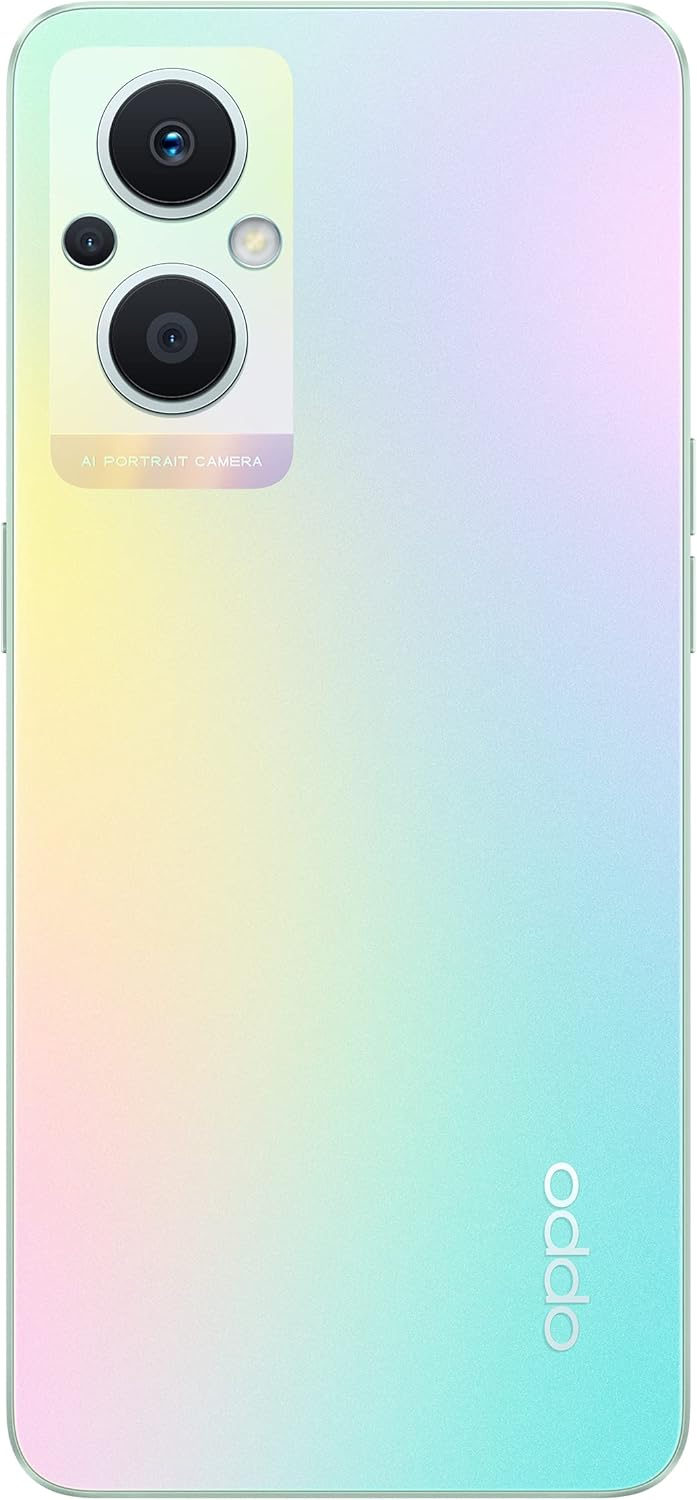
The back of the OPPO F21 Pro (5G) showcases its triple camera system and sleek design.

Ayrıntılı view of the AI Portrait Camera module on the rear, highlighting the lenses and flash.
The OPPO F21 Pro (5G) is equipped with a versatile camera system:
- Arka Kamera: 64 MP (wide, f/1.7, PDAF), 2 MP (macro, f/2.4), 2 MP (depth, f/2.4).
- Ön Kamera: 16 MP (wide, f/2.4).
Access the Camera app from your home screen or app drawer. Select various shooting modes such as Photo, Video, Portrait, Macro, and more. Tap the screen to focus and press the shutter button to capture images or start/stop video recording.
3.4 Bağlantı
- 5G Ağı: Supports N1/ N8/ N28/ N41/ N77/ N78 SA/NSA bands.
- Wifi: İnternet erişimi için kablosuz ağlara bağlanın.
- Bluetooth: Kulaklık ve hoparlör gibi kablosuz aksesuarlarla birlikte kullanın.
- USB Tip-C: Şarj ve veri aktarımı için.
3.5 Güvenlik Özellikleri
The device includes Face Recognition for convenient and secure unlocking. You can set this up in the Security settings menu.
4. Bakım
4.1 Pil Bakımı
Your OPPO F21 Pro (5G) is equipped with a 4500 mAh Lithium-Polymer battery. To maximize battery life:
- Aşırı sıcaklıklardan kaçının.
- Kutunun içinde bulunan orijinal şarj cihazını ve USB kablosunu kullanın.
- Pilin sık sık tamamen boşaltılmasından kaçının.
- Optimize battery settings in the device's settings menu.
4.2 Cihazınızı Temizleme
The device is rated as Water Resistant. To clean your phone:
- Temizlemeden önce cihazı kapatın.
- Yumuşak, tüy bırakmayan bir bez kullanın.
- Sert kimyasallar, aşındırıcı temizleyiciler veya basınçlı hava kullanmaktan kaçının.
- Cihazı suya batırmayın.
4.3 Yazılım Güncellemeleri
Regularly check for and install software updates to ensure your device has the latest features, security patches, and performance improvements. You can check for updates in the device's Settings menu under 'About phone' or 'Software update'.
5. Sorun Giderme
If you encounter issues with your OPPO F21 Pro (5G), try the following basic troubleshooting steps:
- Cihaz Yanıt Vermiyor: Yeniden başlatmayı zorlamak için Güç düğmesini yaklaşık 10-15 saniye basılı tutun.
- Ağ Sorunları: Ensure your SIM card is correctly inserted. Check your network settings and ensure mobile data or Wi-Fi is enabled. Restart your device.
- Uygulama Çöküyor: Uygulamayı kapatıp tekrar açın. Ayarlar > Uygulamalar bölümünden uygulamanın önbelleğini ve verilerini temizleyin. Sorun devam ederse, uygulamayı kaldırıp yeniden yükleyin.
- Pil Hızla Boşalıyor: Review battery usage in Settings to identify power-hungry apps. Reduce screen brightness, disable unnecessary features (GPS, Bluetooth, Wi-Fi) when not in use.
- Depolama Dolu: Gereksizleri sil files, photos, and videos. Move media to a microSD card if installed. Clear app caches.
For more complex issues, refer to the official OPPO support website veya müşteri hizmetleriyle iletişime geçin.
6. Özellikler

Bir fazlaview of the OPPO F21 Pro (5G) showcasing its main features including the 64MP AI Triple Camera, AMOLED screen, and Qualcomm Snapdragon 5G SoC.

The OPPO F21 Pro (5G) in Rainbow Spectrum, displaying both its front and rear aesthetics.
| Özellik | Şartname |
|---|---|
| Marka | Karşıt |
| Model Adı | OPPO F21 Pro (5G) |
| İşletim Sistemi | Android 12.0 |
| İşlemci | Qualcomm SM6375 Snapdragon 695 5G (6 nm), Sekiz Çekirdekli (2x2.2 GHz Kryo 660 Gold ve 6x1.7 GHz Kryo 660 Silver) |
| Veri deposu | 8 GB |
| Dahili Depolama | 128 GB |
| Genişletilebilir Depolama | microSDXC |
| Ekran Boyutu | 6.43 inç (16.33 santimetre) |
| Görüntü Türü | AMOLED |
| Çözünürlük | 1080 x 2400 piksel |
| Arka Kamera | 64 MP (geniş), 2 MP (makro), 2 MP (derinlik) |
| Ön Kamera | 16 MP (geniş) |
| Pil Kapasitesi | 4500 mAh (Lithium-Polymer, non-removable) |
| Hücresel Teknoloji | 5G (Çift SIM) |
| Kablosuz Teknoloji | Wi-Fi, Bluetooth |
| Bağlayıcı Türü | USB Tip C |
| Biyometrik Güvenlik | Yüz Tanıma |
| Su Direnç Seviyesi | Su geçirmez |
| Boyutlar | 6.3 x 2.87 x 0.31 inç |
| Ürün Ağırlığı | 173 Gram |
7. Garanti Bilgileri
Your OPPO F21 Pro (5G) smartphone comes with a 1 yıllık üretici garantisiBu garanti, normal kullanım koşullarındaki malzeme ve işçilik kusurlarını kapsar. Garanti talepleriniz için lütfen satın alma belgenizi saklayın.
The warranty does not cover damage caused by misuse, accidents, unauthorized modifications, or normal wear and tear. For full terms and conditions, please refer to the warranty card included in your product packaging or visit the official OPPO webalan.
8. Destek
For further assistance, technical support, or to find service centers, please visit the official OPPO support webalan:
You may also find helpful FAQs and community forums on the support webalan.