
FLEXISPOT F8L
FLEXISPOT Gas Spring Monitor Arm F8L User Manual
Model: F8L | Brand: FLEXISPOT
1. Giriş
Thank you for choosing the FLEXISPOT F8L Gas Spring Monitor Arm. This manual provides detailed instructions for the safe and efficient installation, operation, and maintenance of your new monitor arm. Please read this manual thoroughly before use and keep it for future reference.
Temel Özellikler:
- Detachable VESA plate for easy monitor attachment.
- Adjustable height for ergonomic viewing, reducing neck, eye, and back strain.
- Wide range of motion for tilt, swivel, and rotation, allowing optimal viewaçıları.
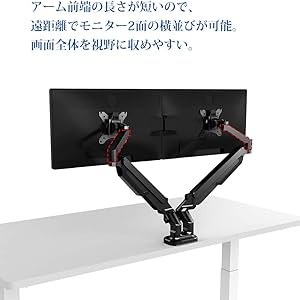
- Compact design suitable for narrow desks, enabling side-by-side monitor placement at a distance.
- Supports VESA standards: 75x75mm and 100x100mm.
- Compatible with monitors from 17" to 36" and weighing between 2-9kg.

This image shows the FLEXISPOT F8L Gas Spring Monitor Arm in white, supporting a monitor. The arm is extended, demonstrating its adjustable nature and sleek design.
2. Güvenlik Talimatları
- Montaja başlamadan önce tüm parçaların eksiksiz ve hasarsız olduğundan emin olun. Herhangi bir parça eksik veya arızalıysa kullanmayın.
- Do not exceed the maximum weight capacity of 9kg (19.8 lbs) or the maximum screen size of 36 inches. Overloading can cause instability and potential injury.
- Install the monitor arm on a stable and sturdy desk surface that can support the combined weight of the arm and your monitor.
- Perform all adjustments slowly and carefully. Avoid sudden movements that could cause the monitor to swing or fall.
- Çocukları ve evcil hayvanları kurulum alanından uzak tutun.
- If you encounter any difficulties during installation or operation, refer to the troubleshooting section or contact customer support.
3. Paket İçeriği
Lütfen paketinizde tüm bileşenlerin eksiksiz olarak bulunduğunu doğrulayın:
- Monitör Kolu Tertibatı
- Masa Clamp Temel
- Grommet Montaj Tabanı
- VESA Plakası
- Donanım Seti (vidalar, rondelalar, Allen anahtarları)
- Kablo Yönetim Klipsleri
- Kullanım Kılavuzu
4. Kurulum ve Kurulum
The FLEXISPOT F8L monitor arm supports two installation methods: C-clamp and Grommet mount. Choose the method suitable for your desk.
4.1 Choosing Your Mounting Method

This diagram illustrates the two primary ways to attach the monitor arm to your desk: the C-clamp method (bottom right) for desk edges and the grommet mount method (top right) for desks with existing cable holes. The grommet mount requires a hole size of 8.5-70mm, and both methods support a desk thickness of 20-100mm.
- C-CIamp Dağ: Ideal for desks with edges. Supports desk thickness from 20mm to 100mm.
- Halkalı Montaj: Requires an existing hole in your desk (diameter 8.5mm to 70mm). Supports desk thickness from 20mm to 100mm.
4.2 Attaching the Monitor Arm to Your Desk
- C-Cl içinamp Dağ:
- C-cl'yi takınamp Monitör kolunun ana direğine taban.
- Cl'yi konumlandırınamp on the edge of your desk and tighten the knob until it is securely fastened.
- Halkalı Montaj İçin:
- Assemble the grommet mount base and insert it through the hole in your desk.
- Secure it from underneath the desk using the provided plate and nut.
4.3 Monitörün Kola Takılması

This image demonstrates the detachable VESA plate feature. The VESA plate can be easily removed from the monitor arm, allowing you to attach it to the back of your monitor first, and then slide the monitor with the plate onto the arm for a simpler installation process.
- VESA Plakasını Monitöre takın:
- Remove the VESA plate from the monitor arm by lifting it upwards.
- VESA plakasını monitörünüzün arkasındaki montaj delikleriyle (75x75 mm veya 100x100 mm) hizalayın.
- Secure the plate to the monitor using the appropriate screws from the hardware kit. Do not overtighten.
- Monitörü Kola Monte Edin:
- Carefully slide the monitor (with the attached VESA plate) onto the arm's mounting head until it clicks into place.
- Ensure the monitor is securely seated before releasing o.
5. Çalıştırma ve Ayarlamalar
The FLEXISPOT F8L monitor arm offers a wide range of adjustments to achieve your optimal viewDeneyim.
5.1 Gaz Yay Gerilimi Ayarı
The gas spring tension needs to be adjusted according to your monitor's weight to ensure smooth and stable movement. If the monitor sags or springs up too easily, adjust the tension screw located on the arm joint (often covered by a plastic cap).
- Use the provided Allen wrench to turn the screw.
- Dönüş saat yönünde to increase tension (for heavier monitors).
- Dönüş saat yönünün tersi to decrease tension (for lighter monitors).
- Adjust gradually until the monitor stays in position when released.
5.2 Monitor Position Adjustments

This diagram illustrates the extensive range of motion for the monitor arm, including 360° rotation, 180° horizontal swivel, and tilt adjustment from -90° to 15°. These features allow for precise positioning of your monitor.
- Yükseklik Ayarı: Gently push or pull the monitor up or down to adjust its vertical position. The gas spring will hold it in place.
- Eğim Ayarı: Tilt the monitor screen up or down from -90° to 15° to reduce glare and optimize viewaçı.
- Döndürme Ayarı: Swivel the monitor arm horizontally up to 180° to share your screen or change viewyön.
- Döndürme Ayarı: Rotate the monitor 360° between landscape and portrait orientations.
This illustration compares typical poor posture when using a fixed monitor stand (left) versus the improved ergonomic posture achievable with a monitor arm (right). By allowing flexible height and angle adjustments, the monitor arm helps reduce strain on the neck, eyes, and back.
6. Bakım
- Regularly check all screws and connections to ensure they are tight and secure. Retighten if necessary.
- Monitör kolunu yumuşak bir bezle temizleyin.amp Bez. Cilaya zarar verebilecek aşındırıcı temizleyicilerden veya çözücülerden kaçının.
- Do not lubricate the gas spring mechanism. It is designed to be maintenance-free.
7. Sorun Giderme
| Sorun | Olası Neden | Çözüm |
|---|---|---|
| Monitör sarkıyor veya istenilen yükseklikte kalmıyor. | Gaz yayının gerilimi monitörün ağırlığı için çok düşük. | Increase gas spring tension by turning the adjustment screw clockwise with the provided Allen wrench. |
| Monitor is difficult to push down or springs up too quickly. | Gaz yayının gerilimi monitörün ağırlığı için çok yüksek. | Decrease gas spring tension by turning the adjustment screw counter-clockwise with the provided Allen wrench. |
| Monitör sallanıyor veya dengesiz hissediliyor. | Montaj clamp/grommet is not tight enough, or VESA screws are loose. | Masa temizliğinin sağlanmasıamp/grommet mount is securely tightened. Check and tighten all VESA mounting screws on the back of the monitor. |
| Cannot attach VESA plate to monitor. | Yanlış VESA deseni veya vida boyutu. | Verify your monitor's VESA pattern (75x75mm or 100x100mm). Use the correct screws from the hardware kit. |
8. Özellikler
| Özellik | Detay |
|---|---|
| Örnek | F8L |
| VESA Uyumluluğu | 75x75mm, 100x100mm |
| Ekran Boyutu Uyumluluğu | 17" - 36" |
| Yük Kapasitesi | 2 - 9 kg (4.4 - 19.8 lbs) |
| Eğim Aralığı | -90° ila +15° |
| Dönme Aralığı | 180° |
| Rotasyon | 360° (Yataydan Dikeye) |
| Montaj Tipi | C-CIamp veya Grommet Dağı |
| Masa Kalınlığı (Cl)amp/Grommet) | 20 mm - 100 mm |
| Maksimum Kol Uzatma | Yaklaşık 62 cm (24.4 inç) |
| Max Height from Desk | Yaklaşık 51 cm (20.1 inç) |

This diagram provides key dimensions of the monitor arm, including a maximum height of approximately 51cm and a maximum horizontal extension of approximately 62cm, illustrating its reach and adjustability.
9. Garanti ve Müşteri Desteği
FLEXISPOT provides a 1 yıllık garanti from the date of purchase for this product. This warranty covers manufacturing defects and material flaws under normal use.
For any questions, concerns, or issues regarding your FLEXISPOT F8L Gas Spring Monitor Arm, please contact our customer support team:
- E-posta: contact@flexispot.jp
- Please provide your purchase details and a description of the issue for faster assistance.
Ask a question about this manual
Ask about setup, troubleshooting, compatibility, parts, safety, or missing instructions. Manuals+ will review the question and use this page’s manual context to help answer it.