
giriiş
Satın aldığınız için teşekkür ederizasing the Naxa NT-1400 Portable 14.1-inch TV and Digital Multimedia Player. This device is designed to provide portable entertainment, featuring a built-in ATSC tuner for over-the-air HD TV reception and multimedia playback capabilities via USB. This manual provides essential information for the proper setup, operation, and maintenance of your device. Please read it thoroughly before use and retain it for future reference.
Güvenlik Bilgileri
- Güç Kaynağı: Use only the provided AC adapter or DC car cord. Ensure the voltage cihaz gereksinimleriyle eşleşiyor.
- Pil Güvenliği: The device contains a rechargeable lithium battery. Do not expose to extreme temperatures, puncture, or disassemble. Dispose of batteries according to local regulations.
- Su ve Nem: Cihazı yağmura, neme maruz bırakmayın veya suya batırmayın.
- Havalandırma: Ünitenin çevresinde yeterli havalandırma olduğundan emin olun. Havalandırma açıklıklarını kapatmayın.
- Temizlik: Disconnect power before cleaning. Use a soft, dry cloth. Avoid liquid cleaners.
- Servis: Cihazın bakımını kendiniz yapmaya çalışmayın. Tüm bakım işlemlerini yetkili personele yaptırın.
Paket İçeriği
Aşağıda listelenen tüm öğelerin paketinizde bulunduğunu doğrulayın:
- Naxa NT-1400 Portable TV Unit
- Uzaktan kumanda
- ETL AC Adapter
- DC Car Cord
- Harici Anten
- A/V Kablosu
- Masa Standı
- Kullanım Kılavuzu (bu belge)

Image: Included accessories for the Naxa NT-1400.
Ürün Bittiview
The Naxa NT-1400 features a 14.1-inch LCD screen with 1280 x 800 resolution, a built-in ATSC tuner for digital TV, and various input options for multimedia playback.

Resim: Ön view of the Naxa NT-1400 Portable TV.

Image: Naxa NT-1400 in a portable setting, such as an RV.
Bağlantı Noktaları ve Kontroller
Familiarize yourself with the various ports and controls located on the unit:
- KARINCA: Connect the external antenna for TV reception.
- HD-GİRİŞ: HDMI input for connecting external high-definition devices.
- VGA: VGA input for connecting to computers or other compatible devices.
- AV-IN/AV-OUT: Audio/Video input and output for connecting to older devices or external displays.
- Kulaklık Jakı (3.5 mm): Özel dinleme için.
- USB Bağlantı Noktası: Multimedya oynatmak için files bir USB sürücüsünden.
- DC 12V ON/OFF: Power input for the AC adapter or DC car cord, with a power switch.
- Ön Panel Kontrolleri: Volume, Channel, Menu, Input Source, Power.

Resim: Yan view of the Naxa NT-1400 showing input/output ports.
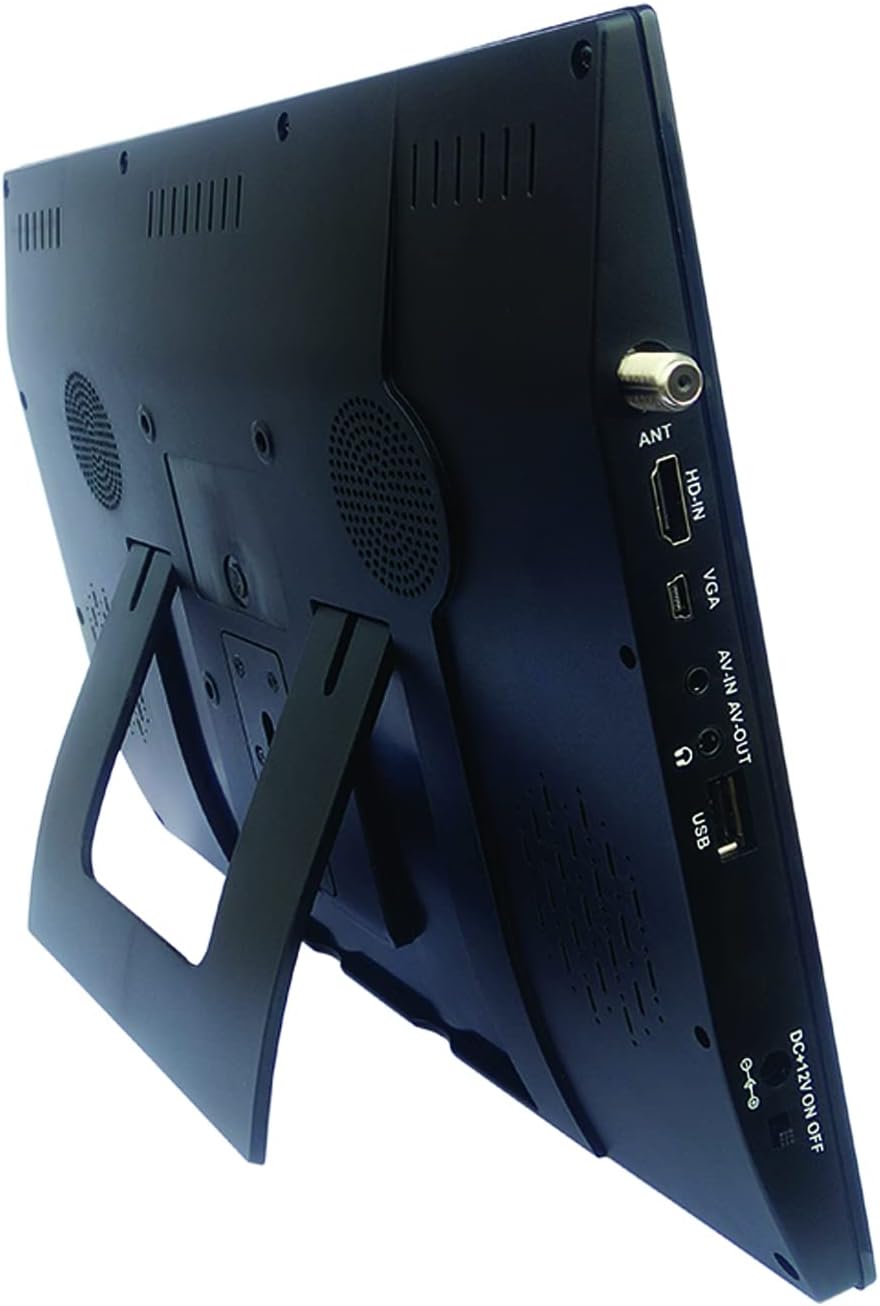
Image: Naxa NT-1400 with the integrated kickstand.
Kurmak
1. Cihaza Güç Verme
- AC Gücü: Connect the ETL AC adapter to the DC 12V input on the unit and plug it into a standard wall outlet.
- DC Araç Gücü: Connect the DC car cord to the DC 12V input on the unit and plug it into your vehicle's 12V accessory socket.
- Dahili Pil: The unit has a built-in rechargeable lithium battery. Ensure it is charged before portable use. The battery charges automatically when connected to AC or DC power.
2. Standın Takılması
- The unit includes an integrated flip-out kickstand for quick setup.
- For more stable placement, attach the provided tabletop stand to the back of the unit using the designated mounting points.
3. Antenin Bağlanması
For optimal over-the-air TV reception, connect the external antenna to the ANT port on the side of the unit. Position the antenna in an area with good signal strength.
4. İlk Kanal Taraması
After powering on the device for the first time, navigate to the 'Channel Setup' or 'Auto Scan' option in the main menu to scan for available digital TV channels. This process may take several minutes.
Kullanım Talimatları
1. Güç Açma/Kapatma
Press the 'POWER' button on the unit or the remote control to turn the device on or off.
2. Giriş Kaynağını Seçme
Press the 'MODE' or 'INPUT' button on the unit or remote control to cycle through available input sources: TV, USB, HDMI, VGA, AV.
3. TV Çalışması
- Kanal Seçimi: Use the 'CH+' / 'CH-' buttons on the unit or the remote control to change channels. You can also enter channel numbers directly using the remote's numeric keypad.
- Ses Kontrolü: Use the 'VOL+' / 'VOL-' buttons on the unit or the remote control to adjust the volume.
- Menü Navigasyonu: Press the 'MENU' button to access settings. Use arrow keys and 'OK' on the remote to navigate and confirm selections.
4. Kulaklık Kullanımı
Plug standard 3.5mm headphones into the headphone jack for private audio listening. The internal speakers will automatically mute.
Multimedya Oynatma
The Naxa NT-1400 supports playback of various multimedia files bir USB sürücüsünden.
1. USB Sürücü Bağlama
Insert your USB flash drive into the USB port on the side of the unit.
2. Accessing USB Media
Switch the input source to 'USB'. The device will display a file browser. Navigate through your folders and select the desired media file.
3. Desteklenen File Biçimler
- Video: MPEG, XVID, AVC, MP4, H.264, HEVC (H.265), FLV, MKV
- Ses: MP3
- Resim: JPEG
- Metin: TXT
Bakım
Temizlik
Ensure the unit is powered off and unplugged before cleaning. Use a soft, dry, lint-free cloth to wipe the screen and exterior surfaces. Do not use liquid cleaners, aerosols, or abrasive materials.
Pil Bakımı
To prolong battery life, avoid fully discharging the battery frequently. If storing the unit for an extended period, charge the battery to approximately 50% and store in a cool, dry place.
Depolamak
When not in use, store the unit in a clean, dry environment away from direct sunlight and extreme temperatures.
Sorun giderme
- Güç Yok: Ensure the AC adapter or DC car cord is securely connected and the power switch is in the 'ON' position. Check if the internal battery is charged.
- Televizyon sinyali yok: Verify the external antenna is properly connected and positioned. Perform an 'Auto Scan' for channels. Signal strength can vary by location.
- Ses Yok: Check the volume level. Ensure headphones are not plugged in unless intended. Verify the audio settings in the menu.
- USB Oynatma Sorunları: Ensure the USB drive is formatted correctly (FAT32 is generally recommended). Verify that the media filedesteklenen formatlardadır.
- Uzaktan Kumanda Çalışmıyor: Check the battery in the remote control. Ensure there are no obstructions between the remote and the unit's IR sensor.
Özellikler
| Özellik | Şartname |
|---|---|
| Marka | Nakşa |
| Model Numarası | NT-1400 |
| Ekran Boyutu | 14.1 inç |
| Ekran Teknolojisi | LCD |
| Çözünürlük | 1280x800 |
| En Boy Oranı | 16:9 |
| Yenileme Hızı | 50/60 Hz |
| Tuner Türü | Built-in Digital ATSC TV Tuner |
| Bağlantı | HDMI, USB, VGA, AV-IN/AV-OUT |
| Hoparlör Tipi | Dahili |
| Pil | 1 Lityum İyon (dahil) |
| Güç Kaynağı | AC Adapter, DC Car Cord, Internal Battery |
| Ürün Boyutları | 1.5"D x 13.45"G x 9.2"Y |
| Ürün Ağırlığı | 2.2 Pound |
Garanti ve Destek
For warranty information, technical support, or service inquiries, please visit the official Naxa Electronics webSite üzerinden veya müşteri hizmetleri departmanıyla iletişime geçin. Garanti talepleriniz için satın alma belgenizi saklayın.
Naxa Electronics: Amazon'daki Naxa Mağazasını ziyaret edin.