
podofo B09VL3JWHD
podofo Wireless CarPlay Android Auto Portable Car Stereo (Model B09VL3JWHD) User Manual
Model: B09VL3JWHD
1. Ürün Bittiview
The podofo Wireless CarPlay Android Auto Portable Car Stereo is a versatile 7-inch touchscreen car player designed for various vehicles, including cars, RVs, and trucks (9-36V). It integrates wireless CarPlay and Android Auto, dual dash cam functionality, Bluetooth for hands-free calling and audio streaming, and an FM transmitter. The unit offers flexible mounting options and includes both front and rear cameras for comprehensive recording.
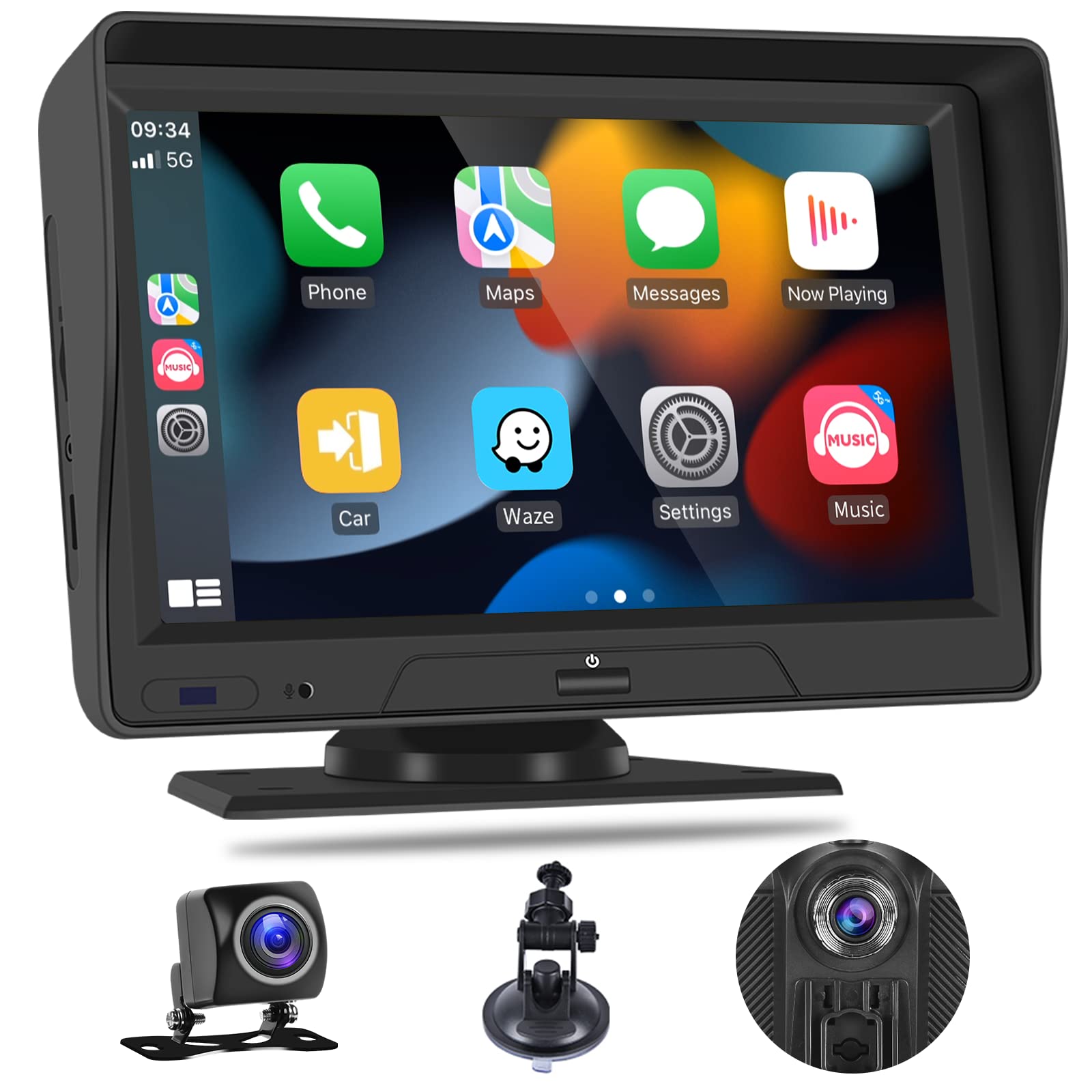
Figure 1: podofo Portable Car Stereo with Wireless CarPlay and Android Auto.
2. Paket İçeriği
Paketin tüm bileşenlerinin mevcut olduğunu doğrulayın:
- 7 inç Akıllı Monitör
- Power Plug (Car Charger)
- Vantuz Tabanı
- Montaj Tabanı
- Braket Sabitleme Etiketi
- 32GB TF Card (pre-inserted)
- Camera Mount Kit (Front and Rear Cameras with cables)
- Kullanıcı Kılavuzu
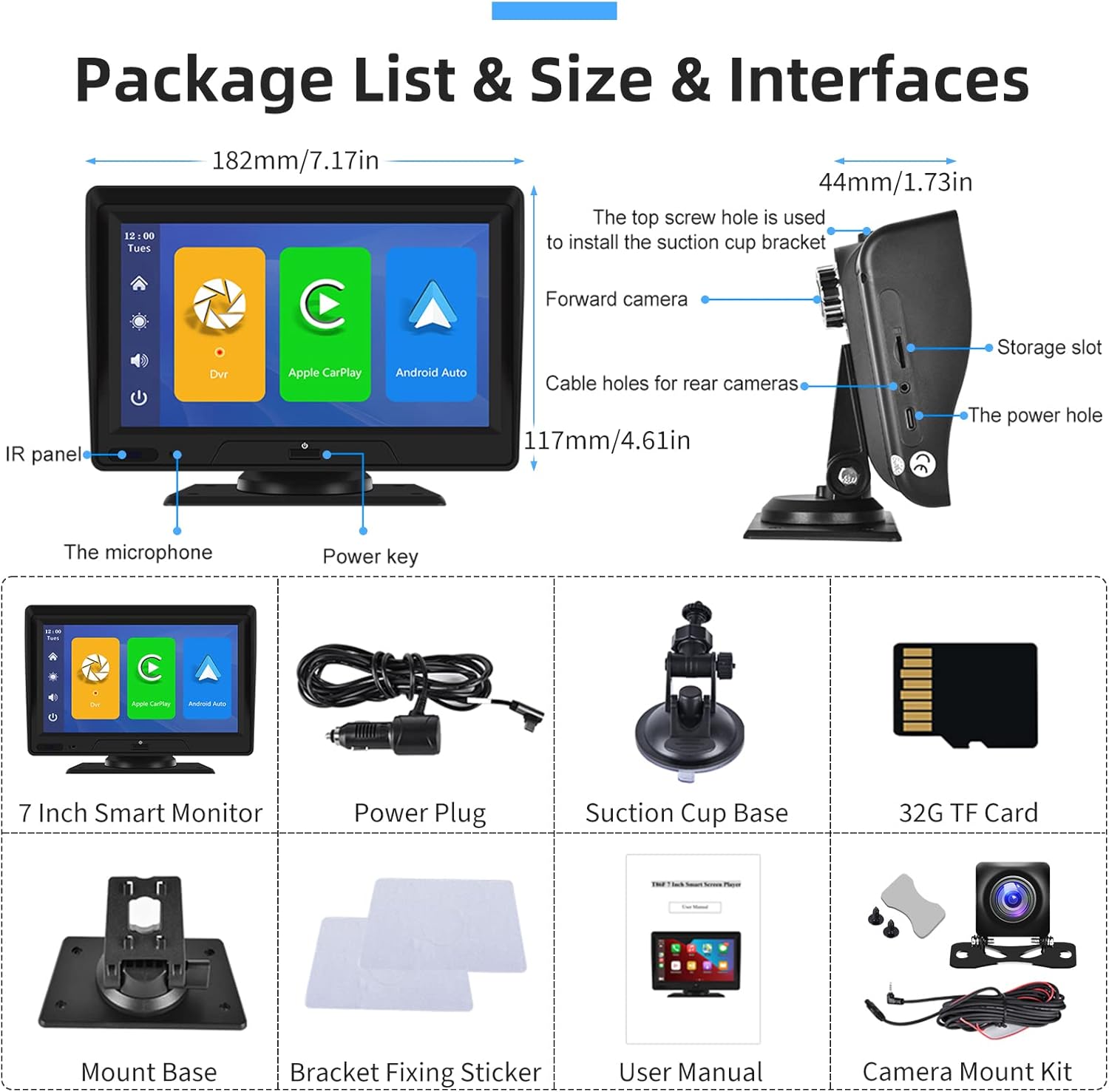
Figure 2: Package contents and interface overview. Includes the 7-inch monitor, power plug, suction cup base, mount base, bracket fixing sticker, 32GB TF card, and camera mount kit.
3. Kurulum ve Kurulum
The portable car stereo offers flexible installation options for your dashboard or windshield.
3.1 Ünitenin Montajı
- Choose between the suction mount or self-adhesive bracket for dashboard or windshield placement.
- Attach the chosen mount to the back of the main unit.
- Securely attach the unit to your desired location in the vehicle. The bracket allows for 360-degree rotation to adjust position and viewaçı.

Figure 3: Installation options showing dashboard and windshield mounting with the included brackets.

Figure 4: The adjustable bracket allows for 360-degree rotation and fine-tuning of the lens position.
3.2 Kamera Kurulumu
Install the front and rear cameras according to the included Camera Mount Kit instructions. The rear camera typically mounts near the license plate, and its 10m cable provides ample length for routing.
3.3 Güç Bağlantısı
Connect the power plug to the unit and then to your vehicle's 9-36V power outlet.
4. Kullanım Talimatları
This section details the primary functions and how to operate your podofo car stereo.
Video 1: Portable Car Stereo Function Display. This video demonstrates various features including CarPlay, Android Auto, voice control, video playback, FM transmitter, and system settings.
4.1 Kablosuz CarPlay ve Android Auto
Connect your smartphone wirelessly to access navigation, music, calls, and messages. This feature allows for a safer driving experience by integrating your phone's essential functions directly onto the stereo's display.
- Bağlantı: Navigate to the CarPlay or Android Auto icon on the main screen. Follow the on-screen prompts to pair your smartphone via Bluetooth. (Refer to Video 1, timestamps 0:41 for CarPlay and 0:53 for Android Auto).
- İşlevsellik: Once connected, you can use compatible apps for navigation (e.g., Maps), music streaming (e.g., Spotify), hands-free calls, and voice commands.

Figure 5: The main interface displaying Wireless CarPlay and Android Auto options, along with common applications.

Şekil 6: Ör.ample of Wireless Apple CarPlay and Android Auto interfaces on the stereo display.
4.2 Dual Dash Cam (Front and Rear Driving Recorder)
The unit features FHD 1080P front and rear cameras for continuous recording, day and night. A dedicated 32GB SD card is included for storage.
- Kayıt: The system supports loop recording, automatically overwriting older footage when the SD card is full. (Refer to Video 1, timestamps 0:12-0:29 for dash cam view and recording controls).
- Gece Görüşü: Advanced sensors provide clear recordings in low-light conditions.
- Görüntü Optimizasyonu: Features automatic gain control, white balance, and backlight compensation for optimal video quality.

Figure 7: Dual dash cam display showing simultaneous front and rear camera views, ideal for monitoring both directions.

Figure 8: Dash cam features highlighting automatic gain control, white balance, and backlight compensation for enhanced video quality, especially at night.

Figure 9: The driving recording function interface, showing options for recording and playback.
4.3 7-inch Touchscreen Backup Camera System
The unit can function as a backup camera system, offering split-screen ability with two-way video input.
- Görüntüleme Modları: View a single camera image or a split screen for dual views.
- Ters Hatlar: The system provides adjustable reversing guidelines to assist with parking. (Refer to Video 1, timestamps 1:53-2:06 for reversing control and line adjustment).

Figure 10: Illustration of adjustable reversing guide lines on the display, allowing customization for precise parking assistance.
4.4 FM Verici
Transmit audio from the car stereo to your vehicle's original car speakers via FM radio.
- Tıkla [FM Transmitter] button to enter the FM transmitting function.
- Tıkla [FM switch] etkinleştirmek için düğmeye basın.
- Select a frequency band to be emitted by the unit (e.g., FM 106.0 MHz). Avoid frequencies occupied by local radio stations.
- Tune your car's original stereo to the same FM frequency.
- Once connected, audio from the portable stereo will play through your car's speakers. (Refer to Video 1, timestamps 1:33-1:42 for FM setup).

Figure 11: The FM Radio Receiver interface, showing frequency selection and connection steps.
4.5 Sesli Asistan
Utilize voice commands for hands-free operation, enhancing safety while driving.
- Komutlar: Supported commands include "Turn off display," "Turn on display," "Show front camera," "Show rear camera," and "Show all cameras." (Refer to Video 1, timestamps 0:30-0:41 for voice control demonstration).
- Etkinleştirme: Simply speak the command clearly.

Figure 12: Voice assistant in action, demonstrating commands like playing music, navigating, and sending messages.
4.6 Diğer Özellikler
- Çift Hoparlör: The unit is equipped with dual speakers for direct audio output.
- Güneşlik: An integrated sunshade helps reduce glare on the screen for better visibility.
- Video Oynatma: Review kaydedilmiş footage directly on the unit. (Refer to Video 1, timestamps 1:21-1:33 for video playback).
- Ayarlar: Access various settings for record resolution, split time, microphone, image mirror, camera format, time configuration, reversing control, screen saver, voice control, language, TF card format, and factory reset. (Refer to Video 1, timestamps 1:42-2:20 for settings menu overview).

Figure 13: The unit features dual speakers for clear audio output and a design optimized for heat dissipation.

Figure 14: The integrated sun visor helps to reduce glare on the screen, improving visibility in bright conditions.
5. Özellikler
| Özellik | Tanım |
|---|---|
| Marka | podofo |
| Model Numarası | B09VL3JWHD |
| Ekran Boyutu | 7 inç |
| Bağlantı Teknolojisi | Wireless CarPlay, Android Auto, Bluetooth, USB |
| Medya Türü | SD Kart |
| Uyumlu Cihazlar | Akıllı Telefon, Hoparlör |
| Ses Çıkışı Modu | Stereo |
| Cilttage Destek | 9-36V (for cars, pickups, SUVs, RVs, buses, trucks) |
| Kamera Çözünürlüğü | FHD 1080P (Front and Rear) |
6. Sorun Giderme
Bu bölümde karşılaşabileceğiniz yaygın sorunlar ele alınmaktadır.
- Bluetooth Disconnections: If experiencing frequent Bluetooth disconnections with Android Auto, try restarting the device and your phone's Bluetooth. Ensure no other devices are interfering.
- Glitches or Random Restarts: Ensure the power connection is stable. If issues persist, try a factory reset (refer to Video 1, timestamp 2:16).
- Kamera Ayna Görüntüsü: eğer kamera view is mirrored incorrectly, check the 'Image Mirror' setting in the system menu (refer to Video 1, timestamp 1:48). This setting might affect both front and rear cameras.
- No Sound via FM Transmitter: Verify that the FM switch is ON and that the frequency on the car stereo matches the unit's output frequency. Ensure the chosen frequency is clear of other radio stations.
- Ünite Açılmıyor: Check the power plug connection and the vehicle's power outlet. Ensure the vehicle's ignition is on.
7. Bakım
To ensure the longevity and optimal performance of your podofo car stereo, follow these maintenance guidelines:
- Temizlik: Dokunmatik ekranı ve dış yüzeyi temizlemek için yumuşak, kuru bir bez kullanın. Aşındırıcı temizleyicilerden veya çözücülerden kaçının.
- Sıcaklık: Cihazı uzun süre aşırı sıcaklıklara maruz bırakmaktan kaçının.
- SD Kart: Periodically format the SD card (refer to Video 1, timestamp 2:14) to maintain recording performance and free up space. Back up important footagBiçimlendirmeden önce e.
- Kablo yönetimi: Ensure all cables are securely routed and not pinched or damaged.
8. Garanti ve Destek
podofo is committed to product performance and user experience.
- Garanti: The product comes with a 1-year warranty on labor and parts.
- İade: 30 günlük para iade garantisi sunulmaktadır.
- Yenisiyle değiştirme: A 12-month replacement policy is available.
- Destek Ekibiyle İletişime Geçin: For any questions or assistance, please contact podofo seller support via Amazon email.