
giriiş
Thank you for choosing the Senicare Digital LED Alarm Clock. This manual provides detailed instructions for setting up, operating, and maintaining your new alarm clock. Please read this manual thoroughly before use to ensure proper functionality and to maximize your experience with its features, including dual alarms, a 7-color night light, a dimmable display, and a convenient USB charging port.
Güvenlik Bilgileri
- Ensure the power adapter is compatible with your local power supply (100-240V AC).
- Cihazı suya veya aşırı neme maruz bırakmayın.
- Saati doğrudan güneş ışığına veya ısı kaynaklarının yakınına koymaktan kaçının.
- Yalnızca verilen güç adaptörünü kullanın.
- Küçük çocukların erişemeyeceği yerde saklayınız.
- Cihazı kendiniz sökmeye veya onarmaya çalışmayın. Sorun yaşarsanız müşteri desteğiyle iletişime geçin.
- Insert batteries correctly, observing polarity (+/-).
Paket İçeriği
- Senicare Digital LED Alarm Clock (Model KT279)
- Güç Adaptörü
- USB Şarj Kablosu
- Kullanım Kılavuzu (bu belge)

Figure 1: Senicare Digital LED Alarm Clock and included accessories.
Ürün Bittiview
Ön View
The front of the clock features a large LED display for time, and indicators for PM, Alarm 1, and Alarm 2.
Tepe View (Kontroller)
The top panel houses the main control buttons and the integrated night light bar.
- ALT SET: Alarm 1 Set button.
- AL2 SET: Alarm 2 Set button.
- ZAMAN: Time setting button.
- RENK: Night light color selection button.
- ERTELEME / IŞIK: Snooze function and night light on/off.
- HOUR +: Adjusts hour, increases alarm volume.
- MIN -: Adjusts minute, decreases alarm volume.
Taraf View (Ports & Dimmer)
The side of the clock includes the power input, USB charging port, and display dimmer slider.
- DC 5V Güç Bağlantı Noktası: Güç adaptörüne bağlanır.
- USB Charging Port (5V-1A): Harici cihazları şarj etmek için.
- EKRAN DIMMER: Slider to adjust the brightness of the time display (0-100%).
Alt View (Pil Bölmesi)
The bottom of the clock contains the battery compartment for backup power.

Şekil 2: Arka view highlighting the USB charging port and power input.

Figure 3: Battery compartment for backup power.
Kurmak
1. Güç Bağlantısı
- Connect the provided power adapter to the DC 5V Power Port on the back of the clock.
- Plug the power adapter into a standard 100-240V AC wall outlet.
- The LED display will light up, indicating the clock is powered on.
2. Yedek Pil (İsteğe Bağlı)
güç içintage protection, install 2 x AAA batteries (not included) into the battery compartment on the bottom of the clock. This will preserve time and alarm settings during a power interruption, though the display will go black.

Figure 4: The clock retains settings during power outages with battery backup.
Kullanım Talimatları
1. Saati Ayarlama
- Basılı tutun ZAMAN Saat haneleri yanıp sönmeye başlayana kadar düğmesine basın.
- Basın HOUR + Saati ayarlamak için düğmesine basın.
- Basın MIN - dakikayı ayarlamak için düğmesine basın.
- Basın ZAMAN Zaman ayarı modundan çıkmak ve onaylamak için tekrar düğmeye basın.
2. Setting Dual Alarms (Alarm 1 & Alarm 2)
The clock features two independent alarms for different schedules.

Şekil 5: Ör.ample of dual alarm functionality.
- To Set Alarm 1: Basılı tutun ALT SET button until the hour digits for Alarm 1 flash.
- Kullanın HOUR + Ve MIN - İstediğiniz alarm saatini ayarlamak için butonlara basın.
- Basmak ALT SET again to confirm and activate Alarm 1. The Alarm 1 indicator will appear on the display.
- To Set Alarm 2: Aynı adımları aşağıdaki yöntemi kullanarak izleyin. AL2 SET düğme.
- To turn an alarm on or off, briefly press the corresponding ALT SET or AL2 SET button. The alarm indicator will appear/disappear.
3. Erteleme Fonksiyonu
Alarm çaldığında, büyük düğmeye basın. ERTELEME / IŞIK button on top of the clock to activate the 9-minute snooze function. The alarm will sound again after 9 minutes.

Figure 6: The SNOOZE / LIGHT button for snooze functionality.
4. Ekran Parlaklığının Ayarlanması
The clock features a 0-100% full-range dimmer for the LED time display. Use the EKRAN DIMMER slider located on the side of the clock to adjust the brightness to your preference.

Figure 7: Adjusting display brightness with the dimmer slider.
5. Night Light Features
The integrated night light offers 7 different colors and adjustable brightness.

Figure 8: The 7-color night light feature.
- Renkleri Değiştirme: kısaca dokunun RENK 7 farklı renk arasında geçiş yapmak için düğme.
- Color Loop Mode: Basılı tutun RENK button for 2 seconds to enter a continuous color-changing loop.
- Turning Off Night Light: Basın ERTELEME / IŞIK button to turn the night light off.
- Adjusting Night Light Brightness: The night light brightness can also be adjusted from 0-100% using the EKRAN DIMMER slider, similar to the main display.
6. Alarm Ses Seviyesini Ayarlama
The alarm volume has 5 adjustable levels, ranging from 45dB to 85dB.
- While an alarm is sounding, or when setting an alarm, press the HOUR + Sesi artırmak için düğmesine basın.
- Basın MIN - Sesi azaltmak için düğmesine basın.

Figure 9: Volume adjustment using HOUR + and MIN - buttons.
7. USB Şarj Bağlantı Noktası
The clock includes a 5V-1A USB charging port on its side, allowing you to charge small electronic devices like smartphones or tablets while the clock is plugged into power.
Bakım
- Saati yumuşak, kuru bir bezle temizleyin. Aşındırıcı temizleyiciler veya çözücüler kullanmayın.
- Keep the clock away from dust and moisture.
- If not in use for an extended period, remove the backup batteries to prevent leakage.
Sorun giderme
| Sorun | Olası Neden | Çözüm |
|---|---|---|
| Saat göstergesi kapalı. | No power, or display dimmer set to 0%. | Check power connection. Adjust DISPLAY DIMMER slider. |
| Alarm çalmıyor. | Alarm ayarlanmamış, alarm sesi çok düşük veya alarm kapatılmış. | Ensure alarm is set and activated (indicator visible). Increase alarm volume. |
| Elektrik kesintisi sonrasında saat/ayarlar kayboldu.tage. | No backup batteries installed, or batteries are dead. | Install fresh 2 x AAA batteries for backup. |
| USB şarjı çalışmıyor. | Clock not powered by AC, or device requires more than 1A. | Ensure clock is plugged into AC power. Check device's charging requirements. |
Özellikler
| Özellik | Detay |
|---|---|
| Örnek | KT279 |
| Görüntü Türü | NEDEN OLMUŞ |
| Güç Kaynağı | Corded Electric (100-240V AC) |
| Pil Yedekleme | 2 x AAA pil (dahil değildir) |
| USB Şarj Portu | 5V-1A |
| Gece Işığı Renkleri | 7 renk |
| Dimmer Ekranı | %0-100 ayarlanabilir |
| Alarm Sesi | 5 seviye (45dB ila 85dB) |
| Erteleme süresi | 9 dakikadır. |
| Ürün Boyutları | 5.91"W x 3.15"H (approx. 150mm x 80mm) |
| Ürün Ağırlığı | 11.7 ons |
| Malzeme | Plastik |
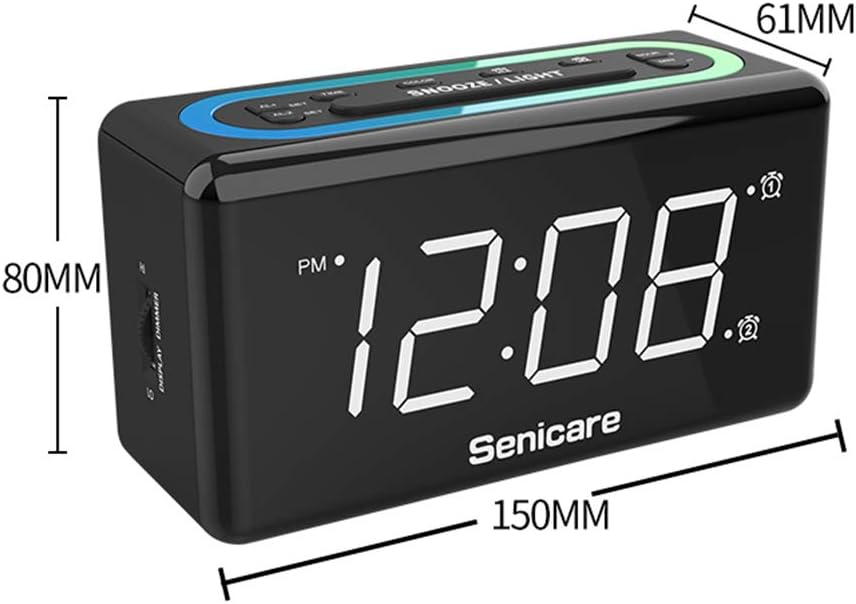
Şekil 10: Ürün boyutları.
Garanti ve Destek
The Senicare Digital LED Alarm Clock comes with a bir yıllık garantiAyrıca şunları da sunuyoruz: 30 günlük para iade garantisi. For any questions or assistance, please contact our customer service team, available 24 saat a day. Your satisfaction is our priority.