
1. Giriş
Thank you for choosing the Awei TC-7 Wired Earphones. These in-ear earphones are designed for clear audio and convenient communication, featuring a Type-C connector for modern devices and an inline microphone with control buttons. Please read this manual carefully to ensure proper use and maintenance of your earphones.
2. Paket İçeriği
- Awei TC-7 Wired Earphones
- Multiple sizes of Ear Cushions (Small, Medium, Large)

Şekil 2.1: The Awei TC-7 earphones include ear caps in various sizes to ensure a comfortable and secure fit for different users.
3. Ürün Bittiview
The Awei TC-7 earphones feature a durable design with a Type-C plug for direct connection to compatible devices. The inline remote control allows for easy management of audio playback and calls.

Şekil 3.1: A close view of the Awei TC-7 earphones, showcasing their in-ear design for optimal sound delivery.

Şekil 3.2: The inline remote control features multi-function buttons for managing audio and calls.

Şekil 3.3: The integrated HD microphone is designed to pick up clear audio, even in noisy environments.
4. Kurulum
- Kulak Yastıklarını Seçin: Choose the ear cushion size (Small, Medium, or Large) that provides the most comfortable and secure fit for your ears. A proper fit enhances sound quality and noise isolation.
- Cihaza Bağlan: Insert the USB-C plug of the earphones into the Type-C port of your smartphone, tablet, laptop, or other compatible device.
- Ses Çıkışı: Ensure your device's audio output is set to the connected earphones. This is usually automatic upon connection.
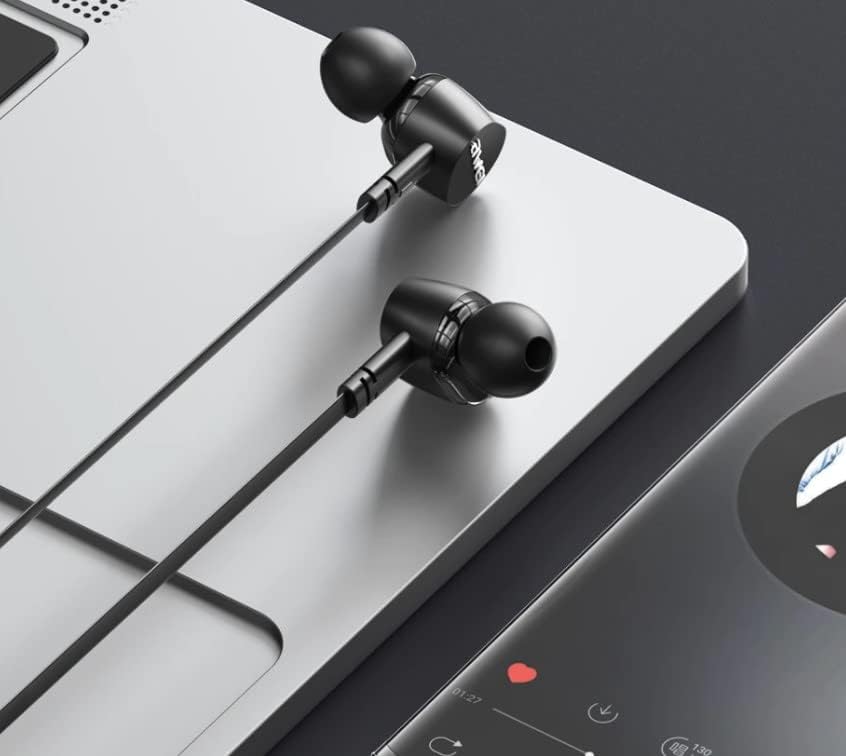
Şekil 4.1: The earphones are compatible with various devices featuring a USB-C port, such as laptops and smartphones.
5. Kullanım Talimatları
The Awei TC-7 earphones feature an inline remote with buttons for convenient control of your audio and calls.
5.1. Müzik Çalma Kontrolü
- Oynat/Duraklat: Ortadaki düğmeye bir kez basın.
- Sonraki Parça: Ortadaki düğmeye hızlıca iki kez basın.
- Önceki parça: Ortadaki düğmeye hızlı bir şekilde üç kez basın.
- Sesi aç: '+' tuşuna basın.
- Sesi kıs: '-' tuşuna basın.
5.2. Çağrı Yönetimi
- Çağrıyı Cevapla/Sonlandır: Gelen bir arama sırasında veya devam eden bir arama esnasında orta düğmeye bir kez basın.
- Çağrıyı Reddet: Press and hold the center button for approximately 2 seconds during an incoming call.
6. Bakım
Proper care will extend the lifespan of your Awei TC-7 earphones.
- Kulak Yastıklarının Temizlenmesi: Regularly remove the ear cushions and clean them with a soft, damp Tekrar takmadan önce tamamen kuruduğundan emin olun.
- Kablo Bakımı: The cable is designed to be tangle-free. Avoid excessive pulling or sharp bending to prevent internal damage.
- Depolamak: When not in use, store the earphones in a clean, dry place, away from extreme temperatures.
- Suya Dayanıklılık: The earphones are rated as waterproof. However, avoid prolonged submersion and ensure the USB-C port is dry before connecting to a device after exposure to water.
7. Sorun Giderme
If you encounter issues with your Awei TC-7 earphones, please refer to the following common solutions:
| Sorun | Olası Neden | Çözüm |
|---|---|---|
| Kulaklıklardan ses gelmiyor | Earphones not properly connected; device volume too low; incorrect audio output setting on device. | Ensure the USB-C plug is fully inserted. Increase device volume. Check device audio settings to confirm output is set to earphones. |
| Mikrofon çalışmıyor | Microphone port blocked; incorrect input setting on device; application permissions. | Ensure the microphone area is clear. Check device sound settings for microphone input. Verify application permissions for microphone access. |
| Düğmeler yanıt vermiyor | Loose connection; device incompatibility; software glitch. | Reconnect the earphones. Test with another compatible device if possible. Restart your device. |
8. Özellikler
| Özellik | Detay |
|---|---|
| Model Adı | TC-7 |
| Bağlantı Teknolojisi | Kablolu |
| Kulaklık girişi | USB-C |
| Kulak Yerleşimi | Kulakta |
| Frekans Aralığı | 20Hz - 20kHz |
| Ek Özellikler | Microphone Included, Inline Control |
| Malzeme | Plastik |
| Su Direnç Seviyesi | Su geçirmez |
| Kablo Özellikleri | Dolaşmayan |
| Uyumlu Cihazlar | Smartphones, Laptops, Tablets, Desktops with USB-C |
9. Garanti ve Destek
Garanti bilgileri ve müşteri desteği için lütfen satın alma noktasında sağlanan belgelere bakın veya satıcınızla iletişime geçin. Herhangi bir garanti talebi için satın alma belgenizi saklayın.