1. Giriş
This manual provides comprehensive instructions for the installation, operation, and maintenance of your ESX VN940-4G Autoradio Navigation Naviceiver. Please read this manual thoroughly before using the device to ensure proper and safe operation.
The ESX VN940-4G is a state-of-the-art car radio system featuring a 9-inch touchscreen display, integrated navigation, and Bluetooth connectivity, designed to enhance your in-car entertainment and navigation experience.
2. Güvenlik Bilgileri
Yaralanmayı veya cihaza zarar gelmesini önlemek için her zaman aşağıdaki güvenlik önlemlerine uyun:
- Cihazı sürüş sırasında dikkatinizi dağıtacak şekilde kullanmayın. Yol güvenliğini her zaman ön planda tutun.
- Ensure all wiring is correctly connected to prevent short circuits or electrical hazards. Consult a professional for installation if unsure.
- Cihazı aşırı sıcaklıklara, uzun süre doğrudan güneş ışığına veya aşırı neme maruz bırakmayın.
- Avoid disassembling or modifying the unit. This can void the warranty and cause damage.
- Dışarıdaki trafik seslerini duyabileceğiniz bir ses seviyesinde tutun.
3. Paket İçeriği
Lütfen paketin içindeki tüm ürünlerin eksiksiz olduğundan emin olun:
- ESX VN940-4G Naviceiver Unit
- Montaj Braketi
- Güç Kablosu Demeti
- GPS Anteni
- USB Uzatma Kablosu
- Kullanım Kılavuzu (bu belge)
4. Kurulum ve Kurulum
Proper installation is crucial for the performance and longevity of your ESX VN940-4G. It is recommended to have the unit installed by a qualified professional.
4.1 Ünitenin Montajı
Use the provided mounting bracket to secure the Naviceiver in your vehicle's dashboard. Ensure the unit is firmly seated and does not obstruct any vehicle controls or airbags.
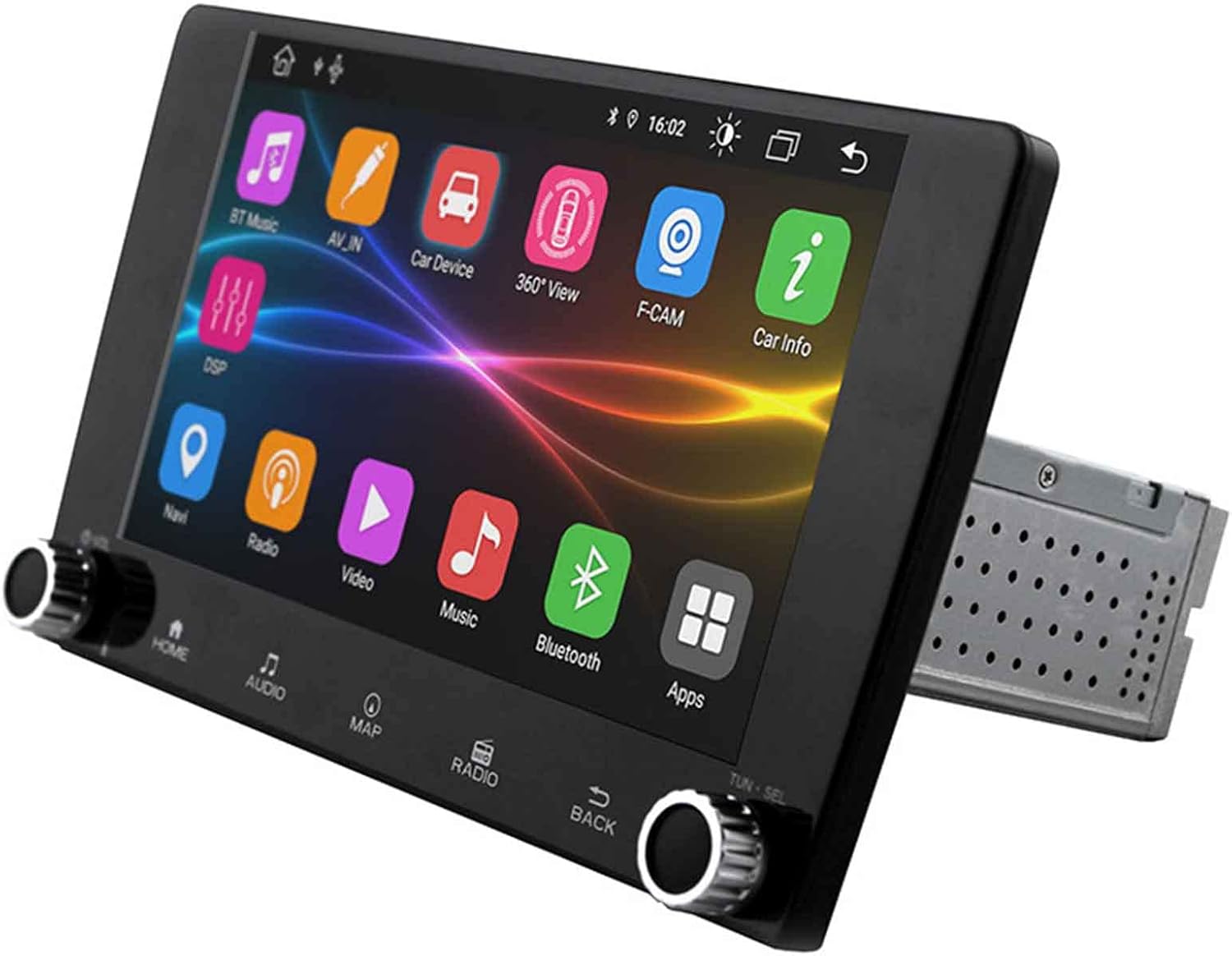
Image: The ESX VN940-4G Naviceiver unit, displaying its side profile and the integrated mounting cage, ready for dashboard installation.
4.2 Kablo Bağlantıları
Connect the power harness, speaker wires, GPS antenna, and any other auxiliary inputs/outputs according to your vehicle's wiring diagram and the unit's connection ports. Pay close attention to positive and negative terminals.
- Güç (Sarı): Sabit 12V (Pil)
- Ateşleme (Kırmızı): Switched 12V (ACC)
- Zemin (Siyah): Vehicle Chassis Ground
- Hoparlör Kabloları: Araç hoparlörlerinin ilgili kablolarına bağlayın (örneğin, Ön Sol +, Ön Sol -).
- GPS Anteni: Connect to the dedicated GPS antenna port and mount the antenna in a location with a clear view gökyüzünün.
4.3 İlk Çalıştırma ve Yapılandırma
After installation, turn on your vehicle's ignition. The unit should power on. Follow the on-screen prompts for initial setup, which may include:
- Dil Seçimi
- Saat ve Tarih Ayarı
- Radio Region Selection
5. Kullanım Talimatları
This section details the primary functions and operations of your ESX VN940-4G.
5.1 Temel Kontroller
- Güç Düğmesi: Press and hold to turn the unit on/off. Short press to mute/unmute.
- Ses Düğmesi: Sesi artırmak için saat yönünde, azaltmak için saat yönünün tersine çevirin.
- Ana menü tuşu: Ana menü ekranına geri döner.
- Geri Düğmesi: Önceki ekrana veya menüye döner.
5.2 Telsiz Çalışması
From the main menu, select the 'Radio' icon. You can manually tune frequencies, scan for stations, or save your favorite stations as presets.
- Tarama: Automatically searches for and stops at strong signals.
- Ön ayarlar: Touch and hold a numbered button to save the current station.
5.3 Bluetooth Bağlantısı
Cihaz, eller serbest görüşme ve ses akışı için Bluetooth'u desteklemektedir.
- 'Bluetooth' menüsüne gidin.
- Mobil cihazınızda Bluetooth'u etkinleştirin ve mevcut cihazları arayın.
- Select 'ESX VN940-4G' from the list on your phone.
- İstendiğinde eşleştirme kodunu onaylayın.
Eşleştirme tamamlandıktan sonra, kablosuz olarak arama yapabilir/alabilir ve müzik dinleyebilirsiniz.
5.4 Navigasyon Sistemi
Access the navigation application by selecting the 'Map' or 'Navi' icon from the main menu. The system provides turn-by-turn directions and real-time traffic information (if supported by the map software).

Image: The ESX VN940-4G Naviceiver's touchscreen displaying a detailed navigation map, including current route, speed, and remaining distance to destination.
- Hedef Girişi: Use the on-screen keyboard to enter addresses or points of interest.
- Rota Rehberi: Follow the voice prompts and visual cues on the screen.
- Harita View: 2D ve 3D arasında geçiş yapın views, and adjust zoom levels.
5.5 Medya Oynatma
The unit supports media playback from various sources, such as USB drives. Connect your USB device to the designated USB port. The unit will automatically detect compatible audio or video files.
6. Bakım
Regular maintenance ensures the longevity and optimal performance of your Naviceiver.
- Ekranın Temizlenmesi: Dokunmatik ekranı nazikçe silmek için yumuşak, tüy bırakmayan bir bez kullanın. İnatçı lekeler için,ampen the cloth slightly with water or a screen-cleaning solution. Do not use abrasive cleaners.
- Yazılım Güncellemeleri: Üreticinin periyodik olarak kontrol edin website for available software updates. Updates can improve performance, add new features, or fix bugs. Follow the instructions provided with the update package carefully.
7. Sorun Giderme
If you encounter issues with your ESX VN940-4G, refer to the following common problems and solutions:
| Sorun | Olası Neden | Çözüm |
|---|---|---|
| Ünite açılmıyor. | Yanlış kablolama, sigorta atması, araç aküsü sorunu. | Güç ve topraklama bağlantılarını kontrol edin. Araç sigortalarını inceleyin. Akünün şarjlı olduğundan emin olun. |
| Hoparlörlerden ses gelmiyor. | Speaker wires disconnected, volume too low, unit muted. | Verify speaker connections. Increase volume. Check if unit is muted. |
| Bluetooth bağlantısı başarısız oluyor. | Bluetooth not enabled on phone/unit, device out of range, interference. | Ensure Bluetooth is active on both devices. Move phone closer. Restart both devices. |
| GPS sinyali kayıp veya hatalı. | GPS antenna obstructed, faulty antenna, poor satellite reception. | Relocate GPS antenna to a clear area. Check antenna connection. Wait for clear sky. |
Bu çözümleri denedikten sonra sorun devam ederse lütfen müşteri desteğiyle iletişime geçin.
8. Özellikler
| Özellik | Detay |
|---|---|
| Model Adı | ESX VN940-4G |
| Marka | ESX |
| Ekran Boyutu | 9 inç (22.8 cm) |
| Ekran Çözünürlüğü | 800 x 480 piksel |
| Bağlantı Teknolojisi | Bluetooth |
| Montaj Tipi | Dashboard-Mounting |
| Ses Çıkışı Modu | Stereo |
| Araç Servis Tipi | Araba |
| Dahil Bileşenler | Montaj Braketi |
| İlk Mevcut Tarih | 10 Mart 2022 |
9. Garanti ve Destek
For warranty information, please refer to the documentation provided at the time of purchase or contact your retailer. Warranty terms and conditions may vary by region and seller.
For technical support, troubleshooting assistance beyond this manual, or inquiries about spare parts, please contact the seller or the official ESX customer service. Contact details are typically available on the seller's website or the ESX official webalan.