
PALOVUE iSound
PALOVUE Wireless Earbuds User Manual
Model: iSound
Your guide to setting up, operating, and maintaining your PALOVUE iSound Wireless Earbuds.
1. Giriş
The PALOVUE iSound Wireless Earbuds are designed to provide a superior audio experience with advanced features for daily use. Equipped with Qualcomm CSR and Bluetooth 5.0 technology, these earbuds offer a stable and crystal-clear connection, supporting aptX HD sound quality. The CVC 8.0 Noise Cancelling technology with 4 built-in microphones ensures clear calls by effectively reducing ambient noise. Their ergonomic design and multiple ear-tip sizes provide a comfortable and secure fit for extended wear.
The iSound earbuds feature convenient one-step reconnection and intuitive one-touch operation. With up to 24 hours of playtime using the compact charging case, they are ideal for on-the-go listening. Further customization and control are available through the PALOVUE iSound APP.

Image: PALOVUE iSound Wireless Earbuds resting in their open charging case, showcasinşık siyah tasarımlarıyla dikkat çekiyor.
2. Kutuda Neler Var?
Upon opening your PALOVUE iSound package, you will find the following components:
- Kablosuz Şarj Kutusu
- PALOVUE iSound Earbuds (Left and Right)
- Ear Tips (multiple sizes for a customizable fit)
- Şarj Kablosu (USB-C)
- Kordon
- Paketleme Kutusu
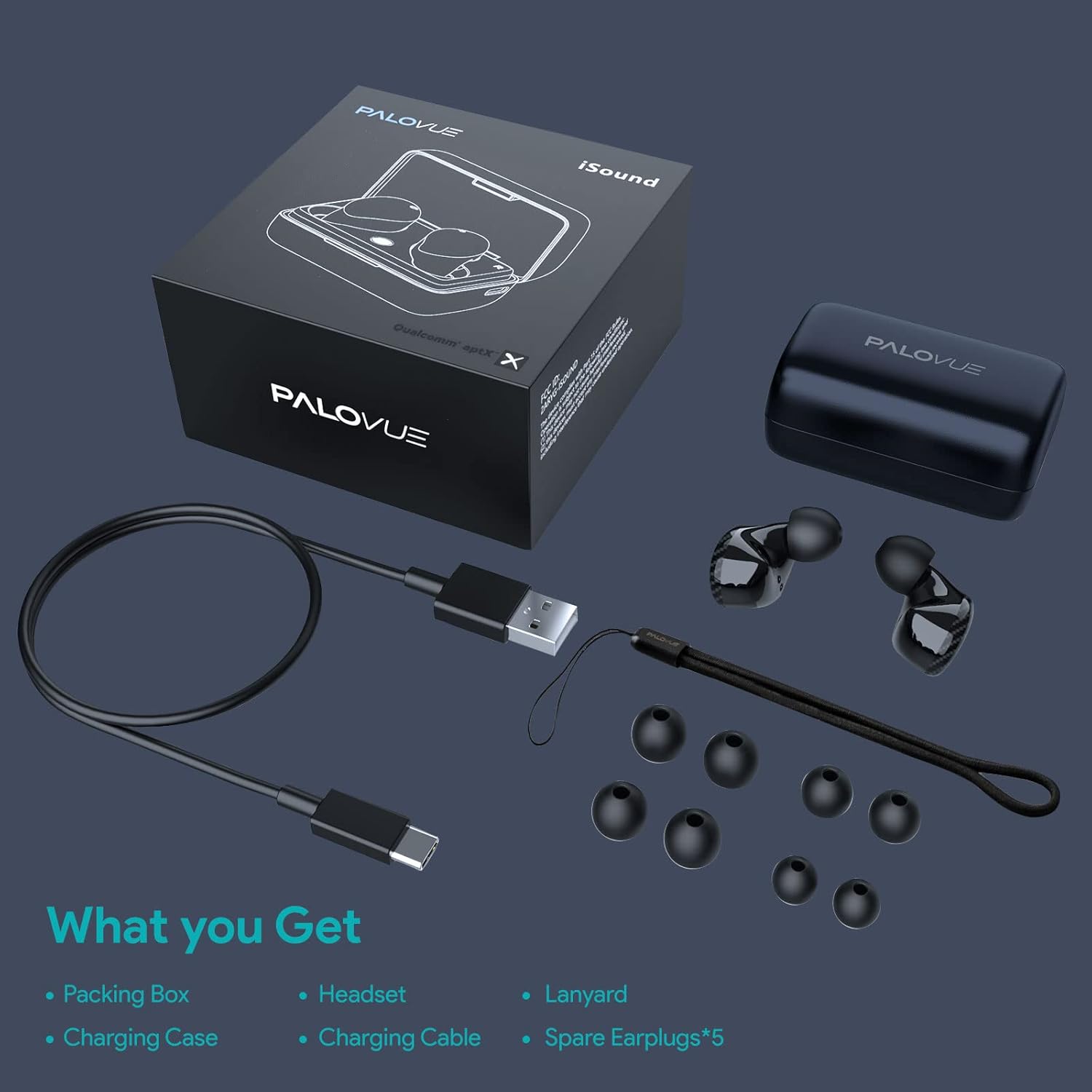
Image: A flat lay showing all items included in the PALOVUE iSound package: the packing box, charging case, earbuds, charging cable, lanyard, and five pairs of spare ear tips.
3. Kurulum Kılavuzu
3.1 İlk Şarj
Before first use, ensure both the earbuds and the charging case are fully charged. Place the earbuds into the charging case. Connect the provided USB-C cable to the charging case and a power source. The indicator lights on the case will show charging status. A full charge typically takes approximately 2 hours for the case.
3.2 Cihazınızla Eşleştirme
The PALOVUE iSound earbuds feature one-step reconnection for convenience.
- Şarj kutusunu açın. Kulaklıklar otomatik olarak açılacak ve eşleştirme moduna girecektir.
- Akıllı telefonunuzda veya Bluetooth özellikli cihazınızda Bluetooth ayarlarına gidin.
- Arama "PALOVUE iSound" in the list of available devices and select it to connect.
- Bağlantı sağlandıktan sonra sesli bir onay duyacaksınız ve kulaklıklarınız kullanıma hazır hale gelecektir.
- Sonraki kullanımlar için şarj kutusunu açmanız yeterlidir; kulaklıklar otomatik olarak en son eşleştirilen cihaza bağlanacaktır.
Video: A detailed guide demonstrating the connection and operation of the PALOVUE iSound earbuds, including initial pairing steps and touch control functions.
4. Kulaklıklarınızı Çalıştırma
4.1 Dokunmatik Kontroller
The PALOVUE iSound earbuds feature intuitive touch controls on each earbud. The specific functions can be customized via the PALOVUE iSound APP.
| Aksiyon | Sol Kulaklık | Sağ Kulaklık |
|---|---|---|
| Tek Dokunuş | Sesi Azalt | Sesi Aç |
| Çift Dokunma | Müzik Çal/Duraklat, Çağrıyı Cevapla/Sonlandır | Müzik Çal/Duraklat, Çağrıyı Cevapla/Sonlandır |
| Uzun Basış | Previous Song, Reject Call | Next Song, Reject Call |
Video: A short demonstration of the touch controls for the PALOVUE iSound earbuds, showing how to adjust volume, skip tracks, and manage calls.
4.2 Using the PALOVUE iSound APP
Enhance your experience by downloading the PALOVUE iSound APP. The app allows you to:
- Customize touch control functions (e.g., volume, track control, call management).
- Kişiselleştirilmiş ses için ekolayzır (EQ) ayarlarını yapın.files (Male Vocals, Electronic, Jazz, Rock, Classical, Female Vocals, Original, Customize).
- Check battery levels of each earbud.
- Access device information and firmware updates.

Image: A woman wearing PALOVUE iSound earbuds, illustrating their comfortable fit and suitability for daily use.

Resim: Patlamış bir view diagram of the PALOVUE iSound earbud, detailing its internal structure and emphasizing Qualcomm AptX and Deep Bass sound capabilities.
5. Bakım
To ensure the longevity and optimal performance of your PALOVUE iSound Wireless Earbuds, follow these maintenance guidelines:
- Temizlik: Kulaklıkları ve şarj kutusunu düzenli olarak yumuşak, kuru, tüy bırakmayan bir bezle temizleyin. Aşındırıcı temizleyiciler veya çözücüler kullanmayın. Kulaklık uçlarından ve hoparlör ızgarasından kulak kiri veya kalıntıları küçük, yumuşak bir fırça veya pamuklu çubuk kullanarak nazikçe temizleyin.
- Depolamak: Kullanılmadığı zamanlarda kulaklıkları tozdan, kirden ve fiziksel hasardan korumak için şarj kutusunda saklayın.
- Pil Bakım: Avoid fully depleting the battery frequently. For long-term storage, charge the earbuds and case to about 50% to preserve battery health.
- Suya Dayanıklılık: The earbuds are rated IPX4 for water resistance, meaning they are protected against splashing water from any direction. They are designed for sports and can withstand sweat and light rain, but they are not suitable for swimming or submersion in water. Ensure the earbuds are dry before placing them back in the charging case.
Video: A short promotional video highlighting the compact size and powerful features of the iSound True Wireless Earbuds, including their IPX4 water resistance.
6. Sorun Giderme
If you encounter issues with your PALOVUE iSound Wireless Earbuds, try the following solutions:
6.1 Eşleştirme Sorunları
- Kulaklıklar bağlanmıyor: Ensure Bluetooth is enabled on your device. Place earbuds back in the case, close it, wait a few seconds, then open it again to re-initiate pairing mode.
- Sadece bir kulaklık çalışıyor: Try placing both earbuds back in the charging case, closing the lid, and then reopening it. Ensure both earbuds have sufficient charge.
- Kulaklıklar Bluetooth listesinde görünmüyor: Turn off Bluetooth on your device, then turn it back on. Restart your device if necessary.
6.2 Ses Kalitesi Sorunları
- Kısık ses: Increase the volume on both your earbuds (via touch control) and your connected device.
- Bozuk ses: Ensure the earbuds are within Bluetooth range of your device. Check for obstructions between the earbuds and your device.
- Kötü çağrı kalitesi: Ensure the microphones are not obstructed. CVC 8.0 Noise Cancelling technology helps, but extreme noise environments can still affect clarity.
6.3 Battery and Charging Issues
- Kulaklıklar şarj olmuyor: Ensure the charging contacts on the earbuds and inside the case are clean and dry. Try a different charging cable or power adapter.
- Şarj olmuyor: Şarj kablosunun ve güç kaynağının doğru çalıştığını doğrulayın.
6.4 How to Reset Your Earbuds
Sürekli sorun yaşıyorsanız, fabrika ayarlarına sıfırlama işlemi sorunu çözebilir:
- Her iki kulakiçi de şarj kutusuna yerleştirin.
- Press and hold the reset button on the charging case (usually located inside or near the charging port) until the indicator lights on the earbuds flash red and green alternately.
- Release the button and wait until only the green light flashes, indicating the reset is complete.
- Kulaklıkları kutusundan çıkarın ve cihazınızla yeniden eşleştirmeyi deneyin.
Refer to the "PALOVUE iSound Connection operation guide" video in the Setup section for a visual demonstration of the reset process.
7. Özellikler
| Özellik | Detay |
|---|---|
| Marka | PALOVA |
| Model Adı | iSes |
| Bağlantı Teknolojisi | Kablosuz (Bluetooth 5.0) |
| Kablosuz İletişim Teknolojisi | Bluetooth |
| Yonga seti | Qualcomm CSR QCC3020 |
| Gürültü Kontrolü | CVC 8.0 Noise Cancellation (for calls) |
| Mikrofonlar | 4 Mikrofon |
| Kontrol Türü | Dokunmatik Kontrol |
| Kulak Yerleşimi | Kulakta |
| Form Faktörü | Kulakta |
| Pil Ömrü (Kulaklıklar) | Yaklaşık 6 saate kadar. |
| Toplam Oynatma Süresi (kılıflı) | 24 Saate Kadar |
| Şarj Süresi (Kılıf) | 2 Saat |
| Bluetooth Menzili | 10 metreye kadar (32.8 fit) |
| Su Direnç Seviyesi | IPX4 (Sıçrama geçirmez) |
| Malzeme | Silicone (Ear Tips) |
| Ürün Ağırlığı | 1.76 ons |
| Uyumlu Cihazlar | Smartphones, Tablets, Laptops, Desktops, Smart TVs, Car Audio Systems |
8. Garanti ve Destek
PALOVUE products typically come with a manufacturer's warranty. Please refer to the warranty card included in your product packaging for specific terms and conditions, including warranty period and coverage details. For technical support, troubleshooting assistance, or warranty claims, please contact PALOVUE customer service through their official website veya ürün dokümantasyonunuzda sağlanan iletişim bilgileri.
You can also visit the official PALOVUE store on Amazon for more information and support: PALOVUE Amazon Store.
Ask a question about this manual
Ask about setup, troubleshooting, compatibility, parts, safety, or missing instructions. Manuals+ will review the question and use this page’s manual context to help answer it.