
LFF DAB Plus Digital FM Radio
LFF DAB Plus Digital FM Radio User Manual
Model: DAB Plus Digital FM Radio
Brand: LFF
1. Giriş
This manual provides detailed instructions for the LFF DAB Plus Digital FM Radio. It covers setup, operation, maintenance, and troubleshooting to ensure optimal performance and user experience. Please read this manual thoroughly before using the device.

Ön view of the LFF DAB Plus Digital FM Radio, showing the speaker grille, color display, and extended antenna.
2. Paket İçeriği
Lütfen paketi aşağıdaki öğeler açısından kontrol edin:
- 1 x LFF DAB Plus Digital FM Radio
- 1 x AC Güç Adaptörü
- 1 x Hızlı Başlangıç Kılavuzu
3. Ürün Bittiview
Radyonun bileşenlerini ve kontrollerini iyice öğrenin.
3.1 Temel Özellikler

This diagram illustrates the radio's key functions: DAB+ radio, 60 station presets, FM radio, sleep timer, headphone jack, Bluetooth connectivity, full-color screen, and dual alarm capability.
3.2 Kontroller ve Bağlantı Noktaları

Üst ve yan view of the radio, showing control buttons and knobs on the top panel, and the 3.5mm headphone jack located on the side.
Refer to the diagram above for the location of the following:
- Güç Düğmesi: Radyoyu açar/kapatır.
- Mod Düğmesi: Switches between DAB+, FM, and Bluetooth modes.
- Ayar/Seçme Düğmesi: Rotates to tune stations or navigate menus, press to select.
- Ses Düğmesi: Ses seviyesini ayarlar.
- Ön Ayar Düğmeleri: For saving and recalling favorite stations.
- Alarm/Sleep Timer Button: Accesses alarm and sleep timer settings.
- Renkli Ekran: İstasyon bilgilerini, saatini ve menü seçeneklerini gösterir.
- Kulaklık Jakı (3.5 mm): Özel dinleme için.
- DC Giriş Bağlantı Noktası: AC güç adaptörünü bağlamak için.
- Teleskopik Anten: Daha iyi radyo alımı için.
4. Kurulum
4.1 Açma
The radio can be powered by the included AC adapter or by batteries.
- AC Gücü: Connect the AC power adapter to the DC IN port on the back of the radio and plug it into a wall outlet.
- Pil Gücü: Open the battery compartment on the back of the radio and insert 4 x 1.5V AA (LR6) batteries, ensuring correct polarity.
Geri view of the radio, detailing the battery compartment for 4x AA batteries, the AC adapter input (5V/1000mA), and the 360° rotatable antenna. Product dimensions are also indicated.
4.2 Anten Ayarı
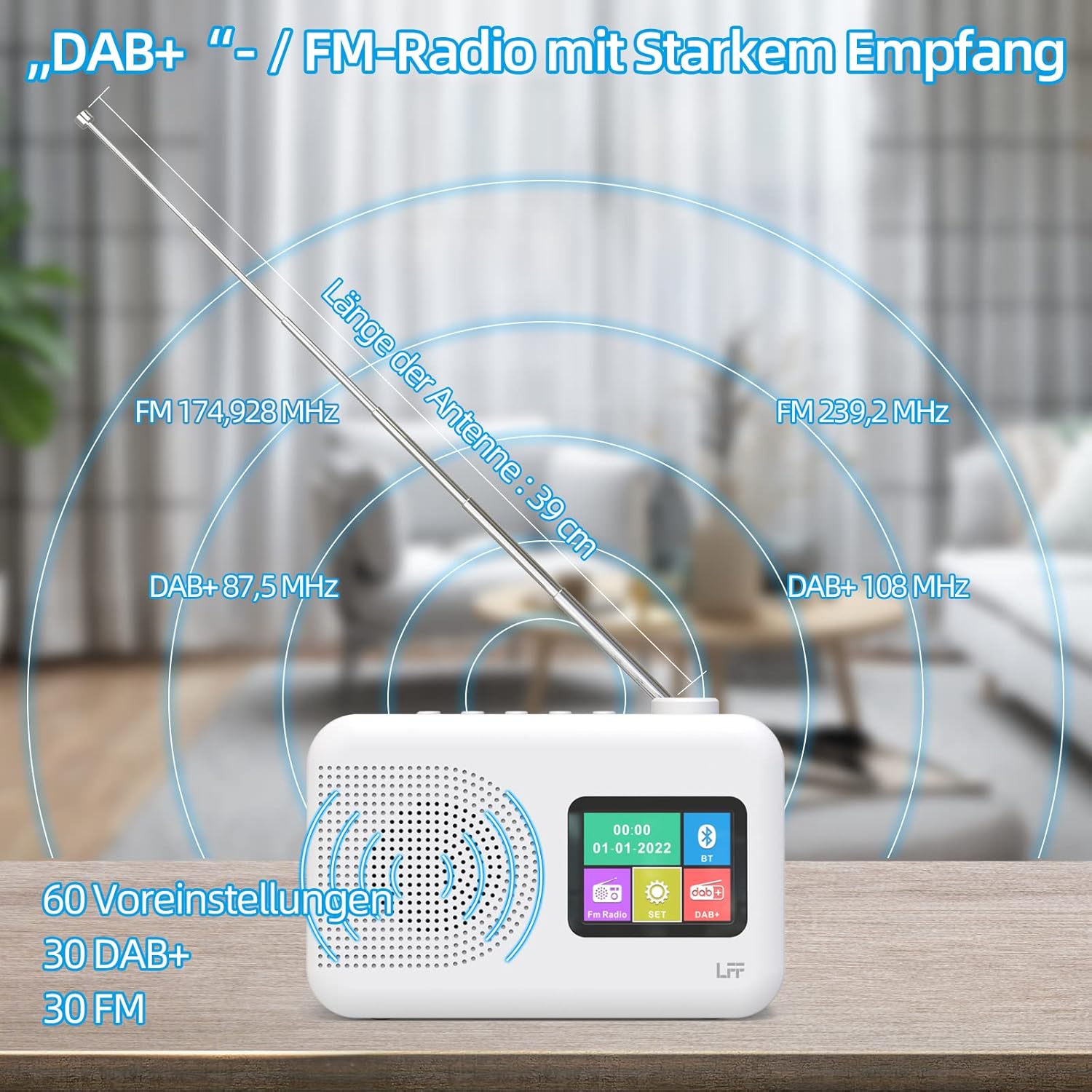
Extend the telescopic antenna fully (approximately 39 cm) and adjust its angle for optimal reception, especially for DAB+ and FM stations.

This diagram illustrates the radio's strong DAB+ and FM reception capabilities with the fully extended 39cm antenna, showing frequency ranges and the capacity for 60 total presets (30 DAB+, 30 FM).
4.3 İlk Tarama (DAB+)
- Radyo'yu aç.
- Ensure the mode is set to DAB+. If not, press the Mod geçiş yapmak için düğmeye basın.
- The radio will automatically perform a full scan for available DAB+ stations. This may take a few minutes.
- Once the scan is complete, the radio will display a list of found stations.
5. Kullanım Talimatları
5.1 DAB+ Radyo Modu
- Basın Mod DAB+ modunu seçmek için kullanılan düğme.
- Döndür Ayarla/Seç Mevcut istasyonlar arasında gezinmek için düğmeyi kullanın.
- Basın Ayarla/Seç İstasyon seçmek için düğme.
- Ön Ayarların Kaydedilmesi: To save a station, press and hold a Ön ayar button until the display confirms. To recall, briefly press the corresponding Ön ayar button. Up to 30 DAB+ stations can be saved.
5.2 FM Radyo Modu
- Basın Mod FM modunu seçmek için düğmesine basın.
- Döndür Ayarla/Seç Frekansı manuel olarak ayarlamak için kullanılan düğme.
- Basılı tutun Ayarla/Seç knob for a few seconds to auto-scan for the next available station.
- Ön Ayarların Kaydedilmesi: Similar to DAB+ mode, press and hold a Ön ayar button to save, and briefly press to recall. Up to 30 FM stations can be saved.
5.3 Bluetooth Modu

This diagram illustrates the three primary playback options for the radio: through its internal speaker, via Bluetooth connection to an external device, or using headphones connected to the headphone jack.
- Basın Mod button to select Bluetooth mode. The display will show "Bluetooth Pairing" or similar.
- Harici cihazınızda (örneğin, akıllı telefonunuzda) Bluetooth'u etkinleştirin ve kullanılabilir cihazları arayın.
- Select "LFF Radio" (or similar name) from the list to pair.
- Once paired, you can play audio from your device through the radio's speaker.
- Not: This radio acts as a Bluetooth receiver. It does not support connecting to Bluetooth headphones or other Bluetooth speakers.
5.4 Uyku Zamanlayıcısı
Uyku zamanlayıcısı, radyonun belirli bir süre sonra otomatik olarak kapanmasını sağlar.

This image depicts the sleep timer function, offering selectable durations of 15, 30, 45, 60, 90, and 120 minutes before the radio automatically powers off.
- Basın Alarm/Uyku Zamanlayıcısı button repeatedly to cycle through sleep timer options (15 min, 30 min, 45 min, 60 min, 90 min, 120 min, OFF).
- Select your desired duration. The radio will turn off automatically after this time.
5.5 Çalar Saat
The radio features a dual alarm function.
- Basılı tutun Alarm/Uyku Zamanlayıcısı Alarm ayarlarını girmek için kullanılan düğme.
- Kullanın Ayarla/Seç knob to set the alarm time, alarm source (DAB+, FM, or buzzer), and volume.
- Basın Ayarla/Seç knob to confirm each setting.
- Repeat the process for the second alarm if needed.
5.6 Kulaklık Kullanımı
Plug 3.5mm headphones into the headphone jack on the side of the radio for private listening. The internal speaker will automatically mute.
6. Bakım
6.1 Temizlik
- Wipe the radio's surface with a soft, dry cloth.
- Cilaya zarar verebileceğinden aşındırıcı temizleyiciler, cilalar veya çözücüler kullanmayın.
6.2 Pil Değişimi
When using battery power, replace all four AA batteries when the low battery indicator appears on the display or when performance degrades.
- Ensure the radio is turned off and disconnected from AC power.
- Arkadaki pil bölmesi kapağını açın.
- Eski pilleri çıkarın ve uygun şekilde atın.
- Insert new 4 x 1.5V AA (LR6) batteries, observing correct polarity (+/-).
- Pil bölmesi kapağını sıkıca kapatın.
6.3 Screen Protection Film
The radio's display comes with a transparent protective film. For optimal clarity, gently peel off this film before first use.
7. Sorun Giderme
Sorunlarla karşılaşırsanız aşağıdaki yaygın sorunlara ve çözümlere bakın:
| Sorun | Olası Neden | Çözüm |
|---|---|---|
| Güç yok | AC adapter not connected, batteries depleted or incorrectly inserted. | Check AC adapter connection. Replace batteries or ensure correct polarity. |
| Zayıf radyo alımı | Anten uzatılmamış, sinyal zayıf, parazitlenme mevcut. | Fully extend and adjust the telescopic antenna. Move the radio to a different location. Avoid sources of interference. |
| Bluetooth bağlanmıyor | Radio not in Bluetooth mode, device too far, already paired with another device. | Ensure radio is in Bluetooth mode. Keep devices within range. Disconnect from other devices. |
| Ses yok | Volume too low, headphones connected, mute activated. | Increase volume. Disconnect headphones. Check if mute is active. |
8. Özellikler
- Marka: LFF uzantısı
- Modeli: DAB Plus Digital FM Radio
- Renk: Beyaz
- Bağlantı Teknolojisi: Bluetooth
- Boyutlar (U x G x Y): 16.1 cm x 5.9 cm x 10.9 cm
- Ayarlama Teknolojisi: DAB
- Güç Kaynağı: AC Adapter (5V/1000mA) or 4 x 1.5V AA (LR6) Batteries
- Desteklenen Radyo Bantları: DAB+, FM
- DAB+ Frekans Aralığı: 174.928 - 239.2 MHz
- FM Frekans Aralığı: 87.5 - 108 MHz
- Ön ayarlar: 30 DAB+, 30 FM
- Anten Uzunluğu: 39 cm (extendable)
- Özel Özellikler: DAB Plus Radio, Sleep Timer, Dual Alarm, Headphone Jack, Color Display
- Dahil Bileşenler: DAB Digital Radio, AC Power Adapter, Quick Start Guide
9. Garanti ve Destek
For any quality-related issues or technical support, please contact the seller directly. We are committed to resolving any problems you may encounter with your LFF DAB Plus Digital FM Radio.
Ask a question about this manual
Ask about setup, troubleshooting, compatibility, parts, safety, or missing instructions. Manuals+ will review the question and use this page’s manual context to help answer it.