
giriiş
This manual provides essential information for the safe and efficient operation of your DuraPro 55-Inch Outdoor 4K UHD LED TV. Please read these instructions thoroughly before installation and use, and retain them for future reference.
The DuraPro 55-Inch Outdoor 4K UHD LED TV is designed for outdoor entertainment in partially shaded areas. It features a 4K display with HDR, 500-nit brightness, and a rugged, weatherproof IP54-rated exterior with tempered glass for protection against environmental elements.
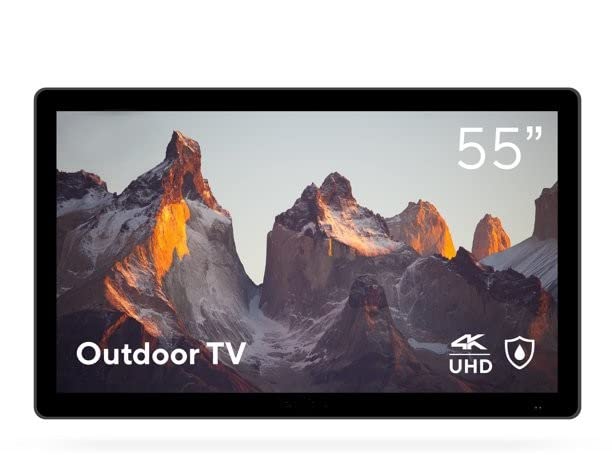
Image: DuraPro 55-Inch Outdoor 4K UHD LED TV.

Image: DuraPro TV mounted on an outdoor wall, showcasing WebOS smart platform.

Image: DuraPro TV displaying 4K UHD and HDR capabilities.

Image: DuraPro TV demonstrating IP54 weatherproof rating with water resistance.
Temel Özellikler
- Optimized for Outdoors: Designed for use in outdoor spaces like covered patios and gazebos.
- 4K UHD HDR Screen: Delivers crisp 4K resolution with High Dynamic Range and 500-nit brightness for enhanced clarity.
- Her Hava Koşulunda Koruma: IP54-rated exterior and tempered glass screen provide protection against rain, dust, and UV rays.
- Entegre Bileşenler: Includes built-in speakers, an IP55 waterproof remote, and a compatible TV wall mount.
- Kullanıcı Dostu Bağlantı: Equipped with 3 HDMI 2.0 inputs (HDCP 2.2 compatible) and 1 USB input for various media sources.
Kutuda Neler Var?
Kuruluma devam etmeden önce tüm bileşenlerin mevcut olduğundan emin olun.
- DuraPro 55-Inch Outdoor 4K UHD LED TV
- Güç kablosu
- IP55 Waterproof Remote Control
- Compatible Wall Mount Bracket

Image: Included wall mount bracket for DuraPro outdoor TV.
Güvenlik Bilgileri
Yangın, elektrik çarpması ve kişilerin yaralanma riskini azaltmak için bu ürünü kullanırken her zaman temel güvenlik önlemlerine uyun.
- Do not expose the TV to direct sunlight for extended periods. This TV is designed for partially shaded outdoor areas.
- Televizyonun etrafında yeterli havalandırma olduğundan emin olun. Havalandırma açıklıklarını kapatmayın.
- Use only the power cable supplied with the TV. Connect to a grounded outdoor-rated power outlet.
- Bu ürüne kendiniz servis vermeye çalışmayın. Tüm servis işlemleri için kalifiye servis personeline başvurun.
- Keep the remote control dry. While it is IP55 waterproof, prolonged submersion or exposure to harsh chemicals should be avoided.
- Securely mount the TV using the provided wall mount and follow all installation instructions carefully to prevent injury or damage.
Kurmak
1. Duvara Montaj Kurulumu
The DuraPro 55-Inch Outdoor TV includes a compatible wall mount. Follow the instructions provided with the wall mount for secure installation. Ensure the mounting surface is structurally sound and capable of supporting the TV's weight (approximately 72 pounds).

Resim: Arka view of DuraPro TV showing VESA mounting points and rugged exterior.
2. Cihazları Bağlama
Locate the input ports on the back or side of the TV. Connect your external devices (e.g., streaming box, game console) using HDMI cables. The TV supports HDMI 2.0 and HDCP 2.2 for 4K sources. A USB port is also available for media playback.
- HDMI: Connect up to three HDMI devices.
- USB BAĞLANTI: Insert a USB drive for viewing photos or playing videos.
3. Güç Bağlantısı
Connect the supplied power cable to the TV's power input and then to a suitable outdoor-rated, grounded electrical outlet.
4. İlk Çalıştırma ve Ağ Kurulumu
Press the power button on the remote control or on the TV. Follow the on-screen prompts to complete the initial setup, including language selection, time zone, and network connection for smart TV features (Webİşletim sistemi).

Image: DuraPro Outdoor TV with WebOS interface on a patio.
Kullanım Talimatları
Uzaktan Kumandayı Kullanma
The included IP55 waterproof remote control allows full functionality of your TV. Familiarize yourself with the button layout for power, volume, channel, input selection, and smart TV navigation.

Image: DuraPro IP55 waterproof remote control with water droplets.
Temel TV İşlevleri
- Güç Açma/Kapatma: Basın Güç düğme.
- Ses Kontrolü: Kullanın Sesi Aç/Kapat düğmeler.
- Giriş Seçimi: Basın Giriş button to cycle through connected sources (HDMI 1, HDMI 2, HDMI 3, USB).
Akıllı TV Özellikleri (Webİşletim Sistemi)
Your DuraPro TV is powered by WebOS, providing access to various streaming applications and smart features. Connect the TV to your home Wi-Fi network during initial setup to enable these functions.
- Ana Sayfa Kontrol Paneli: Access your favorite apps, inputs, and settings from the home screen.
- Uygulama Mağazası: Download and install additional streaming applications.
- Ağ Ayarları: Manage your Wi-Fi connection and other network preferences.

Image: DuraPro TV displaying the WebOS akıllı TV arayüzü.
Bakım
Regular maintenance helps ensure the longevity and optimal performance of your outdoor TV.
- Ekranın Temizlenmesi: Ekranı yumuşak, tiftiksiz bir bezle nazikçe silin. İnatçı lekeler için,ampBezi su veya hafif, aşındırıcı olmayan bir ekran temizleyici ile silin. Sıvıyı doğrudan ekrana püskürtmeyin.
- Dış Cephe Temizliği: Wipe the TV's exterior casinyumuşak bir g ile, damp Bez. Sert kimyasallardan veya aşındırıcı temizleyicilerden kaçının.
- Hava Koşullarından Korunma: While the TV is IP54-rated, it is designed for partially shaded areas. For prolonged periods of extreme weather (heavy rain, snow, direct intense sunlight), consider using a protective cover (not included) to extend the product's life.
- Kablo yönetimi: Ensure all cables are securely connected and routed to prevent water ingress or damage.
Sorun giderme
Televizyonunuzda sorunlarla karşılaşırsanız, müşteri desteğiyle iletişime geçmeden önce aşağıdaki yaygın sorunlara ve çözümlere bakın.
| Sorun | Olası Çözüm |
|---|---|
| Elektrik yok / TV açılmıyor. |
|
| Görüntü yok, ancak ses var. |
|
| Ses yok. |
|
| Uzaktan kumanda çalışmıyor. |
|
| Wi-Fi'ye bağlanılamıyor. |
|
Özellikler
| Özellik | Detay |
|---|---|
| Marka | DuraPro |
| Model Numarası | DP-55 |
| Ekran Boyutu | 55 inç |
| Ekran Teknolojisi | NEDEN OLMUŞ |
| Çözünürlük | 4K UHD |
| Yenileme Hızı | 120 Hz |
| Özel Özellik | Flat, HDR, Weatherproof (IP54), Tempered Glass |
| Bağlantı Teknolojisi | 3x HDMI 2.0 (HDCP 2.2), 1x USB |
| Hoparlör Tipi | Dahili |
| En Boy Oranı | 16:9 |
| Ürün Boyutları (D x G x Y) | 7 x 45.5 x 28.5 inç |
| Ürün Ağırlığı | 72 pound |
| Renk | Siyah |
| Dahil Bileşenler | Power Cable, Remote, Wall Mount |
Garanti ve Destek
For warranty information and technical support, please refer to the warranty card included with your product or visit the official DuraPro website. You may also contact DuraPro customer service directly for assistance with product registration, troubleshooting, or service requests.
Please note: Specific warranty terms and conditions may vary by region and purchase date. Keep your proof of purchase for warranty claims.