
1. Giriş
This manual provides detailed instructions for the installation, operation, and maintenance of your DEKCO Solar Security Camera and Wireless Doorbell Camera system. Please read this manual thoroughly before using the product to ensure proper function and safety. Keep this manual for future reference.
2. Paket İçeriği
Paketi açtıktan sonra tüm parçaların eksiksiz ve iyi durumda olduğunu doğrulayın.
- DEKCO Solar Security Camera
- Kablosuz Kapı Zili Kamera
- İç Mekan Çan Ünitesi
- Solar Panel (integrated with camera)
- Montaj Braketleri ve Vidalar
- USB Şarj Kablosu
- Kullanım Kılavuzu (bu belge)
3. Ürün Bittiview
The DEKCO security system combines a solar-powered outdoor camera with a wireless doorbell camera to provide comprehensive home surveillance.
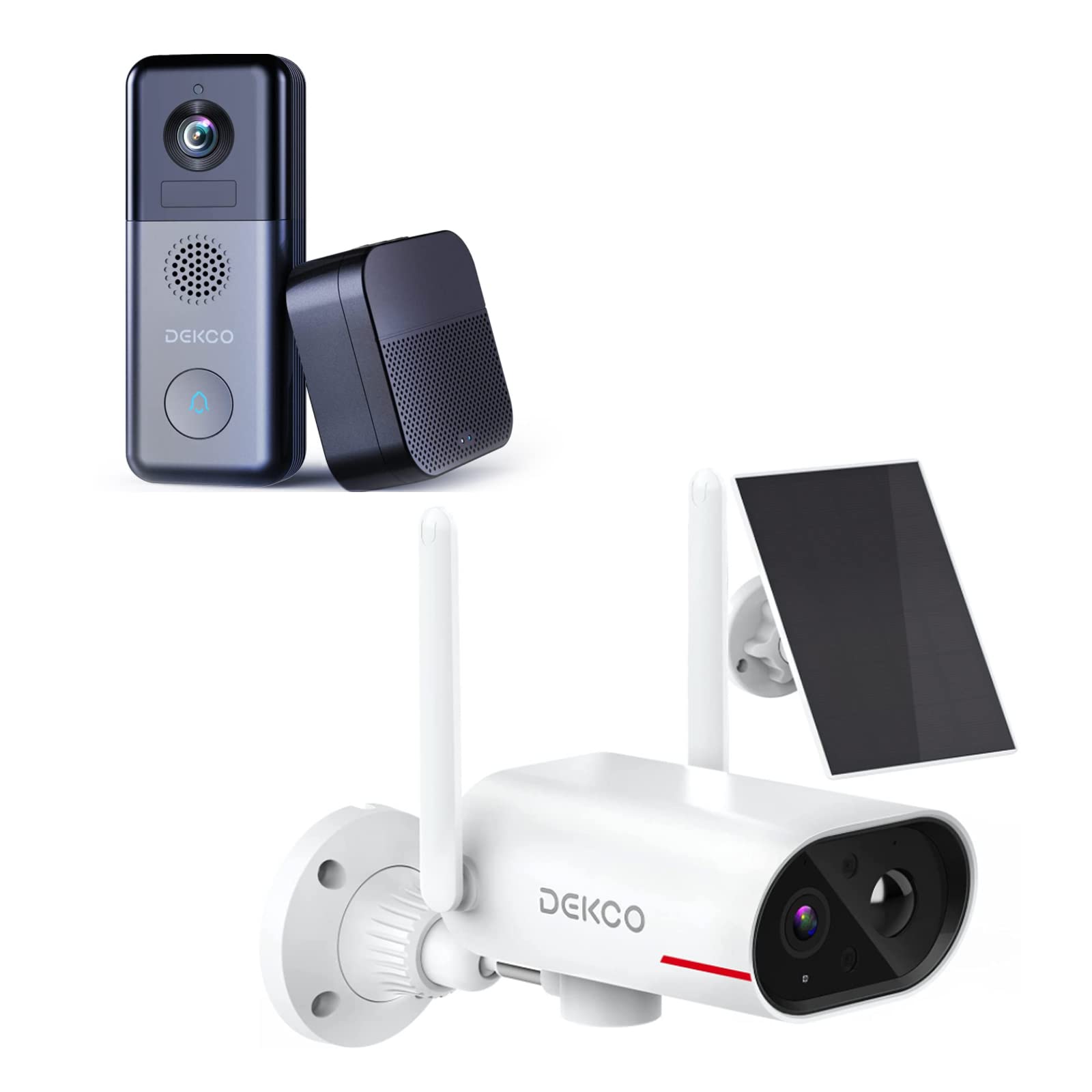
An image showing the DEKCO solar-powered security camera, the wireless doorbell camera, and its indoor chime unit. The security camera is white with two antennas and a solar panel, while the doorbell is dark grey with a camera lens and a call button. The chime is a compact black box.
3.1 Solar Security Camera Features
- 260° ViewMenzil: Achieved through a 170° rotating design.
- %100 Kablosuz: Flexible installation without power cables.
- Güneş Enerjili: Integrated solar panel for continuous power with adequate sunlight.
- Gece Görüşü: Features color night vision for clear images in low light.
- Depolamak: Supports Micro SD card and cloud storage (no monthly fees).
- Su Geçirmezlik Derecesi: IP65 for outdoor use.
3.2 Wireless Doorbell Camera Features
- 180 Günlük Pil Ömrü: Uzun süreli kullanım için dahili 10000mAh şarj edilebilir pil.
- İki Yönlü Ses: Communicate with visitors remotely.
- Hareket Algılama: Receive alerts for activity at your door.
- Kablosuz Zil: Connects to an indoor chime unit.
- Su Geçirmezlik Derecesi: IP65 for outdoor use.
4. Kurulum Kılavuzu
Follow these steps to set up your DEKCO security system.
4.1 Uygulama Kurulumu
- Download the DEKCO app from your smartphone's app store (available for Android and iOS).
- Yeni bir hesap için kaydolun veya zaten bir hesabınız varsa giriş yapın.
4.2 Solar Security Camera Setup
- Başlangıç ücreti: Before installation, fully charge the camera using the provided USB cable.
- Montaj: Choose a location with good Wi-Fi signal and direct sunlight exposure for the solar panel. Use the mounting bracket and screws to securely attach the camera to a wall. Ensure the camera has a clear view İstenilen izleme alanının.
- Eşleştirme: Open the DEKCO app, select 'Add Device', and follow the on-screen instructions to connect the camera to your Wi-Fi network.
4.3 Wireless Doorbell Camera Setup
- Başlangıç ücreti: Fully charge the doorbell camera using the provided USB cable.
- Montaj: Install the doorbell camera at your desired location near your front door using the provided mounting hardware. Ensure it has a clear view ve iyi bir Wi-Fi sinyali.
- Eşleştirme: In the DEKCO app, select 'Add Device' and follow the instructions to connect the doorbell camera to your Wi-Fi network.
- Chime Setup: Plug the indoor chime unit into a power outlet. Follow the app's instructions to pair the chime with the doorbell camera. You can select different chime tones and adjust the volume through the app.
5. Kullanım Talimatları
Learn how to use the features of your DEKCO security system.
5.1 Solar Security Camera Operation
- Canlı View: Open the DEKCO app and select your camera to view canlı footage. You can manually pan/tilt the camera within its 260° range.
- Hareket Algılama: The camera is configured for motion-only alerts. Adjust sensitivity settings in the app to optimize detection and minimize false alarms.
- Kayıt: Motion-triggered events are recorded and stored on the Micro SD card (if installed) or in the cloud. Access recordings via the app's playback feature.
- Gece Görüşü: The camera automatically switches to color night vision in low-light conditions.
5.2 Wireless Doorbell Camera Operation
- Çağrıları Cevaplama: When a visitor presses the doorbell button, your smartphone will receive a notification. Tap the notification to answer and engage in two-way audio communication.
- Hareket Algılama: The doorbell camera detects motion and sends alerts to your phone. Review motion events in the app.
- Canlı View: Canlı yayın başlatabilirsiniz. view of your front door at any time through the DEKCO app.
- Zil İşlevi: The indoor chime will sound when the doorbell button is pressed. Adjust settings in the app.
6. Bakım
Regular maintenance ensures optimal performance and longevity of your devices.
- Lens Temizliği: Periodically wipe the camera lenses and solar panel with a soft, damp Toz ve kiri temizlemek için bir bez kullanın. Aşındırıcı temizleyicilerden kaçının.
- Güneş Paneli Verimliliği: Ensure the solar panel is free from obstructions (leaves, snow, etc.) to maximize charging efficiency.
- Pil Sağlığı: While solar-powered, ensure the security camera receives sufficient sunlight. For the doorbell, monitor battery levels via the app and recharge when necessary.
- Donanım Yazılımı Güncellemeleri: Check the DEKCO app regularly for firmware updates. Install updates to ensure your devices have the latest features and security enhancements.
7. Sorun Giderme
Yaygın sorunlara yönelik çözümler için bu bölüme bakın.
- Cihaz Wi-Fi'ye Bağlanmıyor:
- Wi-Fi ağınızın 2.4 GHz olduğundan emin olun (5 GHz desteklenmiyor).
- Wi-Fi şifresinin doğruluğunu kontrol edin.
- Cihazı Wi-Fi yönlendiricinize daha yakın bir yere taşıyın.
- Restart your router and the device.
- Hareket Algılama Uyarısı Yok:
- Uygulama ayarlarında hareket algılamanın etkinleştirildiğini doğrulayın.
- Hareket hassasiyetini ayarlayın.
- Cihazın açık olduğundan emin olun view ve engellenmiyor.
- Kötü Video Kalitesi:
- Wi-Fi sinyal gücünüzü kontrol edin.
- Kamera lensini temizleyin.
- Doorbell Battery Drains Quickly:
- Reduce motion detection sensitivity or frequency.
- Kullanmadan önce cihazın tamamen şarj olduğundan emin olun.
- Solar Camera Not Charging:
- Ensure the solar panel receives at least 1 hour of direct sunlight daily.
- Güneş paneli yüzeyini temizleyin.
8. Özellikler
| Özellik | Şartname |
|---|---|
| Marka | DEKKO |
| Model Numarası | B09TF8K2W8 |
| Bağlantı Teknolojisi | Kablosuz (Wi-Fi) |
| Güç Kaynağı | Solar Powered (Camera), Battery (Doorbell) |
| Doorbell Battery Capacity | 10000 mAh |
| ViewÇekim Açısı (Kamera) | 260° (170° rotating design) |
| Gece Görüşü | Renkli Gece Görüşü |
| Su Geçirmezlik Derecesi | IP65 |
| Uyumlu Cihazlar | Akıllı telefon (Android) |
| Uyarı Tipi | Yalnızca Hareket |
| Montaj Tipi | Duvara Montaj |
| Video Yakalama Formatı | MPEG-4 |
9. Garanti ve Destek
For warranty information, technical support, or further assistance, please refer to the DEKCO official website or contact DEKCO customer service directly. Keep your purchase receipt as proof of purchase.