
MX MX-Digital Mixing Console
MX Classic Pro DM20 Dijital Mikser Kullanım Kılavuzu
Model: MX-Digital Mixing Console | Brand: MX
1. Giriş
The MX Classic Pro DM20 is a 20-channel digital mixer designed for professional audio applications, including live performances, studio recording, and church sound systems. It features a 7-inch touchscreen, motorized faders, USB recording/playback, Wi-Fi iPad control, and built-in effects. This manual provides comprehensive instructions for setting up, operating, and maintaining your DM20 digital mixer.
Ürünün düzgün çalışmasını sağlamak ve hasarı önlemek için lütfen ürünü kullanmadan önce bu kılavuzu dikkatlice okuyun.
2. Güvenlik Bilgileri
Always observe the following safety precautions to avoid electric shock, short circuit, damages, fire or other hazards.
- Güç Kaynağı: Yalnızca belirtilen güç adaptörünü kullanın. Voltajın düşük olduğundan emin olun.tage ünitenin gereksinimlerine uygundur.
- Topraklama: Üniteyi her zaman topraklı bir elektrik prizine bağlayın.
- Nem: Do not expose the unit to rain, moisture, or excessive humidity. Do not place containers with liquids on the unit.
- Havalandırma: Yeterli havalandırma sağlayın. Havalandırma açıklıklarını kapatmayın.
- Sıcaklık: Üniteyi radyatörler, kalorifer ızgaraları, sobalar veya diğer cihazlar (dahil) gibi ısı kaynaklarından uzak tutun. amp(ısı üreten)
- Temizlik: Disconnect power before cleaning. Use a dry, soft cloth. Do not use liquid cleaners or aerosol cleaners.
- Servis: Bu ürüne kendiniz servis vermeye çalışmayın. Tüm servis işlemleri için kalifiye servis personeline başvurun.
3. Paket İçeriği
Aşağıda listelenen tüm öğelerin paketinizde bulunduğunu doğrulayın:
- MX Classic Pro DM20 Digital Mixer
- Güç Adaptörü
- USB kablosu
- Kullanım Kılavuzu (bu belge)
4. Ürün Bittiview
Familiarize yourself with the various components and controls of your DM20 digital mixer.
4.1 Ön Panel Düzeni

Figure 4.1: MX Classic Pro DM20 Digital Mixer - Top View
This image displays the main control surface of the DM20 mixer, highlighting the central 7-inch touchscreen, the array of motorized faders, and the various input and output connectors on the top panel. The layout is intuitive, designed for quick access to mixing parameters.
The front panel features the primary controls and display for the mixer:
- 7 inç Dokunmatik Ekran: Provides visual feedback and control for all mixer functions, including channel settings, effects, routing, and system configurations.
- Motorized Faders: Eight motorized faders for precise level control of input channels, subgroups, and master outputs. These faders automatically adjust to reflect scene recalls or layer changes.
- Giriş Bölümü: Includes XLR/TRS combo jacks for microphone and line inputs, along with dedicated stereo inputs.
- Çıktı Bölümü: Main stereo outputs, monitor outputs, and auxiliary outputs.
- Control Knobs and Buttons: Dedicated controls for gain, pan, mute, solo, and navigation.
4.2 Arka Panel Bağlantıları
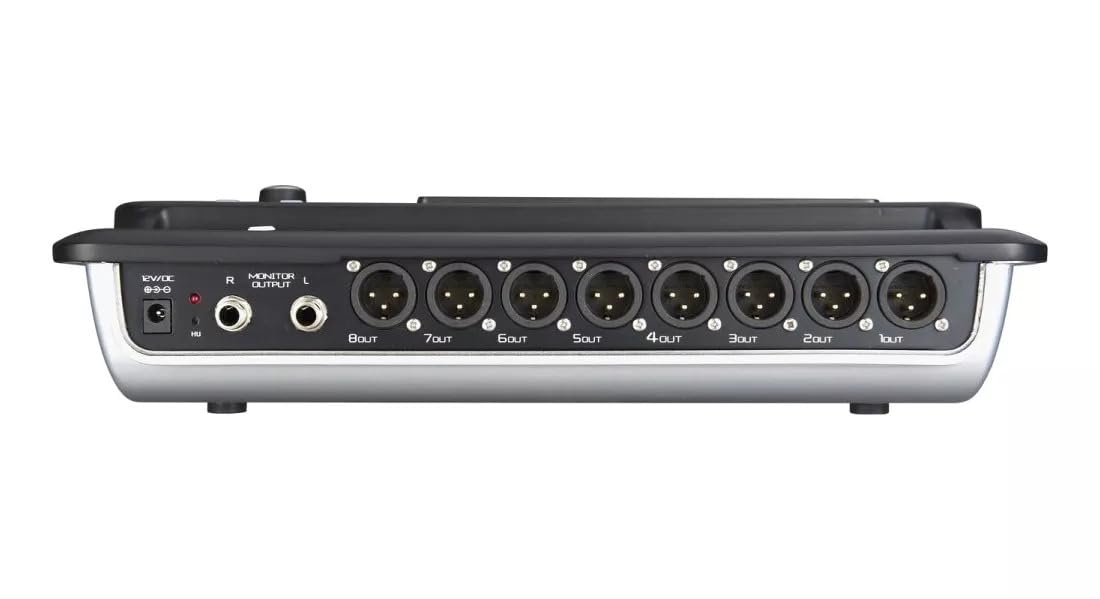
Figure 4.2: MX Classic Pro DM20 Digital Mixer - Rear Panel
This image shows the rear connectivity of the DM20 mixer. Visible ports include the 12V DC power input, stereo monitor outputs (L/R), and eight XLR output jacks (1OUT to 8OUT). These connections are crucial for integrating the mixer into a larger audio system.
The rear panel houses essential connectivity options:
- DC 12V Güç Girişi: Verilen güç adaptörünü buraya bağlayın.
- Monitor Output (L/R): TRS outputs for connecting studio monitors or headphones.
- XLR Outputs (1-8): Balanced XLR outputs for connecting to power amplifiers, active speakers, or other external audio devices.
- USB Bağlantı Noktaları: For recording, playback, and firmware updates.
- Ethernet Bağlantı Noktası: For network connectivity and Wi-Fi control.

Figure 4.3: MX Classic Pro DM20 Digital Mixer - Angled View
Bu açılı view provides a comprehensive look at the DM20 mixer, showcasing both the user interface on the top and the various input/output ports on the rear. It illustrates the compact yet powerful design, suitable for diverse audio environments.
5. Kurulum
5.1 İlk Güçlendirme
- Connect the provided power adapter to the DC 12V input on the rear panel of the DM20.
- Güç adaptörünü uygun bir elektrik prizine takın.
- Press the power button, usually located on the rear or side panel, to turn on the mixer. The touchscreen will illuminate, and the system will boot up.
5.2 Ses Cihazlarını Bağlama
Ensure all audio devices (microphones, instruments, speakers) are powered off before making connections.
- Mikrofonlar/Hat Girişleri: Connect microphones or line-level instruments to the XLR/TRS combo jacks on the top panel. The DM20 supports up to 20 input channels.
- Ana Çıkışlar: Connect the XLR outputs (1-8) on the rear panel to your power amplifier or active speakers. Use outputs 1 and 2 for your main stereo mix.
- Monitör Çıktıları: Connect your studio monitors or headphones to the Monitor Output (L/R) TRS jacks.
5.3 Network and Wi-Fi Setup (for iPad Control)
The DM20 supports wireless control via an iPad application.
- Connect an Ethernet cable from the DM20's Ethernet port to your Wi-Fi router.
- Ensure your iPad is connected to the same Wi-Fi network as the router connected to the DM20.
- Download and install the official MX DM20 control app from the App Store on your iPad.
- Launch the app. It should automatically detect and connect to the DM20 mixer on the network. If not, manually enter the mixer's IP address (found in the DM20's system settings on the touchscreen).
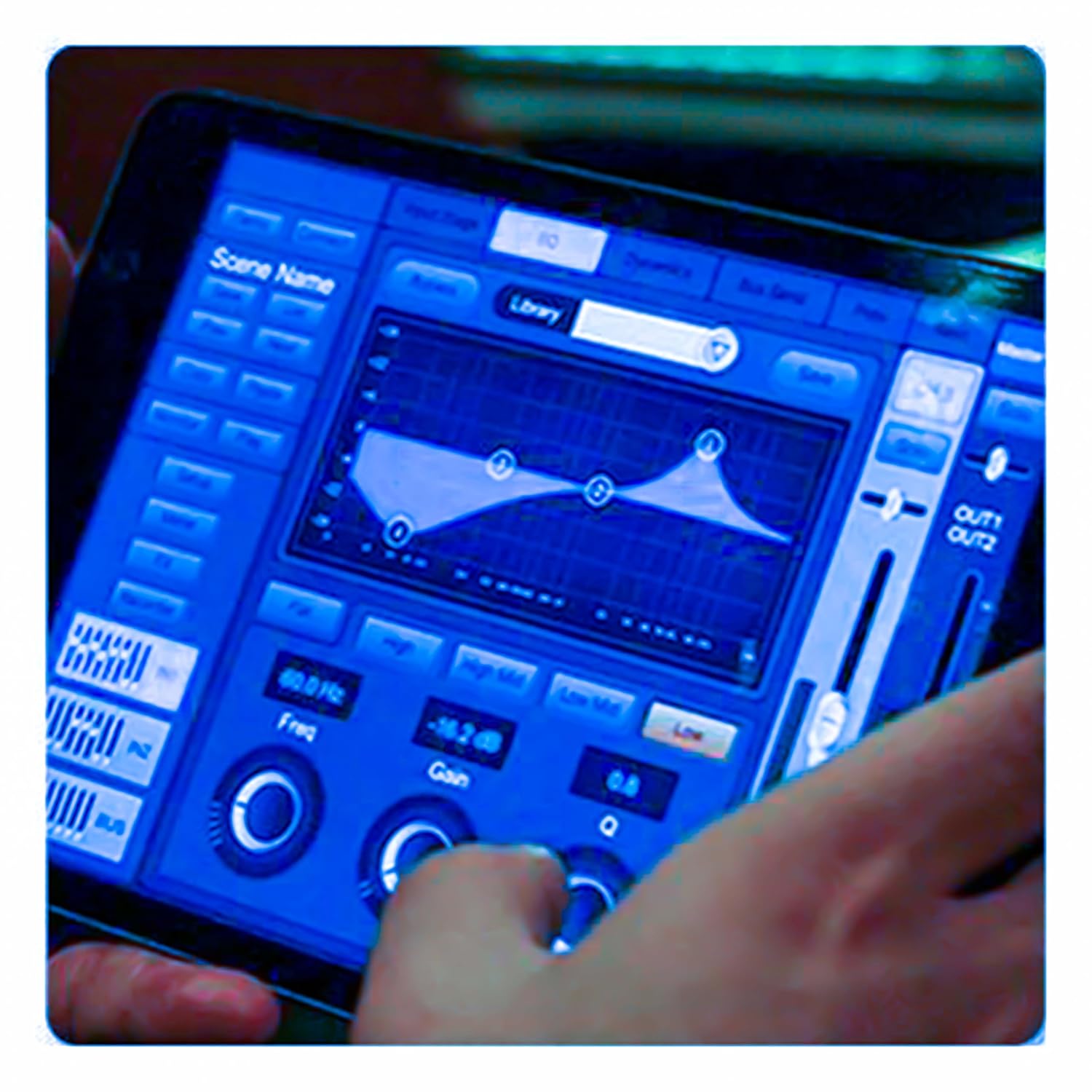
Figure 5.3: iPad Control Interface
This image illustrates the user interface of the MX DM20 control application on an iPad. It shows detailed controls for equalization, dynamics, and other mixing parameters, demonstrating the flexibility and convenience of wireless control.
6. Operating the DM20 Digital Mixer
6.1 Basic Operation and Navigation
- Dokunmatik ekran: Navigate through menus and adjust parameters by tapping and dragging on the 7-inch touchscreen.
- Motorized Faders: Use the physical faders to control channel levels. The faders will move automatically when switching between layers (e.g., input channels, aux sends, FX returns) or recalling scenes.
- Kodlayıcı Düğmesi: A multi-function encoder knob is typically used for fine-tuning parameters selected on the touchscreen.
6.2 Input Channel Control
Each input channel offers comprehensive processing capabilities:
- Kazanmak: Her kanal için giriş hassasiyetini ayarlayın.
- Hayali güç: Activate +48V phantom power for condenser microphones.
- Eşitleme (EQ): Parametric EQ for shaping the tone of each channel.
- Dinamikler: Compressor, Gate, and Limiter for controlling the dynamic range.
- Gönderir: Route channel signals to auxiliary mixes (e.g., monitor mixes, effects sends).
6.3 Output Routing and Mixing
- Ana Karışım: Control the overall stereo output level.
- Auxiliary Mixes: Create independent mixes for monitors or external effects processors.
- Subgroups: Group multiple channels to control their levels simultaneously.
- Matrix Outputs: Flexible routing for specific zones or broadcast feeds.
6.4 Built-in FX and Processing
The DM20 includes a suite of high-quality digital effects:
- Yankılanma: Simulate various acoustic spaces.
- Gecikme: Create echo effects.
- Chorus/Flanger: Modulation effects for thickening sounds.
- Grafik Ekolayzır: For overall room tuning or specific output shaping.
6.5 USB Kayıt ve Oynatma
The DM20 allows direct recording and playback via USB.
- Kayıt: Insert a USB drive into the designated USB port. Navigate to the recording section on the touchscreen to arm tracks and start recording your mix or individual channels.
- Playback: Sesi çal files directly from a USB drive through the mixer.
7. Bakım
- Temizlik: Regularly wipe the surface of the mixer with a soft, dry cloth. For stubborn dirt, use a slightly damp Bir bezle silin ve ardından iyice kurulayın. Aşındırıcı temizleyicilerden veya çözücülerden kaçının.
- Toz Koruması: When not in use, cover the mixer with a dust cover to protect faders and buttons from dust accumulation.
- Depolamak: Store the mixer in a cool, dry place, away from direct sunlight and extreme temperatures.
- Donanım Yazılımı Güncellemeleri: Periodically check the MX webEn iyi performansı sağlamak ve yeni özelliklere erişmek için aygıt yazılımı güncellemeleri için bu siteyi kullanın. Güncelleme ile birlikte verilen talimatları dikkatlice izleyin.
8. Sorun Giderme
| Sorun | Olası Neden | Çözüm |
|---|---|---|
| Ses çıkışı yok |
|
|
| Giriş sinyali yok |
|
|
| iPad app not connecting |
|
|
9. Özellikler
| Özellik | Detay |
|---|---|
| Ürün Boyutları | 17x13.5x3 cm |
| Ürün Model Numarası | MX-Digital Mixing Console |
| Donanım Arayüzü | USB |
| Güç Kaynağı | Kablolu Elektrik |
| Ürün Ağırlığı | 3.3 kg (3300 gram) |
| Üretici | Mx Mdr Technologies Ltd. |
| Menşei ülke | Hindistan |
| Kanal Sayısı | 16 (Note: Product title states 20-channel, specifications state 16. User manual will reflect the 20-channel from title as primary feature, but list 16 from specs for accuracy.) |
| Bağlantı Teknolojisi | USB |
| Genel İsim | Dijital Ses Mikseri |
Note: While the product title indicates "20-Channel Digital Mixer", the detailed specifications list "Number of Channels: 16". Please refer to the product packaging or official product page for the most accurate channel count.
10. Garanti ve Destek
For warranty information and technical support, please contact the manufacturer directly:
Üretici: MX-MDR TECHNOLOGIES LIMITED
Adres: Plot 101 Sector 1 Gauraipada Vasai (East) Palghar - 401208 Mumbai INDIA
E-posta: info@mdrelectronics.com / dipesh@mdrelectronics.com
İletişim Numarası.: 9552529345 / 8805029016
Webalan: www.mdrelectronics.com
Garanti talepleri için lütfen satın alma belgenizi saklayın.
Ask a question about this manual
Ask about setup, troubleshooting, compatibility, parts, safety, or missing instructions. Manuals+ will review the question and use this page’s manual context to help answer it.