
1. Giriş
This manual provides detailed instructions for the safe and effective operation of your Andoer 4K 48MP 60FPS WiFi Camcorder. Please read this manual thoroughly before using the device and retain it for future reference. This camcorder is designed for high-quality video recording and photography, featuring 4K Ultra HD resolution, 48-megapixel photos, a 3-inch IPS touchscreen, and infrared night vision capabilities. It is equipped with WiFi connectivity for easy file transfer and remote control, and comes with essential accessories such as an external microphone and a wide-angle macro lens.

Image 1.1: Andoer 4K Camcorder with included accessories.
2. Paket İçeriği
Aşağıda listelenen tüm ürünlerin paketinizde mevcut olduğundan emin olun. Eksik veya hasarlı bir ürün varsa, lütfen perakendecinizle iletişime geçin.

Resim 2.1: Paket içeriğindeki tüm bileşenler.
- Kamera
- Mikrofon
- Mikrofon için rüzgarlık
- 3.5 mm TRS - TRS Ses Kablosu
- USB kablosu
- El kavrama
- Camera Lens (Wide-angle macro lens)
- Lens Adaptör Halkası
- 2 x Lithium-polymer Batteries (2000mAh)
- Uzaktan kumanda
- Camcorder Storage Bag
- Lens Saklama Çantası
- Camcorder User Manual
- Mikrofon Kullanım Kılavuzu
3. Ürün Bittiview
Video kameranızın çeşitli parçalarını ve kontrollerini iyice öğrenin.
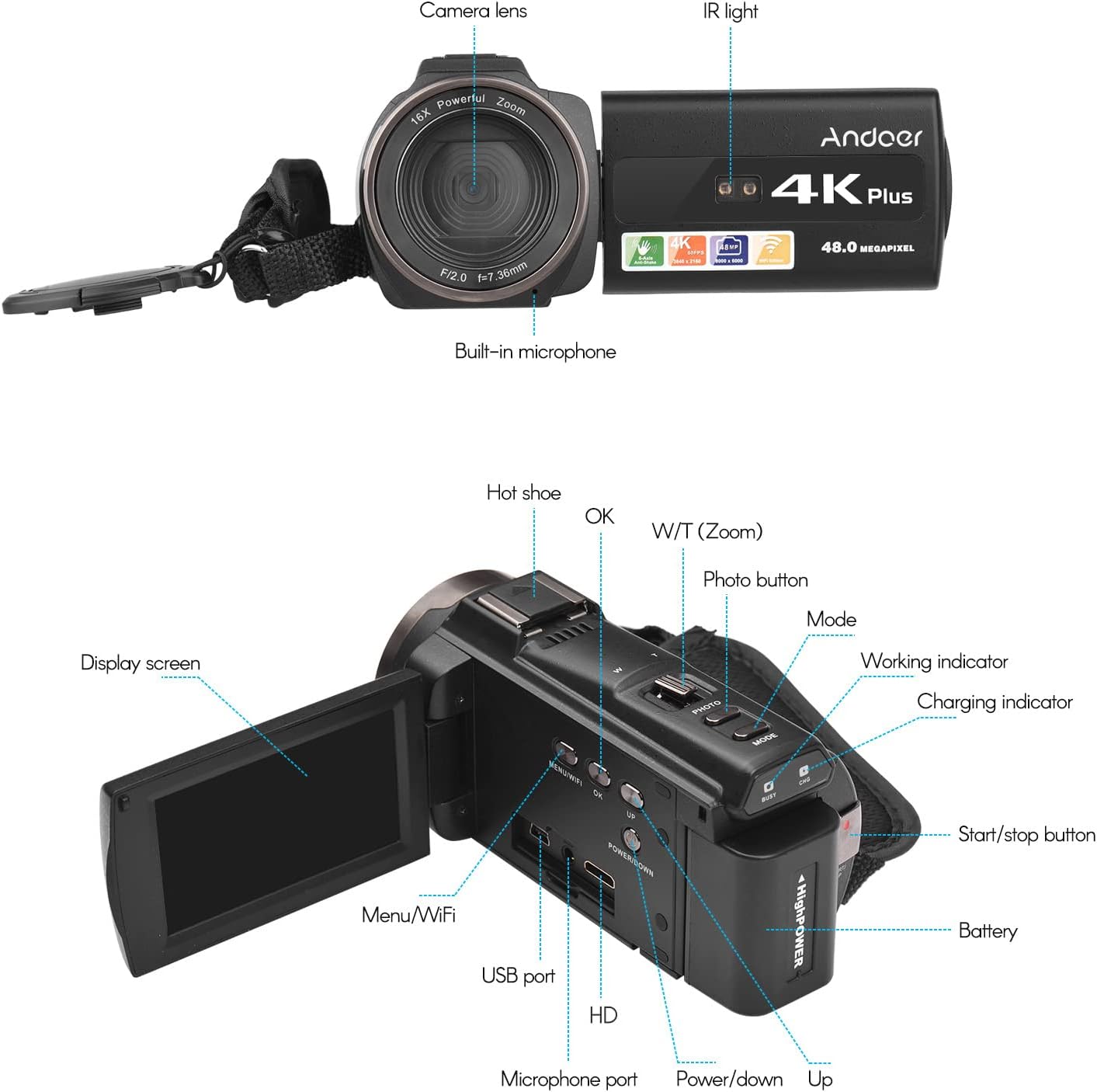
Image 3.1: Front and Rear View of the Camcorder with labeled components.
Temel Bileşenler:
- Kamera Lensi: Görüntü ve video yakalama için kullanılan ana optik bileşen.
- IR Işık: Emits infrared light for night vision recording.
- Dahili Mikrofon: Captures audio. An external microphone can be connected for enhanced sound quality.
- Sıcak Ayakkabı: Mount for external accessories like the included microphone or an LED video light.
- Display Screen (3" IPS Touch Screen): İçin viewcanlı canlıtage, playback, and navigating menus.
- Kontrol Düğmeleri: Including Power, Mode, Photo, Zoom (W/T), OK, Menu/WiFi, Up/Down.
- Limanlar: USB, HD (HDMI), Microphone port.
- Pil Bölmesi: Şarj edilebilir pili barındırır.
4. Kurulum
4.1 Pilin Şarj Edilmesi
Before first use, fully charge the included lithium-polymer batteries. Insert one battery into the camcorder's battery compartment. Connect the camcorder to a power source using the provided USB cable. The charging indicator will illuminate during charging and turn off when fully charged. A full charge typically takes several hours.

Image 4.1: Battery installation and charging indication.
4.2 Bellek Kartının Takılması
The camcorder supports TF (MicroSD) cards up to 128GB. Ensure the card is formatted before first use in the camcorder's settings. Insert the memory card into the designated slot until it clicks into place.
- Use a Class 10 or higher speed rating for optimal performance, especially for 4K video recording.
- The camcorder supports V60 video speed class.
4.3 Attaching the External Microphone
For improved audio quality, attach the external stereo microphone to the hot shoe mount on top of the camcorder. Connect the microphone's 3.5mm audio cable to the microphone input port on the camcorder.
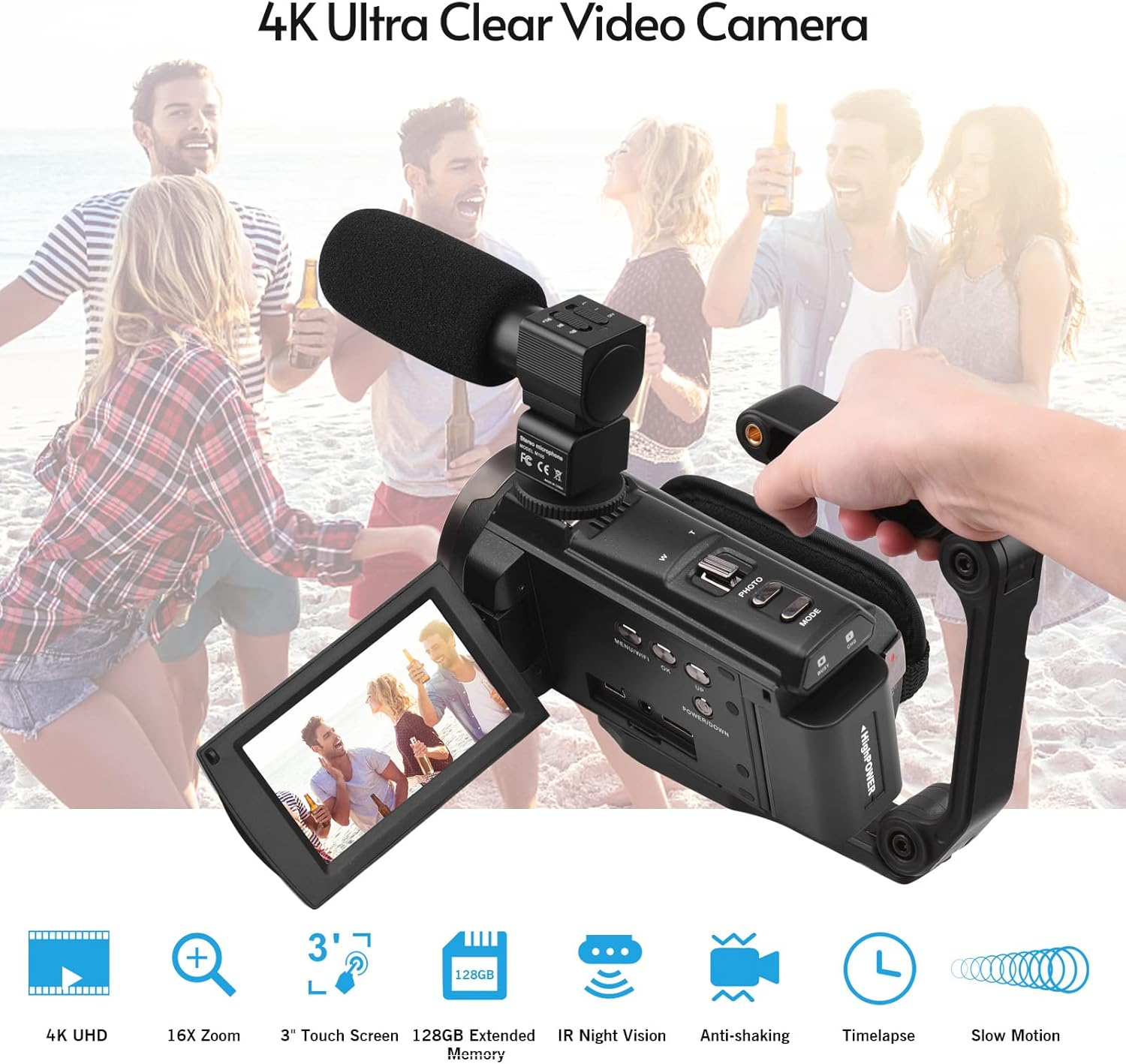
Image 4.2: External microphone attached to the camcorder.
4.4 Attaching the Wide-Angle Macro Lens
To use the wide-angle macro lens, first attach the lens adapter ring to the camcorder's main lens. Then, screw the wide-angle macro lens onto the adapter ring. This lens provides a broader perspective for your shots.

Image 4.3: Wide-angle macro lens for expanded field of view.
4.5 Attaching the Handgrip
The included handgrip can be attached to the bottom of the camcorder via the 1/4" screw hole for more stable handheld recording.
5. Kullanım Talimatları
5.1 Açma/Kapatma
To power on the camcorder, open the display screen and press the Power button. To power off, press and hold the Power button, or close the display screen.
5.2 Video Kaydetme
- Kamerayı açın.
- Basın Mod Video kayıt modunu seçmek için kullanılan düğme.
- Basın Başlat/Durdur button to begin recording. The recording indicator will flash.
- Basın Başlat/Durdur Kaydı durdurmak için tekrar düğmesine basın.
The camcorder supports 4K/60FPS video resolution for clear and smooth footage.
5.3 Fotoğraf Çekme
- Kamerayı açın.
- Basın Mod button to select photo mode.
- Ekranı kullanarak çekiminizi kadrajlayın.
- Basın Fotoğraf button to capture a 48-megapixel image.
5.4 Using the 3" IPS Touch Screen
The capacitive touchscreen allows for intuitive navigation of menus and settings. Tap to select options, swipe to scroll, and pinch to zoom (if supported in specific modes).
5.5 WiFi Function
The built-in WiFi allows for wireless transmission of files to a compatible smartphone or tablet via a dedicated app. It also enables remote control of the camcorder from your mobile device.
- Activate WiFi on the camcorder via the menu.
- Download and install the specified app on your mobile device.
- Connect your mobile device to the camcorder's WiFi network.
- Use the app to control recording, view canlı footage ve transfer files.
5.6 IR Gece Görüşü
For recording in low-light or dark conditions, activate the IR Night Vision feature. This utilizes infrared light to capture clear black and white footage.

Image 5.1: IR Night Vision in operation.
5.7 Dijital Zoom
Use the W/T (Wide/Telephoto) button to adjust the 16x digital zoom. Note that digital zoom can reduce image quality compared to optical zoom.
5.8 Görüntü Sabitleme
The camcorder features 6-axis image stabilization to reduce blur and shakiness in your recordings, especially during handheld use.
5.9 Özel Özellikler
- Hareket Algılama: The camcorder can be set to automatically start recording when motion is detected.
- Face Detection/Recognition: Optimizes focus and exposure for faces in the frame.
- Uzaktan kumanda: Use the included remote control to operate the camcorder from a distance, useful for self-recording or group shots.
- Otomatik Zamanlayıcı: Set a delay before capturing a photo or starting a video recording.

Image 5.2: Tripod mounting for self-timer and stable shots.
5.10 Harici Cihazlara Bağlanma
- USB BAĞLANTI: Bir bilgisayara bağlanın file Aktar.
- HD (HDMI): Connect to a TV or monitor to view Kayıtlarınızı daha büyük bir ekranda izleyin.
6. Bakım
- Temizlik: Use a soft, dry cloth to clean the camcorder body. For the lens, use a specialized lens cleaning cloth and solution. Avoid harsh chemicals.
- Depolamak: Store the camcorder in a cool, dry place away from direct sunlight and extreme temperatures. Remove the battery if storing for extended periods.
- Pil Bakım: Do not expose batteries to high temperatures. Recharge regularly even if not in use to maintain battery health.
- Donanım Yazılımı Güncellemeleri: Üreticinin kontrol edin webEn iyi performansı ve yeni özellikleri sağlamak için mevcut ürün yazılımı güncellemeleri için siteyi düzenli olarak kontrol edin.
7. Sorun Giderme
| Sorun | Olası Neden | Çözüm |
|---|---|---|
| Kamera açılmıyor. | Pil bitmiş veya doğru takılmamış. | Ensure battery is fully charged and correctly inserted. Try the second battery. |
| Video kaydı yapılamıyor/fotoğraf çekilemiyor. | Hafıza kartı dolu, takılı değil veya bozuk. Yanlış mod seçildi. | Check memory card status, ensure it's inserted and has free space. Format if necessary (backup data first). Select the correct mode. |
| Görüntü/video kalitesi zayıf. | Lens is dirty. Low light conditions without IR. Digital zoom used excessively. | Clean the lens. Activate IR Night Vision in dark environments. Avoid excessive digital zoom. Ensure sufficient lighting. |
| WiFi bağlantı sorunları. | Incorrect WiFi settings. App not installed or updated. | Ensure WiFi is enabled on camcorder and mobile device. Re-establish connection. Update or reinstall the mobile app. |
| Microphone not recording audio. | Mikrofon düzgün bağlanmamış veya ayarları yanlış. | Check microphone cable connection. Verify audio input settings in the camcorder menu. |
8. Özellikler
| Özellik | Detay |
|---|---|
| Model Numarası | ZOH0150584179474NZ |
| Video Çözünürlüğü | 4K (3840x2160) at 60FPS |
| Fotoğraf Çözünürlüğü | 48 Megapiksel (8000x6000) |
| Görüntü Sabitleme | 6 eksenli |
| Ekran Görüntüsü | 3-inch IPS Capacitive Touch Screen |
| Dijital Zoom | 16x |
| Bağlantı | USB, Wi-Fi, HDMI |
| Hafıza Kartı Desteği | TF (MicroSD) up to 128GB (Class 10, V60 recommended) |
| Özel Özellikler | IR Night Vision, Motion Detection, Face Detection, Remote Control |
| Pil | 2 x 2000mAh Lithium-polymer |
| lens Diyaframı | f/2.0 |
| Minimum Odak Uzaklığı | 39mm |
| Uyumlu Cihazlar | Tripod, Microphone, TV, Computer, Smartphone |
| İşletim Sistemi Uyumluluğu | Pencereler |
| Ebatlar (Paket) | 18x15x11 cm |
| Ağırlık (Paket) | 1.01 kilo |
9. Garanti ve Destek
Andoer products are designed for reliability and performance. For any technical assistance, troubleshooting beyond this manual, or warranty inquiries, please contact Andoer customer support through their official websitesi veya satıcınız.
Garanti talepleri için lütfen satın alma belgenizi saklayın.