
1. Giriş
This manual provides essential information for the safe and efficient use of your Getac V110 Rugged Convertible Laptop/Tablet PC. Please read this manual thoroughly before operating the device and retain it for future reference. The Getac V110 is designed for durability and performance in challenging environments, offering versatility as both a laptop and a tablet.
2. Güvenlik Bilgileri
Cihaza zarar gelmesini veya kendinize zarar gelmesini önlemek için aşağıdaki güvenlik önlemlerine uyun:
- Cihazı aşırı sıcaklıklara, doğrudan güneş ışığına veya aşırı neme maruz bırakmayın.
- Use only Getac-approved power adapters and accessories.
- Sağlam yapısına rağmen, cihazı düşürmekten veya şiddetli darbelere maruz bırakmaktan kaçının.
- Cihazı kendiniz sökmeye veya onarmaya çalışmayın. Yetkili servis personeline başvurun.
- Aşırı ısınmayı önlemek için havalandırma açıklıklarını açık tutun.
3. Fiziksel Aşırıview
The Getac V110 is a versatile device designed for rugged use. It features a convertible design, allowing it to function as both a traditional laptop and a tablet. Key components include a durable chassis, an 11.6-inch touchscreen display, a full-sized keyboard, and various ports for connectivity.

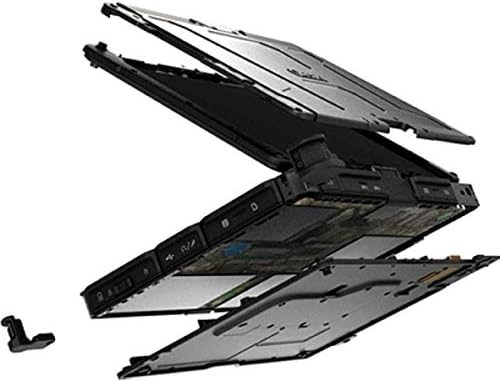
Şekil 3.1: Patlatılmış view illustrating the internal structure and ruggedized layers of the Getac V110.
3.1. Klavye ve Dokunmatik Yüzey
The device includes a backlit keyboard for typing in various lighting conditions and a precision touchpad for navigation.
Şekil 3.2: Yukarıdan aşağıya view of the Getac V110 keyboard and integrated touchpad.
3.2. Convertible Design
The V110 can be easily converted between laptop and tablet modes by rotating the screen. This flexibility allows for optimal use in different scenarios.

Figure 3.3: The Getac V110 configured in laptop mode, displaying the screen and keyboard.

Figure 3.4: The Getac V110 in tablet mode, showcasing the touchscreen interface.
4. Kurulum
4.1. İlk Güç Açma
- Güç adaptörünü cihaza ve elektrik prizine bağlayın.
- Press the power button located on the side or front of the device.
- Dil, bölge ve kullanıcı hesabı oluşturma dahil olmak üzere ilk Windows 8.1 kurulumunu tamamlamak için ekrandaki talimatları izleyin.
4.2. Ağ Bağlantısı
The Getac V110 supports both Wi-Fi and Ethernet for internet access.
- Wifi: Access the network settings in Windows 8.1, select your desired Wi-Fi network, and enter the password if required.
- Ethernet: Connect an Ethernet cable from your network router or switch to the Ethernet port on the device.
4.3. Bluetooth Eşleştirme
Bluetooth cihazlarını bağlamak için:
- Bluetooth cihazının eşleştirme modunda olduğundan emin olun.
- On the Getac V110, navigate to PC Settings > PC and devices > Bluetooth.
- Turn Bluetooth on and select the device from the list to pair.
5. Cihazı Çalıştırma
5.1. Dizüstü Bilgisayar ve Tablet Modları Arasında Geçiş Yapma
To convert the device:
- Gently rotate the screen 180 degrees clockwise or counter-clockwise.
- Fold the screen back over the keyboard to enter tablet mode.
- Unfold the screen and rotate it back to the original position for laptop mode.
5.2. Dokunmatik Ekran Kullanımı
The 11.6-inch LED touchscreen supports multi-touch gestures. Use your fingers or a compatible stylus for navigation, selection, and input.
5.3. Güç Yönetimi
To conserve battery life, adjust power settings in Windows 8.1. You can configure sleep mode, display brightness, and other power-saving options.
- Uyku modu: Briefly press the power button to put the device into sleep mode.
- Kapat: Go to the Charms bar (swipe from right edge or move mouse to top-right corner), select Settings > Power > Shut down.
- Tekrar başlat: Go to the Charms bar, select Settings > Power > Restart.
6. Bakım
6.1. Cihazın Temizlenmesi
Regular cleaning helps maintain performance and appearance.
- Yumuşak, tiftiksiz bir bez kullanın ve hafifçe kurulayın.ampened with water or a mild, non-abrasive cleaner for the screen and exterior.
- Sıvıların doğrudan cihaza püskürtülmesinden kaçınılmalıdır.
- Sert kimyasallar, çözücüler veya aşındırıcı malzemeler kullanmayın.
6.2. Pil Bakımı
Pil ömrünü en üst düzeye çıkarmak için:
- Pilin sık sık tamamen boşaltılmasından kaçının.
- Uzun süre kullanılmayacaksa cihazı serin ve kuru bir yerde saklayın.
- If the device has removable batteries, ensure they are properly seated.
6.3. Yazılım Güncellemeleri
Regularly check for and install operating system and driver updates to ensure optimal performance and security. Access Windows Update through PC Settings.
7. Sorun Giderme
This section addresses common issues you might encounter with your Getac V110.
7.1. Cihaz Açılmıyor
- Güç adaptörünün güvenli bir şekilde bağlandığından ve prizin çalışır durumda olduğundan emin olun.
- Check if the battery is charged. If not, allow it to charge for at least 30 minutes before attempting to power on again.
- Pil çıkarılabilir ise, doğru şekilde takıldığından emin olun.
7.2. Wi-Fi Bağlantı Sorunları
- Windows ayarlarında Wi-Fi'nin etkinleştirilmiş olduğundan emin olun.
- Restart your router and the Getac V110.
- Ensure you are within range of the Wi-Fi network and have the correct password.
- Wi-Fi sürücülerinin güncel olup olmadığını kontrol edin.
7.3. Dokunmatik Ekran Tepki Vermiyor
- Cihazı yeniden başlatın.
- Ekranın temiz ve kalıntılardan arınmış olduğundan emin olun.
- Check for any recent software updates or driver issues.
7.4. Yavaş Performans
- Arka planda çalışan gereksiz uygulamaları kapatın.
- Mevcut depolama alanını kontrol edin.
- Virüs taraması yapın.
- Windows ve sürücülerin güncel olduğundan emin olun.
8. Özellikler
| Özellik | Detay |
|---|---|
| Marka | Getac |
| Model Numarası | V110 |
| İşlemci | Intel Core i5-6300U (2.6 GHz) |
| RAM Bellek | 8 GB DDR4 SDRAM |
| Depolama Kapasitesi | 128 GB |
| Ekran Boyutu | 11.6 inç |
| Ekran Çözünürlüğü | 1366 x 768 piksel |
| Görüntü Türü | NEDEN OLMUŞ |
| İnsan Arayüzü Girişi | Dokunmatik ekran |
| İşletim Sistemi | Windows 8.1 |
| Grafik Eş İşlemcisi | Intel HD Grafik 520 |
| Bağlantı Teknolojisi | Bluetooth, Ethernet, HDMI, USB, Wi-Fi |
| Ürün Ağırlığı | 4.4 Pound |
| Item Dimensions (L x W x Th) | 11.99" x 18.9" x 3.9" |
| Pil Hücresi Tipi | Lithium Ion (23 Watt Hours) |
9. Garanti Bilgileri
The Getac V110 Rugged Convertible Laptop/Tablet PC comes with a 90 günlük sınırlı garanti. This warranty covers manufacturing defects and malfunctions under normal use. It does not cover damage caused by misuse, accidents, unauthorized repairs, or modifications. Please retain your proof of purchase for warranty claims.
For detailed terms and conditions, refer to the warranty documentation provided with your device or contact Getac customer support.
10. Destek
If you require further assistance or encounter issues not covered in this manual, please contact Getac customer support. You can typically find support contact information on the manufacturer's official website or within the device's pre-installed documentation.
When contacting support, please have your device's model number (V110) and serial number ready.