
giriiş
This manual provides detailed instructions for the installation, operation, and maintenance of your Everycom EC-901 80mm Thermal POS Receipt Printer. Please read this manual thoroughly before using the printer to ensure proper functionality and to prevent damage.
Güvenlik Bilgileri
- Yazıcının doğru voltajda bir güç kaynağına bağlı olduğundan emin olun.tage.
- Yazıcıyı suya veya yüksek neme maruz bırakmayın.
- Yazıcıyı doğrudan güneş ışığına veya ısı kaynaklarının yakınına koymaktan kaçının.
- Use only specified thermal paper for optimal performance and to prevent damage to the print head.
- Yazıcıyı kendiniz sökmeye veya onarmaya çalışmayın. Yetkili servis personeliyle iletişime geçin.
Paket İçeriği
Paketin içinde tüm öğelerin mevcut olduğundan emin olun:
- Everycom EC-901 Thermal POS Receipt Printer
- Roll paper × 1 Roll (for initial testing)
- CD-ROM (containing Drivers, Utility Software, Manuals)
- Kağıt Rehberi
- Paper Bearing
- USB kablosu
- Güç Adaptörü Kablosu
Ürün Bittiview
The Everycom EC-901 is a compact 80mm (3-inch) thermal POS receipt printer designed for efficient and reliable printing. It features a USB and LAN interface for versatile connectivity.

Şekil 1: Ön view of the Everycom EC-901 Thermal POS Receipt Printer.
Temel Özellikler:
- Hızlı Baskı Hızı: Up to 160mm per second for quick receipt output.
- Kolay Kağıt Yükleme: Drop-in paper loading mechanism for quick and easy media changes.
- Kompakt Tasarım: Low space requirement with an integrated power supply.
- Variable Paper Width: Supports 80mm paper width.
- Bağlantı: USB and LAN interface options.
- Yüksek Çözünürlük: 203 x 203 DPI for clear print quality.
- Düşük Gürültü Seviyeleri: Operates quietly, suitable for various work environments.

Figure 2: Top-open design for easy paper roll installation.
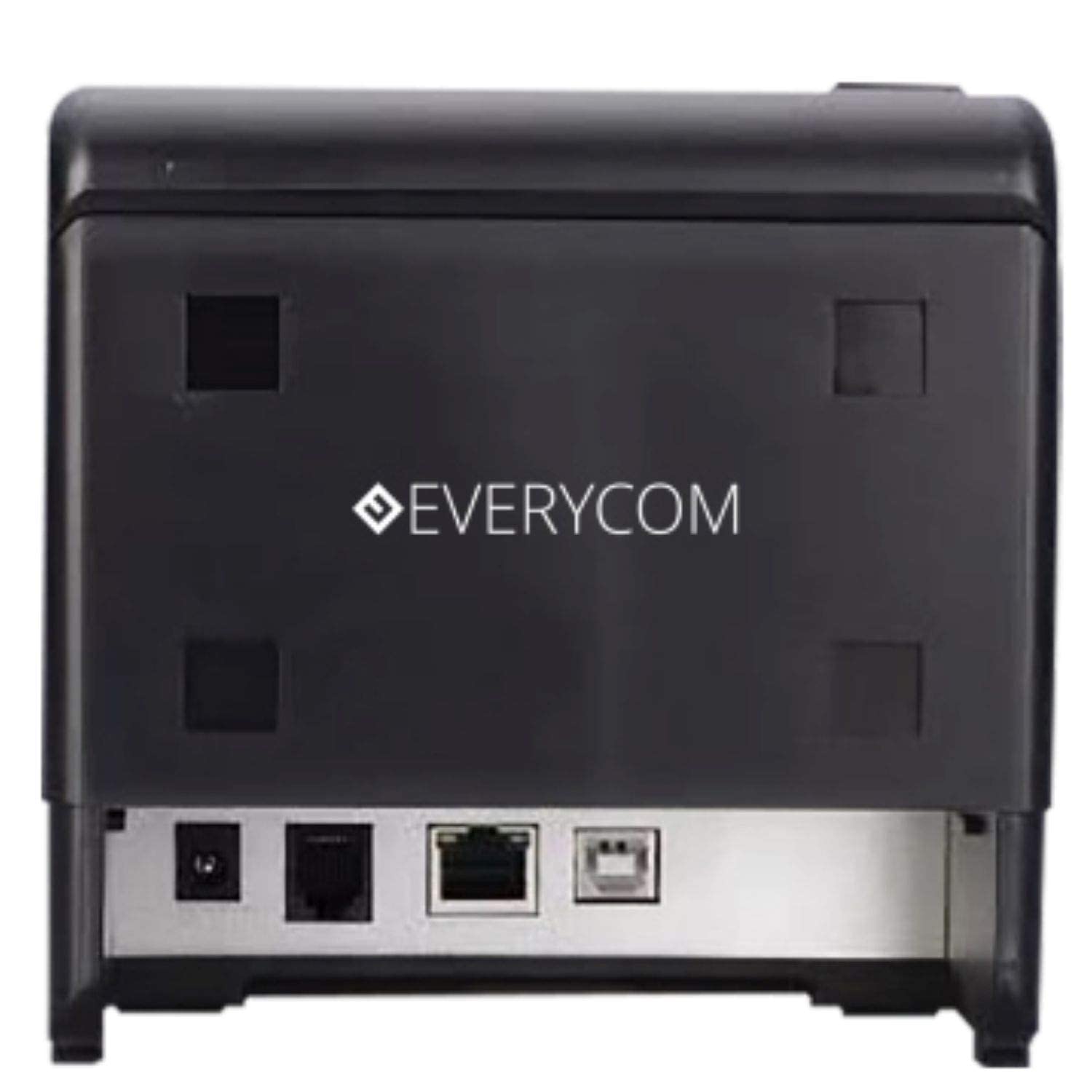
Şekil 3: Arka view showing USB and LAN connectivity ports.

Figure 4: The EC-901 printer is designed for low noise operation.

Figure 5: The EC-901 printer features an easy-to-use design for paper installation.
Kurmak
1. Yazıcının Bağlanması
- Connect the power adapter cable to the printer's power port and then plug it into a suitable electrical outlet.
- For USB connection: Connect one end of the USB cable to the printer's USB port and the other end to your computer.
- For LAN connection: Connect an Ethernet cable to the printer's LAN port and the other end to your network router or switch.
- Turn on the printer using the power switch located on the front or side of the device.
2. Installing the Paper Roll
- Open the printer cover by pressing the release button or lifting the cover.
- Insert the thermal paper roll into the compartment with the paper feeding from the bottom and exiting towards the front.
- Kesicinin yanından az miktarda kağıt çekin.
- Yazıcı kapağını yerine oturana kadar sıkıca kapatın.
3. Sürücü Kurulumu
Insert the provided CD-ROM into your computer's CD/DVD drive. Follow the on-screen instructions to install the printer drivers and utility software. Drivers are typically compatible with Windows operating systems, including Windows 10.
Kullanım Talimatları
Gösterge Işıkları:
- GÜÇ: Yazıcının açık olduğunu gösterir.
- HATA: Lights up or flashes to indicate an error (e.g., print head overheating, cover open).
- KAĞIT: Indicates low paper or no paper.
Basic Printing:
Once the printer is connected and drivers are installed, you can print receipts from your POS software or any application that supports printing. Ensure the Everycom EC-901 is selected as the default printer or the desired printer in your application's print settings.
Bakım
Yazıcının Temizlenmesi:
- Turn off the printer and disconnect the power cable before cleaning.
- Yumuşak, tüy bırakmayan bir bez kullanınampened with isopropyl alcohol to gently clean the thermal print head. Allow it to dry completely before use.
- Wipe the exterior of the printer with a soft, dry cloth. Do not use abrasive cleaners.
Replacing Paper:
When the PAPER indicator lights up or printing becomes faint, replace the paper roll following the steps outlined in the "Installing the Paper Roll" section.
Sorun giderme
| Sorun | Olası Neden | Çözüm |
|---|---|---|
| Yazıcı açılmıyor. | Power cable disconnected or power outlet issue. | Güç kablosu bağlantılarını kontrol edin. Elektrik prizinin çalışır durumda olduğundan emin olun. |
| No printing or blank output. | No paper, paper loaded incorrectly, or print head issue. | Check paper roll and ensure it's loaded correctly. Clean the print head if necessary. Verify printer drivers are installed. |
| PAPER indicator is on. | Paper roll is empty or low. | Kağıt rulosunu değiştirin. |
| ERROR indicator is on. | Printer cover open, print head overheating, or other internal error. | Ensure the printer cover is closed properly. Turn off the printer, wait a few minutes for it to cool down, then restart. If the issue persists, contact support. |
| Yazıcı bilgisayar tarafından tanınmıyor. | Driver not installed or USB/LAN cable issue. | Reinstall printer drivers. Check USB/LAN cable connections. Try a different port or cable. |
Özellikler
| Özellik | Detay |
|---|---|
| Model Adı | EC-901 |
| Baskı Teknolojisi | Termal |
| Basılı Medya | Paper (plain thermal) |
| Maksimum Medya Boyutu | 3 inç (80 mm) |
| Maksimum Baskı Hızı | 160 mm/saniye |
| Çözünürlük | 203 x 203 DPI |
| Bağlantı Teknolojisi | USB, LAN Interface |
| Yazıcı Çıktısı | Tek renkli |
| İşletim Sistemi | Windows 10 (ve diğer Windows sürümleriyle uyumlu) |
| Ürün Boyutları (UxGxY) | 19.8x14.8x14.8 cm |
| Ürün Ağırlığı | 1.8 kilo |
| Özel Özellik | Without Auto cutter |
Garanti ve Destek
For technical assistance, warranty claims, or any product-related inquiries, please contact Everycom customer support.
- Ücretsiz Numara: 1800 121 4480
- Çalışma Saatleri: Pazartesi - Cumartesi, 10:00 - 6:30 (Resmi tatiller hariç)