
TOUCARE T9S
TOUCARE T9S Motorcycle Bluetooth Intercom User Manual
Model: T9S | Brand: TOUCARE
giriiş
The TOUCARE T9S is a high-performance Bluetooth intercom system designed for motorcycle riders. It enables clear communication between up to four riders, offers music sharing, and integrates with your mobile phone for calls and GPS navigation. With advanced noise cancellation and a robust waterproof design, the T9S ensures a reliable and enjoyable riding experience in various conditions.
Temel Özellikler
- 1200M Maximum Distance: Equipped with Bluetooth 5.0 for high compatibility and stability, allowing group communication within a 1200m intercom range.
- Support 4-Riders Intercom: Full-duplex communication for up to 4 riders simultaneously. Universal pairing function ensures compatibility with most Bluetooth headsets and mobile phones.
- Müzik Paylaşımı: Share music with another rider, enjoy Hi-Fi stereo music, FM radio, or GPS voice guidance.
- Noise Reduction and IP67 Waterproof: DSP and CVC advanced noise reduction technology for clear communication up to 120km/h. IP67 waterproof rating for all-weather use.
- Ultra-Long Standby Battery: 800mAh rechargeable battery provides up to a week of standby time and 15 hours of working time.

Image: The T9S system supports communication for up to four riders over a distance of 1200 meters.

Image: CVC & DSP Noise Cancellation Technology ensures clear and smooth communication even at high speeds.

Image: The IP67 waterproof rating makes the T9S suitable for use in all weather conditions, including water sports.

Image: The T9S offers extended endurance times for talking, music playback, and standby, supporting long-distance travel.
Paket İçeriği
Each TOUCARE T9S package includes the following components:
- 1 x Bluetooth Intercom Unit
- 1 x Hi-Fi Speaker Set
- 1 x Boom Microphone
- 1 x Button Microphone
- 1 x USB Kablosu
- 1 x Montaj Braketi
- 1 adet Clamp Plaka
- 1 x Allen Anahtarı

Image: All components included in the TOUCARE T9S package, ensuring you have everything needed for installation and use.
Ürün Bittiview ve Düğme Fonksiyonları
Familiarize yourself with the buttons and indicators on your T9S intercom unit:
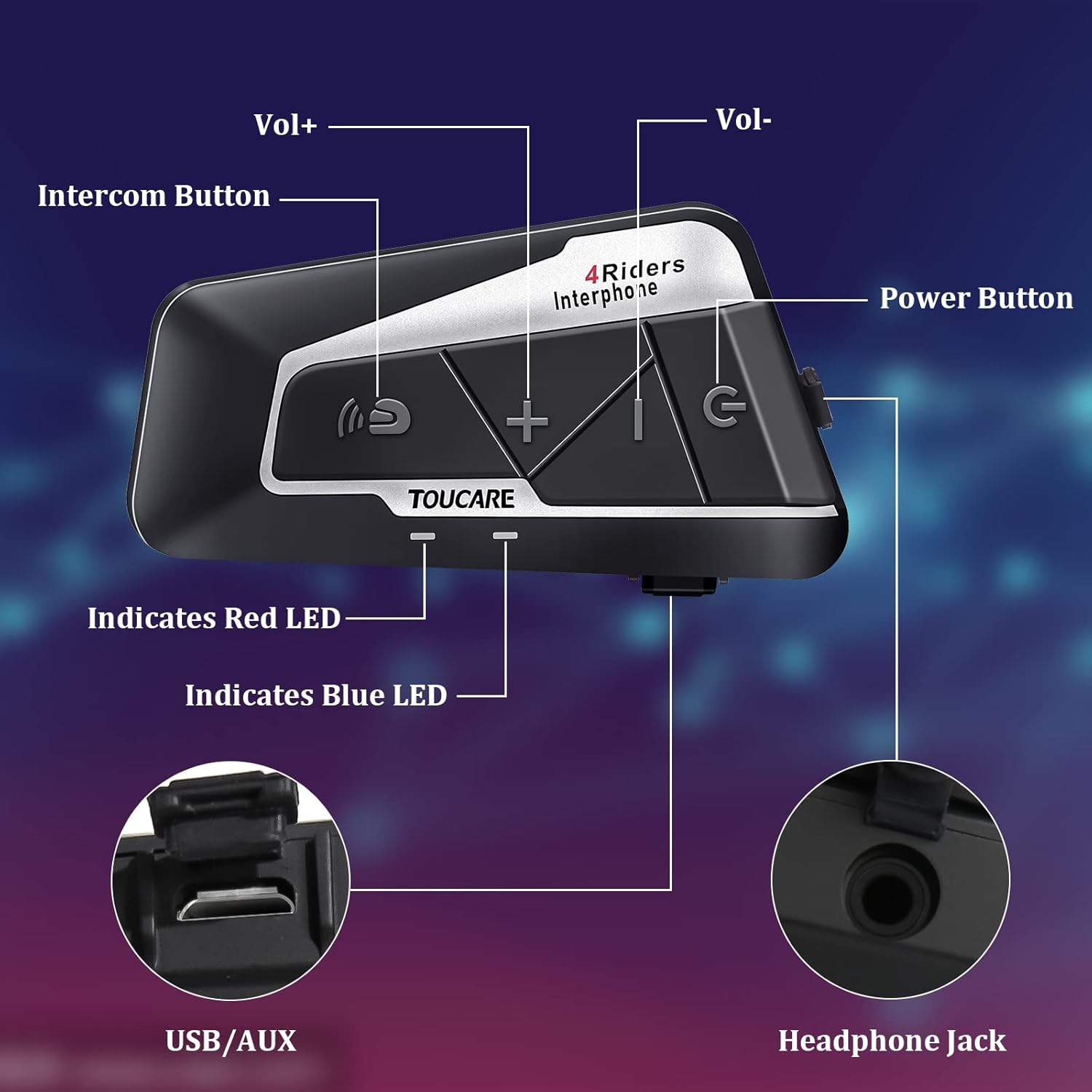
Image: Detailed diagram of the T9S unit, highlighting the location and labels of each button and port.
Power On/Off Button (G)
- Güç Açma/Kapatma: Cihazı açmak veya kapatmak için basılı tutun.
- Paired Mobile Phone: Short press to connect/disconnect with a paired mobile phone.
- Güç İstemi: Short press to hear battery level prompt.
- Hang up Bluetooth Intercom: Short press during an intercom call to end it.
- Müzik Çal/Duraklat: Müziği çalmak veya duraklatmak için kısa basın.
- Call Answering/Third Party Answer/End/Reject: Telefon görüşmelerini yönetin.
Bluetooth Intercom Button (Intercom Icon)
- Cilt +: Sesi artırmak için kısa basın.
- Son Şarkı: Önceki şarkıya geçmek için uzun basın.
- FM Turn Up: Short press during FM mode to tune up.
- FM Turn On/Off: Long press to turn FM radio on or off.
- Son Numarayı Tekrar Ara: Double press to redial the last dialed number.
Volume - Button (-)
- Ses -: Sesi azaltmak için kısa basın.
- Sonraki Şarkı: Sonraki şarkıya geçmek için uzun basın.
- FM Turn Down: Short press during FM mode to tune down.
- FM Turn On/Off: Long press to turn FM radio on or off.
- Sesli arama: Double press to activate voice dialing (if supported by your phone).

Image: The T9S features ultra-large buttons, designed for easy operation even while wearing gloves.
Kurulum Kılavuzu
Sabit Kurulum Yöntemi
Follow these steps to securely install the T9S intercom unit on your helmet:
- Locate and Clean: Identify a suitable flat area on the left side of your helmet for mounting. Ensure the surface is clean and dry.
- Yapıştırıcıyı hazırlayın: Peel off the protective film from the 3M adhesive on the back of the mounting bracket.
- Basınç Uygula: Firmly press the mounting bracket onto the chosen location on your helmet. Apply consistent pressure for several seconds to ensure a strong bond.
- Güvenli Ünite: Slide the T9S intercom unit onto the mounted bracket until it clicks securely into place.
- Install Speakers and Microphone: Route the speaker and microphone wires inside the helmet lining. Position the speakers inside the ear pockets and the microphone near your mouth for optimal audio.
Kullanım Talimatları
Cep Telefonuyla Eşleştirme
- Ensure the T9S is powered off.
- Press and hold the Power On/Off button until the LED indicator flashes red and blue alternately, indicating pairing mode.
- On your mobile phone, enable Bluetooth and search for new devices. Select "TOUCARE T9S" from the list.
- Once paired, the LED will flash blue slowly.
Initiating Intercom Communication
- Ensure all T9S units are powered on and within range.
- To initiate a group intercom, short press the Bluetooth Intercom Button on your unit. The units will attempt to connect.
- To end an intercom call, short press the Power On/Off button.
Müzik Çalma
- Oynat/Duraklat: Güç Açma/Kapama düğmesine kısa basın.
- Sonraki Şarkı: Ses - tuşuna uzun basın.
- Önceki Şarkı: Long press the Bluetooth Intercom button.
- Ses Ayarı: Short press Volume + or Volume - buttons.
FM Radyo
- Açma/Kapatma: Long press either the Bluetooth Intercom button or the Volume - button.
- Ayarla: Short press the Bluetooth Intercom button.
- Kapat: Ses - düğmesine kısa basın.
Aramaları Cevaplama/Bitirme
- Cevap Çağrısı: Short press the Power On/Off button when a call comes in.
- Çağrı Sonu: Short press the Power On/Off button during a call.
- Çağrıyı Reddet: Long press the Power On/Off button when a call comes in.
- Sesli arama: Double press the Volume - button (requires phone support).
- Son Numarayı Tekrar Ara: Double press the Bluetooth Intercom button.
Teknik Özellikler
| Özellik | Şartname |
|---|---|
| Bluetooth Sürümü | 5.0 |
| Bluetooth Profesyonelifiles Desteklendi | HSP, HFP, A2DP, AVRCP, AGHSP |
| Çalışma Saatleri | 15 saat |
| Bekleme Süresi | 350 saat |
| Şarj Süresi | 3 saat |
| Pil Türü | Rechargeable Lithium Battery, 800mAh, 3.7V |
| Boyutlar | 89x46x30 mm |
| Ağırlık | 85 gr |
| Gürültü Kontrolü | Active Noise Cancellation (DSP & CVC) |
| Su Direnç Seviyesi | IP67 |
| Bağlantı Teknolojisi | Kablosuz |
| Malzeme | Lastik |
| Kontrol Türü | Voice Control (via phone), Button Control |
Bakım
To ensure the longevity and optimal performance of your TOUCARE T9S intercom, follow these maintenance guidelines:
- Temizlik: Üniteyi yumuşak, damp bez. Sert kimyasallar, temizlik çözücüleri veya güçlü deterjanlar kullanmayın.
- Depolamak: Cihazı kullanmadığınız zamanlarda serin, kuru ve doğrudan güneş ışığından ve aşırı sıcaklıklardan uzak bir yerde saklayın.
- Pil Bakım: For long-term storage, charge the battery to about 50% every three months to prevent deep discharge and extend battery life.
- Suya Maruz Kalma: Although IP67 rated, avoid prolonged submersion. Ensure charging port is dry before charging.
- Kablo yönetimi: Kabloları ve konektörleri hasar görmemeleri için nazikçe tutun.
Sorun giderme
If you encounter issues with your T9S intercom, try the following solutions:
Güç Yok
- Pili Kontrol Edin: Ensure the unit is fully charged. Connect it to a power source and check if the charging indicator lights up.
- Reset: If unresponsive, try holding the Power On/Off button for an extended period (e.g., 10-15 seconds) to force a reset.
Cannot Pair with Mobile Phone/Other Intercoms
- Eşleştirme modu: Ensure the T9S is in pairing mode (LED flashing red and blue alternately).
- Cihaz Görünürlüğü: Make sure Bluetooth is enabled on your phone/other intercoms and they are discoverable.
- Eşleştirme Geçmişini Temizle: On your phone, forget the T9S device and try pairing again. For intercoms, consult the manual for clearing pairing history if available.
- Mesafe: Ensure devices are within close proximity (e.g., 1 meter) during pairing.
Poor Audio Quality/No Sound
- Hacim: Check if the volume is turned up on both the T9S and the connected device (phone/intercom).
- Mikrofon Konumu: Ensure the microphone is correctly positioned near your mouth and not obstructed.
- Hoparlör Bağlantısı: Verify that the speakers are securely plugged into the headphone jack.
- Parazit yapmak: Güçlü elektromanyetik girişim kaynaklarından uzaklaşın.
- Yazılım: Üreticinin kontrol edin website for any available firmware updates that might improve audio performance.
Garanti ve Destek
For warranty information, technical support, or service inquiries, please refer to the warranty card included with your product or visit the official TOUCARE webSite. Satın alma fişinizi, garanti talepleriniz için satın alma belgeniz olarak saklayın.
For further assistance, you may also contact TOUCARE customer service through the contact information provided on their official channels.
Ask a question about this manual
Ask about setup, troubleshooting, compatibility, parts, safety, or missing instructions. Manuals+ will review the question and use this page’s manual context to help answer it.