
1. Giriş
This manual provides detailed instructions for the BoxWave SlimKeys Bluetooth Keyboard with Trackpad, designed for use with the Apple iPhone 13 mini. Please read this manual thoroughly before using the product to ensure proper operation and to maximize its lifespan.
The SlimKeys Bluetooth Keyboard integrates responsive chiclet-style keys and a full-functioning trackpad, transforming your iPhone 13 mini into a portable workstation. Its ultra-thin and lightweight design makes it an ideal travel companion.
2. Paket İçeriği
- BoxWave SlimKeys Bluetooth Keyboard with Trackpad
- USB Şarj Kablosu
- Kullanıcı Kılavuzu
3. Ürün Özellikleri
- Integrated Keyboard and Trackpad: Combines a full QWERTY keyboard with a responsive trackpad for enhanced navigation.
- İnce ve Hafif Tasarım: At approximately 3/16 inch thick, it is highly portable without compromising key size for comfortable typing.
- Bluetooth Sürüm 3.0: Ensures fast pairing and seamless wireless communication with your device.
- Pil Tasarrufu: Features an on/off switch to extend battery life when not in use.
- Taşınabilir: Designed for easy transport in bags or luggage.

Şekil 3.1: Yukarıdan aşağıya view of the SlimKeys Bluetooth Keyboard, showing the full keyboard layout and integrated trackpad.
4. Kurulum
4.1 Klavyeyi Şarj Etme
- Klavyenin yan tarafındaki şarj portunu bulun.
- Connect the small end of the provided USB charging cable to the keyboard's charging port.
- USB kablosunun daha büyük ucunu bir USB güç kaynağına (örneğin, bilgisayarın USB portuna, USB duvar adaptörüne) bağlayın.
- The charging indicator light will illuminate. Once fully charged, the light will typically change color or turn off.
4.2 Açma/Kapatma
- To power on the keyboard, slide the 'ON/OFF' switch, usually located on the side or back, to the 'ON' position. A power indicator light will briefly illuminate.
- To power off the keyboard, slide the 'ON/OFF' switch to the 'OFF' position. This conserves battery life when the keyboard is not in use.
4.3 Bluetooth Eşleştirme
Follow these steps to pair your BoxWave SlimKeys Bluetooth Keyboard with your Apple iPhone 13 mini:
- Ensure the keyboard is fully charged and powered on.
- On your iPhone 13 mini, go to Ayarlar > Bluetooth.
- Turn on Bluetooth. Your iPhone will begin searching for nearby Bluetooth devices.
- On the keyboard, press the Bluetooth pairing button (often labeled 'Connect' or with a Bluetooth symbol). The Bluetooth indicator light on the keyboard will start blinking, indicating it is in pairing mode.
- On your iPhone, locate 'BoxWave Keyboard' or a similar name in the list of 'Other Devices' and tap on it.
- If prompted, enter the pairing code displayed on your iPhone screen using the keyboard, then press Enter.
- Once paired, the Bluetooth indicator light on the keyboard will stop blinking and remain solid or turn off, and your iPhone will show the keyboard as 'Connected'.

Figure 4.1: Keyboard with highlighted power switch and Bluetooth pairing button locations.
5. Kullanım Talimatları
5.1 Klavye Kullanımı
Once paired, the keyboard functions like a standard computer keyboard. Simply open any application on your iPhone that requires text input (e.g., Messages, Notes, Safari) and begin typing. The on-screen keyboard will automatically disappear, allowing you to use the physical keyboard.
5.2 Dokunmatik Yüzey Kullanımı
The integrated trackpad allows for precise cursor control and navigation on your iPhone 13 mini. Basic gestures include:
- Tek Parmakla Dokunma: Functions as a left-click to select items or activate buttons.
- İki Parmak Kaydırma: Drag two fingers up or down on the trackpad to scroll through content.
- İmleç Hareketi: Move a single finger across the trackpad to move the cursor on your iPhone screen.
5.3 Özel Fonksiyon Tuşları
The keyboard may include function keys (F1-F12) or dedicated media control keys. These keys often require pressing the 'Fn' key simultaneously with the desired function key to activate their secondary functions (e.g., volume control, play/pause, screen lock).
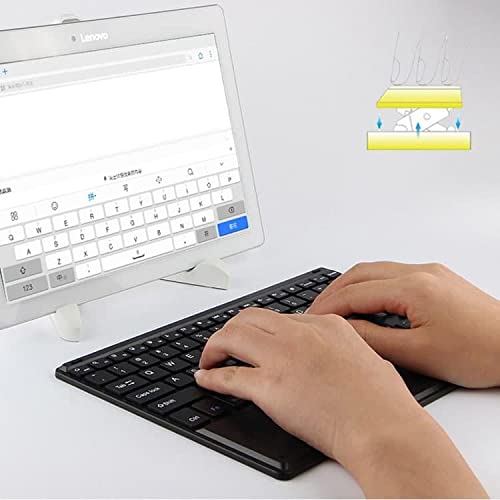
Figure 5.1: User demonstrating typing on the SlimKeys Bluetooth Keyboard.
6. Bakım
6.1 Temizlik
- Temizlemeden önce klavyenin kapalı olduğundan emin olun.
- Yumuşak, tiftiksiz bir bez kullanın ve hafifçe kurulayın.ampened with water or a mild electronics cleaner to wipe the surface.
- Klavyeye zarar verebileceğinden, sert kimyasallar, aşındırıcı temizleyiciler veya aşırı nem kullanmaktan kaçının.
- For dust or debris between keys, use compressed air.
6.2 Pil Bakımı
- To prolong battery life, power off the keyboard when not in use.
- Pili sık sık tamamen boşaltmaktan kaçının. Düşük pil göstergesi göründüğünde şarj edin.
- Klavyeyi uzun süre kullanılmayacaksa serin ve kuru bir yerde saklayın.
7. Sorun Giderme
If you encounter issues with your BoxWave SlimKeys Bluetooth Keyboard, refer to the following common solutions:
- Klavye açılmıyor: Pilinin dolu olduğundan emin olun. Şarj kablosunu bağlayın ve tekrar açmayı denemeden önce en az 30 dakika şarj olmasına izin verin.
- Klavye eşleştirilemiyor:
- Ensure the keyboard is in pairing mode (Bluetooth indicator blinking).
- Make sure Bluetooth is enabled on your iPhone 13 mini.
- Move the keyboard closer to your iPhone.
- Forget the device from your iPhone's Bluetooth settings and attempt to pair again.
- Restart both the keyboard and your iPhone.
- Tuşlar yanıt vermiyor:
- Check if the keyboard is still connected via Bluetooth.
- Pil seviyesinin kritik düzeyde düşük olmadığından emin olun.
- Try reconnecting the keyboard by turning it off and on, or by re-pairing.
- Dokunmatik yüzey çalışmıyor:
- Klavyenin bağlı olduğundan emin olun.
- Check for any settings on your iPhone that might disable external trackpads.
- Dokunmatik yüzeydeki kalıntıları temizleyin.
8. Özellikler
| Özellik | Şartname |
|---|---|
| Marka | Kutu dalgası |
| Model Numarası | bw-1977-29861-11782 |
| Donanım Arayüzü | Bluetooth |
| Bluetooth Sürümü | 3.0 |
| Uyumlu Cihazlar | Apple iPhone 13 mini, Smartphones, Laptops |
| Klavye Açıklaması | Kablosuz |
| Özel Özellikler | Portable, Integrated Trackpad |
| Güç Kaynağı | Pil ile çalışır |
| Boyutlar (Yaklaşık) | 257mm x 172mm x 5mm |

Figure 8.1: Dimensions and operating system compatibility of the SlimKeys Bluetooth Keyboard.
9. Garanti ve Destek
9.1 Garanti Bilgileri
For specific warranty details, please refer to the warranty card included with your product or visit the official BoxWave webSite. Satın alma belgenizi herhangi bir garanti talebi için saklayın.
9.2 Müşteri Desteği
If you require further assistance or have questions not covered in this manual, please contact BoxWave customer support through their official websatın alma belgelerinizle birlikte verilen site veya iletişim bilgileri.