
1. Giriş
Thank you for choosing the GalaxyElec HOTRC A400 Digital Lipo Battery Balance Charger. This charger is designed for safe and efficient charging and discharging of 3S and 4S LiPo batteries, commonly used in RC FPV racing drones and quadcopters. Please read this manual thoroughly before operation to ensure proper use and to prevent damage to the charger or batteries.
2. Güvenlik Talimatları
UYARI: Never use the charger unsupervised. Read the entire operating manual before using this charger. Operate the charger in a well-ventilated area, away from flammable materials. Failure to follow safety procedures may cause serious injury or property damage.
- Always connect the charger to a stable AC power source (100-240V).
- Ensure the battery type and cell count (3S or 4S) match the charger's designated port.
- Hasarlı, şişmiş veya sızıntı yapan pilleri şarj etmeyin.
- Keep the charger away from water, moisture, and direct sunlight.
- Do not cover the charger during operation to allow for proper heat dissipation.
- Çocukların erişemeyeceği yerde saklayınız.
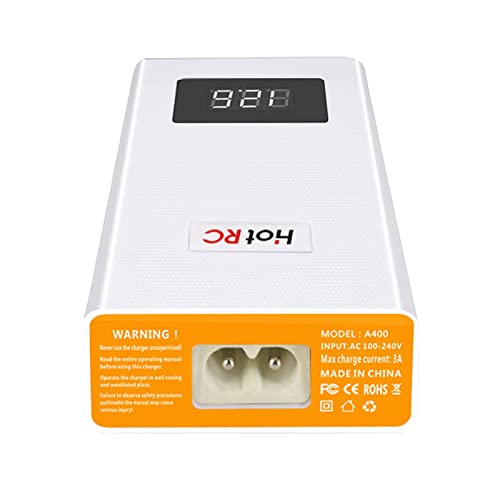
Şekil 2.1: Arka view of the HOTRC A400 charger, displaying the AC power input port, model number, input voltage range, max charge current, and safety warnings.
3. Paket İçeriği
Aşağıda listelenen tüm öğelerin paketinizde bulunduğunu doğrulayın:
- 1 x HOTRC A400 Lipo Battery Balance Charger
- 1 x AC Güç Kablosu
- 1 x Kullanım Kılavuzu
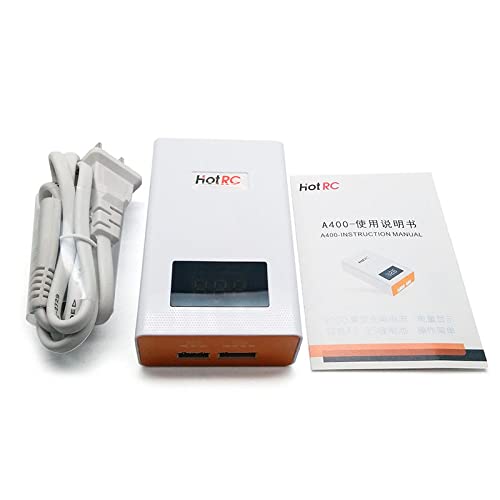
Figure 3.1: The HOTRC A400 charger alongside its power cable and a printed instruction manual, illustrating the typical package contents.
4. Ürün Bittiview
The HOTRC A400 charger features a compact design with a digital LED display for real-time voltage monitoring. It includes dedicated balance ports for 3S and 4S LiPo batteries.
- Dijital LED Ekran: Shows the total voltage bağlı pil.
- 3 CELLS Port: For connecting 3-cell (3S) LiPo batteries.
- 4 CELLS Port: For connecting 4-cell (4S) LiPo batteries.
- AC Güç Girişi: Ana güç kaynağına bağlanır.
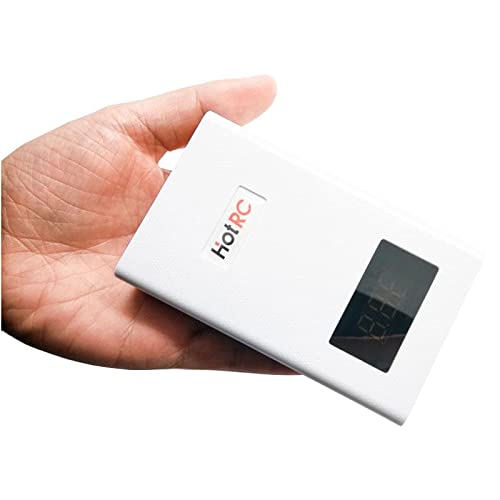
Şekil 4.1: Ön ve yan view of the HOTRC A400 charger, showing its compact white casing with an orange front panel and digital display.
5. Kurulum
- Place the charger on a stable, non-flammable surface in a well-ventilated area.
- Connect the provided AC power cable to the AC power input port on the rear of the charger.
- Plug the other end of the AC power cable into a standard wall outlet (AC 100-240V). The LED display will illuminate, indicating the charger is powered on and ready.
6. Kullanım Talimatları
6.1. Charging 3S LiPo Batteries
- Şarj cihazının açık olduğundan emin olun.
- Connect your 3S LiPo battery's balance plug to the '3 CELLS' port on the front of the charger. Ensure the plug is inserted correctly, aligning the pins.
- The LED display will show the current total voltage of the battery. The charger will automatically begin balancing and charging the battery.
- Charging is complete when the LED display shows 12.6V (4.2V per cell for a 3S battery) and the indicator light turns green (if applicable, refer to specific model indicators).
- Şarj işlemi tamamlandıktan sonra aküyü şarj cihazından çıkarın.
6.2. Charging 4S LiPo Batteries
- Şarj cihazının açık olduğundan emin olun.
- Connect your 4S LiPo battery's balance plug to the '4 CELLS' port on the front of the charger. Ensure the plug is inserted correctly, aligning the pins.
- The LED display will show the current total voltage of the battery. The charger will automatically begin balancing and charging the battery.
- Charging is complete when the LED display shows 16.8V (4.2V per cell for a 4S battery) and the indicator light turns green (if applicable, refer to specific model indicators).
- Şarj işlemi tamamlandıktan sonra aküyü şarj cihazından çıkarın.
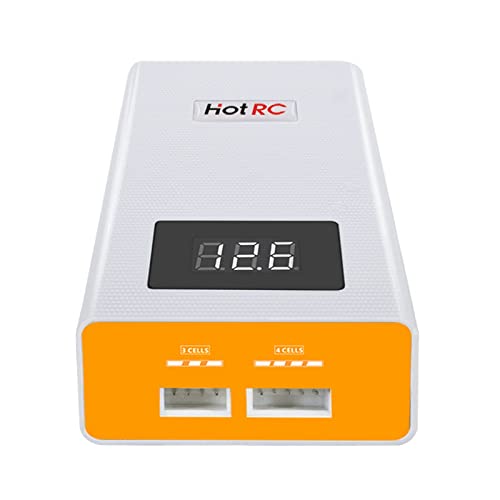
Şekil 6.1: Önden yakın çekim view of the HOTRC A400 charger, highlighting the '3 CELLS' and '4 CELLS' balance ports and the digital LED display.
6.3. LED Display and Indicators
- The digital LED display shows the real-time total voltage bağlı pil.
- During charging, the display will show the increasing cilttage.
- Once the battery reaches its full charge voltage (e.g., 12.6V for 3S, 16.8V for 4S), the charger will stop charging and maintain the balance.
6.4. Discharging Function
The HOTRC A400 charger includes a discharge function. To discharge a battery, simply connect it to the appropriate balance port (3S or 4S). The charger will automatically begin to discharge the battery to a safe storage voltage. Monitor the display to see the voltage decrease. Disconnect the battery once the desired storage voltage is reached or when the charger indicates completion.
7. Bakım ve Saklama
- Clean the charger regularly with a dry, soft cloth. Do not use solvents or abrasive cleaners.
- Şarj cihazınızı serin ve kuru bir yerde, doğrudan güneş ışığından ve aşırı sıcaklıklardan uzakta saklayın.
- Tüm bağlantı noktalarının toz ve kirden arındırılmış olduğundan emin olun.
- Kullanılmadığı zaman şarj cihazını elektrik prizinden çıkarın.
8. Sorun Giderme
- Şarj cihazı açılmıyor: Check the AC power cable connection to both the charger and the wall outlet. Ensure the outlet is functional.
- Pil şarj olmuyor: Verify that the battery's balance plug is fully and correctly inserted into the corresponding 3S or 4S port. Check if the battery is severely over-discharged or damaged.
- Yanlış cilttage ekran: Ensure the battery is properly connected. If the issue persists, the battery or charger may require service.
- Aşırı Isınma: Disconnect the charger immediately. Ensure it is in a well-ventilated area and not covered. Allow it to cool down before resuming use. If overheating continues, discontinue use.
9. Özellikler
| Şartname | Değer |
|---|---|
| Ürün Adı | HOTRC A400 Battery Charger |
| Ağırlık | 138 gr |
| Boyut | Yaklaşık 100 x 60 x 30 mm |
| Maksimum Şarj Akımı | 3A |
| Pil Türü | 3S/4S LiPo |
| Balanced Current | 300mAh/hücre |
| Maksimum Şarj Gücü | 40W |
| Charge Stop Voltage | 4.2V ±0.02V per cell |
| Kabuk Malzemesi | ABS + PC Yanmaz Malzeme |
| Giriş Voltage | AC 100-240V |
| Çıkış Hacmitage | 11.1 Volts (DC) for 3S, 14.8 Volts (DC) for 4S (nominal) |
| Port Sayısı | 2 (1x 3S, 1x 4S) |
| Üretici Referansı | ZZYtsFPV-10851 |
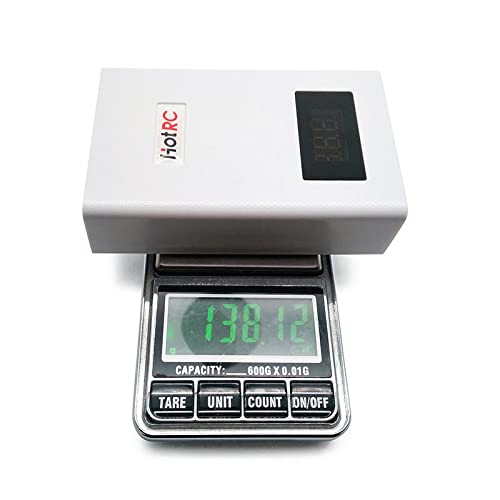
Figure 9.1: The HOTRC A400 charger placed on a digital scale, showing its weight of approximately 138 grams, emphasizing its lightweight design.
10. Garanti ve Destek
This product comes with a standard manufacturer's warranty. For specific warranty details, please refer to the documentation provided at the time of purchase or contact your retailer. For technical support or inquiries, please reach out to the customer service department of GalaxyElec or your authorized dealer.