
giriiş
Thank you for choosing the Mcdodo MC-7050 20W PD GoPower MagSafe 5000mAh Power Bank. This portable charger is designed to provide convenient and efficient power to your devices, featuring both wired USB-C Power Delivery and MagSafe-compatible wireless charging. Please read this manual carefully before use to ensure proper operation and to maximize the lifespan of your device.
Güvenlik Bilgileri
- Powerbank'i aşırı sıcaklıklara, doğrudan güneş ışığına veya ateşe maruz bırakmayın.
- Cihazın düşürülmesinden, çarpılmasından veya sökülmesinden kaçınınız.
- Su ve diğer sıvılardan uzak tutunuz.
- Power bank hasarlı veya şişmişse kullanmayın.
- Çocukların erişemeyeceği yerde saklayınız.
- Sadece sertifikalı şarj kabloları ve adaptörleri kullanın.
- Güç bankasını yerel yönetmeliklere uygun şekilde sorumlu bir şekilde atın.
Paket İçeriği
Lütfen paketi aşağıdaki öğeler açısından kontrol edin:
- Mcdodo MC-7050 20W PD GoPower MagSafe 5000mAh Power Bank
- USB-C - USB-C Şarj Kablosu
- Kullanıcı Kılavuzu
Ürün Bittiview
Familiarize yourself with the components of your Mcdodo MC-7050 Power Bank:

Image: Mcdodo MC-7050 Power Bank shown with its integrated kickstand extended, displaying the MagSafe charging area on the front. This view highlights the compact design and the stand feature for convenient use.
- MagSafe Wireless Charging Area: Central circular area for magnetic wireless charging.
- Güç Düğmesi: Power bank'i etkinleştirir ve pil seviyesini kontrol eder.
- LED Göstergeleri: Display the remaining battery capacity.
- USB-C Bağlantı Noktası: Used for both charging the power bank and charging other devices.
- Entegre Ayak: Allows the power bank to stand upright, useful for viewing content while charging wirelessly.

Resim: Açılı bir view of the Mcdodo MC-7050 Power Bank, clearly showing the USB-C input/output port on the side and the power button located near the top edge. The kickstand is also visible in this perspective.
Kurmak
Power Bank'ın İlk Şarjı
- Kutu içeriğinde bulunan USB-C kablosunu power bank üzerindeki USB-C portuna bağlayın.
- Connect the other end of the USB-C cable to a compatible USB power adapter (not included). For optimal charging speed, use a Power Delivery (PD) compatible adapter.
- The LED indicators will illuminate to show the charging status. All LEDs will be solid when fully charged.
- Power bank'in ilk kullanımdan önce tamamen şarj edilmesi önerilir.
Kullanım Talimatları
Pil Seviyesini Kontrol Etme
Press the power button once to check the remaining battery capacity. The LED indicators will light up to show the current charge level.
Kablolu Şarj (USB-C Çıkışı)
- Connect your device's charging cable to the USB-C port on the power bank.
- Kablonun diğer ucunu cihazınıza bağlayın.
- Power bank, cihazınızı otomatik olarak şarj etmeye başlayacaktır. Başlamazsa, güç düğmesine bir kez basın.
Kablosuz Şarj (MagSafe Uyumlu)
- Ensure your device is compatible with MagSafe or Qi wireless charging.
- Align your MagSafe-compatible device (e.g., iPhone 12 series or newer) with the circular MagSafe charging area on the power bank. The magnets will help align it correctly.
- The power bank will automatically begin wireless charging. If not, press the power button once.
- The integrated kickstand can be used to prop up your phone while wirelessly charging.
Bakım
- Temizlik: Powerbank'in yüzeyini temizlemek için yumuşak ve kuru bir bez kullanın. Sert kimyasallar veya aşındırıcı malzemeler kullanmayın.
- Depolamak: Powerbank cihazınızı serin, kuru ve doğrudan güneş ışığından ve aşırı sıcaklıklardan uzak bir yerde saklayın.
- Pil Sağlığı: To maintain battery health, fully charge and discharge the power bank at least once every three months if not in regular use.
Sorun giderme
- Powerbank şarj olmuyor:
- Şarj kablosunun hem power bank'e hem de güç adaptörüne güvenli bir şekilde bağlı olduğundan emin olun.
- Farklı bir USB-C kablosu veya güç adaptörü deneyin.
- Güç adaptörünün doğru çalıştığını doğrulayın.
- Cihaz powerbank'ten şarj olmuyor:
- Powerbank'in yeterli şarja sahip olduğundan emin olun.
- Şarjı etkinleştirmek için güç düğmesine basın.
- Cihazınız için farklı bir şarj kablosu deneyin.
- Ensure your device is properly aligned for wireless charging.
- Kablosuz şarjı engelleyebilecek kalın telefon kılıflarını çıkarın.
- Yavaş şarj oluyor:
- Ensure you are using a fast-charging compatible cable and adapter for both the power bank and your device.
- Some devices may limit charging speed when using wireless charging.
Özellikler
| Özellik | Şartname |
|---|---|
| Model Adı | MC-7050 |
| Pil Kapasitesi | 5000 mAh |
| Bağlayıcı Türü | USB Tip-C |
| Temel Özellikler | Fast Charging, Wireless Charging (MagSafe compatible) |
| Güç Çıkışı | 20W Güç Dağıtımı (PD) |
| Güç Kaynağı | Pil ile çalışan |
| Port Sayısı | 1 (USB-C for input/output, plus wireless charging) |
| Uyumlu Telefon Modelleri | Compatible with all phones (wired), MagSafe compatible phones (wireless) |
| Tekrar kullanılabilirlik | Şarj edilebilir |
| Ürün Ağırlığı | 0.18 Kilogram |
| Ürün Boyutları (U x G x Y) | 10.7 cm x 6.7 cm x 1.7 cm |
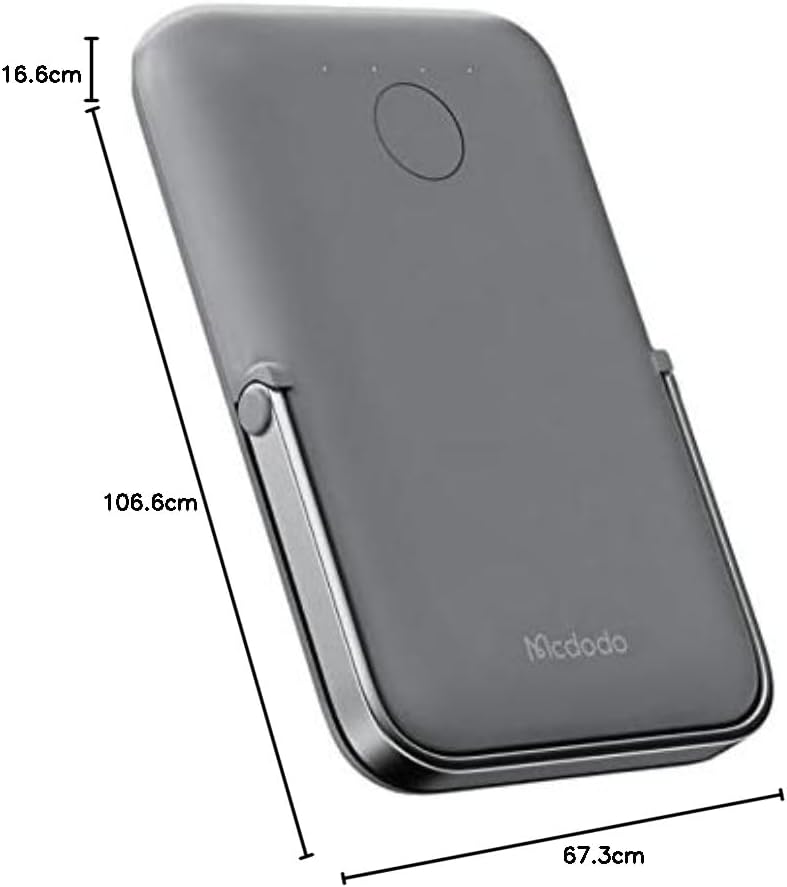
Resim: Yukarıdan aşağıya view of the Mcdodo MC-7050 Power Bank illustrating its compact dimensions, approximately 10.7 cm in length, 6.7 cm in width, and 1.7 cm in thickness.
Garanti ve Destek
For warranty information and technical support, please refer to the warranty card included in your product packaging or visit the official Mcdodo webSite. Satın alma belgeniz olarak satın alma fişinizi saklayın.
Mcdodo Official Webalan: www.mcdodo.com