
giriiş
This manual provides detailed instructions for the LENVII CW888 Bluetooth Wireless 1D/2D QR Barcode Scanner. Please read this manual carefully before using the device to ensure proper operation and to maximize its performance and lifespan. This scanner supports multiple connection methods and is designed for efficient barcode data collection.
Kurmak
1. Paket İçeriği
Tüm bileşenlerin mevcut olduğunu doğrulayın:
- LENVII CW888 Barcode Scanner
- Şarj Üssü
- USB kablosu
- Kullanım Kılavuzu (bu belge)
2. Tarayıcıyı Şarj Etme
The scanner is equipped with a 2200 mAh built-in battery. Before initial use, fully charge the scanner.
- Charging with Base: Place the scanner onto the charging base. Ensure the scanner is properly seated.
- USB Kablosu ile Şarj Etme: Connect the USB cable directly to the scanner and a power source (e.g., computer USB port, USB wall adapter).
A full charge takes approximately 5 hours. The scanner will emit five short beeps (low frequency) and stop scanning when the battery is low. Connect the USB cable for charging when this occurs.
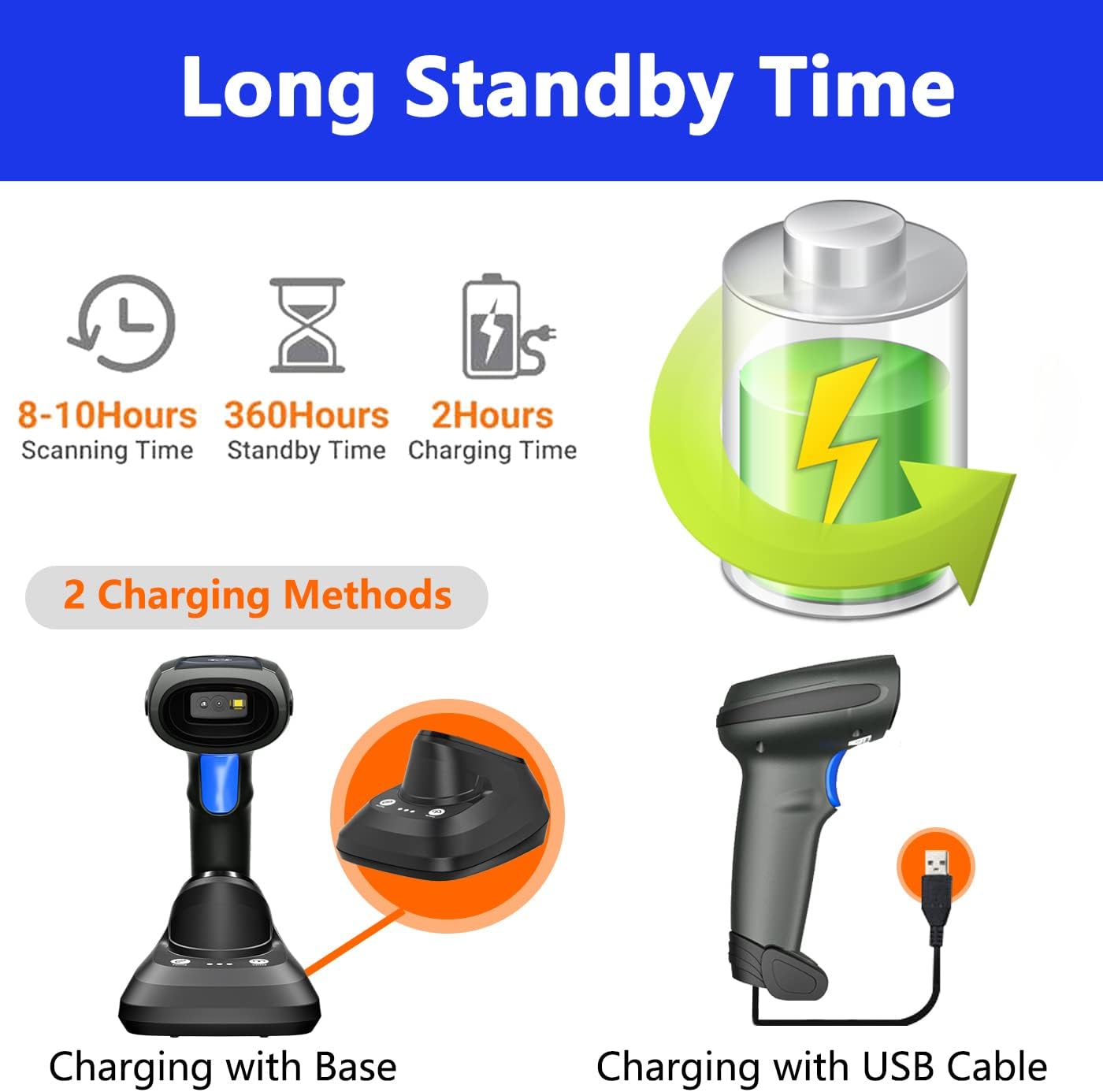
Image: Two charging methods for the LENVII CW888 barcode scanner: using the charging base or directly via USB cable.
3. Bağlantı Yöntemleri
The LENVII CW888 scanner offers three connection options:
3.1. Bluetooth Bağlantısı
Connect the scanner wirelessly to Bluetooth-enabled devices such as smartphones, tablets, or computers.
- Tarayıcının açık olduğundan emin olun.
- Ana cihazınızda (örneğin, akıllı telefon, tablet, bilgisayar) Bluetooth'u etkinleştirin.
- Scan the Bluetooth pairing barcode (usually found in the quick start guide or by scanning a specific configuration code).
- On your device, search for available Bluetooth devices and select "LENVII CW888" (or similar name) to pair.
- A successful connection will be indicated by a specific sound or light on the scanner.
3.2. 2.4G Wireless Connection (via Charging Base)
Use the charging base as a wireless receiver for a 2.4G connection to your computer.
- Connect the charging base to your computer via the USB cable.
- The computer should automatically recognize the base as a HID keyboard device.
- Ensure the scanner is powered on and within range of the base.
- The scanner and base should automatically establish a 2.4G wireless connection.
3.3. USB Kablolu Bağlantı
Connect the scanner directly to your computer using the USB cable for a wired connection.
- Tarayıcının USB kablosunu bilgisayarınızdaki uygun bir USB portuna bağlayın.
- The computer will recognize the scanner as a plug-and-play device, requiring no additional drivers.
- The scanner is ready for use once recognized.

Image: Illustration of the three connection types: Bluetooth, 2.4G wireless via charging base, and USB wired, along with compatible operating systems.
4. Uyumluluk
The LENVII CW888 barcode scanner is compatible with various operating systems and devices:
- İşletim Sistemleri: Windows (7/8/10/XP), Linux, Mac OS
- Cihazlar: Laptops, Tablets, Smartphones, PCs
Kullanım Talimatları
1. Barkodların Taranması
The scanner supports both 1D and 2D barcode types, including those on screens (mobile phones, computers).

Resim: Eskiamples of supported 1D and 2D barcode types, including QR codes, Data Matrix, and various linear barcodes.
Desteklenen Barkod Türleri:
- 1D: UPC / EAN / JAN, UPC-A and UPC-E, EAN-8 and EAN-13, JAN-8 and JAN-13, ISBN / ISSN, Code 39 (with full ASCII), Codabar (NW7), Code 128 and EAN 128, Code 93, etc.
- 2D: QR Code, Data Matrix, PDF417, Aztec, Maxicode.
The scanner features an advanced decoding chip capable of recognizing colorful, blurry, distorted, and reflective barcodes, improving efficiency for mobile payments and various scanning environments.
2. Tarama Modları
Tarayıcı iki temel tarama modu sunar:
- Anahtar Tetikleme Modu: Her bir barkodu ayrı ayrı taramak için tetikleme düğmesine basın.
- Sürekli Tarama Modu: The scanner continuously emits a scanning beam, allowing for hands-free operation when placed on the charging base.

Image: Comparison of Key Trigger Mode, where the user presses a button for each scan, and Continuous Scanning Mode, which allows hands-free operation with the scanner on its base.
3. Veri Yükleme Modları
The scanner supports two data upload methods:
- Anında Yükleme Modu: Barkod verileri, taramanın hemen ardından bağlı cihazınıza eş zamanlı olarak yüklenir.
- Depolama Modu: The scanner can store up to 1,500,000 barcodes in its internal 16MB memory. Data can be collected and stored, then uploaded to the computer together at a later time. This is useful for inventory management or when out of range.

Image: Visual representation of Instant Upload Mode, where scanned data is immediately sent to the device, and Storage Mode, where data is saved internally (16MB capacity) for batch upload.
4. İletim Mesafesi
The effective transmission range varies based on the environment:
- Obstacle Environment (Bluetooth): 49 feet'e (15 metre) kadar.
- Obstacle Environment (2.4G Wireless): 98 feet'e (30 metre) kadar.
- Barrier-Free Environment: 262 feet'e (80 metre) kadar.

Image: Diagram illustrating the effective transmission distances for the scanner under different conditions and connection types.
5. Cradle Functionality
The charging base (cradle) provides additional functionality beyond charging:
- One-Click Pairing: Simplifies the pairing process with the scanner.
- One-Click Upload: Facilitates quick data upload from the scanner's storage memory to the connected device.
- Veri Kaydı: The base also supports data logging functions.

Image: Close-up of the charging cradle, highlighting the "One click pairing" and "One click upload" buttons, along with LED indicators for pairing status, data upload, and power.
6. Adding Prefix/Suffix
The scanner can be configured to add custom prefixes or suffixes to scanned barcode data. This feature is typically enabled by scanning specific configuration barcodes found in the full user manual or quick start guide.

Image: Illustration of how prefixes and suffixes can be added to barcode data after scanning.
Bakım
1. Pil Bakımı
- The scanner has a 2200 mAh battery, providing approximately 9 hours of continuous operation on a full charge.
- Şarj süresi yaklaşık 5 saattir.
- When the battery is low, the scanner will emit five short beeps. Connect it to a power source immediately.
- Pilinizin ömrünü uzatmak için sık sık tamamen boşaltmaktan kaçının.
- Uzun süre kullanılmayacaksa tarayıcıyı serin ve kuru bir yerde saklayın.

Image: Information on the scanner's battery performance, including scanning time, standby time, and charging duration.
2. Temizlik
- Tarayıcının dış yüzeyini temizlemek için yumuşak, kuru bir bez kullanın.
- Tarama penceresi için, lens temizleme bezi veya hafifçe silinmiş yumuşak bir bez kullanın.ampHafif, aşındırıcı olmayan bir temizleyici ile temizleyin.
- Do not use harsh chemicals or abrasive materials, as they can damage the device.
- Temizlemeden önce cihazın kapalı olduğundan emin olun.
Sorun giderme
1. Tarayıcı Bağlanmıyor
- Gücü Kontrol Edin: Ensure the scanner is powered on and has sufficient battery charge.
- Bluetooth Bağlantısı: Verify Bluetooth is enabled on your host device and the scanner is in pairing mode. Re-pair if necessary.
- 2.4G Kablosuz Bağlantı: Ensure the charging base is properly connected to the computer via USB and the scanner is within range.
- USB Kablolu Bağlantı: Try a different USB port or cable. Ensure the cable is securely connected.
- Sürücüler: The scanner is plug-and-play; no specific drivers are usually needed. If issues persist, restart your computer.
2. Unable to Scan Barcodes
- Barkod Türü: Confirm the barcode type is supported by the scanner (refer to "Supported Barcode Types" section).
- Barkod Durumu: Ensure the barcode is not severely damaged, smudged, or too small/large. While the scanner can read blurry/distorted codes, extreme cases may fail.
- Mesafe ve Açı: Tarayıcı ile barkod arasındaki mesafeyi ve açıyı ayarlayın.
- Aydınlatma: Yeterli aydınlatma sağlayın ancak barkodun doğrudan parlamasını önleyin.
- Tarama Modu: Verify the scanner is in the correct scanning mode (Key Trigger or Continuous).
3. Data Not Uploading
- Bağlantı: Tarayıcının cihazınıza doğru şekilde bağlı olduğundan emin olun (Bluetooth, 2.4G veya USB).
- Yükleme Modu: If in Storage Mode, ensure you have initiated the "One-Click Upload" process from the charging base or via a specific command barcode.
- Uygulama Odak Noktası: Ensure the target application (e.g., text editor, POS software) on your device is active and ready to receive input.
Özellikler
| Özellik | Detay |
|---|---|
| Model Numarası | CW888 |
| Boyutlar (U x G x Y) | 19 cm x 8 cm x 10 cm |
| Ağırlık | 210 gram |
| Pil Türü | 1 Lityum İyon (dahil) |
| Pil Kapasitesi | 2200 mAh |
| Çalışma Süresi | Yaklaşık. 9 saat (sürekli kullanım) |
| Şarj Süresi | Yaklaşık 5 saat |
| Bağlantı Teknolojisi | Bluetooth, 2.4G Kablosuz, USB Kablo |
| Uyumlu Cihazlar | Dizüstü bilgisayar, Tablet, Akıllı telefon, Masaüstü bilgisayar |
| Uyumlu işletim sistemi | Windows (7/8/10/XP), Linux, Mac OS, Android, iOS |
| Image Sensor (Pixels) | 640 pixels (H) * 480 pixels (V) |
| Işık kaynağı | Aiming: 617 nm LED; Illumination: 6500K LED |
| Kod Çözme Yeteneği (1D) | UPC / EAN / JAN, UPC-A and UPC-E, EAN-8 and EAN-13, JAN-8 and JAN-13, ISBN / ISSN, Code 39 (with full ASCII), Codabar (NW7), Code 128 and EAN 128, Code 93, etc. |
| Kod Çözme Yeteneği (2D) | QR Kodu, Veri Matrisi, PDF417, Aztec, Maxicode |
| Tarama Mesafesi | 40-200 mm @ UPC / EAN 13mil PCS = 90%; 20-250 mm @ QR 20mil PZ = 100% |
| Tarama Açısı | 65° elevation / 30° / 55° |
| Okuma Hassasiyeti | ≥4mil |
| Veri Depolama Kapasitesi | 16MB (1,500,000'e kadar barkod) |
| Çalışma Hacmitage | 5 Volt (DC) |
| Maksimum Depolama Sıcaklığı | 60 Derece Santigrat |
| Kökeni | Çin |
Garanti ve Destek
1. Garanti Bilgileri
LENVII stands behind the quality of this wireless handheld scanner. Specific warranty terms and duration may vary by region and retailer. Please retain your proof of purchase for warranty claims.
2. Müşteri Desteği
If you encounter any issues or have questions regarding the LENVII CW888 barcode scanner, please contact LENVII customer support. We are committed to providing satisfactory assistance.
For support, please refer to the contact information provided with your product packaging or visit the official LENVII webalan.