
SONSUZA KW-60
FOREVER Smartwatch Kids Call Me 2 KW-60 User Manual
Model: KW-60
1. Giriş
The FOREVER Smartwatch Kids Call Me 2 KW-60 is designed to provide safety and communication for children. This manual will guide you through the setup, operation, and maintenance of your new smartwatch, ensuring a safe and enjoyable experience for your child.

Image: The FOREVER Smartwatch Kids Call Me 2 KW-60 in blue, shown from an angled perspective, highlighting its screen and side buttons.
2. Paket İçeriği
Lütfen paketi aşağıdaki öğeler açısından kontrol edin:
- FOREVER Smartwatch Kids Call Me 2 KW-60
- USB Şarj Kablosu
- Kullanım Kılavuzu (bu belge)

Image: The FOREVER Smartwatch KW-60 displayed next to its green retail packaging, illustrating the product as it appears in its box.
3. Kurulum Kılavuzu
3.1 İlk Şarj
Before first use, fully charge the smartwatch. Connect the USB charging cable to the watch's charging port and plug the other end into a USB power adapter (not included) or a computer's USB port. The charging indicator will show the progress.
3.2 SIM Kart Kurulumu
The KW-60 requires a 2G Micro SIM card for call and data functions. Ensure the SIM card is active and has sufficient credit/data. Turn off the watch before inserting the SIM card.
- Locate the SIM card slot on the side or back of the watch.
- SIM kart yuvasının kapağını dikkatlice açın.
- Insert the Micro SIM card with the gold contacts facing up and the notched corner aligned correctly.
- SIM kart yuvasının kapağını sıkıca kapatın.
3.3 Uygulama Kurulumu ve Eşleştirme
To manage the smartwatch and access all its features, download the Forever KidsCare application on your smartphone. The app is compatible with Android 5.0 or later and iOS 10.0 or later.
- Scan the QR code provided in the watch's packaging or search for "Forever KidsCare" in your smartphone's app store.
- Uygulamayı kurun ve açın.
- Yeni bir hesap oluşturun veya zaten bir hesabınız varsa giriş yapın.
- In the app, select "Add Device" and scan the QR code displayed on the smartwatch screen (or enter the device ID manually).
- Eşleştirme işlemini tamamlamak için ekrandaki talimatları izleyin.
4. Kullanım Talimatları
4.1 Temel Gezinme
The KW-60 features a touch screen for easy navigation. Swipe left/right or up/down to browse through menus and tap to select options.
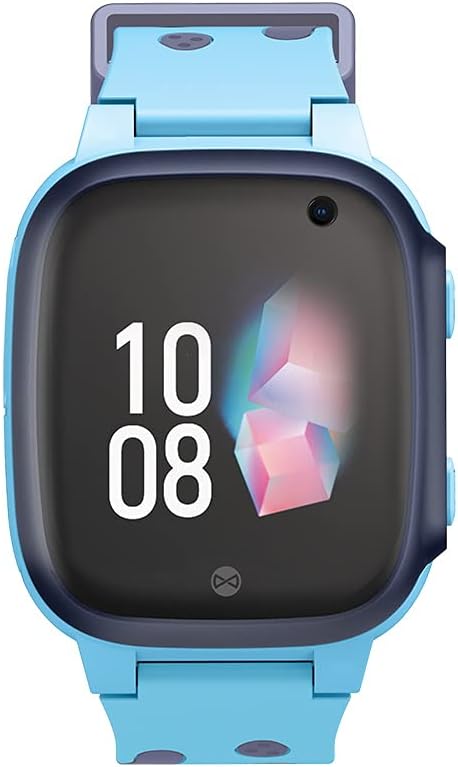
Resim: Doğrudan ön view of the FOREVER Smartwatch KW-60, showing its display with time and date, and the integrated camera lens.
4.2 Arama Yapma ve Alma
The watch allows calls to and from up to 10 registered numbers. These numbers must be set up by the parent/guardian through the Forever KidsCare app.
- Arama yapmak: From the watch's phonebook, select a contact and tap to dial.
- Bir Çağrı Alma: When a call comes in, tap the green answer icon on the screen.
4.3 SOS Fonksiyonu
In case of emergency, the child can press and hold the SOS button on the side of the watch. This will automatically dial pre-set emergency contacts until one answers, and send a location alert to the parent's app.
4.4 Location Tracking (GPS/LBS)
The smartwatch uses GPS and LBS (Location Based Service) to track the child's location, which can be viewed in real-time on the Forever KidsCare app. You can also define safe zones on the map; an alert will be sent to your phone if the child enters or leaves these zones.

Image: The FOREVER Smartwatch KW-60 positioned over a stylized map with various colored location pins, illustrating its tracking capabilities.
4.5 Camera and Photo Sharing
The watch is equipped with a camera. Children can take photos directly from the watch. Parents can also remotely activate the camera via the app to check the child's surroundings.

Image: A hand interacting with the FOREVER Smartwatch KW-60, with chat bubbles displaying "Hi!", "OK", and "Yes!", indicating communication features.
4.6 Messaging (SMS)
The watch supports text messaging. Children can send and receive messages from approved contacts.
4.7 Alarm Clock, Flashlight, and Games
- Çalar Saat: Set alarms via the app for reminders like wake-up times or study breaks.
- El feneri: A built-in flashlight can be activated from the watch's menu.
- Oyunlar: The watch includes pre-installed games for entertainment.
5. Bakım
5.1 Temizlik
Saatinizi düzenli olarak yumuşak, kuru bir bezle silin. İnatçı kirler için hafifçe kurulayın.ampBezi suyla yıkayın. Sert kimyasallar veya aşındırıcı temizleyiciler kullanmayın.
5.2 Pil Bakımı
- Aşırı sıcaklıklardan kaçının, çünkü bunlar pil ömrünü etkileyebilir.
- Saatinizi düzenli olarak şarj edin, ancak uzun süre tamamen boşta bırakmaktan kaçının.
- Yalnızca birlikte verilen şarj kablosunu kullanın.
5.3 Depolama
When not in use for a long time, store the watch in a cool, dry place, away from direct sunlight. Ensure it has some charge to prevent deep discharge.
6. Sorun Giderme
| Sorun | Olası Neden | Çözüm |
|---|---|---|
| Saat açılmıyor | Low battery; Power button not pressed long enough; System crash. | Charge the watch; Press and hold the power button for 5-10 seconds; Perform a soft reset (if applicable, check device specific instructions). |
| Şebeke sinyali yok / Arama yapılamıyor | SIM card not inserted correctly; SIM card inactive/no credit; Poor network coverage. | Reinsert SIM card; Check SIM card status with provider; Move to an area with better signal. |
| GPS location inaccurate | Weak GPS signal (indoors/dense areas); LBS used instead of GPS. | Move to an open outdoor area; Ensure watch has clear sky view. |
| Uygulamayla eşleştirilemiyor. | Incorrect device ID/QR code; Watch not powered on; App issues. | Verify ID/QR code; Ensure watch is on; Restart app and watch; Check app permissions. |
| Pil çabuk bitiyor | Frequent GPS updates; High screen brightness; Excessive usage. | Adjust GPS update frequency in app; Lower screen brightness; Reduce continuous usage. |
7. Özellikler
- Marka: SONSUZA KADAR
- Model Adı: KW-60
- İşletim Sistemi: Android Wear 2.6
- Ekran Boyutu: 3.66 Santimetre
- Bağlantı: Bluetooth
- Özel Özellikler: Camera, GPS, Alarm Clock
- Uyumlu Cihazlar: Akıllı telefon
- Pil Bileşimi: Lityum iyon
- Şarj Edilebilir Pil: Evet
- ASIN: B09HHNTT8B
- Mevcutluk Tarihi: 5 Haziran 2022
8. Garanti ve Destek
For detailed warranty information and technical support, please refer to the warranty card included with your product or visit the official FOREVER webSite. Satın alma fişinizi, garanti talepleriniz için satın alma belgeniz olarak saklayın.
For further assistance, you may contact FOREVER customer service through their official channels.
İlgili belgelerKW-60


Ask a question about this manual
Ask about setup, troubleshooting, compatibility, parts, safety, or missing instructions. Manuals+ will review the question and use this page’s manual context to help answer it.