
1. Giriş
Thank you for choosing the BOROFONE BR15 Portable Bluetooth Speaker. This manual provides essential information for setting up, operating, and maintaining your speaker. Please read it carefully before use to ensure optimal performance and longevity of your device. The BR15 is a versatile portable speaker designed for various audio playback needs, featuring Bluetooth connectivity, FM radio, and support for TF cards and USB drives.
2. Ürün Bittiview
The BOROFONE BR15 is a compact and robust portable Bluetooth speaker. It features a camouflage green design and is built for on-the-go use.
Temel Özellikler:
- Bluetooth 5.0: İstikrarlı ve verimli kablosuz bağlantı için.
- Pil Kapasitesi: 1200mAh, providing approximately 2.5 hours of music playback or talk time.
- Çıkış Gücü: 5W x 2, delivering clear audio.
- Su geçirmez: Designed to withstand splashes.
- Çoklu Oynatma Modları: Supports Bluetooth, FM radio, TF card, and USB disk playback.
- TWS İşlevi: Allows connection of two BR15 speakers for stereo sound.
Hoparlör Bileşenleri:
Familiarize yourself with the speaker's physical components and controls.
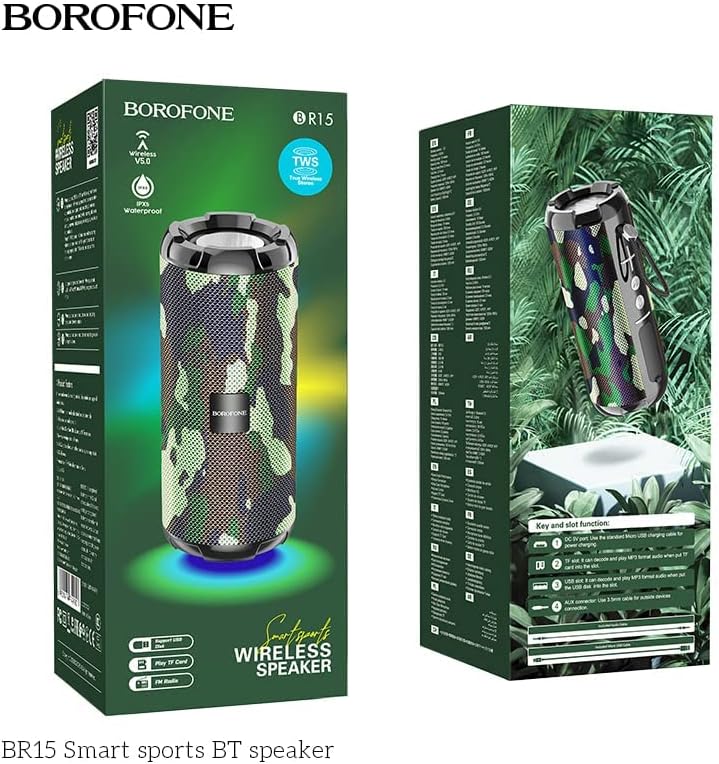
Image: The BOROFONE BR15 speaker packaging, illustrating the various buttons and ports for user reference.
The packaging image above highlights the 'Key and slot function' area, which typically includes:
- Güç Düğmesi: Hoparlörü açmak veya kapatmak için.
- Mod Düğmesi (M): To switch between Bluetooth, FM radio, TF card, and USB disk modes.
- Sesi Açma/Sonraki Parça Düğmesi (+): Sonraki parçaya geçmek için kısa basın, sesi açmak için uzun basın.
- Sesi Azaltma/Önceki Parça Düğmesi (-): Önceki parçaya dönmek için kısa basın, sesi kısmak için uzun basın.
- Oynat/Duraklat Düğmesi: To play or pause audio, answer/end calls.
- Şarj Portu: Hoparlörü şarj etmek için USB bağlantı noktası.
- TF Kart Girişi: MicroSD karttan doğrudan müzik çalmak için.
- USB Bağlantı Noktası: USB flash sürücüden doğrudan müzik çalmak için.
- AUX-in Portu: Harici ses cihazlarını 3.5 mm ses kablosuyla bağlamak için.
3. Kurulum
3.1 Hoparlörü Şarj Etme
- Sağlanan USB şarj kablosunu hoparlörün şarj portuna bağlayın.
- Kablonun diğer ucunu bir USB güç adaptörüne (dahil değildir) veya bir bilgisayarın USB portuna bağlayın.
- Şarj sırasında şarj gösterge ışığı genellikle kırmızı renkte yanar.
- Charging takes approximately 2 hours. The indicator light will turn off or change color (e.g., blue) when fully charged.
3.2 Açma/Kapatma
- Açmak İçin: Sesli bir uyarı duyana veya gösterge ışığı yanana kadar Güç düğmesini birkaç saniye basılı tutun.
- Kapatmak İçin: Sesli bir komut duyana veya gösterge ışığı sönene kadar Güç düğmesini birkaç saniye daha basılı tutun.
4. Kullanım Talimatları
4.1 Bluetooth Eşleştirme
- Ensure the speaker is powered on and in Bluetooth mode (indicated by a flashing blue LED and an audible prompt). If not, press the 'M' (Mode) button to switch to Bluetooth mode.
- Akıllı telefonunuzda veya tabletinizde Bluetooth'u etkinleştirin ve kullanılabilir cihazları arayın.
- Select "BOROFONE BR15" from the list of devices.
- Once paired, the speaker will emit an audible confirmation, and the blue LED will stop flashing and remain solid.
- Artık cihazınızdaki sesleri hoparlörünüz aracılığıyla oynatabilirsiniz.
4.2 Playing Music from TF Card/USB Disk
- Insert a TF card (MicroSD) or USB flash drive with MP3 audio files harfini hoparlör üzerindeki ilgili yuvaya takın.
- The speaker will automatically detect the storage device and switch to the corresponding playback mode. If not, press the 'M' (Mode) button to cycle through modes until you reach TF card or USB disk mode.
- Use the Play/Pause, Next Track (+), and Previous Track (-) buttons to control playback.
4.3 FM Radyo Modu
- FM radyo uyarısını duyana kadar 'M' (Mod) düğmesine art arda basın.
- Mevcut radyo istasyonlarını otomatik olarak taramak ve kaydetmek için Oynat/Duraklat düğmesine basılı tutun. Hoparlör radyo istasyonlarını otomatik olarak tarayacak ve kaydedecektir.
- Use the Next Track (+) and Previous Track (-) buttons to switch between saved stations.
4.4 TWS (Gerçek Kablosuz Stereo) İşlevi
The TWS function allows you to connect two BOROFONE BR15 speakers together for a true stereo sound experience.
- Ensure both BR15 speakers are powered off.
- Power on both speakers. They should both be in Bluetooth pairing mode.
- On one of the speakers, double-press the Play/Pause button. The speaker will attempt to connect to the other BR15 speaker.
- Once successfully paired, you will hear an audible confirmation. The main speaker's LED will flash, and the secondary speaker's LED will be solid.
- Now, connect your smartphone or tablet to the main speaker via Bluetooth as described in section 4.1.
- Ses artık her iki hoparlörden de stereo olarak çalacak.
4.5 Ses Kontrolü
- Sesi arttır: '+' düğmesine uzun süre basın.
- Sesi Azalt: '-' düğmesine uzun süre basın.
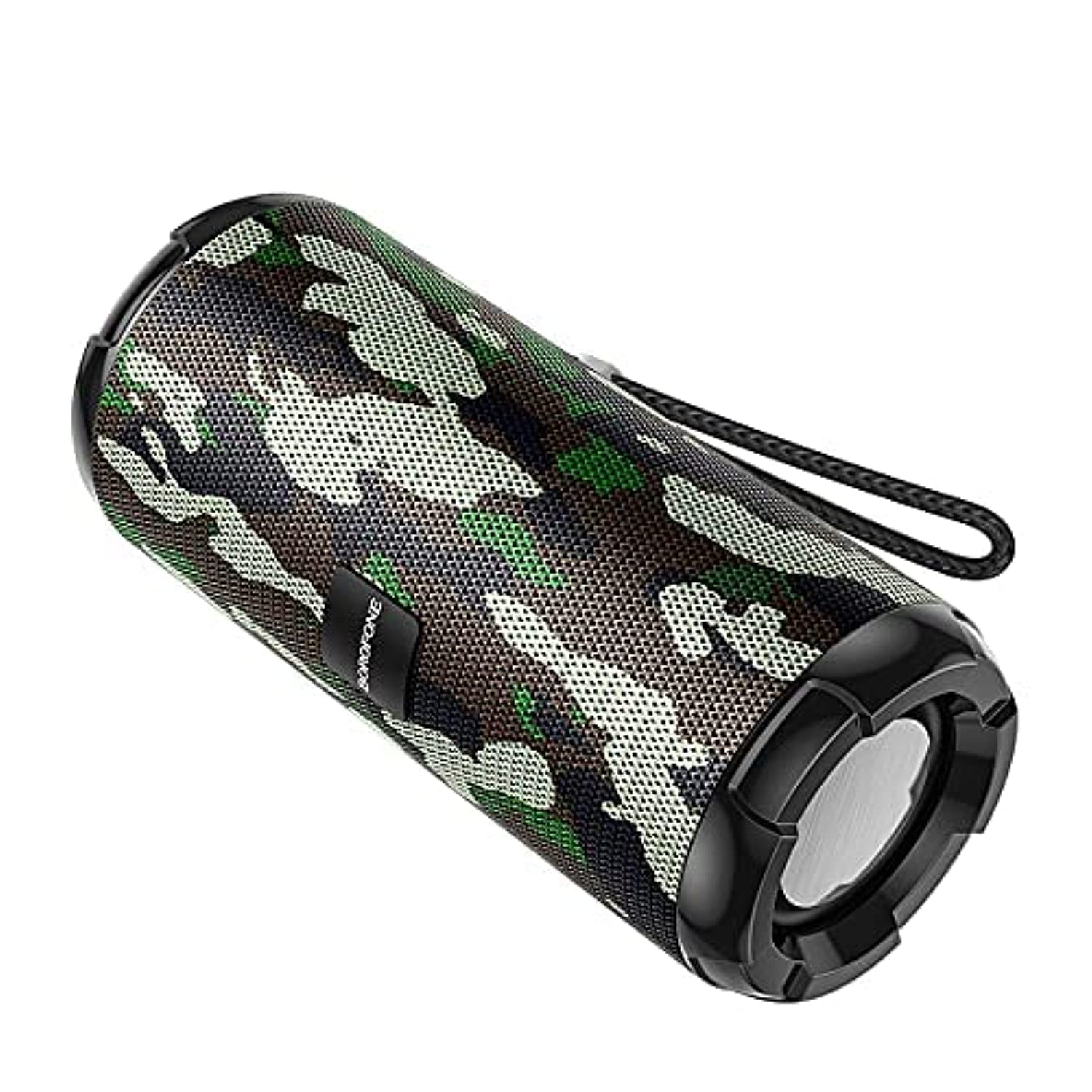
Image: The BOROFONE BR15 Portable Bluetooth Speaker, showcasing its camouflage green finish and cylindrical design.
5. Bakım
5.1 Temizlik
- Temizlemeden önce hoparlörü mutlaka kapatın.
- Use a soft, dry, lint-free cloth to wipe the exterior of the speaker.
- Yüzeye veya iç bileşenlere zarar verebileceğinden, aşındırıcı temizleyiciler, alkol, benzen veya diğer kimyasal çözücüler kullanmayın.
5.2 Depolama
- Hoparlörü serin, kuru ve doğrudan güneş ışığından ve aşırı sıcaklıklardan uzak bir yerde saklayın.
- Uzun süre saklayacaksanız, pilin sağlığını korumak için birkaç ayda bir pili yaklaşık %50'ye kadar şarj edin.
5.3 Pil Bakımı
- Pilin sık sık tamamen boşaltılmasından kaçının.
- Hoparlörü 60°C'nin (140°F) üzerindeki veya -10°C'nin (14°F) altındaki sıcaklıklara maruz bırakmayın.
- Yalnızca verilen şarj kablosunu veya sertifikalı bir eşdeğerini kullanın.
6. Sorun Giderme
| Sorun | Olası Neden | Çözüm |
|---|---|---|
| Hoparlör açılmıyor. | Pil zayıf. | Hoparlörü en az 30 dakika şarj edin. |
| Bluetooth üzerinden eşleştirme yapılamıyor. | Speaker not in pairing mode; Bluetooth disabled on device; speaker too far. | Ensure speaker is in Bluetooth mode (flashing LED). Enable Bluetooth on your device. Move speaker closer to your device (within 10 meters). |
| Ses yok. | Ses seviyesi çok düşük; yanlış mod; cihaz çalışmıyor. | Increase speaker and device volume. Check if the speaker is in the correct mode (Bluetooth, TF, USB, FM). Ensure audio is playing on your connected device. |
| FM radyo alımı zayıf. | Zayıf sinyal. | Move the speaker to an open area or closer to a window. |
| TWS eşleştirmesi başarısız. | Speakers too far apart; one speaker already paired. | Ensure both speakers are close to each other. Disconnect any existing Bluetooth connections from both speakers before attempting TWS pairing. |
7. Özellikler
| Özellik | Şartname |
|---|---|
| Model Adı | BR15 |
| Bluetooth Sürümü | 5.0 |
| Çip | Jerry |
| Pil Kapasitesi | 1200mAh |
| Şarj Süresi | Yaklaşık 2 saat |
| Müzik/Konuşma Süresi | Yaklaşık 2.5 saat |
| Hoparlör Ünitesi | 45mm X 2 |
| Çıkış Gücü | 5W x 2 |
| Boyutlar (U x G x Y) | 162 mm x 70 mm x 70 mm (6.38 x 2.76 x 2.76 inç) |
| Ağırlık | Belirtilmemiş |
| Malzeme | Plastik |
| Renk | Kamuflaj Yeşili |
| Suya Dayanıklılık | Evet |
| Bağlantı | Bluetooth, TF Card, USB Disk, FM Radio, AUX-in, TWS |
| Uyumlu Cihazlar | Akıllı telefon, Tablet |

Image: The BOROFONE BR15 Portable Bluetooth Speaker positioned outdoors, highlighting its portability and design.
8. Garanti ve Destek
BOROFONE products are designed and manufactured to the highest quality standards. For information regarding warranty coverage, please refer to the warranty card included with your purchase or visit the official BOROFONE website. If you encounter any issues or require technical assistance, please contact BOROFONE customer support through their official channels.
No official product videos were provided for this model.