
1. Giriş
This manual provides essential information for the safe and efficient operation, installation, and maintenance of your sloHEXtted Q800 8-Button Industrial Wireless Crane Remote Control System. Please read this manual thoroughly before installation and operation to ensure proper usage and to prevent potential hazards.

Şekil 1.1: sloHEXtted Q800 Wireless Crane Remote Control System (Transmitter and Receiver)
2. Ürün Özellikleri
- 8-Button Momentary Control: The system features an 8-button transmitter designed for momentary operation, suitable for various crane and hoist functions.
- Geniş Hacimtage Uyumluluk: The receiver supports 110-460V AC/DC power input, ensuring versatility across different industrial setups.
- Genişletilmiş Kontrol Aralığı: Offers a control distance of up to 100 meters with 360-degree barrier-free remote control and strong signal penetration.
- Dayanıklı Yapı: Both the transmitter and receiver are constructed from PA65 reinforced flame-retardant fiber plastic, providing strong anti-pressure ability, waterproofing, anti-corrosion properties, and insulation.
- Ergonomic Transmitter Design: The lightweight transmitter features an ergonomic design for comfortable handling during extended use.
- IP65 Koruma Derecesi: The system complies with IP65/NEMA4 international specifications, making it dust-proof and waterproof, suitable for harsh environments with oil pollution, high humidity, and dust.
- Yüksek Kaliteli Bileşenler: Equipped with a quality circuit board for reliable performance, dust-proof structure, and high-performance metal contact buttons.
- Acil Durdurma Fonksiyonu: An EU standard emergency stop push button is integrated on the transmitter for immediate system shutdown in critical situations.
- Silikon Düğmeler: Durable silicone-wrapped buttons enhance comfort and tactile feedback.
Şekil 2.1: Transmitter with key components labeled, including Emergency Stop, ON/HORN, Status LED, and Silicone Buttons.

Şekil 2.2: Kapatmak view of the EU Standard Emergency Stop button, designed for quick and safe operation.

Şekil 2.3: The transmitter housing, made from nylon reinforced fiber plastic, provides shock-proof protection.
3. Kurulum ve Kurulum
3.1 Paketin Açılması ve Muayene
Upon receiving your Q800 system, carefully unpack all components and inspect them for any signs of damage. Ensure all listed components are present:
- Verici
- Alıcı
- Transmitter dust-cover
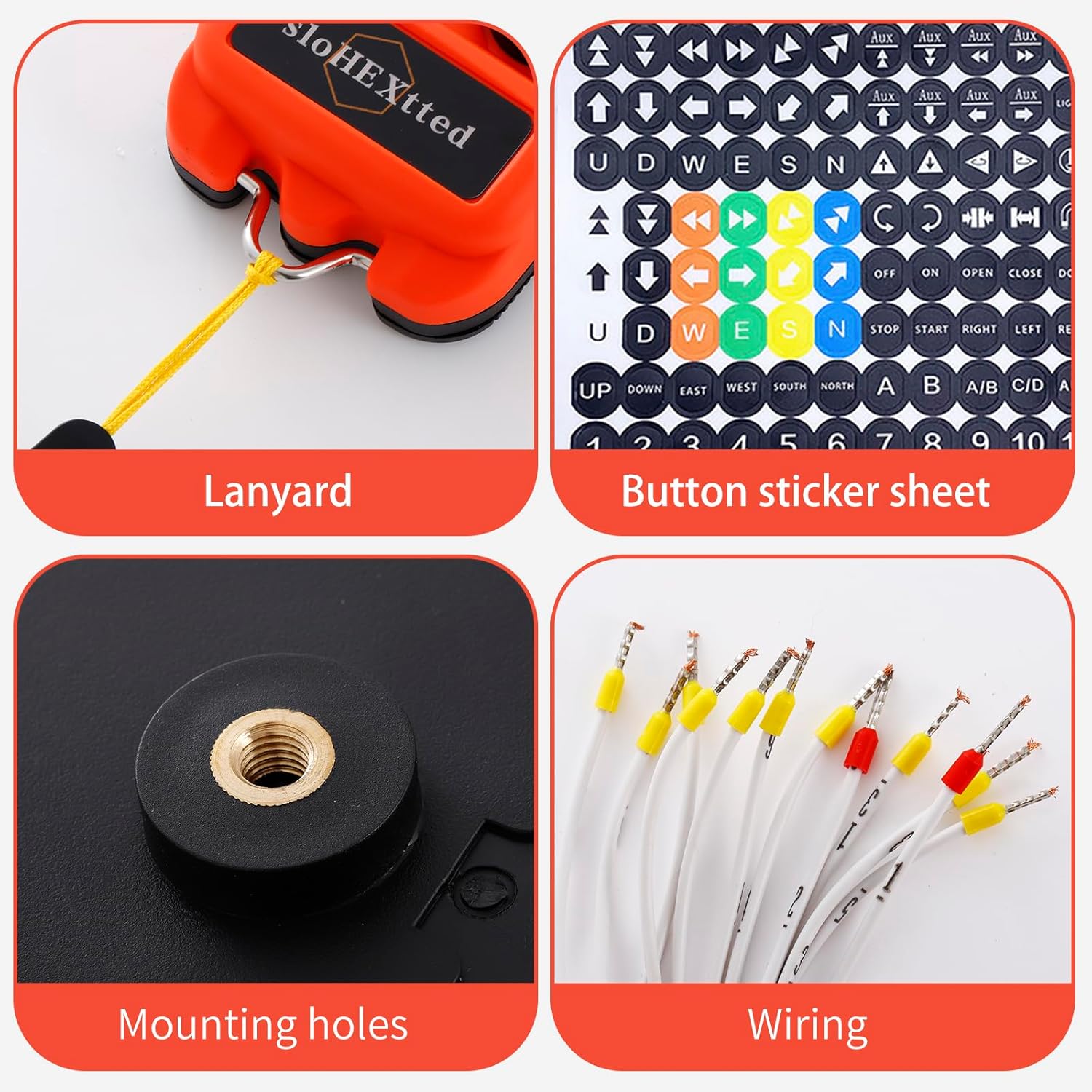
- Button sticker sheet
- Mounting hardware (bolts, washers, spring)

Şekil 3.1: Included components: Lanyard, Button Sticker Sheet, Mounting Holes on receiver, and pre-wired connections.
3.2 Power Supply and Wiring
The receiver requires a power supply within the 110-460V AC/DC range. It is crucial to select the correct voltage hacme göretage marked on the contactor in the control box of your crane or hoist. Incorrect voltage can cause severe damage to the unit and connected equipment.
- Güç Kaynağını Belirleyin: Locate the main power source for your crane or hoist control box.
- Hacmi Doğrulatage: Sesi onaylatage of the power source matches the receiver's specifications (110-460V AC/DC).
- Kablolamayı Bağlayın: Connect the receiver's pre-wired cables to the corresponding terminals in your control box. Refer to the wiring diagram provided on the receiver unit for precise connections. Ensure all connections are secure and insulated.
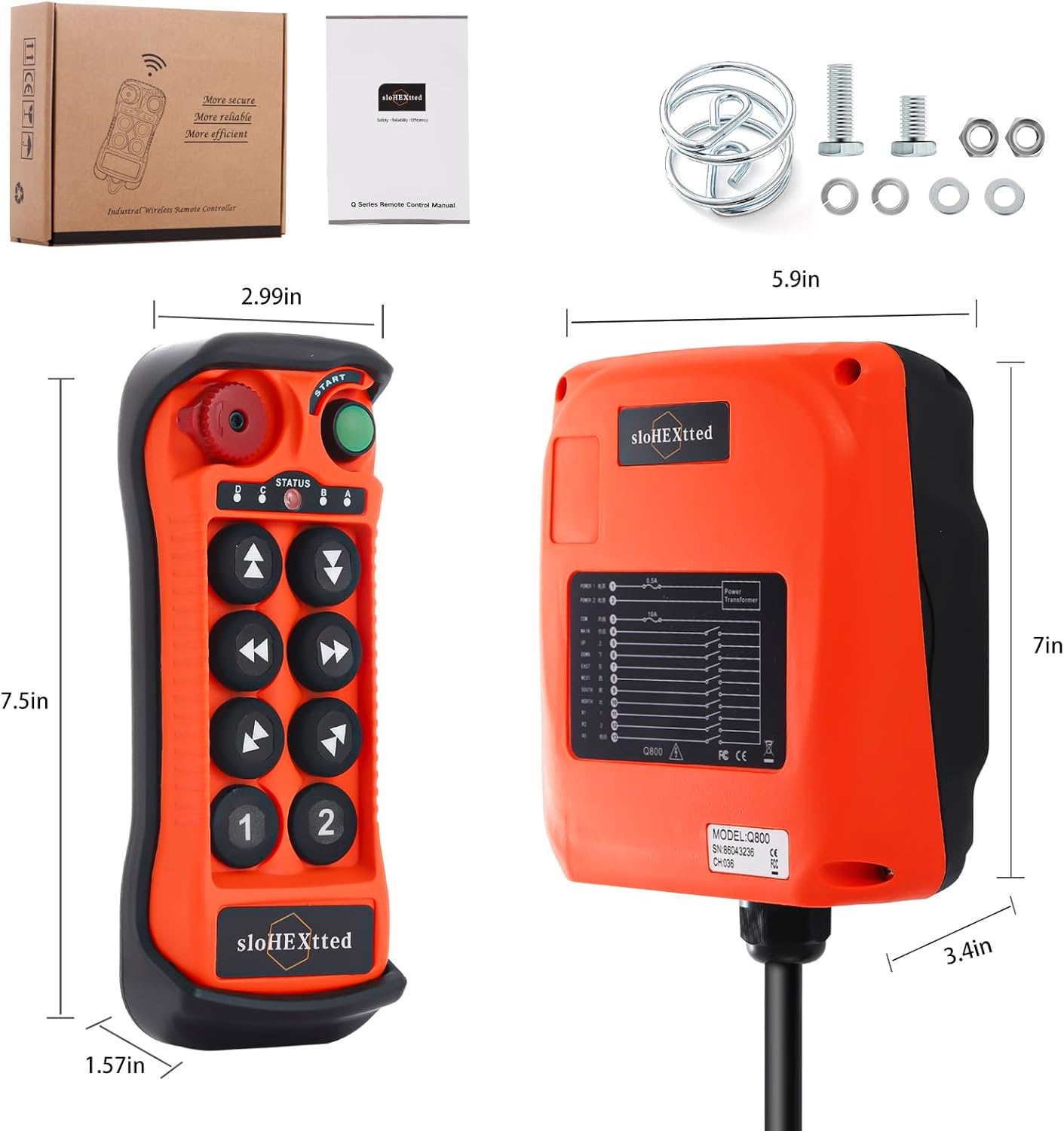
Şekil 3.2: The receiver unit displays a clear wiring diagram for proper electrical connections.
3.3 Receiver Mounting
The receiver unit should be mounted in a secure location, protected from excessive vibration and direct impact. Use the provided mounting holes and hardware for installation.
- Konum Seçin: Choose a mounting location that allows for optimal signal reception and easy access for wiring.
- Güvenli Alıcı: Use appropriate bolts, washers, and nuts to firmly attach the receiver to a stable surface.
3.4 Verici Pil Kurulumu
The transmitter requires batteries for operation. Batteries are not included with the system and must be purchased separately. Refer to the transmitter's battery compartment for the correct battery type and orientation.
4. Kullanım Talimatları
4.1 Temel İşlemler
The Q800 system operates as a momentary control system. Functions are active only while the corresponding button is pressed.
- Güç Açık: Press the green 'START' button to activate the transmitter. The status LED will indicate power.
- Fonksiyon Düğmeleri: Use the directional buttons (Up, Down, East, West, South, North) and auxiliary buttons (1, 2) to control the corresponding functions of your crane or hoist.
- ON/HORN Button: Press the 'ON/HORN' button for signaling or activating an auxiliary function.
- Acil durdurma: In case of an emergency, press the red 'Emergency Stop' button to immediately halt all operations. To reset, twist the button clockwise and pull it out.
Video 4.1: This video demonstrates the secure and efficient operation of the Q800 crane remote control, highlighting its responsiveness and ease of use.
Video 4.2: This video illustrates the functionality of the hoist crane industrial wireless remote transmitter and receiver, showcasing its application in industrial settings.
5. Bakım
5.1 Temizlik
Due to its IP65 rating, the system is resistant to dust and water. However, regular cleaning is recommended to maintain optimal performance and longevity.
- Verici ve alıcıyı ad ile silin.amp kiri ve kiri temizlemek için bez.
- Avoid using harsh chemicals or abrasive cleaners that could damage the plastic housing or silicone buttons.
- Ensure the emergency stop button is free from debris to allow for proper function.
5.2 Pil Değişimi
When the transmitter's battery indicator shows low power, replace the batteries promptly to avoid interruption of operation. Refer to the transmitter's battery compartment for instructions on how to open it and replace the batteries correctly.
5.3 Genel Muayene
Periodically inspect the system for any signs of wear, damage, or loose connections. Pay attention to:
- The integrity of the transmitter's silicone shell and buttons.
- The receiver's housing for cracks or damage.
- All wiring connections to ensure they are tight and free from corrosion.
6. Sorun Giderme
Bu bölüm, yaygın sorunlar için temel sorun giderme adımlarını sağlar. Daha karmaşık sorunlar için müşteri desteğiyle iletişime geçin.
| Sorun | Olası Neden | Çözüm |
|---|---|---|
| Sistem yanıt vermiyor | Düşük verici pili Emergency Stop engaged Alıcı güç almıyor Aralık dışı | Verici pillerini değiştirin Disengage Emergency Stop Check receiver power supply Alıcıya yaklaşın |
| Aralıklı kontrol | Sinyal paraziti Gevşek kablo bağlantısı | Relocate receiver or transmitter to avoid interference Tüm kablo bağlantılarını kontrol edin ve sabitleyin |
| Düğmeler yanıt vermiyor | Hasarlı düğme İç arıza | Inspect buttons for physical damage Müşteri desteğiyle iletişime geçin |
7. Teknik Özellikler
| Şartname | Detay |
|---|---|
| Üretici | sloHEXtted |
| Parça Numarası | Q800 |
| Ürün Model Numarası | Q800 8-Button 110-460V AC/DC |
| Ürün Ağırlığı | 4.27 pound |
| Ürün Boyutları | 5 x 3 x 2 inç |
| Alıcı Hacmitage | 110-460V AC / DC |
| Kontrol Türü | Anlık basma düğmesi |
| Kolu / Kolu Yerleştirme | Basmalı Düğme |
| Malzeme | PA65 Reinforced Flame Retardant Fiber Plastic |
| IP Derecelendirmesi | IP65 / NEMA4 |
| Kontrol Mesafesi | 100 metreye kadar |
| Piller Dahil | HAYIR |
| Piller Gerekli | Evet |
| Dahil Bileşenler | Transmitter, Receiver, Transmitter Dust-Cover, Button Sticker Sheet |
8. Garanti ve Destek
8.1 Garanti Bilgileri
For specific warranty details regarding your sloHEXtted Q800 system, please refer to the warranty card included with your product or contact the manufacturer directly. Keep your proof of purchase for any warranty claims.
8.2 Müşteri Desteği
If you encounter any issues not covered in this manual or require further assistance, please contact sloHEXtted LLC customer support. Contact information can typically be found on the product packaging or the official sloHEXtted webalan.