
1. Giriş
Satın aldığınız için teşekkür ederizasing the KEPLUG Sunrise Alarm Clock. This device is designed to enhance your waking and sleeping experience with its unique features, including sunrise and sunset simulations, dual alarms, FM radio, and various natural sounds. Please read this manual carefully to ensure proper use and optimal performance.
Paket İçeriği:
- 1 x KEPLUG Sunrise Alarm Clock
- 1 x Mikro USB Kablosu
- 1 x Duvar Adaptörü
- 1 x Kullanım Kılavuzu
2. Ürün Bittiview
Familiarize yourself with the main components and controls of your KEPLUG Sunrise Alarm Clock.

Resim 2.1: Ön view of the KEPLUG Sunrise Alarm Clock, showing the digital time display and the illuminated light panel. The clock face is round with a white base.
Kontrol Düğmeleri ve Bağlantı Noktaları:
Refer to the diagram below for button identification (exact button layout may vary slightly by model, but functions are consistent).
- Zaman Ayar Düğmesi: Zaman ayarı moduna girmek için kullanılır.
- Alarm 1 Düğmesi: Alarm 1'i ayarlamak ve etkinleştirmek için kullanılır.
- Alarm 2 Düğmesi: Alarm 2'i ayarlamak ve etkinleştirmek için kullanılır.
- FM Radyo Butonu: Activates and controls FM radio functions.
- Işık Düğmesi: Controls the light brightness and color modes.
- Ses +/- Düğmeleri: Ses seviyesini ayarlar.
- Yukarı/Aşağı Düğmeleri: Menülerde gezinir ve değerleri ayarlar.
- Snooze/Sleep Aid Button: Activates snooze during an alarm or sleep aid function.
- USB Şarj Noktası: Harici cihazları şarj etmek için.
- Mikro USB Güç Girişi: Güç adaptörüne bağlanır.
3. Kurulum
3.1 Güç Bağlantısı
- Connect the micro USB cable to the power input port on the back of the alarm clock.
- Duvar adaptörünü standart bir elektrik prizine takın.
- Ekran yanarak cihazın açık olduğunu gösterecektir.
The clock includes a built-in backup battery to retain settings during power outages or disconnections.
3.2 Saati Ayarlama
- Basın Zaman Ayar Düğmesi (often represented by a clock icon). The hour display will start flashing.
- Kullanın Yukarı/Aşağı Düğmeleri Saati ayarlamak için
- Basın Zaman Ayar Düğmesi again to confirm the hour and move to minute setting. The minute display will flash.
- Kullanın Yukarı/Aşağı Düğmeleri Dakikaları ayarlamak için
- Basın Zaman Ayar Düğmesi a third time to confirm the minutes.
- 12 saatlik ve 24 saatlik format arasında geçiş yapmak için tuşuna basın. Yukarı/Aşağı Düğmeleri while the time is flashing during setup, or refer to the specific instructions in your manual for a dedicated time format button.
3.3 Time Display Brightness
The time display offers three brightness settings: High, Low, and Off. This can typically be adjusted by repeatedly pressing a dedicated display brightness button or by holding the Time Setting button. Refer to your specific model's instructions for exact control.
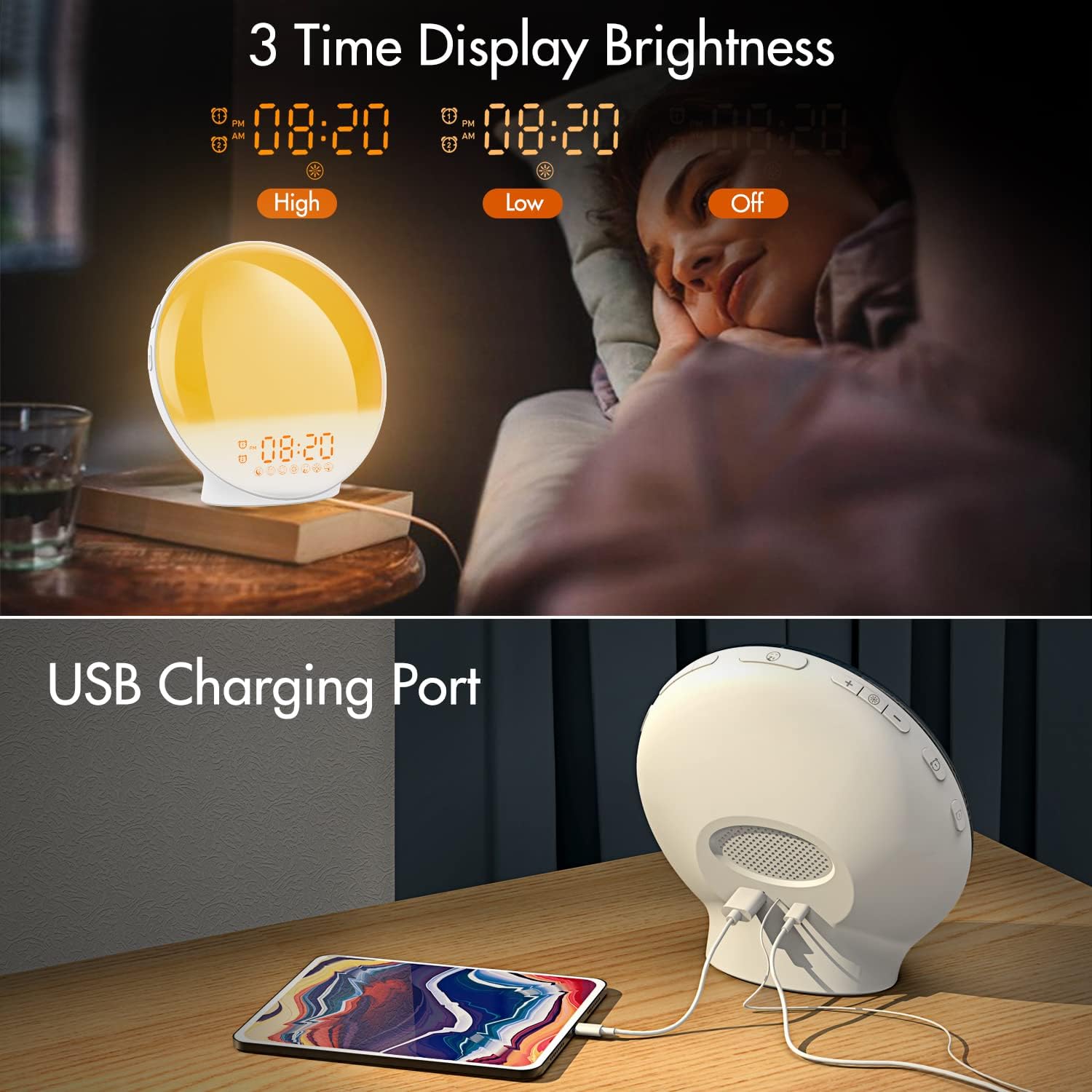
Resim 3.1: Illustration of the three time display brightness options: High, Low, and Off, allowing users to customize visibility for different times of day or night.
4. Kullanım Talimatları
4.1 Alarmların Ayarlanması (Alarm 1 ve Alarm 2)
The clock features two independent alarms, allowing for separate wake-up times (e.g., weekday and weekend).

Resim 4.1: Depiction of the dual alarm functionality, allowing users to set different alarms for weekdays and weekends, along with the snooze feature.
- Basın Alarm 1 Düğmesi (veya Alarm 2 Düğmesi) to activate and enter alarm setting mode. The alarm time will flash.
- Kullanın Yukarı/Aşağı Düğmeleri İstediğiniz alarm saatini ayarlamak için
- Basın Alarm butonu again to confirm the hour and set the minutes.
- Kullanın Yukarı/Aşağı Düğmeleri İstenilen alarm dakikasını ayarlamak için.
- Basın Alarm butonu again to select the wake-up sound. Use Yukarı/Aşağı Düğmeleri to cycle through 7 nature sounds or FM radio.
- Basın Alarm butonu again to set the volume level (1-16) for the alarm sound. Use Yukarı/Aşağı Düğmeleri Ayarlamak.
- Basın Alarm butonu one last time to confirm all settings and activate the alarm. An alarm icon will appear on the display.
4.2 Erteleme İşlevi
When an alarm sounds, tap the Ertele Düğmesi (often the large button on top or front) to pause the alarm for 9 minutes. This can be repeated up to 5 times.
4.3 Gün Doğumu Simülasyonu
The sunrise simulation gradually brightens the light before your alarm time, mimicking a natural sunrise.

Resim 4.2: Visual representation of the sunrise simulation feature, where the light intensifies gradually over a set period before the alarm, designed for a gentle wake-up.
- When setting an alarm, after selecting the sound and volume, you will typically be prompted to set the sunrise duration.
- Kullanın Yukarı/Aşağı Düğmeleri to choose a duration between 10 to 60 minutes. The light will gradually increase from 0% to the set brightness level (0-20) during this period.
- The light color will transition from deep red to bright yellow, simulating a natural sunrise.
4.4 Sunset Simulation / Sleep Aid
The sunset simulation gradually dims the light and can play soothing sounds to help you fall asleep.

Resim 4.3: Illustration of the sunset simulation, where the light gradually dims over a period of 10 to 120 minutes, accompanied by optional sleep sounds like rain, forest, river, or FM radio.
- Basın Snooze/Sleep Aid Button (or a dedicated Sleep Aid button) to activate the sleep aid function.
- Kullanın Yukarı/Aşağı Düğmeleri to select a duration for the dimming process (10-120 minutes).
- You can also select a natural sound (Rain, Forest, River) or FM radio to play during this period.
- The light will gradually dim from 100% to 0% over the selected duration, and the sound will fade out.
4.5 FM Radyo
The built-in FM radio allows you to listen to your favorite stations or use them as an alarm sound.

Resim 4.4: Üzerindeview of the 7 available alarm sounds and the FM radio option, providing diverse choices for waking up.
- Basın FM Radyo Düğmesi radyoyu açmak/kapatmak için.
- Tutun FM Radyo Düğmesi to automatically scan and save available stations.
- Kullanın Yukarı/Aşağı Düğmeleri to manually tune to a specific frequency or cycle through saved stations.
- kullanarak ses seviyesini ayarlayın. Ses +/- Düğmeleri.
4.6 Night Light / Color Light
The clock can function as a night light with various color options and adjustable brightness.

Resim 4.5: Display of the 7 color atmosphere light options and 20 brightness levels, highlighting the clock's versatility as a mood light or reading lamp.
- Basın Işık Düğmesi ışığı açmak için.
- Basın Işık Düğmesi repeatedly to cycle through 7 static colors (e.g., Red, Green, Blue, Yellow, Indigo, Purple, White) or an automatic color-changing mode.
- Kullanın Yukarı/Aşağı Düğmeleri to adjust the brightness level (0-20) of the selected color or white light.
- Tutun Işık Düğmesi ışığı kapatmak için.
4.7 USB Şarj Portu
A 5V/2.4A USB port is located on the back of the device, allowing you to charge your smartphone or other small electronic devices.
Resim 4.6: Arka view of the alarm clock showing the USB charging port in use, connected to a tablet for charging.
5. Bakım
- Temizlik: Cihazı yumuşak ve kuru bir bezle silin. Aşındırıcı temizleyiciler veya çözücüler kullanmayın.
- Depolamak: Uzun süre kullanılmayacaksa cihazı serin ve kuru bir yerde saklayın.
- Güç: Always use the provided power adapter to prevent damage.
6. Sorun Giderme
| Sorun | Olası Neden | Çözüm |
|---|---|---|
| Saat açılmıyor. | Güç adaptörü bağlı değil veya arızalı. | Ensure the power adapter is securely connected to both the clock and a working power outlet. Try a different outlet. |
| Alarm çalmıyor. | Alarm etkinleştirilmedi veya ses seviyesi çok düşük. | Check if the alarm icon is displayed. Re-set the alarm and ensure the volume is set to an audible level. |
| Gün doğumu simülasyonu çalışmıyor. | Sunrise duration not set during alarm setup. | Ensure you have set a sunrise duration (10-60 minutes) when configuring the alarm. |
| FM radyoda parazit veya zayıf sinyal. | Zayıf sinyal veya anten konumu. | Extend the antenna wire fully. Reposition the clock to improve reception. Perform an auto-scan for stations. |
| USB şarjı çalışmıyor. | Cihaz uyumlu değil veya kablo arızalı. | Ensure the device you are charging is compatible with 5V/2.4A USB charging. Try a different USB cable. |
7. Özellikler
- Marka: KEPÇE
- Modeli: B09FRY71NH
- Ürün Ölçüleri: 16x16x6.1 cm
- Ürün Ağırlığı: 481 gr
- Cilttage: 5 Volt
- Güç Kaynağı: Pille Çalışır (AC adaptör ile)
- Görüntüleme Türü: Dijital
- Özel Özellikler: Charging Port, Dimmable Light, Sunrise/Sunset Simulation, Dual Alarm, FM Radio, Nature Sounds
- İlk Mevcut Tarih: 12 Kasım 2021
8. Garanti ve Destek
For warranty information or technical support, please refer to the contact details provided with your purchase documentation or visit the official KEPLUG webSite. Satın alma belgeniz olarak satın alma fişinizi saklayın.