
giriiş
The Keychron Q2 is a fully customizable wired mechanical keyboard featuring a compact 65% layout. Constructed with a solid full aluminum frame, the Q2 is designed for easy assembly and offers a premium typing experience. It supports full QMK and VIA programming for extensive customization and features hot-swappable switches for personalized tactile feedback.

Image: The Keychron Q2 Wired Custom Mechanical Keyboard, showcasing its compact 65% layout and blue color scheme.
Kurulum Kılavuzu
1. Paket İçeriği
Başlamadan önce tüm bileşenlerin mevcut olduğundan emin olun:
- Keychron Q2 Keyboard Kit (Aluminum Case, PCB, Steel Plate, Sound Absorbing Foam, Case Foam, Gaskets)
- USB Type-C - Type-C Kablosu
- USB Tip-A'dan Tip-C'ye Adaptör
- Anahtar Çektirme
- Tuş Çektirmesi
- Tornavida
- Altıgen anahtarı
- Stabilizers (4 sets)
Note: All tools are typically located at the bottom of the packaging.

Image: Diagram illustrating the contents of the Keychron Q2 package, including the keyboard, cables, and tools.
2. Klavyenin Bağlanması
- Locate the USB Type-C port on the back of the Keychron Q2 keyboard.
- Connect one end of the provided USB Type-C to Type-C cable to the keyboard.
- Connect the other end of the cable to your computer's USB Type-C port. If your computer only has USB Type-A ports, use the included USB Type-A to Type-C adapter.
- Ensure the operating system switch (located on the back edge of the keyboard) is set to the correct position for your system (Mac or Windows).
- Klavyeniz işletim sisteminiz tarafından otomatik olarak tanınacaktır.

Resim: Yakın çekim view of the Keychron Q2 keyboard with a USB-C cable connected, showing the Mac/Win switch.
Kullanım Talimatları
1. QMK/VIA Özelleştirmesi
The Keychron Q2 supports full QMK and VIA programming, allowing you to remap keys, create macros, and customize lighting effects. To use VIA software:
- VIA yazılımını Keychron'un resmi sitesinden indirin. webalan (keychron.com/pages/qmk-via).
- Connect your Q2 keyboard to your computer via the USB cable.
- Launch the VIA software. The software should automatically detect your Q2 keyboard. If not, you may need to import the Q2 keymap JSON file, also available on the Keychron webalan.
- Use the graphical interface to drag and drop functions, assign macros, and configure lighting for each key. Changes are applied in real-time.

Image: Screenshot of the VIA software interface, demonstrating how to remap keys on the Keychron Q2 keyboard.
2. Sıcak Değiştirilebilir Anahtarlar
The Q2's PCB supports both 3-pin and 5-pin MX style mechanical switches, allowing for easy switch replacement without soldering.
- Birlikte verilen tuş kapağı sökme aletini kullanarak, değiştirmek istediğiniz tuştan tuş kapağını dikkatlice çıkarın.
- Use the provided switch puller to gently grip the top and bottom clips of the switch. Pull the switch straight up to remove it from the PCB.
- Yeni anahtarın pinlerini PCB üzerindeki deliklerle hizalayın. Bükülmeyi önlemek için pinlerin düz olduğundan emin olun.
- Yeni anahtarı yerine oturuncaya kadar sıkıca bastırın.
- Tuş kapağını tekrar takın.

Resim: Yakın çekim view of the Keychron Q2's PCB with several switches removed, demonstrating the hot-swappable feature.
3. Keycaps and RGB Lighting
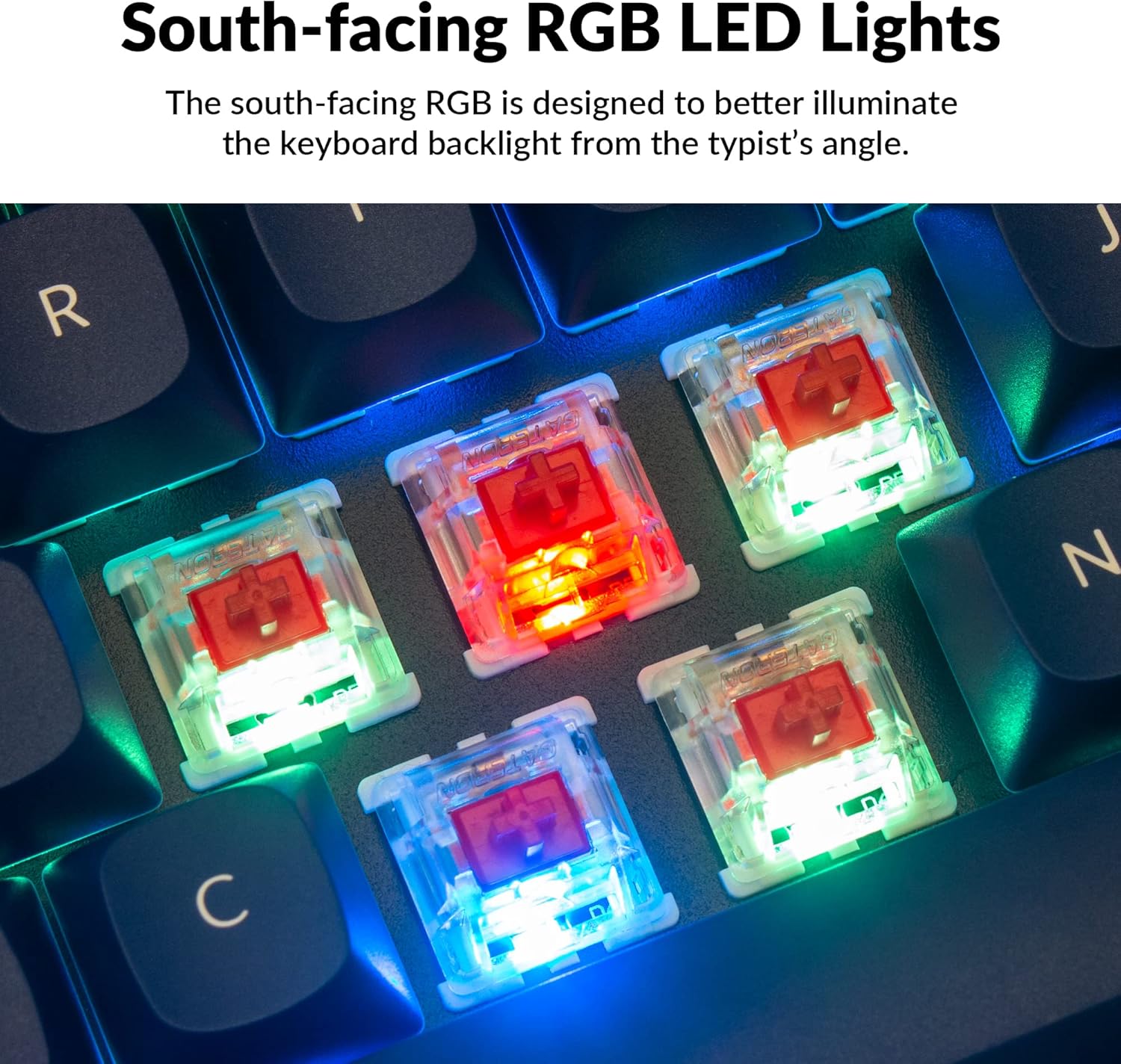
The Q2 comes with premium non-shine-through PBT keycaps, known for their durability and oil resistance. The keyboard features south-facing RGB LEDs, designed to provide better illumination of the backlight from the typist's perspective.
Resim: Ayrıntılı view of the Keychron Q2's double-shot PBT keycaps, highlighting their texture and legends.

Image: A close-up of the Keychron Q2's south-facing RGB LEDs illuminating the switches from below.
Bakım
1. Klavyeyi Temizleme
Düzenli temizlik, klavyenin performansını ve görünümünü korumaya yardımcı olur.
- Toz Giderimi: Tuş başlıkları arasındaki toz ve kalıntıları temizlemek için basınçlı hava spreyi kullanın.
- Tuş Kapağı Temizliği: For deeper cleaning, remove the keycaps using the provided keycap puller. Wash them with mild soap and water, then ensure they are completely dry before reattaching.
- Kasa Temizleme: Alüminyum kasayı yumuşak bir bezle silin.amp Kumaş. Cilaya zarar verebilecek sert kimyasallardan kaçının.
2. Switch and Stabilizer Maintenance
The hot-swappable design allows for easy maintenance of switches and stabilizers.
- Anahtar Değişimi: If a switch becomes faulty, replace it using the hot-swapping procedure described in the Operating Instructions.
- Stabilizer Lubrication: For optimal performance and reduced wobbliness on larger keys (space bar, shift, enter), the PCB-mounted screw-in stabilizers can be lubricated. This typically involves disassembling the keyboard to access the stabilizers.

Image: An exploded diagram of the Keychron Q2, showing its various components like keycaps, switches, top case, gaskets, plate, PCB, sound absorbing foam, case foam, bottom case, and silicone gaskets, illustrating ease of disassembly.
Sorun giderme
Yaygın Sorunlar ve Çözümleri:
- Klavye Yanıt Vermiyor:
- USB kablosunun hem klavyeye hem de bilgisayara güvenli bir şekilde bağlandığından emin olun.
- Verify the Mac/Windows switch on the back of the keyboard is set to the correct operating system.
- Try connecting the keyboard to a different USB port or a different computer to rule out port issues.
- Bilgisayarınızı yeniden başlatın.
- Çalışmayan Belirli Tuşlar:
- Remove the keycap and switch for the non-functional key. Inspect the switch pins for bends or damage. Straighten bent pins carefully or replace the switch if damaged.
- Anahtarın PCB'ye tam olarak oturduğundan emin olun.
- Check VIA software to ensure the key has not been accidentally remapped or disabled.
- RGB Aydınlatma Sorunları:
- Klavyenin düzgün bağlandığından emin olun.
- Use the VIA software to check and adjust lighting settings.
- Perform a factory reset if lighting issues persist (refer to Keychron's official support for specific reset procedures).
- Klavye Rastgele Bağlantı Kesiyor:
- Farklı bir USB kablosu deneyin.
- Ensure the USB port on your computer is stable and providing sufficient power.
- Bilgisayarınızın USB sürücülerini güncelleyin.
If you encounter issues not covered here, please refer to the official Keychron support resources.
Özellikler
| Özellik | Detay |
|---|---|
| Marka | Anahtarkron |
| Model Adı | Q2 |
| Model Numarası | Q2-J1 |
| Klavye Düzeni | 65% (68 Keys), QWERTY |
| Bağlantı Teknolojisi | Kablolu (USB-A, USB-C) |
| Uyumlu Cihazlar | PC (Linux, MacOS, Windows) |
| Anahtar Türü | Gateron G Pro Red (Linear), Hot-swappable |
| Arka aydınlatma | RGB (Güney yönüne bakan) |
| Malzeme | Full Aluminum Frame, PBT Keycaps |
| Ürün Boyutları | 12.89"U x 4.76"G x 1.33"Y |
| Özel Özellikler | QMK/VIA Programmable, Double Gasket Design |
Garanti Bilgileri
Keychron products typically come with a standard manufacturer's warranty. For detailed information regarding the warranty period, coverage, and terms and conditions for your Keychron Q2 keyboard, please refer to the official Keychron webSatın alma belgenizi veya ürününüzle birlikte verilen garanti belgesini saklayın. Garanti talepleriniz için satın alma belgenizi saklayın.
Destek ve Kaynaklar
For further assistance, software downloads (VIA), firmware updates, and frequently asked questions, please visit the official Keychron support page:
- Keychron Resmi Webalan: www.keychron.com
- QMK/VIA Software & Firmware: www.keychron.com/pages/qmk-via
- Keychron Store: Visit the Keychron Store on Amazon
You can also find community forums and additional user guides online for advanced customization and troubleshooting tips.