
1. Giriş
Thank you for choosing the BONTEC Mobile TV Stand. This stand is designed to provide a versatile and stable solution for displaying your flat or curved TV, offering mobility, height adjustment, and tilting features. Please read this manual carefully before assembly and use to ensure safe and proper operation. Keep this manual for future reference.
Güvenlik Bilgileri
- Montaja başlamadan önce tüm parçaların eksiksiz ve hasarsız olduğundan emin olun. Herhangi bir parça eksik veya arızalıysa kullanmayın.
- 20 kg (44 lbs) maksimum ağırlık kapasitesini aşmayın.
- Ensure your TV's VESA pattern is compatible with the stand (75x75mm, 100x100mm, 100x200mm, 200x100mm, 200x200mm).
- Çizilmeleri önlemek için standı yumuşak ve temiz bir yüzeye monte edin.
- Always tighten all screws securely. Periodically check for loose connections.
- Montaj sırasında çocukları ve evcil hayvanları uzak tutun.
- Use caution when moving the stand, especially with a TV mounted. Ensure wheels are unlocked before moving and locked when stationary.
2. Ürün Bittiview
The BONTEC Mobile TV Stand is a robust and adaptable solution for various environments, including homes, offices, and public spaces. It supports TVs from 13 to 49 inches and offers flexible viewseçenekleri.

Figure 2.1: The BONTEC Mobile TV Stand with a television mounted, highlighting its sleek design and portability.
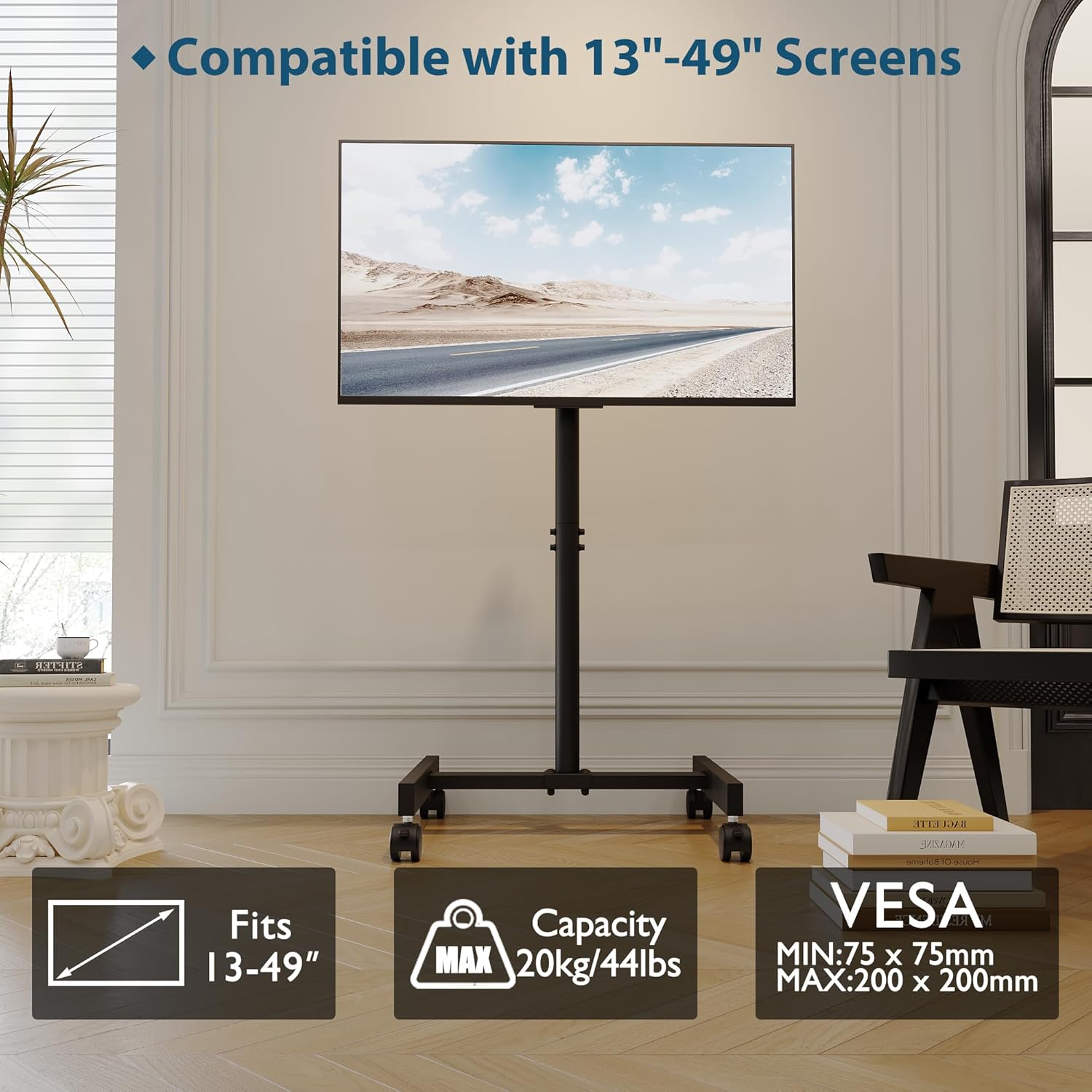
Figure 2.2: Compatibility details for screen sizes, weight capacity, and VESA mounting patterns.
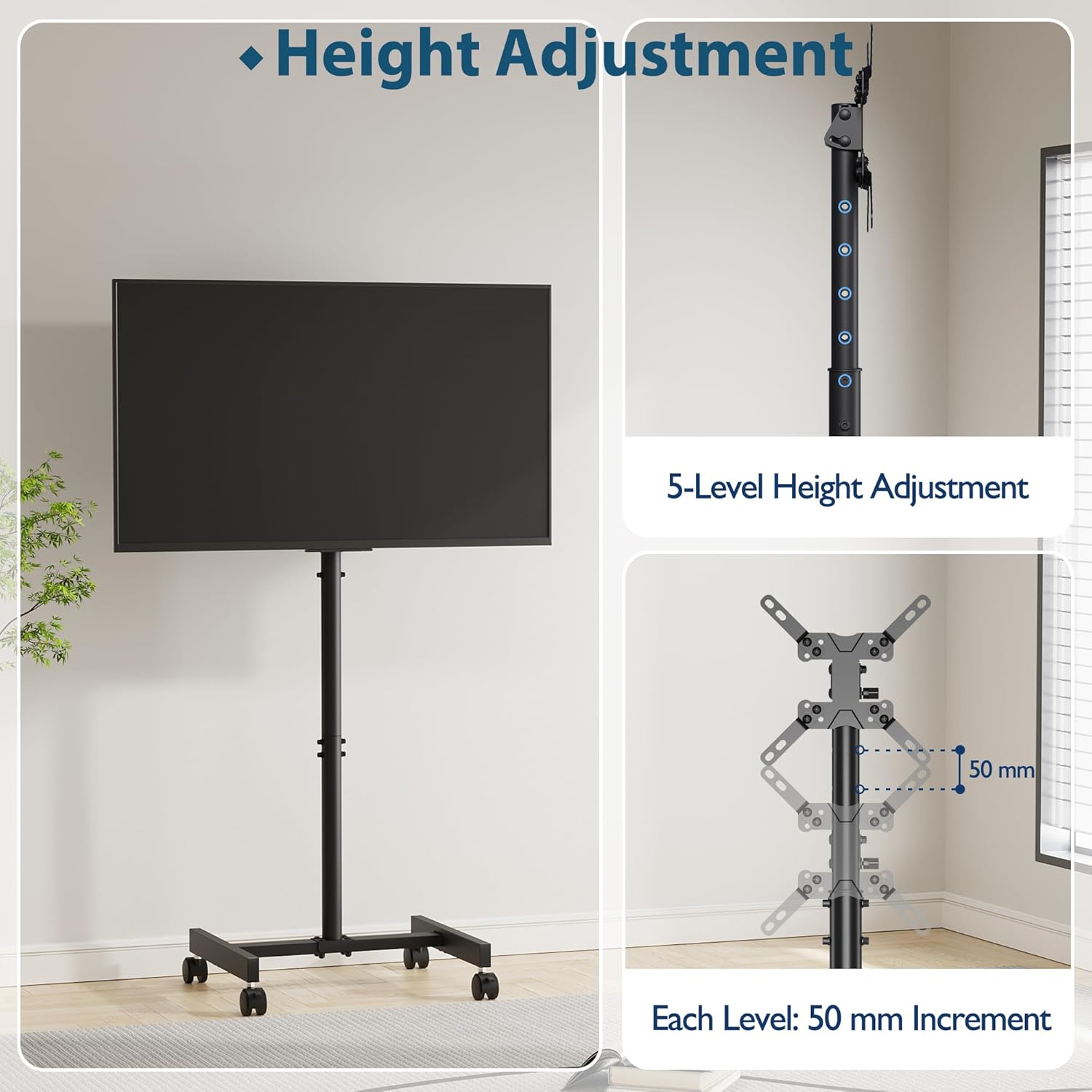
Figure 2.3: The stand offers 5 levels of height adjustment, each changing the height by 50mm.

Figure 2.4: The TV stand can be tilted upwards by 30 degrees for optimal viewaçıları.

Figure 2.5: Equipped with four 360-degree silent wheels for easy movement and portability.

Şekil 2.6: Ayrıntılı ürün özellikleri ve boyutları.
3. Kurulum ve Montaj
The BONTEC Mobile TV Stand is designed for quick and easy installation. All necessary hardware components and a clear instruction manual are included. Please follow the steps below carefully.
Montaj Adımları
- Parçaları Paketinden Çıkarın ve Tanımlayın: Carefully unpack all components and lay them out on a soft, clean surface. Refer to the included parts list to ensure all pieces are present. The hardware is typically organized in labeled bags (e.g., A, B, C) to correspond with assembly steps. Do not open all bags at once.
- Tabanı birleştirin: Attach the vertical support column to the wheeled base. Ensure all screws are aligned and tightened securely.
- Install the TV Mounting Bracket: Secure the TV mounting bracket to the top of the vertical support column. This bracket is designed to accommodate various VESA patterns.
- TV askı aparatlarını TV'ye takın: Attach the two vertical TV brackets to the back of your television using the appropriate screws and spacers provided. Ensure the brackets are securely fastened and level. Note: Some users have reported that the provided screws for TV attachment might be too short for certain TV models. Please ensure the screws are long enough to securely engage with your TV's mounting holes without damaging internal components.
- Televizyonu monte edin: Carefully lift your TV and hook the attached TV brackets onto the mounting bracket on the stand. Ensure the TV is securely seated and locked into place.
- Yüksekliği ve Eğimi Ayarlayın: Once the TV is mounted, you can adjust the height and tilt as desired (refer to Section 4 for detailed instructions).
Video 3.1: Demonstration of the 5-level height adjustment mechanism. The stand can be adjusted in 50mm increments to achieve the desired viewyükseklik.
Video 3.2: Demonstration of the upward tilting feature, allowing the screen to be angled up to 30 degrees for improved viewçeşitli pozisyonlardan.
Video 3.3: Demonstration of the lockable wheels, showing how to engage and disengage the wheel locks for secure positioning or easy mobility.
Video 3.4: Illustration of the space-saving design, demonstrating how the stand can be positioned close to a wall or desk.
4. Kullanım Talimatları
Yükseklik Ayarı
The TV stand offers 5 height levels, with each level differing by 50mm, ranging from 910mm to 1160mm. To adjust the height:
- Televizyonun güvenli bir şekilde monte edildiğinden emin olun.
- Loosen the height adjustment screws on the main column.
- Carefully raise or lower the TV to the desired height. It is recommended to have assistance when adjusting the height with a TV mounted.
- Once at the desired height, securely tighten the height adjustment screws to lock the position.
Tilting Feature
The TV stand allows for an upward tilt of up to 30 degrees to achieve an optimal viewaçı.
- Locate the tilting mechanism on the TV mounting bracket.
- Adjust the tilt angle by loosening the tilt locking knobs, setting the desired angle, and then securely tightening the knobs.
Hareketlilik ve Kilitlenebilir Tekerlekler
The stand is equipped with four 360-degree silent wheels for easy movement. Each wheel has a locking mechanism for stability.
- Taşımak: Ensure all wheel locks are disengaged (unlocked). Gently push the stand to its new location.
- Güvenliği sağlamak için: Once the stand is in the desired position, press down on the locking lever on each wheel to engage the lock. This will prevent the stand from moving unintentionally.
5. Bakım
Regular maintenance will help prolong the life of your BONTEC Mobile TV Stand.
- Temizlik: Standı yumuşak, kuru bir bezle silin. İnatçı lekeler için hafifçe kuru bir bez kullanın.amp Bez kullanılabilir ve ardından kurutulmalıdır. Aşındırıcı temizleyicilerden veya çözücülerden kaçının.
- Bağlantıları Kontrol Edin: Periodically check all screws and bolts to ensure they remain tight. Loose connections can affect stability and safety.
- Tekerlek Muayenesi: Ensure the wheels are free of debris and roll smoothly. Lubricate if necessary.
6. Sorun Giderme
| Sorun | Olası Neden | Çözüm |
|---|---|---|
| Sehpa dengesiz veya sallanıyor. | Screws are loose; TV weight exceeds capacity; uneven floor. | Tighten all assembly screws. Verify TV weight is within 20 kg (44 lbs). Move stand to a level surface. |
| TV cannot be mounted or seems loose. | Incorrect VESA pattern; TV brackets not properly hooked; wrong screws used. | Verify TV's VESA pattern matches stand's compatibility. Ensure TV brackets are fully engaged with the stand's mounting plate. Use correct screw length for your TV. |
| Tekerlekler düzgün dönmüyor veya kilitlenmiyor. | Tekerleklerde biriken parçalar; kilit mekanizması sıkışmış. | Clean wheels of any hair or debris. Check if the locking mechanism is obstructed. |
| Difficulty adjusting height or tilt. | Adjustment screws/knobs are too tight or loose. | Loosen adjustment screws/knobs sufficiently before attempting to adjust. Tighten firmly after adjustment. |
7. Özellikler
| Özellik | Şartname |
|---|---|
| Model Numarası | XXSA253 |
| Uyumlu Ekran Boyutları | 13 - 49 inç |
| Maksimum Ağırlık Kapasitesi | 20 kg (44 lbs) |
| VESA Uyumluluğu | 75x75mm, 100x100mm, 100x200mm, 200x100mm, 200x200mm |
| Yükseklik Ayar Aralığı | 910 mm to 1160 mm (5 levels, 50mm increments) |
| Eğim Açısı | Up to 30 degrees upward |
| Malzeme | Alaşımlı Çelik |
| Ürün Boyutları (U x G x Y) | 42.3 x 42.5 x 116 cm (maksimum yükseklik) |
| Ürün Ağırlığı | 4.39 kilo |
8. Garanti ve Destek
BONTEC products are manufactured with high-quality materials and undergo strict quality control. This product comes with a standard manufacturer's warranty against defects in materials and workmanship. For specific warranty details, please refer to the warranty card included with your product or contact BONTEC customer support.
Müşteri Desteği
If you have any questions, require assistance with assembly, or encounter any issues not covered in this manual, please contact our customer support team:
- Webalan: www.bontec.com (Örnamp(Bağlantı)
- E-posta: support@bontec.com (Örnamp(E-posta)
- Telefon: +1-800-XXX-XXXX (Examp(Sayı)
Please have your model number (XXSA253) and purchase information ready when contacting support.