
giriiş
This manual provides comprehensive instructions for the setup, operation, and maintenance of your Nady DW-11-LT-HM Digital Wireless Lapel & Headset Microphone System. This system delivers superior digital audio quality with ultra-low latency and reliable performance in the UHF 900MHz band. Please read this manual thoroughly before using the system to ensure optimal performance and longevity.
Güvenlik Bilgileri
- Üniteyi yağmura veya neme maruz bırakmayın.
- C'yi açmayınasing; tüm servis işlemlerini kalifiye personele yaptırın.
- Use only the specified power adapter for the receiver.
- Ensure proper battery polarity when installing batteries in the transmitter.
- Sistemi ısı kaynaklarından ve direkt güneş ışığından uzak tutunuz.
- Avoid dropping or subjecting the components to strong impacts.
Paket İçeriği
Aşağıda listelenen tüm öğelerin paketinizde bulunduğunu doğrulayın:
- DW-11 Digital Wireless Receiver
- LT-HM Digital Wireless Bodypack Transmitter
- Yaka Mikrofonu
- Kulaklık Mikrofonu
- Alıcı için Güç Adaptörü
- 2 adet AA Pil (verici için)
- Kullanım Kılavuzu (bu belge)
Ürün Bittiview
DW-11 Digital Wireless Receiver
The receiver unit processes the digital audio signal from the transmitter and outputs it to your audio system. It features a front panel display and controls, along with rear panel audio outputs and power input.
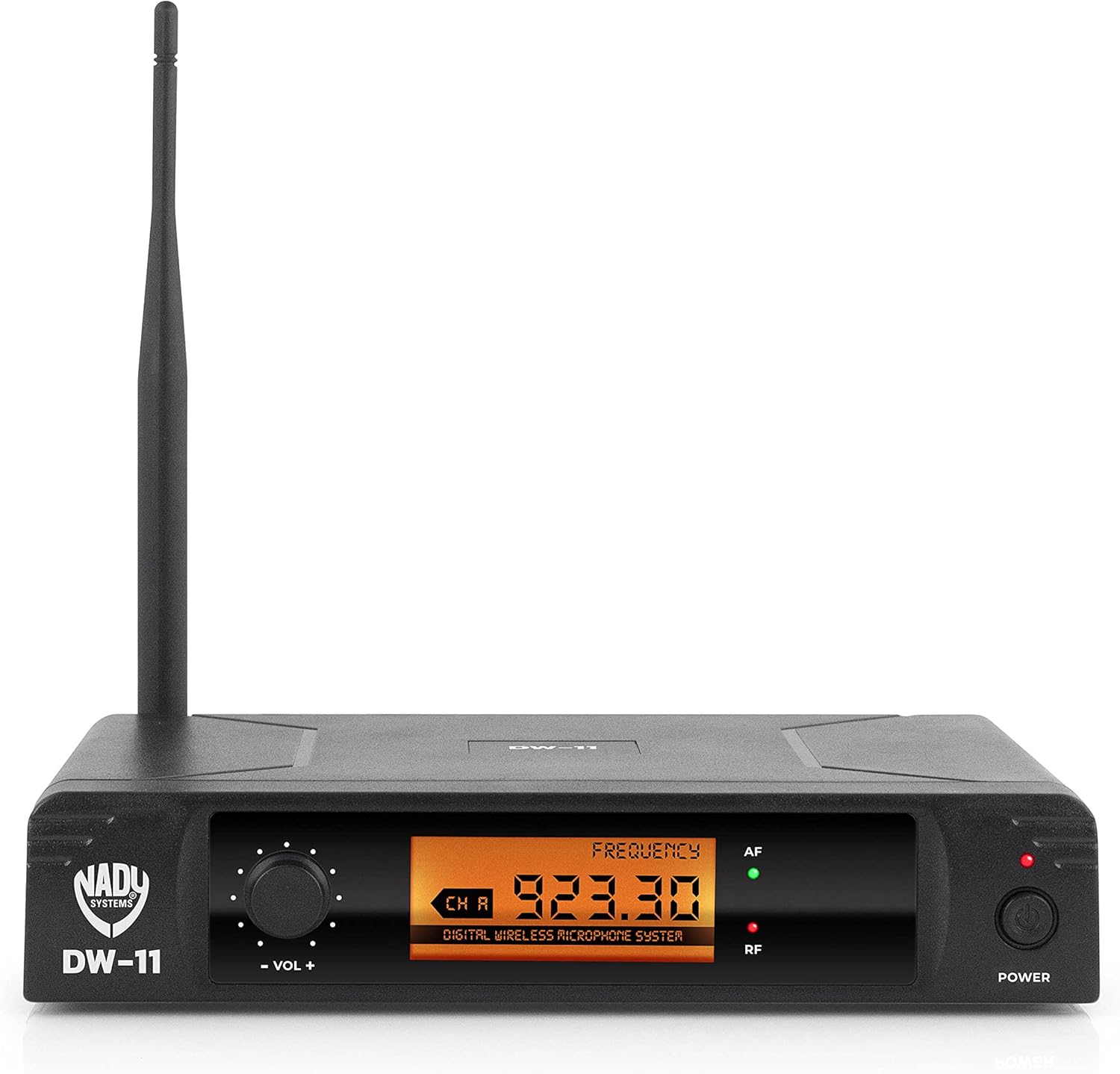
Şekil 1: Front Panel of DW-11 Receiver. This image displays the front of the Nady DW-11 receiver, highlighting its digital display, volume control knob, and power button. Indicators for AF (Audio Frequency) and RF (Radio Frequency) are also visible.

Şekil 2: Rear Panel of DW-11 Receiver. This image shows the rear connections of the Nady DW-11 receiver, including the balanced XLR output, unbalanced 1/4" output, and the DC 12-15V power input.
LT-HM Digital Wireless Bodypack Transmitter
The bodypack transmitter is lightweight and designed for discreet wear. It connects to either the included lapel or headset microphone and transmits the audio signal wirelessly to the DW-11 receiver. It operates on two AA batteries.
- Lapel Microphone: A small, clip-on microphone suitable for interviews, presentations, and general speech.
- Kulaklık Mikrofonu: Worn on the head, providing a secure fit and consistent microphone placement for active performers or presenters.
Kurulum Talimatları
- Bileşenleri Paketinden Çıkarın: Tüm bileşenleri dikkatlice ambalajından çıkarın.
- Alıcı Yerleşimi: Place the DW-11 receiver on a stable surface, away from other wireless devices or large metal objects that could interfere with the signal. Ensure the antenna is upright and unobstructed.
- Connect Receiver Power: Connect the provided power adapter to the DC 12-15V input on the rear of the DW-11 receiver and plug it into an AC outlet. Do not power on the receiver yet.
- Verici pillerini takın: Open the battery compartment on the LT-HM bodypack transmitter. Insert two fresh AA batteries, observing the correct polarity (+/-). Close the compartment securely.
- Connect Microphone to Transmitter: Plug either the lapel or headset microphone into the input jack on the LT-HM bodypack transmitter. Ensure the connection is firm.
- Alıcıyı Ses Sistemine Bağlayın:
- For balanced connections, use an XLR cable to connect the "BAL MIC OUT" on the receiver to an XLR input on your mixer or audio interface.
- For unbalanced connections, use a 1/4" TS cable to connect the "UNBAL LINE SUM OUT" on the receiver to a 1/4" input on your mixer or ampcankurtaran.
Kullanım Talimatları
- Alıcıyı Açın: Press the "POWER" button on the front panel of the DW-11 receiver. The display should illuminate.
- Vericiyi Açın: Press and hold the power button on the LT-HM bodypack transmitter until its indicator light illuminates.
- Frekans Senkronizasyonu: The Nady DW-11 system operates on a fixed frequency (902-951MHz band). The receiver and transmitter are pre-set to communicate on a specific channel. Ensure both units are powered on and within range. The "RF" (Radio Frequency) indicator on the receiver should light up, indicating a successful connection.
- Sesi Ayarla: Use the "VOL +" and "VOL -" knob on the front of the DW-11 receiver to adjust the output level. Start with a low volume and gradually increase it to a comfortable listening level on your connected audio system. The "AF" (Audio Frequency) indicator will light up when audio is being received.
- Mikrofon Kullanımı:
- Lapel Mic: Clip the lapel microphone approximately 6-8 inches below your chin, centered on your clothing.
- Kulaklık Mikrofonu: Kulaklığın mikrofon kolunu ağzınızın köşesinden yaklaşık 1-2 cm uzağa konumlandırın.
- Menzil: The system offers an extended wireless range of up to 300 feet (line of sight). Performance may vary depending on environmental conditions and obstructions.
- Kapat: To turn off the system, first power off the transmitter, then the receiver.
Bakım
- Temizlik: Use a soft, dry cloth to clean the exterior of the receiver and transmitter. Do not use liquid cleaners or solvents.
- Pil Değişimi: Replace the AA batteries in the transmitter when the battery indicator shows low power or when audio quality degrades. Always use fresh, high-quality batteries.
- Depolamak: When not in use for extended periods, remove batteries from the transmitter and store the system in a cool, dry place, away from extreme temperatures and humidity.
Sorun giderme
| Sorun | Olası Neden | Çözüm |
|---|---|---|
| Ses çıkışı yok |
|
|
| Kesintili ses veya parazit |
|
|
| Weak audio signal |
|
|
Özellikler
- Modeli: DW-11-LT-HM
- Frekans Tepkisi: 20Hz-20kHz
- Kablosuz Menzili: 300 feet'e kadar (görüş hattı)
- Verici Pil Ömrü: Up to 11 hours (with 2 AA batteries)
- Alıcı Çıkışları: 1/4" Unbalanced, XLR Balanced
- Çalışma Frekansı: 902-951MHz UHF band
- Modülasyon: Dijital QPSK
- Dijital Ses Dönüşümü: 48 kHz / 24 bit
- Ürün Ağırlığı: 1.94 pound
- Ürün Ölçüleri: 14 x 14 x 3 inç
Garanti ve Destek
Garanti bilgileri veya teknik destek için lütfen resmi Nady web sitesine başvurun. webSite üzerinden veya müşteri hizmetleri departmanıyla iletişime geçin. Satın alma fişinizi, olası garanti talepleri için satın alma belgesi olarak saklayın.
Nady Webalan: www.nady.com