
1. Giriş
Thank you for choosing the A4tech FG1112 Fstyler Wireless Keyboard and Mouse Set. This compact and efficient combo provides a reliable 2.4GHz wireless connection, offering convenience and comfort for your daily computing needs. The keyboard features a Q Turkish layout with FN multimedia keys, while the mouse offers precise 1200 DPI optical tracking. This manual will guide you through the setup, operation, and maintenance of your new device.
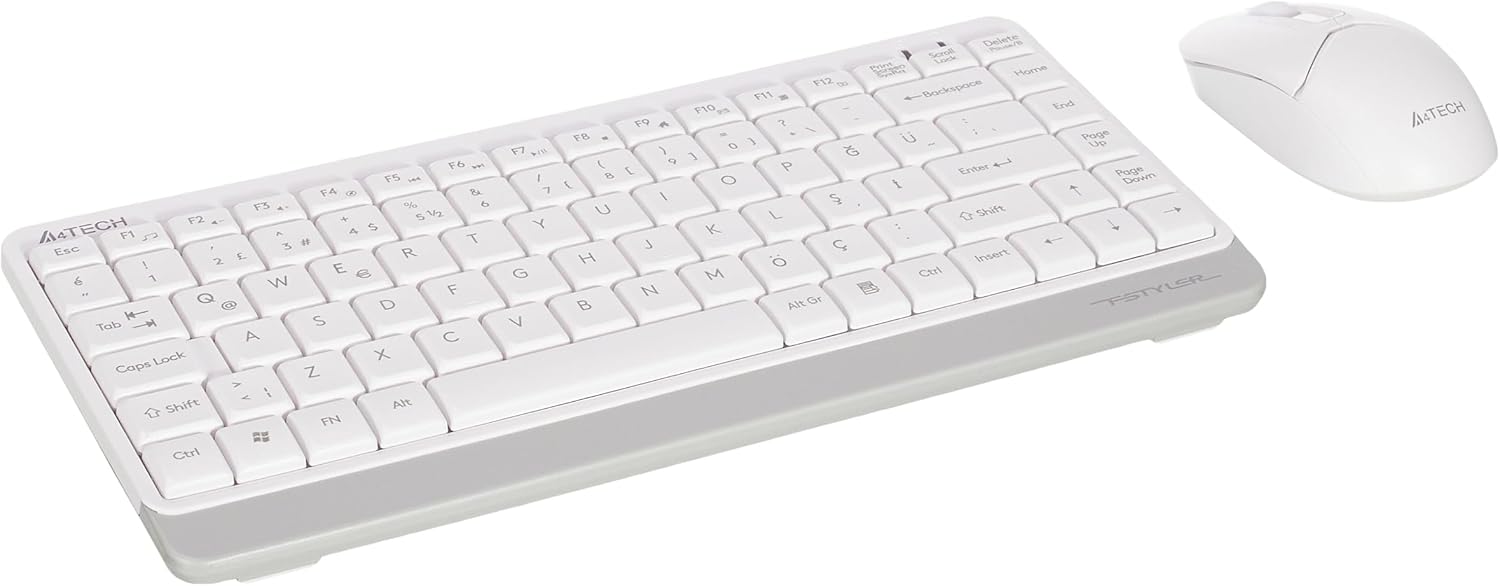
Image 1.1: A4tech FG1112 Fstyler Wireless Keyboard and Mouse Set (White)
2. Paket İçeriği
Lütfen paket içeriğini kontrol ederek tüm öğelerin mevcut olduğundan emin olun:
- 1 x A4tech FG1112 Wireless Keyboard
- 1 x A4tech Fstyler Wireless Mouse
- 1 x USB Nano Alıcı
- 2 adet AAA pil (klavye için)
- 1 x AA Battery (for mouse, typically included)
- 1 x Kullanım Kılavuzu (bu belge)
3. Kurulum Talimatları
- Pilleri Takın:
- For the keyboard: Open the battery compartment cover on the underside of the keyboard. Insert two AAA batteries, ensuring correct polarity (+/-). Close the cover.
- For the mouse: Open the battery compartment cover on the underside of the mouse. Insert one AA battery, ensuring correct polarity (+/-). Close the cover.

Image 3.1: Mouse bottom view showing battery compartment and power switch.
- USB Nano Alıcısını Bağlayın: Locate the USB Nano Receiver, typically stored inside the mouse's battery compartment or packaged separately. Plug the receiver into an available USB port on your computer.
- Güç Açık:
- For the keyboard: Ensure the keyboard is powered on. There might be a power switch on the top right or underside.
- For the mouse: Slide the power switch on the underside of the mouse to the "ON" position.
- Otomatik Bağlantı: Your computer should automatically detect and install the necessary drivers for the keyboard and mouse. This process may take a few moments. Once complete, your devices are ready for use.
Video 3.1: A short demonstration of the A4tech Fstyler Wireless Keyboard and Mouse Set, showing its compact design and wireless connectivity. This video illustrates the product's features and ease of use.
4. Kullanım Talimatları
4.1 Klavye Kullanımı
The A4tech FG1112 keyboard features a compact design with a Q Turkish layout. It is designed for comfortable and quiet typing.

Resim 4.1: Üst view of the A4tech FG1112 Wireless Keyboard, highlighting its Q Turkish layout.
Multimedia and Function Keys:
The keyboard includes 12 multimedia and internet function keys integrated into the F1-F12 keys. To activate these functions, press the FN İstediğiniz F tuşuyla aynı anda tuşa basın.
- FN + F1: Medya oynatıcı
- FN + F2: Sesi kıs
- FN + F3: Sesi aç
- FN + F4: Sesini kapatmak
- FN + F5: Önceki parça
- FN + F6: Sonraki parça
- FN + F7: Oynat/Duraklat
- FN + F8: Dur
- FN + F9: Home Page
- FN + F10: E-Posta
- FN + F11: Benim bilgisayarım
- FN + F12: Hesap makinesi

Image 4.2: Illustration of FN key functionality for multimedia controls.
4.2 Fare Kullanımı
The A4tech Fstyler mouse provides precise 1200 DPI optical tracking for smooth and accurate cursor movement.

Resim 4.3: Üst view of the A4tech Fstyler Wireless Mouse.
Temel Fonksiyonlar:
- Sol tık: Primary function, used for selecting items, opening filevb.
- Sağ tık: İkincil işlev, genellikle bağlam menülerini açar.
- Kaydırma tekerleği: Belgeleri kaydırmak için kullanılır ve web pages vertically. Can also function as a middle click button.
5. Bakım
- Temizlik: Klavyeyi ve fareyi temizlemek için yumuşak, kuru bir bez kullanın. İnatçı kirler için, biraz daha yumuşak bir bez yeterli olacaktır.amp Bez kullanılabilir, ancak cihazların içine sıvı girmemesine dikkat edin.
- Pil Değişimi: When the keyboard or mouse becomes unresponsive or exhibits delayed input, it's time to replace the batteries. Follow the "Insert Batteries" steps in the Setup section.
- Depolamak: When not in use for extended periods, turn off the mouse to conserve battery life. Store the devices in a cool, dry place.
6. Sorun Giderme
| Sorun | Olası Çözüm |
|---|---|
| Klavye/Fare yanıt vermiyor |
|
| Delayed or intermittent response |
|
| Multimedya tuşları çalışmıyor |
|
7. Özellikler
| Özellik | Detay |
|---|---|
| Marka | A4tech |
| Örnek | FG1112 |
| Bağlantı Teknolojisi | 2.4GHz Kablosuz |
| Klavye Düzeni | Q Turkish |
| Klavye Türü | Multimedia Membrane |
| Fare DPI'ı | 1200 DPI Optik |
| Klavye Güç Kaynağı | 2 x AAA Pil |
| Fare Güç Kaynağı | 1 x AA Battery (typical) |
| Özel Özellikler | Wireless, Mini, Multimedia Keys, Optical Mouse, Laser Printed Keys, Water-resistant design (with drainage channels) |
| Ürün Ağırlığı | 0.62 Kilograms (Set) |
| Boyutlar (Klavye) | Approx. 315mm (Width) x 146mm (Depth) x 25mm (Height) |
| Boyutlar (Fare) | Approx. 64mm (Width) x 108mm (Depth) x 35mm (Height) |

Image 7.1: Dimensions of the A4tech FG1112 Keyboard and Mouse.
8. Garanti ve Destek
This A4tech FG1112 Fstyler Wireless Keyboard and Mouse Set comes with a 2 yıllık garanti Satın alma tarihinden itibaren geçerlidir. Lütfen garanti talepleriniz için satın alma belgenizi saklayın.
For technical support, troubleshooting assistance, or warranty inquiries, please contact A4tech customer service through their official websitenize veya yerel distribütörünüze başvurun.
Daha fazla bilgi ve destek kaynaklarına şu adresten ulaşabilirsiniz: A4tech Store on Amazon.