
1. Giriş
This manual provides detailed instructions for the Orbic Speed Mobile Hotspot, Model VZORB400LBVZRT. This device allows you to create a personal Wi-Fi network using a 4G LTE cellular connection, enabling up to 10 Wi-Fi enabled devices to connect to the internet simultaneously. It is designed for portability, offering up to 12 hours of usage time and up to 5 days of standby time on a single charge.
Please read this manual thoroughly to ensure proper setup, operation, and maintenance of your device.
2. Ürün Bittiview
The Orbic Speed Mobile Hotspot is a compact and efficient device for on-the-go internet access. Familiarize yourself with its components:
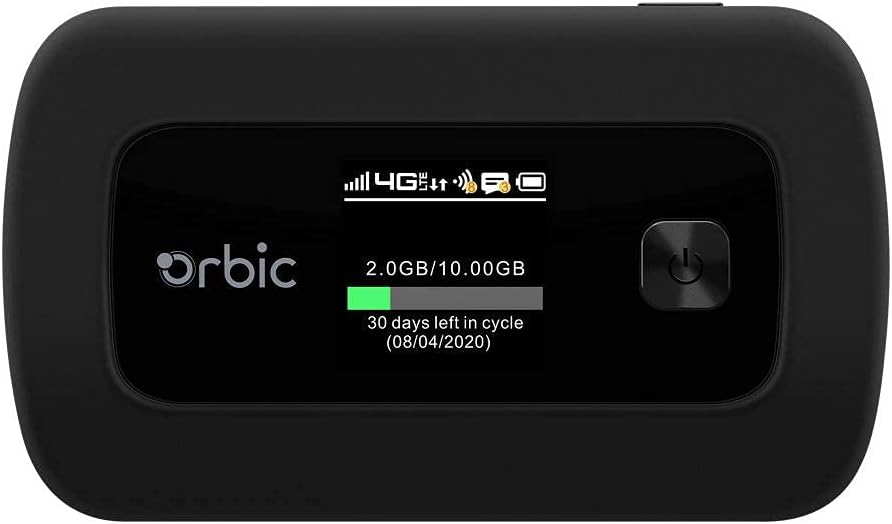
Şekil 2.1: Ön view of the Orbic Speed Mobile Hotspot, displaying the screen with network status, data usage, and power button.

Şekil 2.2: Arka view of the Orbic Speed Mobile Hotspot, showing the Verizon logo, indicating network compatibility.
Paket İçeriği:
- Orbic Speed Mobile Hotspot (Model VZORB400LBVZRT)
- Lityum İyon Pil
- Şarj Kablosu (USB)
- Güç Adaptörü (Duvar Şarj Cihazı)
- Hızlı Başlangıç Kılavuzu (eğer dahilse)
3. Kurulum
Follow these steps to set up your Orbic Speed Mobile Hotspot:
- SIM Kartı Takın: Open the back cover of the hotspot and carefully insert your activated 4G LTE SIM card into the designated slot. Ensure it is correctly oriented.
- Pili takın: Place the provided Lithium Ion battery into the battery compartment, ensuring the contacts align. Replace the back cover.
- Cihazı Şarj Edin: Connect the charging cable to the hotspot and the power adapter. Plug the adapter into a wall outlet. Allow the device to charge fully before first use. The screen will indicate charging status.
- Güç Açık: Press and hold the power button (located on the front panel) until the screen illuminates. The device will boot up and attempt to connect to the 4G LTE network.
- Başlangıç konfigürasyonu: Once powered on, the screen will display network status, Wi-Fi name (SSID), and password. Note these details for connecting your devices.
4. Kullanım Talimatları
4.1 Connecting Devices to Your Hotspot
- Ensure your Orbic Speed Mobile Hotspot is powered on and connected to the 4G LTE network.
- On your Wi-Fi enabled device (e.g., laptop, smartphone, tablet), open the Wi-Fi settings.
- Scan for available Wi-Fi networks. Locate the network name (SSID) displayed on your hotspot's screen.
- Select the hotspot's SSID and enter the Wi-Fi password (also displayed on the hotspot's screen) when prompted.
- Your device should now be connected to the internet via the hotspot. The hotspot supports up to 10 connected devices simultaneously.
4.2 WPS (Wi-Fi Korumalı Kurulum) Kullanımı
The Orbic Speed Mobile Hotspot supports WPS for easy connection of compatible devices:
- On your Wi-Fi device, initiate the WPS connection process.
- On the Orbic Speed Mobile Hotspot, navigate to the WPS option (refer to the on-screen menu or a dedicated WPS button if available) and activate it.
- The devices will automatically connect without needing to manually enter the password.
4.3 Monitoring Data Usage
The hotspot's screen displays real-time data usage information, including current usage and remaining data in your billing cycle. This helps you manage your data plan effectively.
4.4 Erişim Web Interface (Advanced Settings)
For advanced settings such as changing Wi-Fi name/password, managing connected devices, or configuring network settings, you can access the hotspot's web interface. Typically, you connect a device to the hotspot's Wi-Fi, then open a web browser and enter a specific IP address (e.g., 192.168.1.1 or 192.168.0.1) or a web address provided in the device's documentation. You will need to log in with administrator credentials, usually found on a sticker inside the battery compartment or in the quick start guide.
5. Bakım
5.1 Pil Bakımı
- Pil ömrünü uzatmak için cihazı aşırı sıcaklıklara maruz bırakmaktan kaçının.
- Charge the battery regularly. If the device will not be used for an extended period, charge it to about 50% before storing.
- Yalnızca orijinal veya onaylı şarj aksesuarlarını kullanın.
5.2 Temizlik
Wipe the device with a soft, dry cloth. Do not use liquid cleaners or abrasive materials, as they may damage the device.
5.3 Yazılım Güncellemeleri
Periodically check for software updates for your hotspot. Updates can improve performance, add features, and enhance security. These are typically managed through the device's web arayüz.
6. Sorun Giderme
If you encounter issues with your Orbic Speed Mobile Hotspot, refer to the following common solutions:
- Ağ Bağlantısı Yok:
- SIM kartınızın doğru şekilde takılı olduğundan ve bir veri planıyla etkinleştirildiğinden emin olun.
- Check for 4G LTE network coverage in your current location.
- Erişim noktasını yeniden başlatın.
- Cihazlar Wi-Fi'ye bağlanamıyor:
- Verify the Wi-Fi name (SSID) and password on the hotspot's screen match what you are entering.
- Ensure the hotspot is powered on and broadcasting its Wi-Fi signal.
- Bağlı cihaz sayısının maksimum sınırına (10) ulaşılıp ulaşılmadığını kontrol edin.
- Restart both the hotspot and the device attempting to connect.
- Yavaş İnternet Hızı:
- Relocate the hotspot to an area with better cellular signal strength.
- Bağlı cihaz sayısını azaltın.
- Check your data plan for any speed throttling or data limits.
- Battery Drains Quickly / Not Charging:
- Ensure the charging cable and adapter are securely connected and functioning.
- Avoid using the hotspot in extremely hot or cold environments.
- If the battery life has significantly degraded, it may need replacement.
- Cihaz Yanıt Vermiyor:
- Perform a soft reset by holding the power button until the device turns off, then power it back on.
- If a soft reset fails, locate the reset pinhole (if available) and use a paperclip to perform a factory reset (note: this will erase all custom settings).
7. Özellikler
| Özellik | Detay |
|---|---|
| Model Numarası | VZORB400LBVZRT |
| Marka | Orbic (Verizon compatible) |
| Bağlantı Teknolojisi | 4G LTE, Wi-Fi (802.11ac) |
| Frekans Bant Sınıfı | Çift Bant |
| Maksimum Bağlı Cihaz Sayısı | 10'e kadar |
| Kullanım Süresi | 12 saate kadar |
| Bekleme Süresi | 5 güne kadar |
| Pil Türü | 1 Lityum İyon pil |
| Özel Özellik | WPS (Wi-Fi Korumalı Kurulum) |
| Anten Tipi | Dahili |
| Ürün Boyutları | 2.55 x 3.46 x 1.85 inç |
| Ürün Ağırlığı | 8.8 ons |
8. Garanti ve Destek
For warranty information and technical support, please refer to the documentation provided with your purchase or contact the retailer/manufacturer directly. As this product may be a renewed item, specific warranty terms may vary. Please consult your purchase agreement for details regarding Amazon Renewed Guarantee or other applicable warranties.
For further assistance, you may need your device's serial number, which is typically located on a sticker inside the battery compartment or on the original packaging.