
1. Giriş
This manual provides essential information for the safe and efficient operation of your HKS VFD 7.5KW 10HP 220V Variable Frequency Drive. Please read this manual thoroughly before installation, operation, or maintenance to ensure proper usage and prevent potential hazards.
The HKS VFD is designed for precise motor speed control in various industrial applications, including CNC machines, spindle motors, compressors, and grinders. It supports both single-phase and three-phase 220V input and provides three-phase 220V output with a frequency range of 0-400Hz.
2. Güvenlik Bilgileri
WARNING: Electrical shock hazard. Only qualified personnel should perform installation and maintenance.
- Herhangi bir kablolama veya bakım işlemi yapmadan önce elektriğin kesildiğinden emin olun.
- Doğru hacmi doğrulayıntage and current ratings before connecting the VFD.
- Do not connect AC power to the output terminals (U, V, W).
- Discharging time is greater than 5 seconds after power-off. Wait for the indicator to turn off before touching components.
- The inside of the heat sink may reach about 176°F (80°C) when the VFD is working. Exercise caution.
- Do not install any switch between the VFD and the load. Refer to the wiring diagram for proper switch implementation.
- Select a VFD model with a power rating at least 15% greater than the load for heavy-duty applications.
- Ensure your motor is a 3-phase asynchronous motor before purchasing and connecting.
3. Ürün Bittiview
3.1. Temel Özellikler
- Güç: 7.5KW (10HP)
- Giriş Voltage: AC 220V (180-250V), 1-phase or 3-phase
- Çıkış Hacmitage: 220V, 3 fazlı
- Giriş Akımı: 35A
- Çıkış Akımı: 50A
- Giriş Frekansı: 40-60Hz
- Çıkış Frekansı: 0-400Hz
- Intuitive display and control buttons.
- Detachable control panel for remote operation.
- Multiple protection features: overload, fuse, overvoltage, düşük hacimtage, restart, stall, short circuit, and overheat protection.
- Low noise and electromagnetic interference due to PMW control technology and optimized cooling design.
3.2. Boyutlar
The HKS VFD 7.5KW 10HP 220V unit has approximate dimensions of 5 x 5 x 5 inches and weighs 6.45 pounds.

Figure 3.2.1: HKS VFD unit with indicated dimensions (5.9in x 7.1in x 8.7in, note: image dimensions differ slightly from product specifications, refer to text for official dimensions).

Figure 3.2.2: The HKS VFD features a detachable control panel for flexible installation and remote control capabilities.
4. Kurulum
4.1. Kablo Bağlantıları
Ensure all power is disconnected before proceeding with wiring. The VFD has terminals for input power (R, S, T) and output to the motor (U, V, W).
- İçin 3 fazlı güç girişi, connect to R, S, and T terminals.
- İçin single-phase 220V power input, connect to R and T terminals. Ensure the voltage difference between the two lines is approximately 220V (±15%).
- Bağlan 3 fazlı motor to the U, V, W output terminals.
- Use the Delta (Δ) wiring method for load terminals.
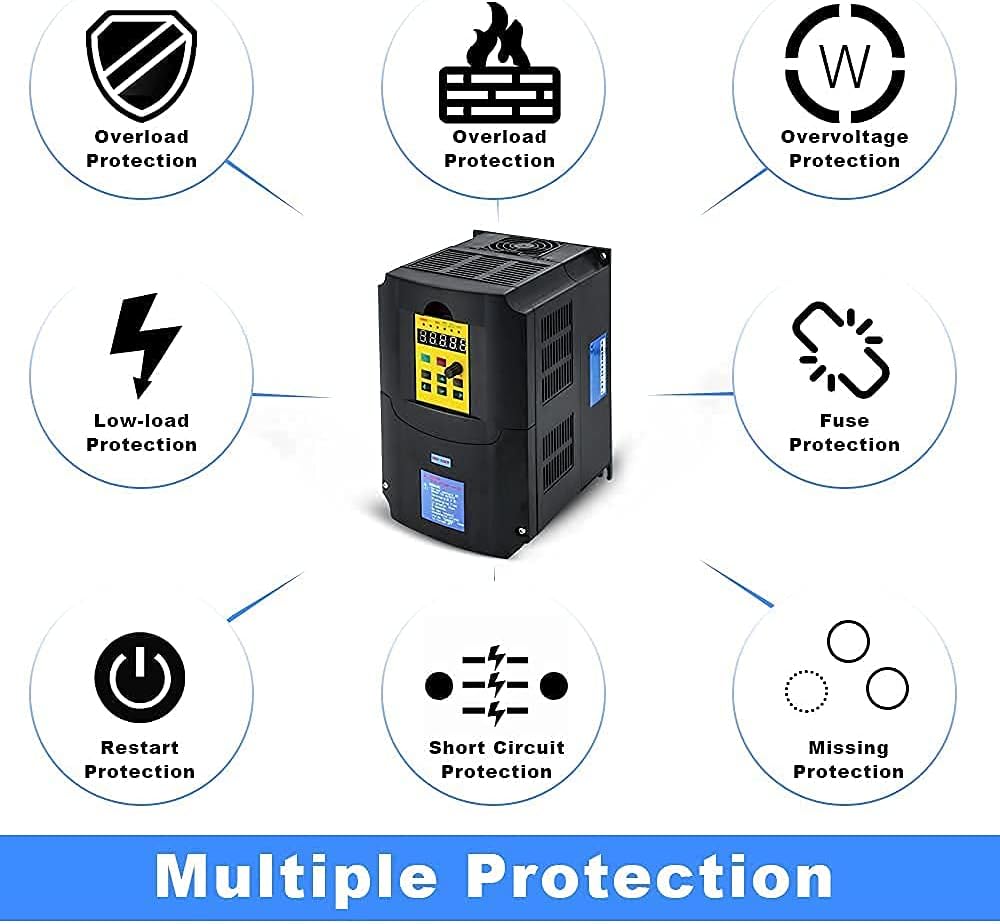
Figure 4.1.1: Simplified wiring diagram showing input power connection to the VFD and output to a 3-phase motor. A circuit breaker is shown for safety.

Figure 4.1.2: Detailed basic connection diagram for the HKS VFD, illustrating input (R, S, T) and output (U, V, W) terminals, control signal inputs (FWD/STOP, REV/STOP, RESET, etc.), and external potentiometer connections.
4.2. Power Connection Video Guide
Video 4.2.1: This video demonstrates how to connect power to the HKS A2 Series VFD. It shows the process of opening the terminal cover and connecting the input wires to the R and T terminals for single-phase 220V power, ensuring proper voltage difference. The video also highlights the importance of securing connections.
5. Operasyon
5.1. Kontrol Paneli Üzerindeview

Figure 5.1.1: Illustration of the HKS VFD control panel, detailing the function of each button (RUN/STOP, SET, JOG, UP/DOWN, Adjustment Knob) and indicators (ERROR, FWD, REV, ANALOG, SEGMENT, PANEL, Digital LCD).
5.2. Initial Parameter Setting Guide
To ensure optimal performance and compatibility with your motor, follow these steps for initial parameter setup. This guide focuses on common settings for 50Hz parameters.
- Ayarlamak pn32 (Parameter management) = 6 (50 Hz parametreleri için başlatma).
- Ayarlamak pn02 (Initial start up frequency by panel or other external signal) = Load rating frequency.
- Ayarlamak pn03 (Source of runtime frequency) = 2 (Panel düğmesi).
- Ayarlamak pn04 (Source of runtime command) = 1 (Panel düğmesi kontrolü).
- Ayarlamak pn10 (Maximum runtime frequency) = Load rating frequency.
- Ayarlamak pn12 (Motor rating frequency) = Load rating frequency.
Note: For 60Hz parameters, adjust relevant frequency settings accordingly. Consult the full manual for detailed parameter descriptions (Chapters 5-7).
Video 5.2.1: This video demonstrates the initial parameter setting guide for the HKS A2 Series VFD, specifically for 50Hz parameters. It shows how to navigate the menu and adjust parameters like pn32, pn02, pn03, pn04, pn10, and pn12 using the control panel buttons.
5.3. Jog Fonksiyonu
The JOG function allows for momentary operation of the motor at a preset low frequency. Press the JOG button to activate. The panel will indicate the JOG status.
Video 5.3.1: This video demonstrates the JOG function of the HKS A2 Series VFD. It shows how to activate the JOG function and observe the panel indicators for forward (FWD) and reverse (REV) operation.
6. Bakım
Regular maintenance ensures the longevity and reliable operation of your HKS VFD. Always disconnect power before performing any maintenance.
- VFD'yi temiz tutun ve toz ve kirden arındırın.
- Aşırı ısınmayı önlemek için ünitenin etrafında yeterli havalandırma olduğundan emin olun.
- Tüm kablo bağlantılarının sıkılığını ve aşınma veya hasar belirtilerini periyodik olarak kontrol edin.
- Inspect the cooling fan for proper operation and clear any obstructions.
- Avoid exposing the VFD to excessive moisture or corrosive environments.

Figure 6.1.1: Image showing the cooling fan and ventilation design of the HKS VFD, highlighting the importance of maintaining clear airflow for optimal performance and lifespan.
7. Sorun Giderme
This section provides basic troubleshooting steps for common issues. For complex problems, contact customer support.
| Sorun | Olası Neden | Çözüm |
|---|---|---|
| VFD does not power on. | No input power, loose connections, internal fuse blown. | Check power supply, verify wiring, inspect fuses (qualified personnel only). |
| Motor çalışmıyor. | Incorrect parameter settings, motor wiring error, overload. | Review parameter settings (e.g., pn02, pn03, pn04), check motor connections, reduce load. |
| Aşırı yükleme hatası. | Motor overloaded, VFD undersized for application, acceleration time too short. | Reduce load, ensure VFD power rating is sufficient (at least 15% higher than motor for heavy loads), increase acceleration time (pn08). |
| aşırı sestage/Gereksiztaghata. | giriş hacmitage kabul edilebilir aralığın dışında. | Giriş hacmini doğrulayıntage, 180-250V AC aralığındadır. |
| High temperature error. | Insufficient cooling, blocked vents, high ambient temperature. | Ensure proper ventilation, clear obstructions, consider cooling solutions. |
7.1. Koruma Özellikleri

Figure 7.1.1: Visual representation of the various protection features integrated into the HKS VFD, including overload, low-load, overvoltage, fuse, restart, short circuit, and missing protection.
8. Özellikler
| Özellik | Detay |
|---|---|
| Güç | 7.5KW (10HP) |
| Giriş Voltage | AC 220V (180-250V) |
| Giriş Aşaması | 1 fazlı veya 3 fazlı |
| Çıkış Hacmitage | 220V |
| Çıkış Aşaması | 3-fazlı |
| Giriş Akımı | 35A |
| Çıkış Akımı | 50A |
| Giriş Frekansı | 40-60Hz |
| Çıkış Frekansı | 0-400Hz |
| Ürün Boyutları | 5 x 5 x 5 inç |
| Ürün Ağırlığı | 6.45 pound |
| Önerilen Kullanımlar | Compressor, CNC router, Spindle motor, Grinder |
9. Garanti ve Destek
For warranty information or technical support, please refer to the product packaging or contact HKS customer service. It is recommended to have your product model number (7.5KW 10HP 220V) and purchase details available when contacting support.
If you have complex needs or encounter issues not covered in this manual, please contact customer service for accurate advice. Attaching pictures of the load equipment parameters (e.g., motor nameplate) can assist in faster resolution.