
1. Giriş
This manual provides instructions for the setup, operation, and maintenance of your Crosley C6B-DB Belt-Drive Bluetooth Turntable. The C6B-DB is a fully manual two-speed turntable designed to deliver an authentic analog listening experience. It features a durable MDF plinth, a heavy steel platter, and a low-vibration synchronous motor. The adjustable tonearm with a pre-installed moving magnet cartridge allows for precise tracking. Connectivity options include RCA outputs for wired speakers and built-in Bluetooth for wireless streaming to external speakers. Please read this manual thoroughly before using your turntable.
2. Güvenlik Bilgileri
Please observe the following safety precautions to prevent damage to the unit and ensure safe operation:
- Üniteyi yağmura veya neme maruz bırakmayın.
- Do not expose the unit to direct sunlight, heat sources, or extreme temperatures.
- Ünite çevresinde uygun havalandırmanın olduğundan emin olun.
- Yalnızca üniteyle birlikte verilen güç adaptörünü kullanın.
- Üniteyi sökmeye veya değiştirmeye çalışmayın. Tüm bakım işlemlerini yetkili personele yaptırın.
- Üniteyi güçlü manyetik alanlardan uzak tutun.
- Handle the stylus with care to avoid damage and injury.
3. Kutuda Neler Var?
Aşağıda listelenen tüm öğelerin paketinizde bulunduğunu doğrulayın:
- Crosley C6B-DB Turntable Unit
- Güç Kaynağı Adaptörü
- Kullanıcı Kılavuzu
- Toz Kapağı
- Plak
- tahrik Kayışı
- Keçe Mat
- Karşı ağırlık
- Kaymayı Önleyici Ağırlık
4. Ürün Bittiview
Familiarize yourself with the components of your Crosley C6B-DB turntable.

Şekil 1: Crosley C6B-DB Turntable with its clear dust cover in place. This image shows the overall design of the turntable, including the plinth, platter, tonearm, and the protective dust cover.
4.1 Üst View Bileşenler
- Toz Kapağı: Kullanılmadığı zamanlarda pikapı tozdan korur.
- Tabak: The surface on which records are placed. Made of heavy steel for stability.
- Felt Mat: Provides a soft surface for records and helps reduce static.
- Mil: Plağı plak üzerinde yerinde tutar.
- Silah kolu: Holds the cartridge and stylus, guiding it across the record grooves.
- Kartuş: Converts groove vibrations into electrical signals. The C6B-DB comes with a pre-installed moving magnet cartridge.
- Kalem (İğne): The tip of the cartridge that reads the record grooves.
- Karşı ağırlık: Adjusts the tracking force of the tonearm.
- Kaymayı önleyici ayar düğmesi: Compensates for the inward force on the tonearm, ensuring even tracking.
- İşaret Kolu: Raises and lowers the tonearm gently.
- Hız Seçici: 33 1/3 RPM ve 45 RPM arasında geçiş yapın.
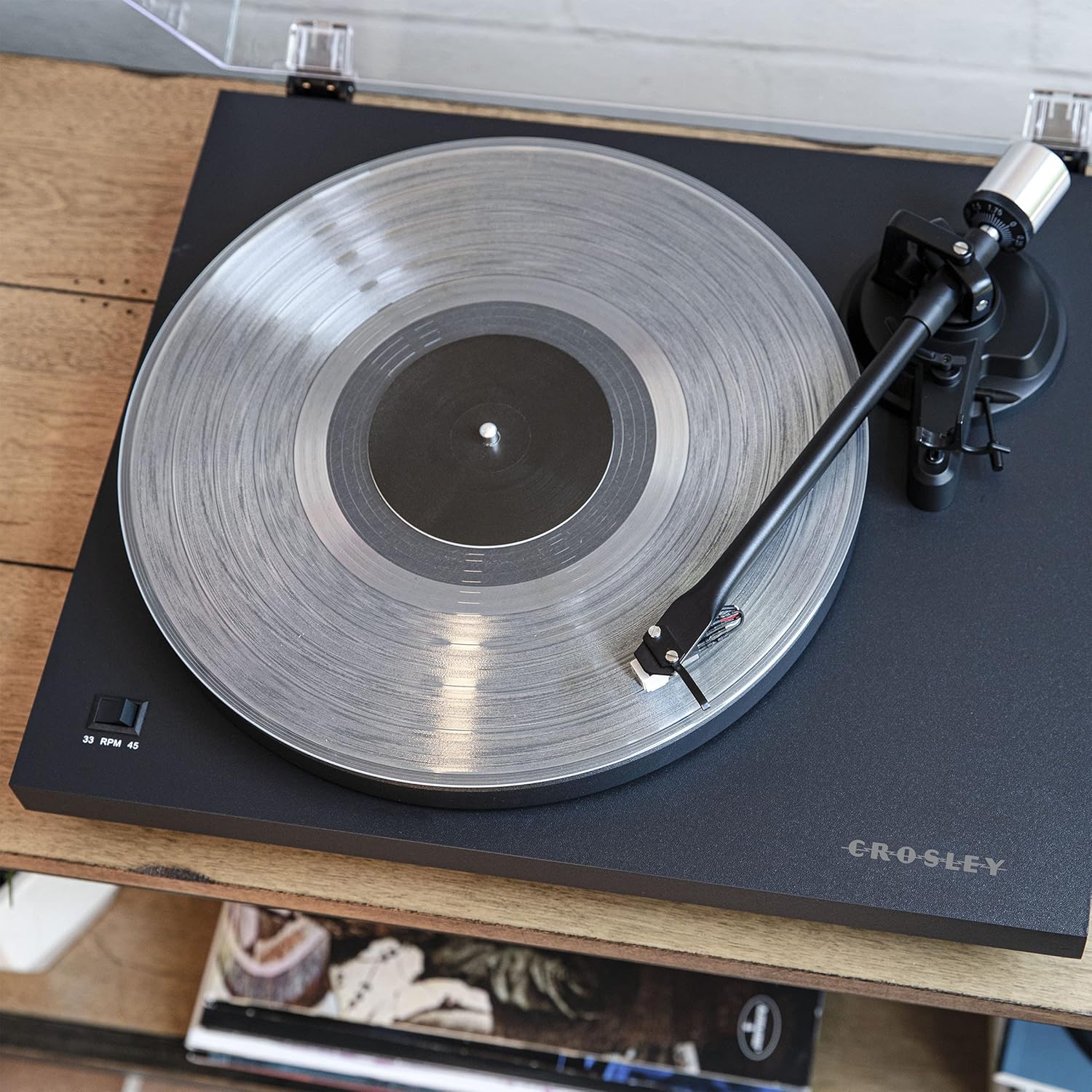
Şekil 2: Yukarıdan aşağıya bir view of the turntable, highlighting the platter, felt mat, spindle, and the tonearm assembly. The speed selector switch is visible on the left side of the plinth.

Şekil 3: A detailed close-up of the pre-installed moving magnet cartridge and stylus on the tonearm. This component is crucial for converting the physical grooves of a record into an audio signal.
4.2 Arka Panel Bağlantıları
- Yer Terminali: For connecting a ground wire from an amplifier/receiver to reduce hum.
- RCA Çıkışı (Sol/Sağ): Bir şeye bağlanır amplifli veya güçlendirilmiş hoparlörler.
- Fono/Hat Anahtarı: Selects between the built-in preamplifier (Line) or an external phono preamplifier (Phono).
- DC GİRİŞİ 12V: Birlikte verilen adaptör için güç girişi.
- Bluetooth Göstergesi: LED light indicating Bluetooth pairing status.
- Güç düğmesi: Turns the turntable on or off.

Şekil 4: The rear panel of the turntable, showing the ground terminal, RCA L/R outputs, Phono/Line switch, DC 12V power input, Bluetooth indicator, and the main power switch.
5. Kurulum
Follow these steps to set up your turntable for first use.
5.1 Paketten Çıkarma ve Yerleştirme
- Tüm bileşenleri dikkatlice ambalajından çıkarın.
- Place the turntable on a stable, level surface away from direct sunlight, heat, and vibrations.
- Ensure there is enough space around the turntable for proper ventilation and operation.
5.2 Plaka ve Kayış Montajı
- Place the platter onto the turntable spindle.
- Tahrik kayışını bulun. Kayışı yavaşça plak tablasının iç kenarı boyunca ve ardından motor kasnağı boyunca gerin. Kayışın bükülmediğinden emin olun.
- Keçe matı tabağın üstüne yerleştirin.
5.3 Pikap Kolu Dengeleme ve İzleme Kuvveti Ayarı
Proper tonearm adjustment is crucial for optimal sound quality and to prevent damage to your records and stylus.
- Kalem koruyucusunu çıkarın.
- Place the counterweight onto the rear of the tonearm. Rotate it clockwise until it is approximately halfway on.
- With the cueing lever in the down position, carefully balance the tonearm by rotating the counterweight until the tonearm floats horizontally. Do not let the stylus touch the platter or record.
- Once balanced, hold the counterweight steady and rotate the numbered ring on the front of the counterweight until "0" aligns with the line on the tonearm.
- Rotate the entire counterweight (both parts) counter-clockwise to the recommended tracking force. For the pre-installed cartridge, a tracking force of 2.0 grams is typically recommended. Refer to your cartridge manufacturer's specifications for precise values.
5.4 Anti-skate Adjustment
The anti-skate mechanism prevents the tonearm from being pulled inward excessively.
- Attach the small loop of the anti-skate weight's thread to the anti-skate post on the tonearm.
- Pass the thread through the wire support.
- Set the anti-skate dial to the same value as your tracking force (e.g., 2.0 for 2.0 grams tracking force).
5.5 Ses Bağlantısı
Connect your turntable to an audio system.
- Using Built-in Preamplifier (Line Out): Connect the RCA cables from the turntable's RCA outputs to a Line-level input (AUX, CD, Tuner) on your amplifier or powered speakers. Set the Phono/Line switch on the turntable's rear panel to "Line".
- Using External Preamplifier (Phono Out): Eğer senin amplifier has a dedicated Phono input, connect the RCA cables from the turntable's RCA outputs to the Phono input on your amplifier. Set the Phono/Line switch on the turntable's rear panel to "Phono". Connect the ground wire from the turntable to the ground terminal on your ampcankurtaran.
5.6 Güç Bağlantısı
Connect the power adapter to the DC IN 12V port on the turntable and then plug it into a wall outlet.
6. Operasyon
Instructions for playing records and using Bluetooth connectivity.
6.1 Plak Çalma
- Ensure the turntable is powered on using the switch on the rear panel.
- Select the correct speed (33 1/3 or 45 RPM) using the speed selector switch on the plinth.
- Place a record on the felt mat.
- Pikap kolunu kaldırma kolunu kullanarak yukarı kaldırın.
- Pikap kolunu, plağın istenen başlangıç oluğunun üzerine elle konumlandırın.
- Gently lower the tonearm using the cueing lever. The stylus will begin playing the record.
- To stop playback, lift the tonearm using the cueing lever and return it to the tonearm rest.
6.2 Bluetooth Out Function
The C6B-DB can stream audio wirelessly to external Bluetooth speakers.
- Harici Bluetooth hoparlörünüzün eşleştirme modunda olduğundan emin olun.
- Turn on the turntable. The Bluetooth indicator light on the rear panel will flash, indicating it is searching for a device.
- Bağlantı kurulduktan sonra Bluetooth gösterge ışığı sabit mavi renkte yanacaktır.
- You can now play records, and the audio will stream to your paired Bluetooth speaker.
- To disconnect, turn off the Bluetooth speaker or the turntable.
Video 1: This video demonstrates the features and operation of the Crosley C6B Turntable, including playing records, speed selection, and Bluetooth connectivity. It highlights the adjustable tonearm, pre-mounted cartridge, steel platter, and belt-driven motor.
7. Bakım
Regular maintenance helps prolong the life of your turntable and records.
7.1 Pikabın Temizlenmesi
- Wipe the dust cover and plinth with a soft, dry cloth. Do not use abrasive cleaners or solvents.
- Kalem ucunu temizlemek için, kalem ucu temizliği için tasarlanmış yumuşak bir fırça kullanın ve arkadan öne doğru nazikçe fırçalayın.
7.2 Kalem Değişimi
The stylus is a consumable part and should be replaced after approximately 300-500 hours of playback, or if you notice a degradation in sound quality. The C6B-DB is compatible with NP5 replacement needles.
- Gently pull the old stylus assembly downwards and forwards to remove it from the cartridge.
- Align the new stylus assembly with the cartridge body and push it upwards until it clicks into place.
8. Sorun Giderme
Pikapınızda sorun yaşıyorsanız, aşağıdaki yaygın sorunlar ve çözümlere göz atın.
| Sorun | Olası Neden | Çözüm |
|---|---|---|
| Güç yok | Güç adaptörü bağlı değil; Elektrik prizi aktif değil. | Ensure power adapter is securely connected to the turntable and a working outlet. Check the power switch on the rear panel. |
| Ses yok veya düşük ses seviyesi | Incorrect Phono/Line switch setting; RCA cables not connected; Amplifier/speakers off or volume low; Stylus damaged. | Set Phono/Line switch correctly (Line for line input, Phono for phono input). Check RCA cable connections. Ensure amplifier/speakers are on and volume is up. Inspect stylus for damage and replace if necessary. |
| Ses bozuk veya atlamalı | Tracking force incorrect; Anti-skate incorrect; Stylus dirty or damaged; Record dirty or damaged; Turntable not level. | Re-adjust tracking force and anti-skate. Clean stylus. Clean record. Ensure turntable is on a level surface. Replace stylus if damaged. |
| Kayıt hızı yanlış | Incorrect speed selected; Drive belt dislodged or worn. | Select the correct speed (33 1/3 or 45 RPM). Check if the drive belt is properly seated around the platter and motor pulley. Replace belt if worn. |
| Bluetooth eşleştirmiyor | External speaker not in pairing mode; Too far from speaker. | Ensure external Bluetooth speaker is in pairing mode. Move turntable closer to the speaker. |
9. Özellikler
| Özellik | Detay |
|---|---|
| Model Numarası | C6B-DB |
| Ürün Boyutları | 16.38 x 14.25 x 5.25 inç |
| Ürün Ağırlığı | 12.13 pound |
| Hızlar | 33 1/3, 45 dev/dak |
| Motor Tipi | AC Motor, Belt-Drive |
| Kartuş Tipi | Moving Magnet (NP5 replacement needle compatible) |
| Bağlantı | RCA Output (Phono/Line switchable), Bluetooth Out |
| Malzeme | Mühendislik Ahşap, Plastik |
| Güç Kaynağı | Kablolu Elektrik (DC 12V) |
10. Garanti ve Destek
Crosley products are manufactured to high-quality standards. For detailed warranty information, please refer to the warranty card included with your product or visit the official Crosley website. If you encounter any issues or require technical assistance, please contact Crosley customer support.
Crosley Support: www.crosleyradio.com/support