
1. Giriş
Satın aldığınız için teşekkür ederizasing the BYTECH BYMCLB116BK Projector Decor Light-Rainbow. This device is designed to project vibrant rainbow light effects, enhancing room ambiance and providing unique lighting for creative photography. Please read this manual thoroughly before use to ensure proper operation and maintenance.

Image 1.1: The BYTECH BYMCLB116BK Projector Decor Light-Rainbow packaging, highlighting its key features including rainbow glow, secure stabilization, 360-degree rotation and tilt, and USB connectivity.
2. Güvenlik Bilgileri
- Cihazı su ve nemden uzak tutunuz.
- Cihazı aşırı sıcaklıklara veya doğrudan güneş ışığına maruz bırakmayın.
- Cihazı düşürmekten veya güçlü darbelere maruz bırakmaktan kaçının.
- Cihazı kendiniz sökmeye veya onarmaya çalışmayın. Tüm bakım işlemlerini yetkili personele yaptırın.
- Use only the provided USB cable or a certified equivalent for power.
- Devrilmeyi önlemek için cihazın sabit ve düz bir yüzeye yerleştirildiğinden emin olun.
- Çocukların ve evcil hayvanların erişemeyeceği yerde saklayınız.
3. Paket İçeriği
Lütfen paket içeriğini dikkatlice kontrol edin. Eksik veya hasarlı bir ürün varsa, satıcınızla iletişime geçin.
- 1 x BYTECH BYMCLB116BK Projector Decor Light-Rainbow
- 1 x USB Power Cable (with wired remote control)
- 1 x Kullanım Kılavuzu
4. Kurulum
- Paketi aç: Carefully remove the Projector Decor Light from its packaging.
- Atama: Place the projector on a stable, flat surface. Consider the desired projection area and distance from the wall or ceiling for optimal effect. The device features 360-degree rotation and tilt for flexible positioning.
- Gücü bağlayın: Insert the small end of the USB power cable into the USB port on the projector. Connect the larger end of the USB cable to a standard USB power adapter (not included) or a powered USB port (e.g., on a computer or power bank).
- Secure Stabilization: Ensure the base is firmly placed to prevent accidental movement, utilizing its secure stabilization feature.
5. Kullanım Talimatları
The BYTECH Projector Decor Light is designed for simple operation.
- Güç Açma/Kapatma: Once connected to a power source, locate the wired remote control on the USB cable. Press the power button on the remote to turn the light on or off.
- Adjust Brightness/Mode: Use the other buttons on the wired remote control to cycle through different brightness levels or projection modes, if available. Refer to the remote's markings for specific functions.
- Projeksiyon Açısını Ayarla: L'yi manuel olarak ayarlayınamp head to rotate and tilt 360 degrees to direct the rainbow light projection to your desired area.
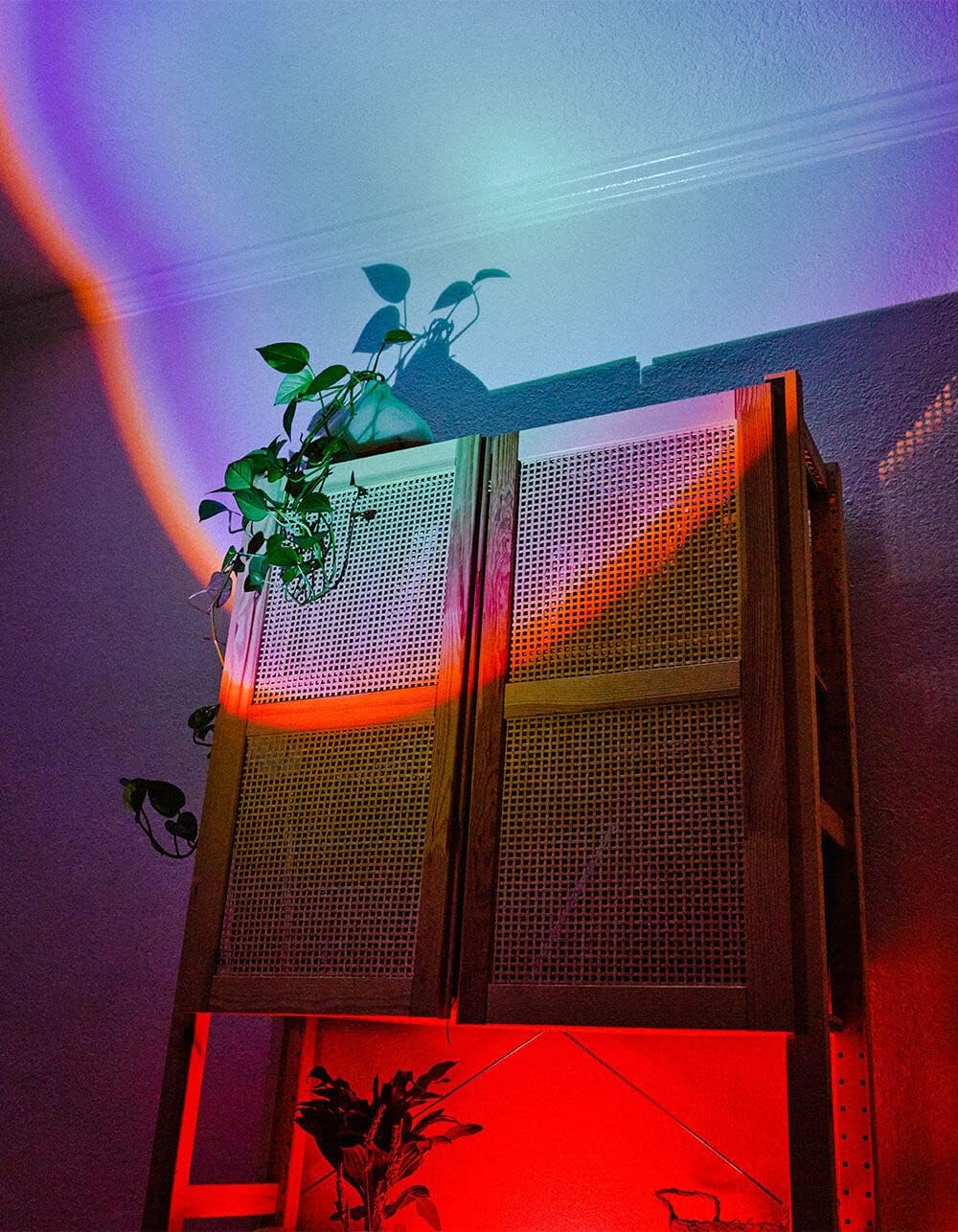
Image 5.1: The BYTECH Projector Decor Light-Rainbow in operation, casting vibrant rainbow light patterns onto a room's wall and furniture, demonstrating its ambient effect.
6. Bakım
- Temizlik: Disconnect the power before cleaning. Use a soft, dry cloth to wipe the surface of the projector. Do not use abrasive cleaners or solvents.
- Depolamak: When not in use for extended periods, store the device in a cool, dry place, away from direct sunlight and moisture.
- İşleme: Handle the device with care to avoid damage to the lens or internal components.
7. Sorun Giderme
| Sorun | Olası Neden | Çözüm |
|---|---|---|
| Cihaz açılmıyor. | Güç bağlantısı yok veya kablo arızalı. | Ensure the USB cable is securely connected to both the projector and a powered USB port/adapter. Try a different USB port or adapter. |
| Işık zayıf veya titriyor. | Insufficient power supply or dirty lens. | Ensure the power source provides adequate power. Clean the projector lens gently with a soft, dry cloth. |
| Projeksiyon bulanık. | Lens kirli. | Gently clean the projector lens with a soft, dry cloth. |
8. Özellikler
- Modeli: BYMCLB116BK
- Marka: Baytek
- Güç Girişi: USB Powered (5V DC, current not specified, typical for USB)
- Işık kaynağı: NEDEN OLMUŞ
- Projeksiyon Türü: Rainbow Glow
- Ayarlanabilirlik: 360° Rotation & Tilt
- Paket Boyutları: 5 x 5 x 5 inç
- Ürün Ağırlığı: 1 pound
- Üretici: BYTECH
9. Garanti ve Destek
This product is covered by a limited warranty provided by BYTECH. For specific warranty terms and conditions, please refer to the warranty card included with your purchase or visit the official BYTECH website. For technical support, troubleshooting assistance, or to inquire about replacement parts, please contact BYTECH customer service through their official channels.
Garanti talepleri için lütfen satın alma belgenizi saklayın.