
giriiş
Satın aldığınız için teşekkür ederizasing the Tzumi 7796 GO Theater Wi-Fi LED Cinema Projector. This manual provides essential information for setting up, operating, and maintaining your projector. Please read it thoroughly before use to ensure proper functionality and to maximize your viewing experience. This projector is designed for versatile use, including home entertainment, outdoor movie nights, and business presentations, offering a portable solution with Wi-Fi and multiple connectivity options.
Önemli Güvenlik Bilgileri
- Projektör lensine doğrudan bakmayın.amp Açık.
- Projektörün aşırı ısınmasını önlemek için çevresinde yeterli havalandırma olduğundan emin olun. Havalandırma açıklıklarını kapatmayın.
- Projektörü sudan ve diğer sıvılardan uzak tutun.
- Yalnızca projektörle birlikte verilen güç adaptörünü kullanın.
- Projektörü kendiniz tamir etmeye çalışmayın. Tüm servis işlemlerini yetkili personele yaptırın.
- Place the projector on a stable, level surface to prevent damage from falling.
- Şimşekli fırtınalar sırasında veya uzun süre kullanılmadığında projektörün fişini çekin.
Paket İçeriği
Lütfen tüm öğelerin mevcut olduğundan emin olun:
- Tzumi 7796 GO Theater Wi-Fi LED Cinema Projector
- Uzaktan kumanda
- Güç Adaptörü
- Kullanım Kılavuzu (bu belge)
- AV Kablosu (dahilse)
Ürün Bittiview
Ön View

Resim: Ön view of the Tzumi 7796 projector. This image displays the main projection lens on the left side and ventilation grilles along the front and right side of the device. The overall casing is white.
Taraf View Limanlarla
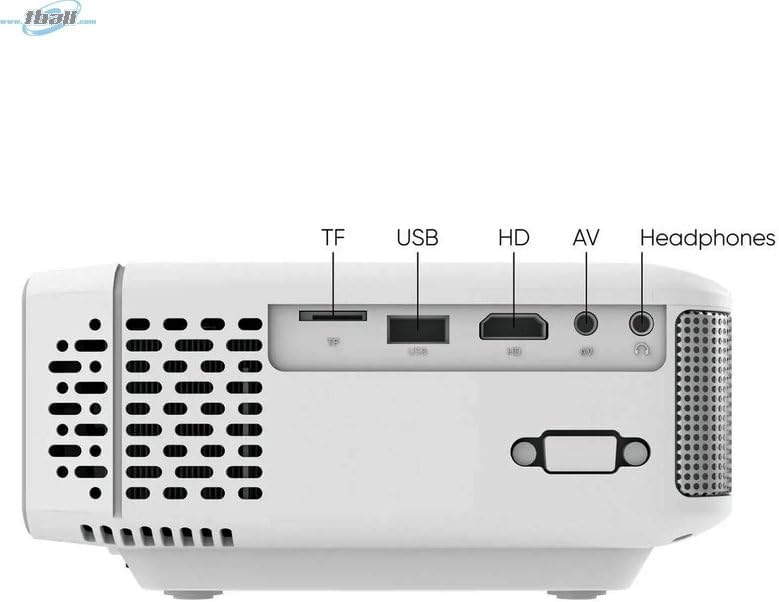
Resim: Taraf view of the Tzumi 7796 projector highlighting its various input ports. From left to right, these include a TF card slot, a USB port, an HD (HDMI) port, an AV input, and a headphone jack. This side also features ventilation grilles.
Tepe View Kontrollerle

Resim: Tepe view of the Tzumi 7796 projector. This image shows the manual focus and keystone correction dials located near the lens. The central control panel features directional buttons (Up, Down, Left, Right), Home, Option, Back, Power, and Enter buttons for navigation and control.
Arka View Güç Girişi ile

Resim: Arka view of the Tzumi 7796 projector. This view primarily shows the power input socket on the left side and additional ventilation grilles on the right side.
Kurulum Kılavuzu
1. Yerleşim
Projektörü sabit, düz bir yüzeye yerleştirin. En iyi sonuçlar için. viewing, position the projector directly in front of your screen or wall. The ideal projection distance will vary based on the desired screen size. Ensure there is adequate space around the projector for ventilation.

Resim: This image illustrates the versatility of the Tzumi 7796 projector, showing it being used in both an indoor home setting and an outdoor movie night environment. This highlights its suitability for various entertainment scenarios.
2. Güç Bağlantısı
- Connect the power adapter to the projector's power input port (refer to "Rear View with Power Input" image).
- Güç adaptörünün diğer ucunu duvar prizine takın.
- Projeksiyon cihazındaki güç gösterge ışığı yanmalıdır.
3. Cihazları Bağlama
Projeksiyon cihazı çeşitli giriş kaynaklarını destekler:
- HDMI: Connect your laptop, gaming console, or streaming device using an HDMI cable to the HD port.
- USB BAĞLANTI: Medya dosyalarını oynatmak için USB flash sürücüyü USB bağlantı noktasına takın. filedoğrudan s.
- AV: Use the provided AV cable to connect older devices like DVD players to the AV port.
- TF Kartı: Insert a TF (MicroSD) card into the TF card slot to play media files.
- Wifi: For wireless screen mirroring or streaming, connect the projector to your Wi-Fi network (see "Operating Instructions - Wi-Fi Connectivity").
4. Odak ve Trapez Düzeltme
- Odak: Döndür ODAK ring near the lens until the projected image is clear and sharp.
- Kilit taşı: If the image appears trapezoidal (wider at the top or bottom), adjust the KİLİT TAŞI correction dial until the image is rectangular.
Kullanım Talimatları
Açma/Kapatma
- Güç Açık: Basın Güç button on the projector's control panel or the remote control.
- Kapat: Basın Güç button again. Confirm shutdown if prompted.
Giriş Kaynağı Seçimi
After powering on, the projector will display its main menu. To select an input source:
- Use the directional buttons on the projector or remote to navigate to the desired input (e.g., HDMI, USB, AV, TF Card, Wi-Fi).
- Basın Girmek Seçiminizi onaylamak için düğmeye basın.
Wi-Fi Bağlantısı
To connect your projector to a Wi-Fi network for screen mirroring or online content:
- From the main menu, navigate to the Wifi or Ağ Ayarları seçenek.
- Seçme Wi-Fi Kurulumu and choose your desired network from the list.
- Ekran klavyesini kullanarak Wi-Fi şifresini girin ve onaylayın.
- Once connected, you can use screen mirroring features (e.g., Miracast, AirPlay) or access built-in smart features if available.
Ses Ayarları
The projector features two built-in 3W speakers. You can also connect external audio devices:
- Dahili Hoparlörler: Audio will play automatically through the projector's speakers. Adjust volume using the remote or control panel.
- Headphones/External Speakers: Connect headphones or external speakers to the 3.5mm headphone jack on the side of the projector. This will typically mute the built-in speakers.
Bakım
Lensin Temizlenmesi
En iyi görüntü kalitesini korumak için projektör merceğini temiz tutun.
- Optik lensler için özel olarak tasarlanmış, yumuşak ve tüy bırakmayan bir bez kullanın.
- Lensi dairesel hareketlerle nazikçe silin.
- Avoid using abrasive cleaners or excessive pressure, which can scratch the lens.
Genel Bakım ve Saklama
- Keep the projector in a cool, dry place when not in use.
- Protect the projector from dust and extreme temperatures.
- Do not expose the projector to direct sunlight for extended periods.
- Dış yüzeyi temizleyin.asinyumuşak bir g ile, damp bez. Sert kimyasallardan kaçının.
Sorun giderme
| Sorun | Olası Neden | Çözüm |
|---|---|---|
| Görüntü yansıtılmıyor. |
|
|
| Görüntü bulanık |
|
|
| Görüntü yamuk şeklindedir. |
|
|
| Ses yok |
|
|
| Wi-Fi bağlantı sorunları |
|
|
Özellikler
- Modeli: 7796
- Marka: Tzumi
- Ekran Çözünürlüğü: 1920x1080 (Tam HD)
- Parlaklık: 1600 Lümen
- Bağlantı Teknolojisi: HDMI, Wi-Fi, USB, AV, TF Card
- Özellik: Taşınabilir
- Önerilen Kullanımlar: Home entertainment, Outdoor movie nights, Business presentations
- Ürün Ağırlığı: 3 pound
- Paket Boyutları: 11 x 9 x 5 inç
- Dahili Hoparlörler: Two 3W speakers
Garanti ve Destek
For warranty information and technical support, please refer to the documentation included with your purchase or visit the official Tzumi webSite. Satın alma belgenizi garanti talepleriniz için saklayın.
Çevrimiçi destek: Amazon'daki Tzumi Mağazasını ziyaret edin.