
1. Giriş
This manual provides essential instructions for the installation, operation, and maintenance of your Hikvision 8MP AcuSense WDR Mini Bullet Network Camera, model DS-2CD2083G2-IU. Please read this manual thoroughly before using the product and retain it for future reference.
Ürün Bittiview
The Hikvision DS-2CD2083G2-IU is a high-performance 8-megapixel (4K) network camera designed for advanced surveillance. It features AcuSense technology for accurate human and vehicle target classification, Wide Dynamic Range (WDR) for clear imaging against strong backlight, and a fixed 2.8mm lens for a wide field of view. Its IP67 rating ensures robust outdoor performance, and the integrated microphone allows for audio monitoring.
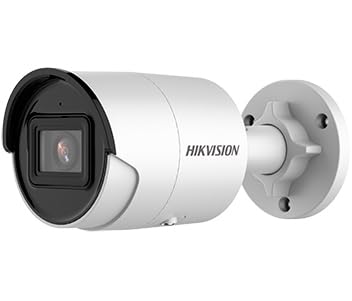
Figure 1: Hikvision 8MP AcuSense WDR Mini Bullet Network Camera (DS-2CD2083G2-IU)
This image displays the Hikvision 8MP AcuSense WDR Mini Bullet Network Camera, highlighting its compact bullet-style design suitable for various installation environments.
Temel Özellikler
- 8 Megapixel (4K) Resolution: Delivers high-quality, detailed video.
- AcuSense Teknolojisi: Reduces false alarms by accurately classifying human and vehicle targets.
- Geniş Dinamik Aralık (WDR): Ensures clear images even in scenes with strong contrast.
- Fixed 2.8mm Lens: Geniş bir yelpaze sunar. viewaçı.
- Infrared (IR) Illumination: 40 metreye kadar gece görüşü.
- IP67 Hava Koşullarına Dayanıklılık Derecesi: Çeşitli hava koşullarında dış mekan kullanımına uygundur.
- Dahili Mikrofon: Enables audio monitoring.
- Entegre Kart Okuyucu: Supports local storage (microSD card not included).
2. Güvenlik Bilgileri
Yaralanmayı veya ürüne zarar gelmesini önlemek için lütfen aşağıdaki güvenlik önlemlerine uyun:
- Ensure the power supply meets the camera's requirements (6.5 Watts).
- Fotoğraf makinesini aşırı sıcaklıklara, neme veya aşındırıcı ortamlara maruz bırakmayın.
- Avoid pointing the lens directly at strong light sources, as this may damage the sensor.
- Kurulum, yerel elektrik yönetmeliklerine uygun olarak yetkili personel tarafından yapılmalıdır.
- Yalnızca üretici tarafından belirtilen aksesuarları kullanın.
- Clean the camera lens with a soft, dry cloth. Avoid harsh chemicals.
3. Kurulum ve Kurulum
3.1 Paketin açılması
Carefully unpack the camera and check for any signs of damage. Ensure all components are present. (Typical components include: camera unit, mounting template, screws, waterproof connector, quick start guide).
3.2 Fiziksel Kurulum
The camera is designed for ceiling mounting. Select a suitable location that provides the desired field of view and is within reach of network and power cables. Due to its IP67 rating, it is suitable for outdoor environments.
- Use the provided mounting template to mark drill holes on the ceiling.
- Drill the necessary holes and insert wall plugs if required.
- Secure the camera base to the mounting surface using the supplied screws.
- Optimum kapsama alanı için kamera açısını ayarlayın.
3.3 Ağ ve Güç Bağlantısı
This is an IP network camera. It requires a network connection and power. Power over Ethernet (PoE) is typically supported, simplifying installation by delivering both power and data over a single Ethernet cable. If PoE is not used, a separate 12V DC power adapter (not included) will be required.
- Connect an Ethernet cable from your network switch/router to the camera's RJ45 port. Use the waterproof connector for outdoor installations.
- If not using PoE, connect a 12V DC power adapter to the camera's power input.
- Bağlantı kurulduktan sonra kamera açılacaktır. Açılış işleminin tamamlanması için birkaç dakika bekleyin.
3.4 İlk Yapılandırma
Kameraya erişim web bir arayüz aracılığıyla web browser using its default IP address (refer to the quick start guide or use Hikvision's SADP tool to discover the IP address). You will be prompted to set a strong password for security. Follow the on-screen instructions to configure network settings, date/time, and other basic parameters.
4. Kullanım Talimatları
4.1 Canlı View ve Kayıt
After initial setup, you can view the live feed from the camera through its web interface, a Network Video Recorder (NVR), or Hikvision's client software (e.g., iVMS-4200) or mobile app (Hik-Connect). Configure recording schedules and methods (continuous, motion-triggered) via the camera's settings or NVR.
4.2 AcuSense Smart Features
The AcuSense technology allows the camera to distinguish between humans, vehicles, and other moving objects, significantly reducing false alarms caused by animals, rain, or falling leaves. Configure these detection rules in the camera's event settings to receive more accurate alerts.
- Hareket Algılama 2.0: Set up detection zones and sensitivity for human and vehicle events.
- İzinsiz giriş tespiti: Define virtual boundaries, and the camera will trigger an alarm if a human or vehicle crosses them.
- Sınır Geçişi Algılama: Similar to intrusion, but for a specific line.
4.3 Geniş Dinamik Aralık (WDR)
WDR compensates for extreme lighting conditions, such as strong backlight, to ensure that both bright and dark areas of the image are clearly visible. This feature is typically enabled by default but can be adjusted in the image settings.
4.4 Infrared (IR) Night Vision
The camera automatically switches to IR mode in low-light conditions, providing clear black-and-white video up to 40 meters. Ensure no obstructions block the IR LEDs for optimal night vision performance.
4.5 Ses İzleme
With its built-in microphone, the camera can capture audio from the surveillance area. Audio settings, including gain control, can be configured in the camera's web interface. Ensure local regulations regarding audio recording are followed.
5. Bakım
- Temizlik: Kamera lensini ve muhafazasını düzenli olarak yumuşak bir bezle temizleyin.amp bezle silin. Aşındırıcı temizleyiciler kullanmayın.
- Donanım Yazılımı Güncellemeleri: Hikvision resmi web sitesini periyodik olarak kontrol edin website for firmware updates. Keeping the firmware updated ensures optimal performance, new features, and security enhancements.
- Kablo Denetimi: For outdoor installations, periodically inspect cables and connections for wear or damage, especially the waterproof connectors.
- Şifre Yönetimi: Regularly change your camera's password to maintain security.
6. Sorun Giderme
| Sorun | Olası Neden | Çözüm |
|---|---|---|
| No image/camera offline | No power, network cable disconnected, incorrect IP address. | Check power supply and network cable. Verify IP address using SADP tool. Restart camera. |
| Kötü görüntü kalitesi | Dirty lens, incorrect focus (if adjustable), poor lighting, network bandwidth issues. | Clean the lens. Ensure adequate lighting. Check network connection speed. Adjust image settings (WDR, exposure). |
| Hareket algılamadan kaynaklanan yanlış alarmlar | Sensitivity too high, environmental factors (trees, animals), AcuSense not configured. | Adjust motion detection sensitivity. Configure AcuSense human/vehicle detection. Adjust detection zones. |
| Erişilemiyor web arayüz | Hatalı IP adresi, ağ bağlantı sorunu, tarayıcı uyumluluğu. | Verify IP address. Ensure camera and PC are on the same network segment. Try a different browser. |
Bu çözümleri denedikten sonra sorun devam ederse lütfen Hikvision teknik desteğiyle iletişime geçin.
7. Özellikler
| Özellik | Detay |
|---|---|
| Model Numarası | DS-2CD2083G2-IU |
| Görüntü Sensörü | CMOS |
| Maksimum Çözünürlük | 8 MP (4K) |
| Mercek | 2.8mm Sabit Lens |
| IR Aralığı | 40 metreye kadar |
| WDR | Desteklenen |
| AkuSense | Human and Vehicle Target Classification |
| Ses | Dahili Mikrofon |
| Yerel Depolama | Integrated Card Reader (MicroSD slot) |
| Hava koşullarına dayanıklılık | IP67 |
| Güç Tüketimi | 6.5 Watt |
| Boyutlar (U x G x Y) | 15 x 15 x 8 cm (yaklaşık) |
| Montaj Tipi | Tavan Montajı |
| Uyarı Tipi | Motion Only (configurable for human/vehicle) |
8. Garanti ve Destek
Hikvision ürünleri genellikle sınırlı üretici garantisiyle birlikte gelir. Lütfen ürününüzle birlikte gelen garanti kartına bakın veya resmi Hikvision web sitesini ziyaret edin. webBölgenize özgü ayrıntılı garanti şartları ve koşulları için siteyi ziyaret edin.
For technical support, firmware downloads, or further assistance, please visit the official Hikvision support portal or contact their customer service department. Ensure you have your product model number (DS-2CD2083G2-IU) and serial number ready when contacting support.
Resmi Hikvision Webalan: www.hikvision.com