
1. Giriş
The CAMMHD C2 is a compact, head-mounted 4K video camera designed for hands-free recording. It features 6-axis anti-shake stabilization, Wi-Fi connectivity for app control, and a long-lasting 2200mAh battery, making it suitable for various activities such as vlogging, travel, and sports. This manual provides detailed instructions for the proper use and maintenance of your CAMMHD C2 camera.

Figure 1: CAMMHD C2 4K Head-Mounted Video Camera
2. Paket İçeriği
Lütfen aşağıda listelenen tüm ürünlerin paketinizde mevcut olduğundan emin olun. Eksik veya hasarlı bir ürün varsa, lütfen müşteri hizmetleriyle iletişime geçin.
- CAMMHD C2 4K Head-Mounted Camera
- Headband Bracket
- Kask Braketi
- 3M Yapışkan Pedler
- Mounting Bracket Tools
- USB Type-C Şarj Kablosu
- Güç Adaptörü
- 32 GB Hafıza Kartı (önceden takılı veya ayrı olarak)
- Kullanıcı Kılavuzu

Şekil 2: Dahil edilen aksesuarlar
3. Ürün Bittiview
Kameranın bileşenlerini ve kontrollerini iyice öğrenin.
3.1 Kamera Bileşenleri
- Mercek: Video ve fotoğraf çeker.
- Power/Wi-Fi Button: Powers the device on/off and activates Wi-Fi.
- Fotoğraf Düğmesi: Takes still images.
- Kayıt Düğmesi: Video kaydını başlatır ve durdurur.
- Gösterge Işığı: Displays device status (power, recording, Wi-Fi).
- TF Kart Girişi: Insert microSD card for storage.
- C Tipi Bağlantı Noktası: Şarj ve veri aktarımı için.
- Sıfırlama Düğmesi: Cihazı fabrika ayarlarına sıfırlar.

Şekil 3: Ön view of the CAMMHD C2 camera

Şekil 4: Alt view of the CAMMHD C2 camera showing ports
4. Kurulum
4.1 İlk Şarj
Before first use, fully charge the camera using the provided USB Type-C cable and power adapter. The indicator light will show charging status.
4.2 Hafıza Kartının Takılması
Locate the TF card slot. Gently insert the provided 32GB microSD card (or another compatible card up to 512GB) until it clicks into place. Ensure the camera is powered off before inserting or removing the memory card.
4.3 Kamerayı Monte Etme
The CAMMHD C2 offers versatile mounting options:
4.3.1 Head-Worn Installation
Attach the camera to the headband bracket. Adjust the headband for a comfortable and secure fit on your head. This method provides a first-person perspective.
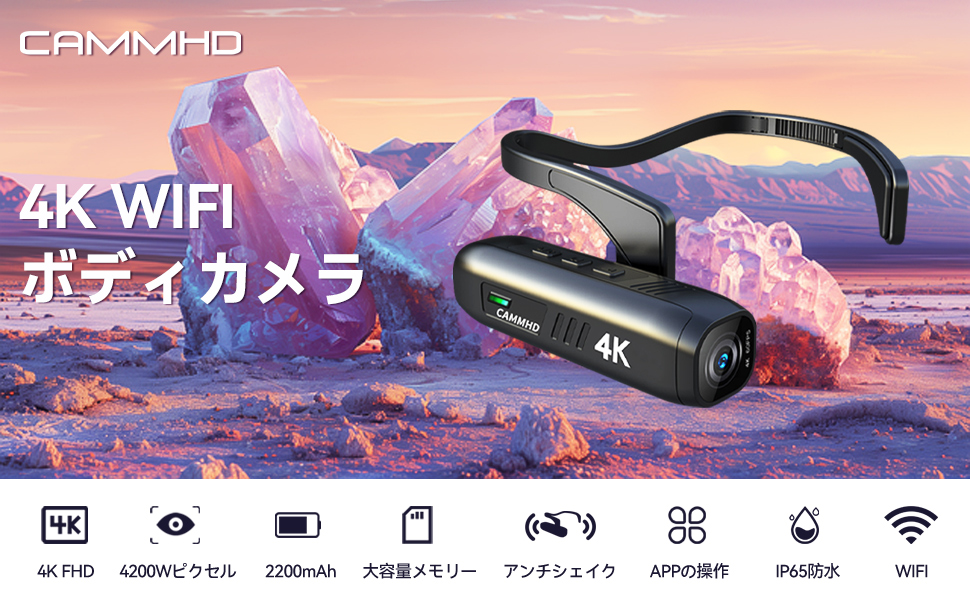
Figure 5: Head-worn installation for hands-free recording
4.3.2 Helmet-Mounted Installation
Use the helmet bracket and 3M adhesive pads to securely attach the camera to your helmet. Ensure the adhesive surface is clean and dry before application for optimal adhesion.

Figure 6: Helmet-mounted installation for secure attachment
5. Operasyon
5.1 Güç Açma/Kapatma
Basılı tutun Güç/Wi-Fi Düğmesi for a few seconds to turn the camera on or off. The indicator light will illuminate when powered on.
5.2 Video Kaydetme
Basın Kayıt Düğmesi once to start video recording. Press it again to stop recording. The indicator light will change to show recording status.
5.3 Fotoğraf Çekme
Basın Fotoğraf Düğmesi once to capture a still image.
5.4 Wi-Fi Connection and App Control
The CAMMHD C2 supports Wi-Fi connectivity for real-time viewing, control, and file transfer via a smartphone app.
- Download the "Viidure Camera" app from your smartphone's app store.
- Power on the CAMMHD C2 camera.
- Basın Güç/Wi-Fi Düğmesi briefly to activate Wi-Fi mode on the camera. The indicator light will show Wi-Fi status.
- On your smartphone, go to Wi-Fi settings and connect to the camera's Wi-Fi network (e.g., "M20Pro_20F_XXXXXXXXXX"). The default Wi-Fi password is 12345678.
- Open the "Viidure Camera" app. You can now view canlı footage, control recording, adjust settings, and transfer files directly to your smartphone.
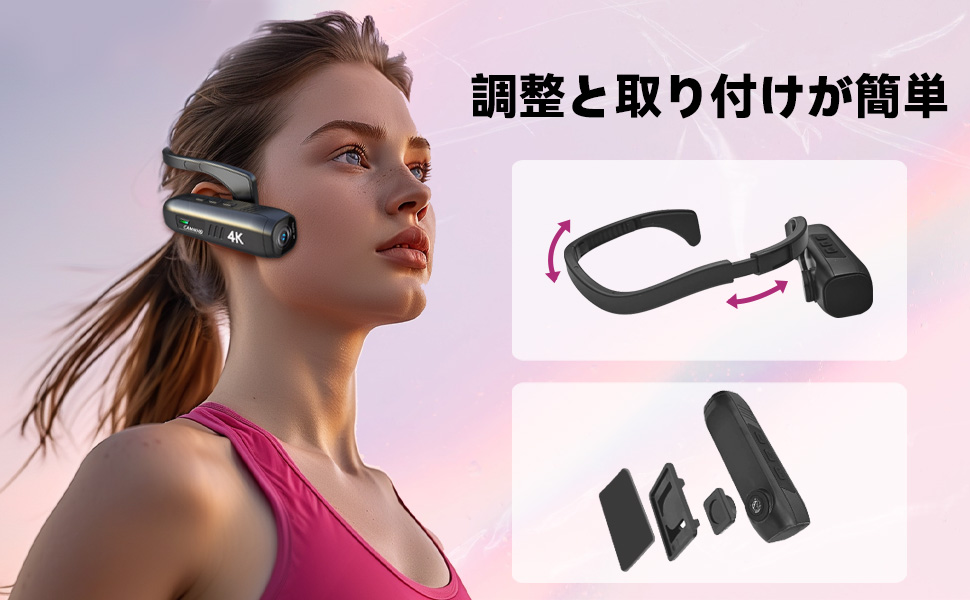
Figure 7: Wi-Fi app control interface
5.5 Temel Özellikler
- 4K Yüksek Çözünürlük: Records videos in 3840 x 2160 4K at 30fps or 2704 x 1520 2K at 30fps for clear and vivid footage.
- 6-Axis Anti-Shake: Advanced stabilization technology minimizes blur from movement, ensuring smooth video.
- Uzun Pil Ömrü: Integrated 2200mAh battery provides approximately 5-7 hours of continuous recording.
- Geniş Açı Mercek: 130-degree wide-angle lens captures a broader field of view.
- Genişletilebilir Depolama: 512 GB'a kadar microSD kartları destekler.
6. Bakım
- Fotoğraf makinesinin objektifini yumuşak, tüy bırakmayan bir bezle temiz tutun. Aşındırıcı malzemelerden kaçının.
- Kamerayı serin, kuru ve doğrudan güneş ışığından ve aşırı sıcaklıklardan uzak bir yerde saklayın.
- Regularly back up your recorded data to prevent loss.
- Ensure the Type-C port cover is securely closed when not in use to protect against dust and moisture.
7. Sorun Giderme
| Sorun | Olası Neden | Çözüm |
|---|---|---|
| Kamera açılmıyor. | Pil zayıf; cihaz arızalı. | Kamerayı tamamen şarj edin. Sorun devam ederse, destek ekibiyle iletişime geçin. |
| Wi-Fi'ye bağlanılamıyor. | Incorrect password; Wi-Fi not activated on camera; app issue. | Ensure Wi-Fi is active on camera. Verify password (12345678). Restart camera and app. |
| Video kalitesi düşük. | Lens is dirty; low light conditions; incorrect resolution settings. | Clean the lens. Ensure adequate lighting. Check resolution settings in the app. |
| Kamera donuyor veya tepkisizleşiyor. | Yazılım hatası. | Sıfırla düğmesine basın. |
8. Özellikler
| Özellik | Detay |
|---|---|
| Marka | CAMMHD |
| Örnek | C2 |
| Video Yakalama Çözünürlüğü | 4K (3840 x 2160) @ 30fps, 2K (2704 x 1520) @ 30fps |
| Fotoğraf Sensörü Teknolojisi | CMOS (Sony 386 sensor) |
| Video Yakalama Formatı | MP4 |
| Ses Formatı | WAV |
| Bağlantı | USB, Wi-Fi |
| Özel Özellikler | 4K, Wi-Fi, Vlog, 6-axis Anti-shake |
| Pil Kapasitesi | 2200 mAh Lityum İyon |
| Ortalama Pil Ömrü | 5-7 Saat |
| Depolama Desteği | Up to 512GB microSD card (32GB included) |
| Ağırlık | 75 gr |
| Boyutlar (D x G x Y) | 28x26x101 mm |
9. Garanti ve Destek
The CAMMHD C2 camera comes with a 1 yıllık garanti from the date of purchase. For technical support, warranty claims, or any inquiries, please contact CAMMHD customer service through the retailer where you purchased the product or visit the official CAMMHD webalan.
Çevrimiçi Kaynaklar: For additional support, FAQs, and firmware updates, please refer to the CAMMHD official store or product page: CAMMHD Official Store