
awei Y600
Awei Y600 Kablosuz Bluetooth Stereo Mini Hoparlör Kullanım Kılavuzu
Model: Y600 | Marka: Awei
giriiş
This manual provides detailed instructions for the safe and efficient use of your Awei Y600 Wireless Bluetooth Stereo Mini Speaker. Please read this manual thoroughly before operating the device and retain it for future reference.
The Awei Y600 is a portable wireless speaker designed for high-quality audio playback. Key features include:
- Bluetooth Version: CSR 4.1
- Pil Kapasitesi: 2600mAh
- Sürücü Ünitesi: 50mm
- Hoparlör gücü: 8W
- Şarj süresi: 5.5 saat
- Konuşma süresi: 14 saat
- Time to play the music: 14 hours
- Boyutu: 188x78x78 mm
- Frekans Aralığı: 20Hz-20KHz
- Şarj Hacmitage: DC 5V / 1.5A
- Mikrofon: Evet
Paket İçeriği
Lütfen kutuyu açtığınızda paket içeriğini kontrol ederek tüm öğelerin mevcut olduğundan emin olun:
- Awei Y600 Wireless Bluetooth Stereo Mini Speaker
- USB Şarj Kablosu
- Ses Kablosu (AUX)
- Kullanım Kılavuzu (bu belge)
Ürün Bittiview
Familiarize yourself with the various parts of your Awei Y600 speaker.

Şekil 1: Ön taraf view of the Awei Y600 speaker, showcasing its rose gold finish and black speaker grille.
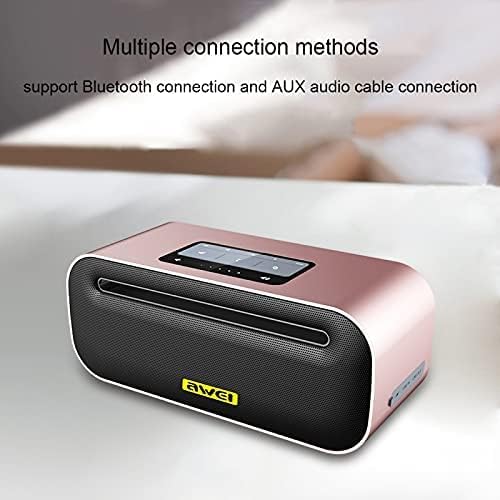
Şekil 2: Üst view of the Awei Y600 speaker, highlighting the control panel and indicating support for Bluetooth and AUX audio cable connections.
The speaker features a sleek design with a control panel on the top for easy access to functions like power, volume, and mode selection. The rear panel typically houses the charging port and AUX input.
Kurmak
Hoparlörü Şarj Etme
Before first use, fully charge the speaker. Connect the provided USB charging cable to the speaker's charging port and the other end to a USB power adapter (DC 5V / 1.5A) or a computer's USB port.
- Şarj esnasında şarj gösterge ışığı yanacaktır.
- Tam şarj için şarj süresi yaklaşık 5.5 saattir.
- Şarj işlemi tamamlandığında gösterge ışığı değişecek veya sönecektir.
Kullanım Talimatları
Güç Açık/Kapalı
- Cihazı açmak için: Sesli bir uyarı duyana veya gösterge ışığı yanana kadar Güç düğmesini birkaç saniye basılı tutun.
- Kapatmak için: Güç düğmesini tekrar birkaç saniye basılı tutun.
Bluetooth Eşleştirme
- Hoparlörün açık olduğundan ve Bluetooth eşleştirme modunda olduğundan emin olun (bu durum yanıp sönen mavi bir ışık veya sesli bir uyarı ile belirtilir).
- Cihazınızda (akıllı telefon, tablet, bilgisayar) Bluetooth'u etkinleştirin ve kullanılabilir cihazları arayın.
- Bulunan cihazlar listesinden "Awei Y600"yi seçin.
- Once paired, the speaker will provide an audible confirmation, and the indicator light will become solid blue.
- The speaker will automatically connect to the last paired device when powered on, if the device's Bluetooth is active and within range.
AUX Modu
To use the speaker with a non-Bluetooth device, connect one end of the provided 3.5mm audio cable to the speaker's AUX input port and the other end to the audio output jack of your device.
- The speaker should automatically switch to AUX mode. If not, press the Mode button (if available) to cycle through modes.
- Volume control can be managed both on the speaker and the connected device.
Oynatmayı Kontrol Etme
- Oynat/Duraklat: Oynat/Duraklat düğmesine basın.
- Sesi aç: Sesi Açma (+) tuşuna basın.
- Sesi kıs: Sesi Azalt (-) tuşuna basın.
- Sonraki Parça: Press and hold the Volume Up (+) button (or specific button if available).
- Önceki parça: Press and hold the Volume Down (-) button (or specific button if available).
Eller Serbest Arama
Hoparlör, Bluetooth aracılığıyla bir akıllı telefona bağlandığında eller serbest görüşme için kullanılabilir.
- Cevap Çağrısı: Press the Play/Pause button (or Call button if available).
- Çağrı Sonu: Press the Play/Pause button (or Call button if available) again.
- Çağrıyı Reddet: Press and hold the Play/Pause button (or Call button if available).
Bakım
- Temizlik: Hoparlörün yüzeyini temizlemek için yumuşak, kuru bir bez kullanın. Aşındırıcı temizleyiciler, alkol veya kimyasal çözücüler kullanmayın.
- Depolamak: Hoparlörü serin, kuru ve doğrudan güneş ışığından ve aşırı sıcaklıklardan uzak bir yerde saklayın.
- Pil Bakım: Pil ömrünü uzatmak için pili sık sık tamamen boşaltmaktan kaçının. Hoparlörü, uzun süre kullanılmasa bile düzenli olarak şarj edin.
- Suya Dayanıklılık: Bu hoparlör su geçirmez değildir. Suya veya yüksek neme maruz bırakmaktan kaçının.
Sorun giderme
| Sorun | Olası Neden | Çözüm |
|---|---|---|
| Hoparlör açılmıyor. | Pil zayıf. | Hoparlörü tam olarak şarj edin. |
| Bluetooth üzerinden eşleştirme yapılamıyor. | Hoparlör eşleştirme modunda değil; Cihazın Bluetooth'u kapalı; Hoparlörden çok uzakta. | Hoparlörün eşleştirme modunda olduğundan emin olun; Cihazınızda Bluetooth'u açın; Cihazınızı hoparlöre daha yakın bir mesafeye (10 metre içinde) getirin. |
| Ses yok. | Volume too low; Incorrect mode; Device not playing audio. | Increase volume on speaker and device; Ensure correct mode (Bluetooth/AUX); Check if audio is playing on the connected device. |
| Ses bozulması. | Volume too high; Weak signal. | Lower volume; Move closer to the connected device. |
Özellikler
| Özellik | Detay |
|---|---|
| Model Adı | Y600 |
| Marka | Awei |
| Bluetooth Sürümü | Sosyal Sorumluluk Yasası 4.1 |
| Pil Kapasitesi | 2600mAh |
| Sürücü Ünitesi | 50mm |
| Hoparlör Gücü | 8W |
| Şarj Süresi | 5.5 saat |
| Konuşma Zamanı | 14 saat |
| Müzik Çalma Süresi | 14 saat |
| Boyutlar (U x G x Y) | 188x78x78 mm |
| Frekans Aralığı | 20Hz-20KHz |
| Şarj Hacmitage | DC 5V / 1.5A |
| Mikrofon | Evet |
| Bağlantı Teknolojisi | Kablolu/Kablosuz |
| Ses Çıkışı Modu | Stereo |
Güvenlik Bilgileri
- Hoparlörü aşırı sıcaklıklara, doğrudan güneş ışığına veya yüksek neme maruz bırakmayın.
- Do not disassemble, repair, or modify the device yourself. This will void the warranty and may cause damage or injury.
- Hoparlörü çocuklardan ve evcil hayvanlardan uzak tutun.
- Use only the original or certified charging cables and adapters.
- Hoparlörü düşürmekten veya sert darbelere maruz bırakmaktan kaçının.
Garanti ve Destek
For warranty information and technical support, please refer to the warranty card included with your purchase or visit the official Awei webLütfen garanti talepleriniz için satın alma belgenizi saklayın.
Note: Any risks associated with the product's use are stated as "No" in the product description.
Ask a question about this manual
Ask about setup, troubleshooting, compatibility, parts, safety, or missing instructions. Manuals+ will review the question and use this page’s manual context to help answer it.