
1. Ürün Bittiview
The AI Carecam NPK Intelligent Camera is a wireless indoor security camera designed for home and office use. It features 360° pan and tilt capabilities, 2MP 1080P Full HD resolution, night vision, two-way audio communication, and motion detection. The camera supports up to a 128GB Micro SD card for local storage and is controlled via a mobile application.
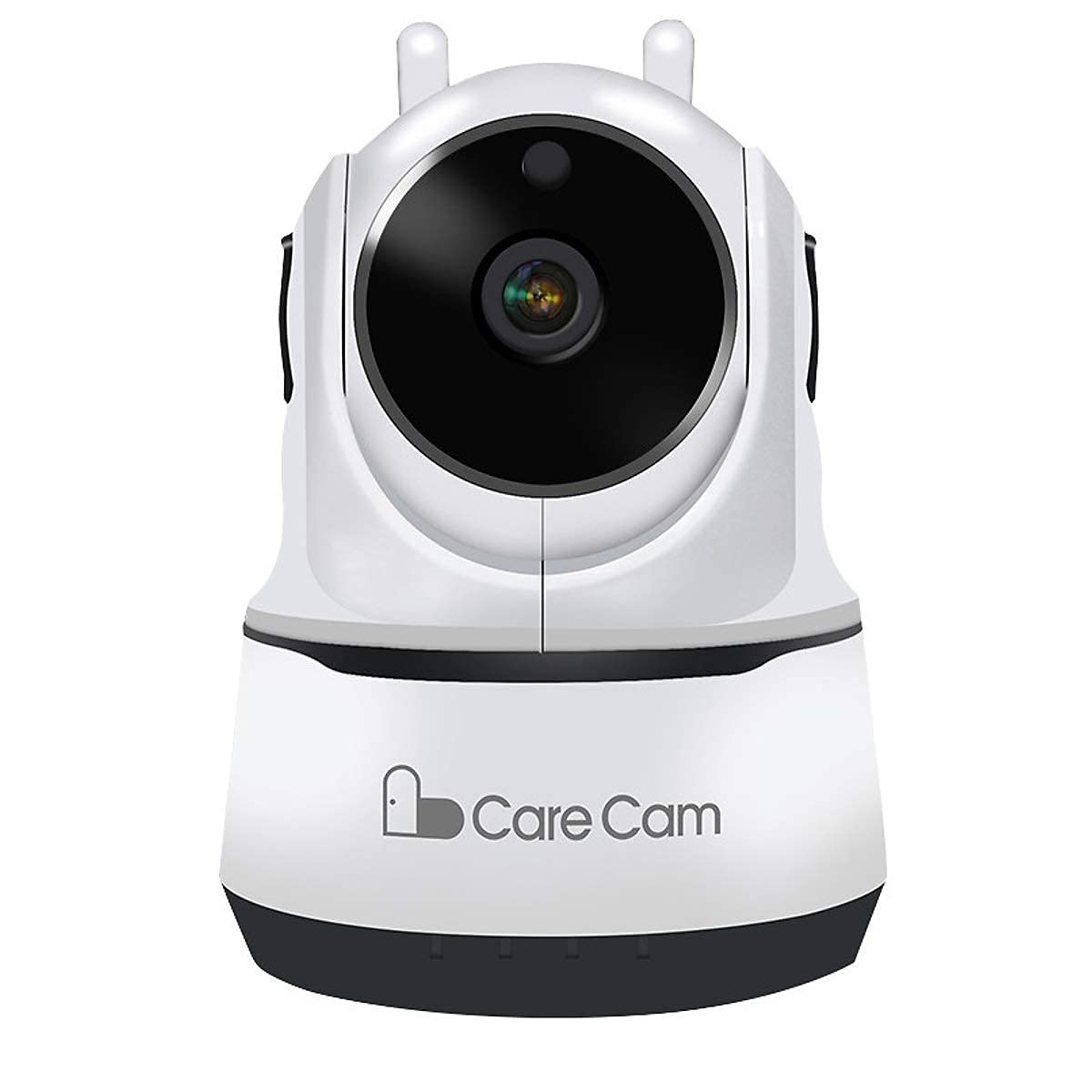
Şekil 1: Ön view of the AI Carecam NPK Intelligent Camera, showing the lens and base.
2. Paket İçeriği
- AI Carecam NPK Intelligent Camera
- Güç Adaptörü
- Kullanım Kılavuzu (bu belge)
3. Kurulum Talimatları
3.1 Identifying Camera Ports
Before setup, familiarize yourself with the camera's ports and interfaces.
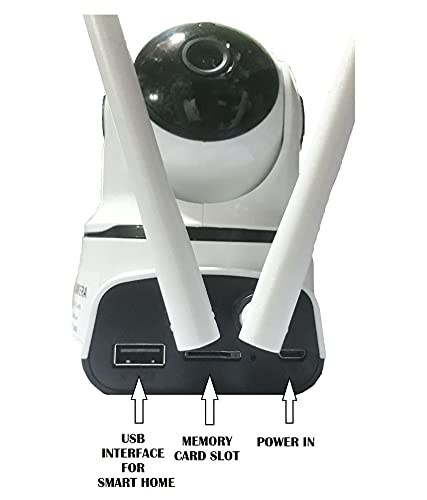
Şekil 2: Arka view of the camera showing the USB interface, memory card slot, and power input port.
- USB Arayüzü: For smart home integration (if applicable).
- Hafıza kardı bölümü: Insert a Micro SD card (up to 128GB) for local video storage.
- Güç Girişi: Verilen güç adaptörünü buraya bağlayın.
3.2 Kamerayı Açma
- Connect the provided power adapter to the "Power In" port on the camera.
- Adaptörü standart bir elektrik prizine takın.
- The camera will power on and initiate its self-test sequence. Wait for the camera to indicate readiness (e.g., a specific LED indicator or voice prompt).
3.3 Mobil Uygulamanın Yüklenmesi
The camera is controlled via a dedicated mobile application, compatible with Android and iOS devices. Arama "Carecam" or the recommended app name in your device's app store.

Şekil 3: The camera supports control via Android and iOS mobile applications.
3.4 Wi-Fi'ye Bağlanma
- Ensure your mobile device is connected to the 2.4GHz Wi-Fi network you intend to use for the camera.
- Open the installed Carecam application.
- Follow the in-app instructions to add a new device. This typically involves scanning a QR code on the camera or entering Wi-Fi credentials.
- Bağlantı kurulduktan sonra, kameranın durum göstergesi değişecek ve uygulamada bir onay mesajı alacaksınız.
4. Kullanım Talimatları
4.1 Canlı View ve Pan/Tilt Kontrolü
After successful setup, open the app to view the live feed from your camera. Use the on-screen controls to adjust the camera's viewaçı.

Şekil 4: Control the camera's 355° pan and 90° tilt movements directly from the mobile application.
- Tava: Kamerayı yatay olarak 355°'ye kadar döndürün.
- Tilt: Kamerayı dikey olarak 90°'ye kadar ayarlayın.
4.2 İki Yönlü Ses İletişimi
The camera supports two-way audio, allowing you to listen and speak through the camera using the mobile app.

Şekil 5: The camera features clear two-way audio with a sensitive microphone to restore vocals.
- Canlı yayında viewKonuşmak için mikrofon simgesine dokunun.
- Kameranın bulunduğu konumdan gelen sesi dinlemek için hoparlör simgesine dokunun.
4.3 Gece Görüşü
The camera automatically switches to night vision mode in low-light conditions, providing clear monitoring even in darkness using infrared light.
4.4 Hareket Algılama ve Uyarılar
Configure motion detection settings within the app to receive alerts on your mobile device when movement is detected. The camera is designed for motion-only alerts.
- Uygulama içindeki kamera ayarlarına gidin.
- Locate the "Motion Detection" or "Alert Settings" section.
- Enable motion detection and customize sensitivity levels and alert schedules as needed.
4.5 Micro SD Card Storage
The camera supports local storage on a Micro SD card up to 128GB. Ensure a compatible card is inserted for continuous recording or event-triggered recordings.

Şekil 6: The camera supports Micro SD (TF) card storage up to 128GB for recording video footage.
- Insert the Micro SD card into the designated slot with the contacts facing the correct direction.
- Format the Micro SD card through the camera's app settings for optimal performance.
5. Bakım
5.1 Kamerayı Temizleme
- Temizlemeden önce kameranın kapalı ve fişinin çekilmiş olduğundan emin olun.
- Yumuşak, kuru bir bez kullanarak fotoğraf makinesinin gövdesini nazikçe silin.
- For the lens, use a specialized lens cleaning cloth to avoid scratches. Do not use liquid cleaners directly on the lens.
5.2 Mikro SD Kart Yönetimi
- Regularly check the storage status of your Micro SD card via the app.
- Format the card periodically to maintain optimal recording performance and free up space.
- Back up important recordings before formatting the card.
6. Sorun Giderme
- Kamera Wi-Fi'ye bağlanmıyor:
- Wi-Fi ağınızın 2.4 GHz olduğundan emin olun. Kamera 5 GHz ağları desteklemiyor.
- Uygulamada Wi-Fi şifresinin doğru girildiğinden emin olun.
- Sinyal gücünü artırmak için kamerayı Wi-Fi yönlendiricisine yaklaştırın.
- Kamerayı ve yönlendiricinizi yeniden başlatın.
- Görüntü yok veya görüntü kalitesi düşük:
- Check the power connection to ensure the camera is on.
- Kamera lensinin temiz ve herhangi bir engel içermediğinden emin olun.
- İnternet bağlantı hızınızı doğrulayın.
- Hareket algılama çalışmıyor:
- Check the motion detection settings in the app to ensure it is enabled and configured correctly.
- Adjust the sensitivity level.
- Kameranın görüş alanının view açıktır.
- Micro SD card not recording:
- Mikro SD kartın doğru şekilde takıldığından emin olun.
- Format the Micro SD card through the app.
- Check if the card is full; if so, back up data and format it.
- Verify the card is not damaged.
7. Özellikler
| Özellik | Detay |
|---|---|
| Marka | AI |
| Model Adı | NPK Carecam (HVG Carecam) |
| Bağlantı Teknolojisi | Kablosuz (Wi-Fi) |
| Özel Özellik | 2MP Kamera |
| İç/Dış Mekan Kullanımı | Kapalı |
| Güç Kaynağı | Kablolu Elektrik |
| Bağlantı Protokolü | Wifi |
| Denetleyici Türü | Android, iOS (App) |
| Renk | Beyaz |
| Form Faktörü | Kubbe |
| Su Direnç Seviyesi | Suya dayanıklı değil |
| Uyarı Tipi | Yalnızca Hareket |
| Oda Tipi | Ofis, Ev |
| Işık kaynağı | Infrared (for Night Vision) |
| Kontrol Yöntemi | Uygulama |
| Ağ Bağlantı Teknolojisi | Kablosuz |
| Kablosuz Teknoloji Türü | Wifi |
| Video Yakalama Çözünürlüğü | 1080P (FHD), H.264 |
| Video Yakalama Formatı | MP4, AVI |
| Gece Görüşü | Gece Rengi |
| Ürün Boyutları | 10 x 10 x 10 Santimetre |
| Ürün Ağırlığı | 200 Gram |
| Birim Sayısı | 1 Sayım |
| Öğe Sayısı | 1 |
| Dahili Medya | Adaptör |
| ViewAçı | 360 Derece |
| Alanı View | 360 Derece |
| Yakınlaştırma Türü | Optik Yakınlaştırma |
| Fotoğraf Sensörü Teknolojisi | CMOS |
| Flash Bellek Türü | Mikro SD (128 GB'a kadar) |
8. Garanti Bilgileri
The AI Carecam NPK Intelligent Camera comes with a 1 yıllık üretici garantisi from the date of purchase. This warranty covers defects in materials and workmanship under normal use. Please retain your proof of purchase for warranty claims. The warranty does not cover damage caused by misuse, accidents, unauthorized modifications, or natural disasters.
9. Destek
For technical assistance, troubleshooting, or warranty inquiries, please contact the manufacturer or your point of purchase. The packer contact information is provided below:
Packer Contact: HOTSPOT ELECTRONICS, MUMBAI 400004
Please have your product model number (NPK Carecam) and proof of purchase ready when contacting support.