
1. Giriş
Thank you for choosing the Sndway SW-DM60 Laser Distance Meter. This device is designed for precise and efficient distance measurements, offering various functions for professional and personal use. Please read this manual carefully before operating the device to ensure correct usage and to maximize its lifespan.
2. Güvenlik Bilgileri
Uyarı: This product is a Class II laser product. Do not stare into the laser beam. Avoid direct eye exposure. Do not aim the laser at people or animals. Use only as described in this manual.
- Cihazı değiştirmeye veya parçalarına ayırmaya çalışmayın.
- Cihazı çocukların erişemeyeceği yerde saklayınız.
- Avoid using the device in explosive environments or near flammable materials.
- Cihazı aşırı sıcaklıklardan, nemden ve şiddetli titreşimlerden koruyun.
- Cihazınızı uzun süre kullanmayacaksanız pillerini çıkarın.
3. Ürün Bittiview
The Sndway SW-DM60 is a compact and robust laser distance meter. It features a large LCD screen with backlight for clear readings in various lighting conditions.

Şekil 3.1: Ön view of the Sndway SW-DM60 Laser Distance Meter, showing the display, laser aperture, and control buttons.
The device is designed with a reinforced shell for durability in outdoor environments.

Şekil 3.2: Size comparison of the Sndway SW-DM60 Laser Distance Meter, illustrating its compact dimensions (approximately 11 cm / 4.5 inches in length).
4. Kurulum
4.1 Pil Kurulumu
The Sndway SW-DM60 requires two AAA batteries (not included) for operation.
- Cihazın arkasındaki pil bölmesini bulun.
- Pil bölmesi kapağını açmak için aşağı doğru kaydırın.
- Bölmenin içinde gösterildiği gibi kutupların (+/-) doğru olmasına dikkat ederek iki adet AAA pil takın.
- Pil bölmesi kapağını yerine oturtup tık sesi duyana kadar kaydırarak kapatın.
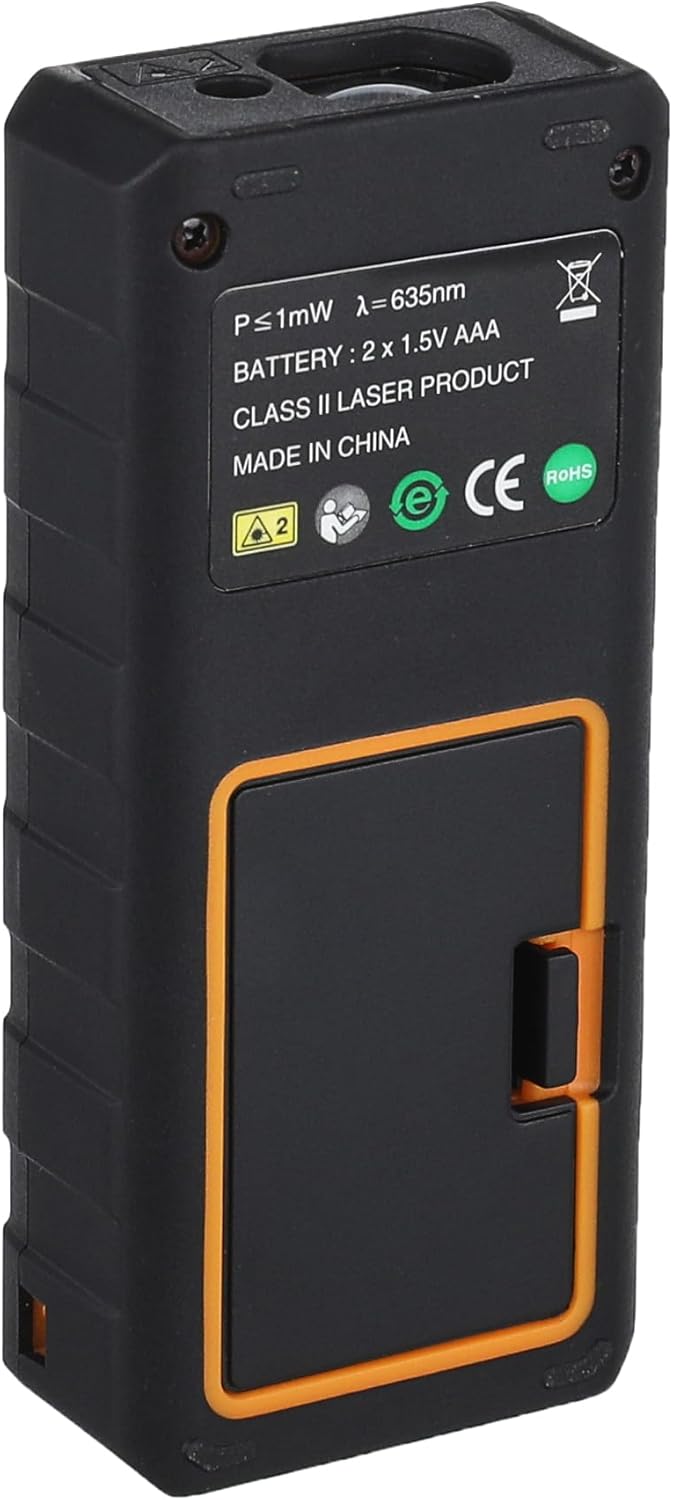
Şekil 4.1: Geri view of the Sndway SW-DM60 Laser Distance Meter, showing the battery compartment cover.
5. Kullanım Talimatları
Familiarize yourself with the device's buttons and display before beginning measurements.

Şekil 5.1: The Sndway SW-DM60 display showing various measurement results, including distance, area, and volume.
5.1 Güç Açma/Kapatma
- Güç Açık: Basın OKUMAK button once to turn on the device. The laser will activate.
- Kapat: Basılı tutun KAPALI/TEMİZ button for a few seconds to turn off the device. The device will automatically power off after 150 seconds of inactivity.
5.2 Temel Ölçüm (Tek Mesafe)
- Cihazı açın.
- Aim the laser beam at the target point.
- Basın OKUMAK Düğmeye bir kez basın. Ölçülen mesafe ekranda görüntülenecektir.
5.3 Sürekli Ölçüm
This mode allows for dynamic measurement, displaying the current distance as you move the device.
- Cihazı açın.
- Press the measurement function button (often labeled with a square or multiple lines, refer to device specific icons) until the continuous measurement icon appears on the display.
- Move the device slowly. The display will update with real-time distance measurements.
- Basın OKUMAK Sürekli ölçümü durdurmak ve son değeri kaydetmek için düğmeye tekrar basın.
5.4 Alan Ölçümü
- Press the measurement function button until the area measurement icon (typically a square) appears.
- İlk kenarı (örneğin uzunluğu) bastırarak ölçün. OKUMAK.
- İkinci kenarı (örneğin genişliği) bastırarak ölçün. OKUMAK Tekrar.
- Cihaz alanı otomatik olarak hesaplayıp gösterecektir.
5.5 Hacim Ölçümü
- Press the measurement function button until the volume measurement icon (typically a cube) appears.
- Uzunluğu ölçmek için üzerine basın. OKUMAK.
- Genişliği bastırarak ölçün. OKUMAK.
- Basınca basarak yüksekliği ölçün OKUMAK.
- Cihaz otomatik olarak hacmi hesaplayıp gösterecektir.
5.6 Pisagor Ölçümü
This function allows indirect measurement of height or distance using the Pythagorean theorem.
- Press the measurement function button until the Pythagorean measurement icon (typically a triangle) appears.
- Follow the on-screen prompts to measure the required sides (e.g., hypotenuse, base).
- Cihaz bilinmeyen tarafı hesaplayıp ekrana yansıtacaktır.
5.7 Add and Subtract Measurement
This function allows you to add or subtract measurement results.
- Ölçüm yapın.
- Press the '+' or '-' button.
- Bir sonraki ölçümü gerçekleştirin.
- The device will display the sum or difference.
5.8 Birim Dönüşümü
The device supports unit selection among Meter (m), Inch (in), and Foot (ft).
- Press the 'UNIT' button (often labeled 'U' or with unit symbols) to cycle through the available units. The selected unit will be displayed on the screen.
5.9 Historical Data Record
Cihaz 30 adede kadar ölçüm verisi grubunu hafızasında tutabilmektedir.
- Press the 'History' or 'Memory' button (often labeled with a folder icon) to view daha önce depolanmış ölçümler.
- Use the arrow buttons (if available) to navigate through the stored data.
6. Bakım
- Temizlik: Yumuşak bir d kullanınamp cloth to wipe the surface of the device. Do not use organic solvents or abrasive cleaning agents.
- Depolamak: If the device will not be used for an extended period, remove the batteries and store it in a cool, dry place, away from direct sunlight and extreme temperatures.
- Koruma: Always keep the device in its fabric carrying pouch when not in use to protect it from dust and minor impacts.
7. Sorun Giderme
| Sorun | Olası Neden | Çözüm |
|---|---|---|
| Cihaz açılmıyor | Düşük veya bitmiş piller; Yanlış pil montajı | Pilleri değiştirin; Pil kutuplarını kontrol edin. |
| Yanlış ölçümler | Unstable surface; Obstruction in laser path; Extreme environmental conditions | Ensure stable measurement; Clear laser path; Operate within specified temperature/humidity ranges |
| Ekran soluk veya boş | Düşük piller | Pilleri değiştirin |
| Lazer görünmüyor | Device not powered on; Laser malfunction | Press READ button; If problem persists, contact support |
8. Özellikler
| Özellik | Şartname |
|---|---|
| Ölçüm Aralığı | 0.05m - 60m |
| Ölçüm Doğruluğu | ±2mm |
| Ölçüm Birimi | Meter (m) / Inch (in) / Foot (ft) |
| Lazer Sınıfı | Class II, <1mW, 635nm |
| Historical Data Record | 30 gruba kadar |
| Çalışma Sıcaklığı | 0°C - 40°C (32°F - 104°F) |
| Depolama Sıcaklığı | -20°C - 60°C (-4°F - 140°F) |
| Depolama Nemi | %20 - %80 bağıl nem |
| Otomatik Kapanma | 150 saniye hareketsizlik |
| Güç Kaynağı | 2 x AAA Alkaline batteries (not included) |
| Ürün Ağırlığı | Yaklaşık. 93g (pilsiz) |
| Malzeme | Güçlendirilmiş Plastik |
9. Garanti ve Destek
Information regarding product warranty and customer support was not provided in the available product data. Please refer to the packaging or contact the retailer/manufacturer directly for details on warranty coverage and technical assistance.


