
1. Giriş
Thank you for choosing the SNDWAY SW-TG100 Laser Distance Meter. This device is designed for precise and rapid measurement of distances, areas, and volumes. It utilizes laser technology to provide accurate readings up to 100 meters, making it an essential tool for professionals and DIY enthusiasts in construction, interior design, and various other fields. Please read this manual carefully before using the device to ensure safe and optimal operation.
2. Güvenlik Bilgileri
Bu cihaz Sınıf 2 lazer yayar. Aşağıdaki güvenlik önlemlerine uyun:
- Do not stare into the laser beam directly. Direct exposure to the laser can cause eye damage.
- Lazer ışınını insanlara veya hayvanlara doğrultmayın.
- Cihazı sökmeyin veya üzerinde değişiklik yapmayın. Unauthorized modifications can lead to hazardous laser radiation exposure.
- Cihazı çocukların erişemeyeceği yerde saklayınız.
- Cihazı yalnızca bu kılavuzda açıklanan amaç doğrultusunda kullanın.
- Avoid using the device in explosive environments or near flammable materials.
3. Ürün Bittiview
The SNDWAY SW-TG100 is a compact and ergonomic laser distance meter. Below is an image illustrating the device's general appearance.
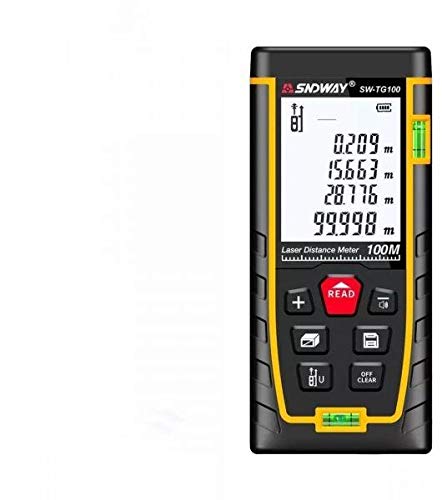
Şekil 1: Ön view of the SNDWAY SW-TG100 Laser Distance Meter. The image shows the device's display screen, measurement buttons, and the laser emission/reception lens.
Başlıca bileşenler genellikle şunlardır:
- LCD Ekran: Shows measurement results, unit, battery status, and function indicators.
- Ölçüm Düğmesi: Initiates single or continuous measurements.
- Fonksiyon Düğmeleri: For selecting measurement modes (distance, area, volume, Pythagorean, etc.), unit conversion, and saving data.
- Clear/Off Button: Son ölçümü siler veya cihazı kapatır.
- Lazer Açıklığı: Where the laser beam is emitted and received.
- Pil Bölmesi: (If applicable) For inserting or accessing batteries.
4. Kurulum
4.1 Açma/Kapatma
- Açmak İçin: Basın [MEAS] Düğmeye kısa süre basın. Ekran yanacaktır.
- Kapatmak İçin: Basılı tutun [CLEAR/OFF] button for a few seconds until the display turns off. The device will also automatically power off after a period of inactivity to conserve battery.
4.2 Battery Installation (if applicable)
While the product specifications indicate no batteries are required, this typically implies an internal rechargeable battery. If your model requires external batteries, open the battery compartment cover located on the back or bottom of the device. Insert the specified battery type (e.g., AAA batteries) according to the polarity indicators (+/-). Close the compartment cover securely.
4.3 Birim Ayarı
To change the measurement unit (e.g., meters, feet, inches), press the [BİRİM] İstenilen birim görüntülenene kadar düğmeye art arda basın.
5. Kullanım Talimatları
5.1 Tek Mesafe Ölçümü
- Cihazı açın.
- Lazer ışınını hedef yüzeye doğrultun.
- Basın [MEAS] Düğmeye bir kez basın. Lazer aktifleşecektir.
- Basın [MEAS] button again. The measurement will be taken, and the result will appear on the display.
5.2 Alan Ölçümü
- Basın [FONKSİYON] button until the area measurement icon (usually a square or rectangle) appears on the display.
- Measure the first side (e.g., length) by pointing the laser and pressing [MEAS].
- Measure the second side (e.g., width) by pointing the laser and pressing [MEAS] Tekrar.
- Cihaz alanı otomatik olarak hesaplayıp gösterecektir.
5.3 Hacim Ölçümü
- Basın [FONKSİYON] button until the volume measurement icon (usually a cube) appears on the display.
- Measure the length by pointing the laser and pressing [MEAS].
- Measure the width by pointing the laser and pressing [MEAS].
- Measure the height by pointing the laser and pressing [MEAS].
- Cihaz otomatik olarak hacmi hesaplayıp gösterecektir.
5.4 Sürekli Ölçüm (İzleme)
This mode allows for dynamic measurement, displaying the distance in real-time as you move the device.
- Basılı tutun [MEAS] button (or press it twice quickly, depending on the model) to enter continuous measurement mode.
- Move the device slowly towards or away from the target. The display will update with the current distance.
- Basmak [MEAS] or [CLEAR/OFF] Sürekli ölçüm modundan çıkmak için.
6. Bakım
- Temizlik: Yumuşak bir d kullanınamp Cihazı temizlemek için bezasing. Do not use abrasive cleaners or solvents. Clean the laser lens carefully with a soft, lint-free cloth, similar to cleaning camera lenses.
- Depolamak: Store the device in a cool, dry place, away from direct sunlight and extreme temperatures. If storing for an extended period, remove any external batteries (if applicable).
- Etkiden Kaçının: Cihazı düşmelerden ve şiddetli darbelerden koruyun; bunlar cihazın doğruluğunu ve işlevselliğini etkileyebilir.
7. Sorun Giderme
| Sorun | Olası Neden | Çözüm |
|---|---|---|
| Cihaz açılmıyor. | Pil zayıf veya bitmiş. | Charge the device or replace batteries (if applicable). |
| Hatalı ölçümler. | Dirty laser lens; unstable measurement surface; strong light interference. | Clean the laser lens; ensure a stable measurement point; measure in less bright conditions if possible. |
| Ekranda "Hata" mesajı görüntüleniyor. | Measurement out of range; poor reflection from target. | Ensure target is within measurement range (0.05m-100m); use a reflective target plate if measuring against highly reflective or transparent surfaces. |
8. Özellikler
| Özellik | Detay |
|---|---|
| Üretici | GÜNDÜZ YOLU |
| Örnek | SW-TG100 |
| Ölçüm Aralığı | 100 metreye kadar |
| Ölçüm Doğruluğu | Typically ±2mm (specific accuracy may vary based on conditions) |
| Ölçüm Birimleri | m / ft / in |
| Lazer Sınıfı | Sınıf 2 |
| Ürün Ağırlığı | 260 gr |
| Paket Boyutları | 16x8.8x5.2 cm |
| Piller Gerekli | No (implies internal rechargeable battery) |
| İlk Mevcut Tarih | 7 Temmuz 2021 |
9. Garanti ve Destek
SNDWAY products are manufactured to high-quality standards. For specific warranty information, please refer to the warranty card included with your product or contact the retailer from whom you purchased the device. For technical support, troubleshooting assistance beyond this manual, or service inquiries, please contact SNDWAY customer service through their official webSiteye veya satın alma işleminizle birlikte verilen iletişim bilgilerine.
Garanti talepleri için lütfen satın alma belgenizi saklayın.


