
giriiş
The Poly DA75 is a versatile USB-A/USB-C digital adapter designed to connect Poly Quick Disconnect (QD) headsets to computers. It ensures clear audio quality for call center environments, supporting both USB-A and USB-C connections for compatibility with various systems. This adapter is engineered to work seamlessly with platforms such as Avaya, Genesys, and Cisco, providing a reliable audio solution for professionals.
Temel özellikler şunlardır:
- Evrensel Bağlantı: Equipped with both USB-A and USB-C connectors on the cable for broad compatibility with new and legacy equipment.
- Intelligent Headset Recognition: Automatically adjusts audio performance to the specific Poly Quick Disconnect headset for optimized call quality.
- Ses Yalıtımı: Incorporates features to manage safe volume levels, protecting user hearing.
- Platform Entegrasyonu: Fully compatible with leading call center platforms including Avaya, Genesys, and Cisco.
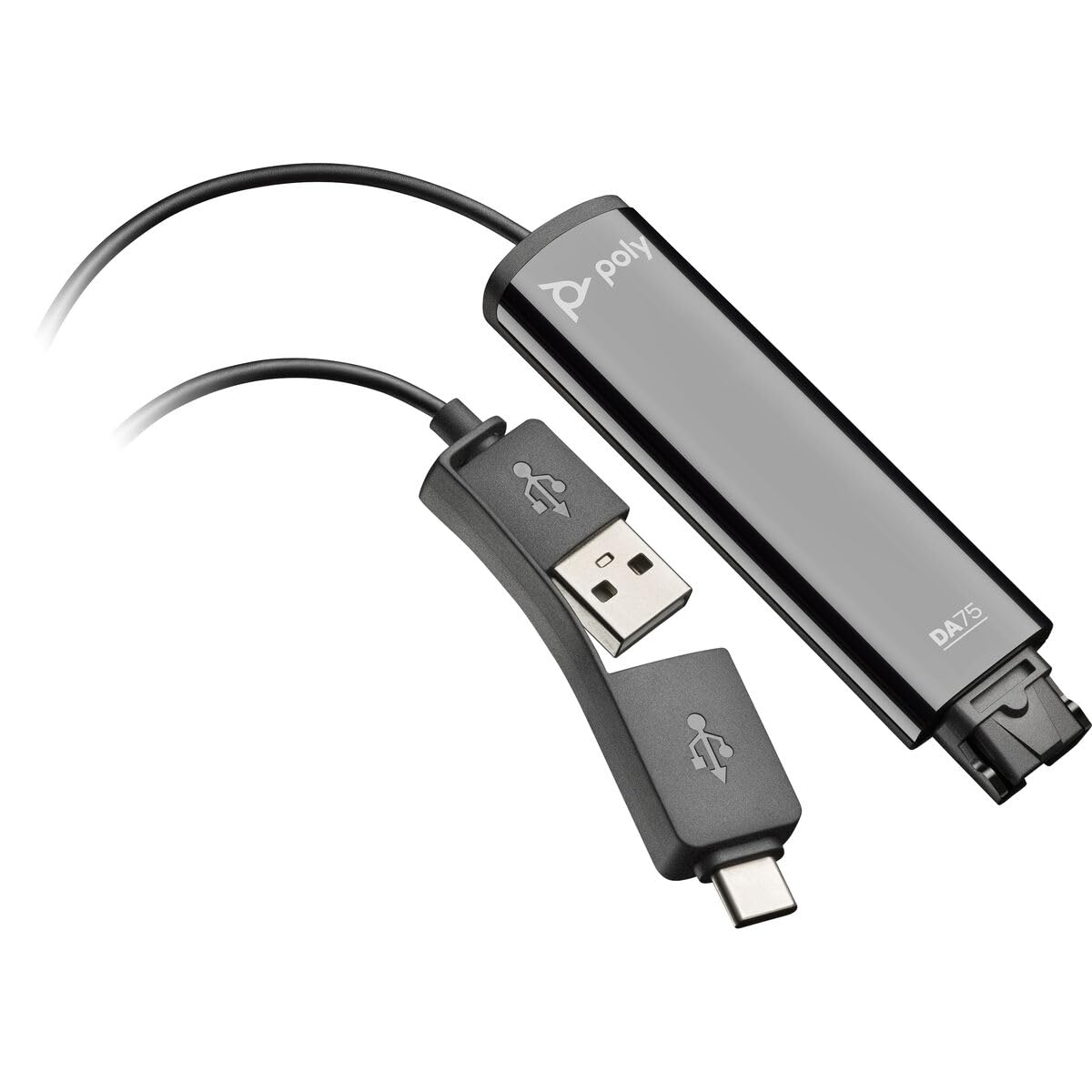
Image: The Poly DA75 USB-A/USB-C Digital Adapter, showing its dual USB-A and USB-C connectors and the Quick Disconnect port for headsets.
Kutuda Neler Var?
The Poly DA75 package typically includes the following items:
- Poly DA75 USB-A/USB-C Digital Adapter
- Belgeler (Hızlı Başlangıç Kılavuzu, Güvenlik Bilgileri)
Note: Headsets are sold separately and are not included with the DA75 adapter.
Kurmak
Follow these steps to set up your Poly DA75 Digital Adapter:
- Kulaklığı Bağlayın: Connect your Poly Quick Disconnect (QD) headset to the QD port on the Poly DA75 adapter. Ensure the connection is secure.
- Bilgisayara Bağlan:
- If your computer has a USB-A port, use the USB-A connector on the DA75 cable.
- If your computer has a USB-C port, use the USB-C connector on the DA75 cable.
Plug the appropriate USB connector into an available USB port on your computer.
- Sürücü Kurulumu: The DA75 is a plug-and-play device. Your operating system (Windows, macOS) should automatically detect the device and install the necessary drivers. This process may take a few moments.
- Cihaz Tanımayı Doğrulayın:
- Pencereler: Git Ayarlar > Sistem > Ses or Denetim Masası > Ses. The Poly DA75 should appear as an audio input and output device.
- MacOS: Git System Settings > Sound. The Poly DA75 should appear as an input and output device.
Select the Poly DA75 as your default communication device for both playback and recording.
- Yazılım Yapılandırması: If you are using communication software (e.g., Avaya, Genesys, Cisco, Microsoft Teams, Zoom), ensure that the Poly DA75 is selected as the audio device within the application's settings.
Kullanım Talimatları
The Poly DA75 adapter facilitates audio communication through your connected Poly QD headset. Its operation is primarily managed through your computer's operating system and communication software.
- Çağrı Yapma/Arama Alma: Use your communication software to initiate or answer calls. The audio will be routed through your connected Poly QD headset via the DA75 adapter.
- Ses Kontrolü: Adjust the listening volume using your computer's system volume controls or the volume controls within your communication application.
- Mikrofonun Sesini Kapatma: Mute and unmute your microphone using the controls provided by your communication software.
- Ses Optimizasyonu: The DA75 automatically optimizes audio for your specific Poly QD headset. No manual adjustments are typically required for audio profiles.
Bakım
To ensure the longevity and optimal performance of your Poly DA75 Digital Adapter, follow these maintenance guidelines:
- Temizlik: Gently wipe the adapter with a soft, dry, anti-static cloth. Do not use liquid cleaners or abrasive materials.
- Depolamak: Adaptörü serin, kuru ve doğrudan güneş ışığından ve aşırı sıcaklıklardan uzak bir yerde saklayın.
- İşleme: Kabloyu, özellikle bağlantı noktalarının yakınında, aşırı bükmekten veya döndürmekten kaçının; aksi takdirde iç hasar meydana gelebilir.
- Bağlantı: Ensure the Quick Disconnect (QD) connection and USB connections are clean and free of debris before connecting.
Sorun giderme
If you encounter issues with your Poly DA75 Digital Adapter, refer to the following troubleshooting steps:
| Sorun | Olası Neden | Çözüm |
|---|---|---|
| Kulaklıktan ses gelmiyor |
|
|
| Mikrofon çalışmıyor |
|
|
| Adapter not recognized by computer |
|
|
Özellikler
| Özellik | Detay |
|---|---|
| Model Numarası | 218266-01 |
| Marka | POLİ |
| Bağlayıcı Türü | USB-A, USB-C (dual connector) |
| Uyumlu Cihazlar | Poly Quick Disconnect (QD) Headsets |
| Belirli Kullanımlar | PC, Call Center Platforms (Avaya, Genesys, Cisco) |
| Renk | Siyah |
| Ürün Boyutları (U x G x Y) | 0.98 x 0.39 x 2.95 inç |
| Ürün Ağırlığı | 30 Gram |
| Port Sayısı | 2 (USB-A/USB-C to QD) |
| UPC | 197029650054, 017229175112 |
Garanti ve Destek
Garanti Bilgileri: The Poly DA75 Digital Adapter comes with a 2 yıllık üretici sınırlı garantisiBu garanti, normal kullanım koşullarındaki malzeme ve işçilik kusurlarını kapsar. Garanti talepleriniz için lütfen satın alma belgenizi saklayın.
Teknik Destek: For technical assistance, product inquiries, or warranty service, please contact Poly customer support. Visit the official Poly website for the most up-to-date support contact information, FAQs, and additional resources.
Çevrimiçi Kaynaklar: Çoklu Destek Webalan