
1. Giriş
The ezcap234 Portable Cassette Player & Recorder is a versatile device designed for playing cassette tapes, converting them to MP3 files, and functioning as an AM/FM radio. It also features a built-in microphone for voice recording and a speaker for direct audio output. This manual provides detailed instructions for the setup, operation, and maintenance of your device.

Figure 1.1: Ezcap234 Portable Cassette Player and Recorder (Grey model)
This image displays the Ezcap234 device from a slightly elevated angle, showcasing its grey and black casing, speaker grille, control buttons, and extended antenna. It highlights the compact and portable design of the unit.
2. Ürün Özellikleri
- AM/FM Radio Reception: Supports AM 520-1610KHz and FM 87-108MHz with excellent reception via a long antenna and upgraded DSP chip.
- Kaset Çalar: Plays standard cassette tapes with an auto-stop function. Includes playback function for recorded files.
- Cassette to MP3 Converter: Converts audio from cassette tapes directly to digital MP3 files on a Micro SD (TF) card. Supports automatic song division and FAT/FAT32 TF card format. No computer or driver required.
- Ses Kaydedici: Features a built-in microphone for voice recording directly to the TF card.
- Ses Kalitesi: Equipped with a 1W speaker for clear audio output. Includes a 3.5mm headphone jack for private listening.
- Taşınabilir Tasarım: Lightweight and compact, suitable for on-the-go use.
- Güç Kaynağı: Operates on 2x AA batteries or via USB power.

Figure 2.1: Key Features of the Ezcap234
This image illustrates the primary functionalities of the Ezcap234, including Tape Player/Converter, AM/FM Radio, Voice Recorder, Earphone Jack, Playback, and Inside Speaker, represented by distinct icons.
3. Paket İçeriği
Paketin içinde tüm öğelerin mevcut olduğundan emin olun:
- Ezcap234 Portable Cassette Player & Recorder
- USB kablosu
- Kullanım Kılavuzu
- Mikro SD kart

Figure 3.1: Contents of the Ezcap234 Retail Box
This image shows the Ezcap234 device, its retail packaging, a USB cable, and the user guide, indicating the items included in the product box.
4. Ürün Düzeni ve Kontrolleri
Familiarize yourself with the various parts and controls of your Ezcap234 device:

Figure 4.1: Ezcap234 Labeled Diagram
Bu diyagram ayrıntılı bir bilgi sağlar view of the Ezcap234, with labels pointing to key components such as the antenna, volume adjustment, microphone, earphone jack, Micro SD card slot, radio tuning knob, FM/AM switch, Tape/Radio switch, Record/Stop recording button, Indicator LED, UP/DOWN buttons, Play/Stop playing button, Tape fast forward and rewind buttons, Stop playing tape button, Play tape button, Speaker, and 5V DC jack.
- Anten: Extend for improved AM/FM radio reception.
- Ses Ayarı: Rotary knob to control audio output level.
- Mikrofon: Ses kaydı için dahili mikrofon.
- Kulaklık Girişi (3.5 mm): Kulaklık bağlamak için.
- Mikro SD Kart Yuvası: Insert TF card for MP3 conversion and recording.
- Radyo Ayar Düğmesi: Radyo frekansını ayarlar.
- FM/AM Switch: Selects between FM and AM radio bands.
- Tape/Radio Switch: Toggles between cassette player and radio modes.
- Record / Stop Recording Button: Kaydı başlatır veya durdurur.
- Gösterge LED'i: Shows device status (e.g., recording, power).
- YUKARI / AŞAĞI düğmeleri: Navigation buttons, typically for MP3 playback.
- Play / Stop Playing Button: Kaset çalmayı/MP3 çalmayı başlatır veya duraklatır.
- Tape Fast Forward and Rewind Buttons: Controls tape movement.
- Stop Playing Tape Button: Stops cassette playback.
- Konuşmacı: Ses çıkışı için entegre hoparlör.
- 5V DC Jakı: USB güç kablosunu bağlamak için.
5. Kurulum
5.1 Güç Kaynağı
The Ezcap234 can be powered by two (2) AA batteries or via the included USB cable.
- Pil Montajı: Open the battery compartment cover on the back of the device. Insert two AA batteries, ensuring correct polarity (+/-). Close the cover securely.
- USB Gücü: Connect the small end of the USB cable to the 5V DC jack on the device and the other end to a USB power adapter (not included) or a computer USB port.
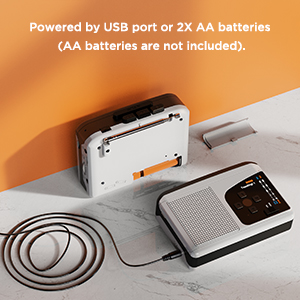
Figure 5.1: Powering the Ezcap234
This image demonstrates the two power options for the Ezcap234: connecting via a USB cable to a power source or inserting two AA batteries into the battery compartment.
5.2 Micro SD (TF) Card Insertion
A Micro SD (TF) card is required for converting tapes to MP3, recording voice, and playing MP3 files. Ensure the card is formatted to FAT or FAT32.
- Cihazın yan tarafında bulunan Micro SD kart yuvasını bulun.
- Insert the Micro SD card gently until it clicks into place. To remove, push the card in again until it springs out.
6. Kullanım Talimatları
6.1 Kaset Oynatma
- Kaset bölmesini açın ve bir kaset yerleştirin. Bölmeyi kapatın.
- Kaydırın Tape/Radio switch to the "Tape" position.
- Basın Oynamak oynatmayı başlatmak için düğmesine basın.
- Ayarla Hacim Düğmeyi istediğiniz dinleme seviyesine ayarlayın.
- Kullanın Hızlı İleri or Geri sarma Bant üzerinde gezinmek için düğmeler.
- Basın Durmak button to end playback. The device features an auto-stop function at the end of the tape.
6.2 AM/FM Radyo Çalışması
- Kaydırın Tape/Radio switch to the "Radio" position.
- Kaydırın FM/AM switch to select your desired band (FM or AM).
- Uzatmak Anten optimum alım için.
- Döndür Radyo Ayar Düğmesi to find a station.
- Ayarla Hacim topuz.

Figure 6.1: Ezcap234 Radio Functionality
This image visually represents the Ezcap234's capability to receive AM/FM radio broadcasts, with text bubbles indicating various types of content like Sport Programs, Weather, Music, Entertainment Programs, Talk shows, and News.
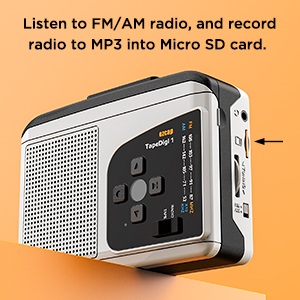
Figure 6.2: Recording Radio to MP3
Bu görüntü yan tarafı gösteriyor. view of the Ezcap234, highlighting the Micro SD card slot, with text indicating the ability to listen to FM/AM radio and record it to MP3 on the Micro SD card.
6.3 Cassette to MP3 Conversion
This device allows you to convert audio from cassette tapes directly to MP3 files on a Micro SD (TF) card without needing a computer.
- Ensure a FAT/FAT32 formatted Micro SD card is inserted into the slot.
- Insert the cassette tape you wish to convert.
- Kaydırın Tape/Radio switch to the "Tape" position.
- Basın Oynamak button on the cassette player.
- Basın Kayıt button. The Indicator LED will change to confirm recording has started.
- The device supports automatic song division. Each song will be saved as a separate MP3 file.
- Kaydı durdurmak için Kayıt Tekrar düğmeye basın.

Figure 6.3: Direct Recording from Tape to TF Card
This image shows the Ezcap234 with a cassette tape placed next to it, illustrating the direct recording capability of tapes onto a TF card.
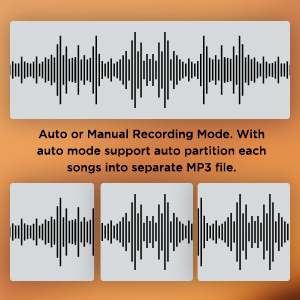
Figure 6.4: Recording Mode Options
This graphic displays waveform representations, indicating that the Ezcap234 supports both auto and manual recording modes, with auto mode capable of partitioning songs into separate MP3 files.
6.4 Ses Kaydı
The built-in microphone allows you to record external voices directly to the Micro SD card.
- Mikro SD kartın takılı olduğundan emin olun.
- Kaydırın Tape/Radio switch to the "Radio" position (or any mode where tape is not playing).
- Basın Kayıt button. The Indicator LED will illuminate.
- Lütfen dahili mikrofona doğru net bir şekilde konuşun.
- Kaydı durdurmak için Kayıt Tekrar düğmeye basın.
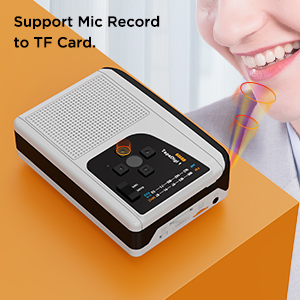
Figure 6.5: Microphone Recording Capability
This image depicts a person speaking near the Ezcap234, with sound waves emanating from their mouth towards the device, illustrating its support for microphone recording to a TF card.
6.5 MP3 Playback from TF Card
MP3 çalabilirsiniz files stored on your Micro SD card. Ensure MP3 files are placed in the "TAPEMP3" folder on the card.
- Ensure a Micro SD card with MP3 files in the "TAPEMP3" folder is inserted.
- Kaydırın Tape/Radio switch to the "Tape" position.
- Basın Oynamak button. The device will automatically detect and play MP3 files from the "TAPEMP3" folder.
- Kullanın YUKARI/AŞAĞI Parçalar arasında gezinmek için kullanılan düğmeler.
- Ayarla Hacim topuz.
- Basın Durmak Oynatmayı sonlandırmak için düğme.
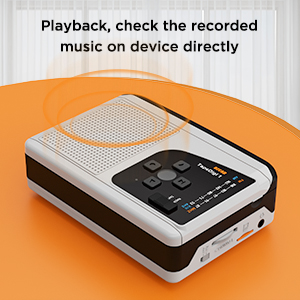
Figure 6.6: Playback Functionality
This image shows the Ezcap234 with sound waves emanating from it, indicating its ability to play back and allow users to check recorded music directly on the device.
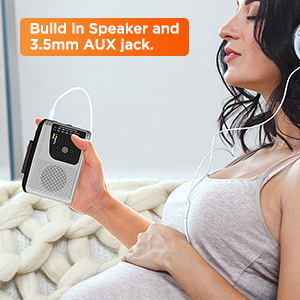
Figure 6.7: Headphone Use
This image depicts a person holding the Ezcap234 while wearing headphones, emphasizing the device's built-in speaker and 3.5mm AUX jack for private listening.
7. Bakım
- Temizlik: Cihazın dışını temizlemek için yumuşak ve kuru bir bez kullanın. Sıvı temizleyiciler veya aşındırıcı malzemeler kullanmayın.
- Kaset Kafası Temizliği: Periodically clean the cassette player's head and pinch rollers with a cotton swab lightly dampEn iyi ses kalitesini sağlamak ve kasetin zarar görmesini önlemek için izopropil alkol ile sonlandırılmıştır.
- Depolamak: When not in use for extended periods, remove batteries to prevent leakage. Store the device in a cool, dry place away from direct sunlight and extreme temperatures.
- Nemden Kaçının: Cihazı sudan ve yüksek nemden uzak tutun.
8. Sorun Giderme
| Sorun | Olası Neden | Çözüm |
|---|---|---|
| Cihaz açılmıyor. | Batteries are dead or incorrectly inserted. USB cable is not connected properly or power source is faulty. | Replace batteries or ensure correct polarity. Check USB cable connection and try a different USB port or power adapter. |
| Hoparlörden/kulaklıktan ses gelmiyor. | Volume is too low. Headphones not fully plugged in. Device is in the wrong mode (e.g., Tape mode for Radio). | Increase volume. Ensure headphones are fully inserted into the 3.5mm jack. Verify the Tape/Radio switch is in the correct position. |
| Zayıf radyo alımı. | Antenna not extended. Weak signal in current location. | Fully extend the antenna. Try repositioning the device or moving to a different location. |
| Cassette to MP3 conversion fails or filebozuk. | Micro SD card not formatted to FAT/FAT32. Card is full. Tape head is dirty. | Format the Micro SD card to FAT or FAT32. Delete unnecessary files from the card or use a new card. Clean the cassette head. |
| MP3 files on TF card not playing. | MP3 files are not in the "TAPEMP3" folder. Incorrect file Biçim. | MP3'ü sağlayın files are placed in a folder named "TAPEMP3" on the root of the Micro SD card. Verify files are standard MP3 format. |
9. Özellikler
| Özellik | Detay |
|---|---|
| Ürün Boyutları | 4.7 x 3.5 x 1.4 inç (11.94 x 8.89 x 3.56 cm) |
| Ürün Ağırlığı | 10.5 ons (297.67 gram) |
| Üretici | ezap |
| Model Numarası | 7a57a55c-dbb1-4096-9f82-bf14841a9e93 |
| Renk | Gri |
| Özel Özellik | Hafif, Taşınabilir |
| Bağlantı Teknolojisi | USB |
| Tuner Teknolojisi | Sabah, FM |
| Güç Kaynağı | Battery Powered (2x AA batteries), USB Power Supply |
| Desteklenen Radyo Bantları | Sabah, FM |
| Sıklık | FM: 87-108 MHz; AM: 520-1610 KHz |
| Dahil Bileşenler | Owner's Manual, USB cable, micro SD card |

Figure 9.1: Ezcap234 Product Dimensions
This image provides a perspective view of the Ezcap234, with overlaid measurements indicating its approximate dimensions: 4.7 inches in length, 3.5 inches in width, and 1.4 inches in height.
10. Garanti ve Destek
For product support, technical assistance, or warranty inquiries, please contact the manufacturer, ezcap. Refer to the contact information provided with your purchase documentation or visit the official ezcap webdaha fazla ayrıntı için site.
Please note that return policies may vary based on the retailer. For purchases made on Amazon, a 30-day refund/replacement policy is typically available from the date of purchase.
Üretici: ezcap Official Store