
giriiş
Thank you for choosing the seenda MMO Gaming Mouse Vanguard S. This high-performance gaming mouse is designed to enhance your gaming experience with its customizable features and ergonomic design. It offers a smooth and precise gaming experience with up to 10000 DPI, programmable macros, and interchangeable side plates to suit various gaming styles.
Please read this manual carefully to ensure proper setup, operation, and maintenance of your new gaming mouse.
Paket İçeriği
- RGB Oyun Faresi x 1
- Side Plates Packet x 1 (includes various side plates)
- Kullanıcı Kılavuzu x 1
- Ambalaj Kutusu x 1

Figure 1: Package Contents of the seenda Vanguard S Gaming Mouse.
Kurmak
1. Fareyi Bağlama
- Unpack the seenda MMO Gaming Mouse Vanguard S from its packaging.
- Farenin USB kablosunu bilgisayarınızdaki kullanılabilir bir USB bağlantı noktasına bağlayın.
- The mouse should be automatically recognized by your operating system (Windows 7, XP, Vista, or newer).
2. Yazılım Kurulumu
To unlock the full customization potential of your Vanguard S mouse, including programmable macros, DPI settings, and RGB lighting, you need to install the official seenda software.
- Visit the official seenda website to download the latest software for the Vanguard S gaming mouse.
- Kurulumu tamamlamak için ekrandaki talimatları izleyin.
- Kurulum tamamlandıktan sonra, fare ayarlarınızı yapılandırmak için yazılımı başlatın.
Kullanım Talimatları
1. Temel Fare İşlevleri
- Sol tık: Birincil eylem.
- Sağ tık: İkincil eylem/bağlam menüsü.
- Kaydırma tekerleği: Yukarı/aşağı kaydırma, Orta tıklama.
- DPI +/- Buttons: Adjust DPI sensitivity on the fly.
2. Interchangeable Side Plates
The Vanguard S mouse comes with multiple interchangeable side plates, allowing you to customize the mouse's grip and button layout for different game types (MMO, MOBA, FPS) or personal preference. The side plates attach magnetically for easy swapping.
- Gently pull the currently attached side plate away from the mouse body to detach it.
- Select your desired side plate from the packet.
- Align the new side plate with the magnetic connectors on the mouse body and gently push until it snaps into place.

Figure 2: Swapping Interchangeable Side Plates.
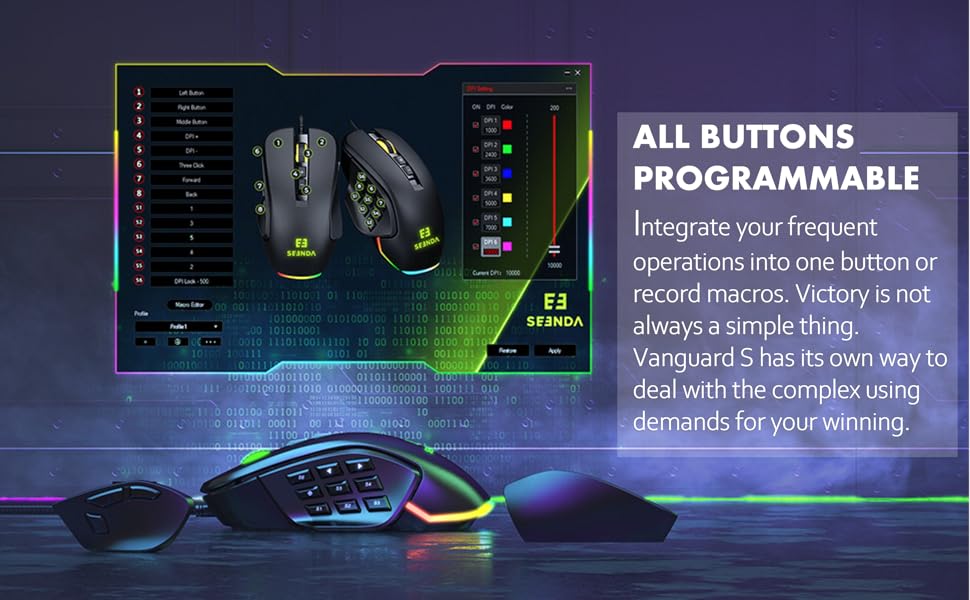
Figure 3: Different Side Plate Configurations.
3. DPI Ayarlaması
The mouse features a high-precision optical sensor with up to 10000 DPI. You can adjust the DPI sensitivity using the dedicated DPI +/- buttons located on the top of the mouse. Each DPI level can be associated with a specific RGB lighting color for quick visual identification.
- Basın DPI+ Hassasiyeti artırmak için düğme.
- Basın DPI- Hassasiyeti azaltmak için düğme.
- Default DPI steps and their corresponding colors are typically: 1000 (Red), 2400 (Green), 3600 (Blue), 5000 (Yellow), 7000 (Cyan), 10000 (Pink). These can be customized via software.
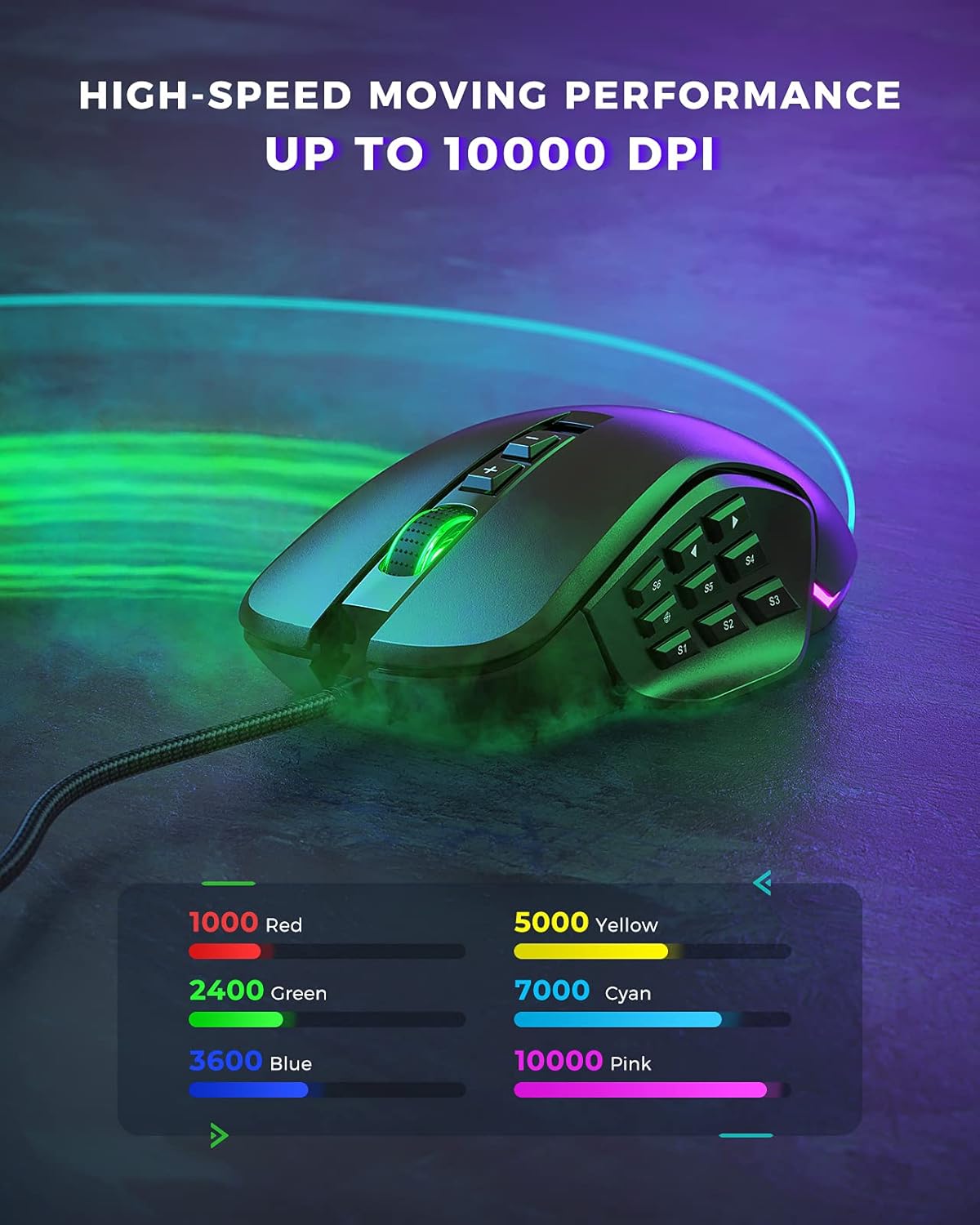
Figure 4: DPI Levels and Corresponding RGB Colors.
Özelleştirme
The seenda Vanguard S offers extensive customization options through its dedicated software. This allows you to tailor the mouse to your specific gaming and productivity needs.
1. Programmable Buttons and Macros
The mouse features multiple programmable buttons, including side buttons, which can be assigned to various functions, key presses, or complex macros. This is particularly useful for MMO and MOBA games.
- Launch the seenda gaming software.
- Navigate to the "Button Settings" or "Macro Editor" section.
- Programlamak istediğiniz düğmeyi seçin.
- Choose from predefined functions, assign a single key, or record a macro sequence.
- Save your changes to the mouse profile.

Figure 5: Software Interface for Button Programming.
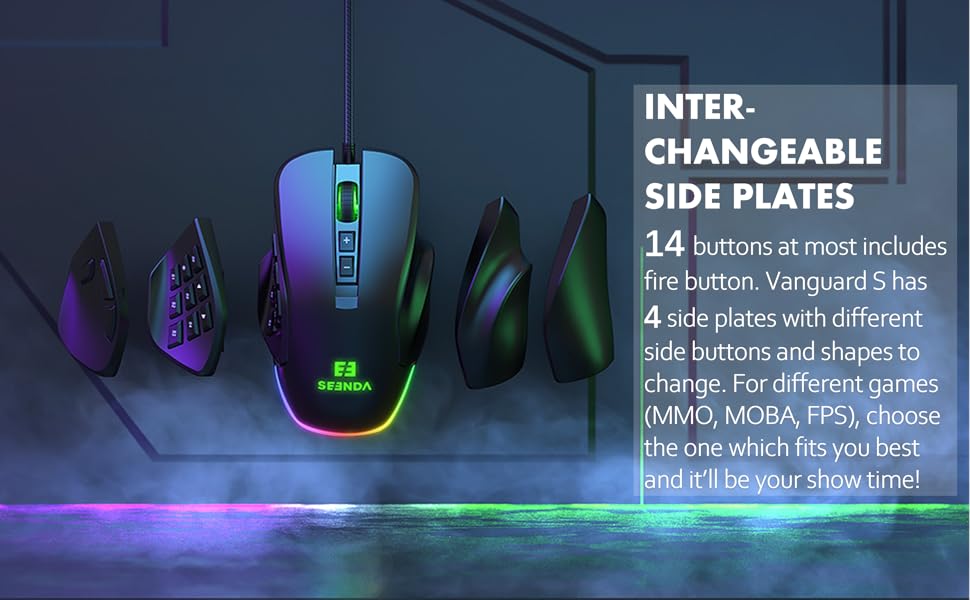
Figure 6: Macro and Button Assignment in Software.
2. RGB Arka Aydınlatma Özelleştirmesi
Personalize your gaming setup with customizable RGB backlighting. The software allows you to choose from various lighting effects, colors, and brightness levels for different DPI steps.
- In the seenda gaming software, navigate to the "RGB Settings" or "Lighting" section.
- Select your preferred lighting mode (e.g., Colorful Streaming, Steady, Breathing, Neon).
- Adjust colors for each DPI level or choose a dynamic effect.
- Apply the settings to your mouse.

Figure 7: RGB Lighting Customization Options.

Figure 8: Various RGB Backlight Styles.
Bakım
1. Farenizi Temizleme
- Temizlemeden önce fareyi bilgisayarınızdan ayırın.
- Yumuşak, tiftiksiz bir bez kullanın ve hafifçe kurulayın.ampFarenin yüzeyini silmek için su veya hafif bir temizleme solüsyonu kullanın.
- Sert kimyasallar, aşındırıcı temizleyiciler veya çözücüler kullanmaktan kaçının.
- Use a soft brush or compressed air to clean dust and debris from around the buttons and scroll wheel.
- Fareyi bilgisayarınıza yeniden bağlamadan önce tamamen kuru olduğundan emin olun.
2. Genel Bakım
- Avoid dropping the mouse, especially when side plates are attached, as they may detach.
- Fareyi aşırı sıcaklıklara veya neme maruz bırakmayın.
- Keep the mouse away from liquids.
Sorun giderme
| Sorun | Olası Neden | Çözüm |
|---|---|---|
| Fare yanıt vermiyor | Gevşek USB bağlantısı, arızalı USB portu, sürücü sorunu. |
|
| Buttons not working/incorrectly mapped | Software configuration error, software not installed. |
|
| DPI değişmiyor | Yazılım çakışması, düğme arızası. |
|
| RGB aydınlatma çalışmıyor | Yazılım ayarları, güç sorunu. |
|
Özellikler
| Özellik | Detay |
|---|---|
| Model Numarası | YC-YJ101 |
| DPI | 10000 DPI'a kadar |
| Programlanabilir Düğmeler | Up to 5 programmable buttons (customizable via software) |
| Yan plakalar | Interchangeable (3 included) |
| Tasarım | Ergonomic, Ambidextrous (with appropriate side plates) |
| Bağlantı | USB Kablolu |
| Hareket Algılama | Optik |
| Uyumlu işletim sistemi | Windows 7, Windows XP, Windows Vista, and newer USB-compatible systems |
| Ürün Ağırlığı | 3.97 ons |
| Paket Boyutları | 5.59 x 4.57 x 2.13 inç |
Garanti ve Destek
Garanti Bilgileri
seenda products undergo rigorous testing. If you encounter any issues with your Vanguard S gaming mouse, please do not hesitate to contact seenda customer support. We are committed to ensuring a positive experience with our products.
Müşteri Desteği
For technical assistance, troubleshooting, or warranty claims, please visit the official seenda website for contact information or support resources. You can also find the latest software and firmware updates there.