
giriiş
Thank you for choosing the Lepulse Lescale F4 Body Fat Scale. This smart scale is designed to provide comprehensive insights into your body composition, helping you monitor your health and fitness progress. Please read this manual carefully before use to ensure proper operation and to maximize the benefits of your device.
Güvenlik Bilgileri
- Do not use this device if you are pregnant, have a pacemaker, or other internal medical devices.
- The scale is for household use only and should not be used for medical diagnosis or treatment.
- Doğru ölçümler için teraziyi her zaman sert ve düz bir yüzeye yerleştirin. Halı veya düz olmayan zeminlerden kaçının.
- Terazinin kenarına basmayın; bu, terazinin devrilmesine neden olabilir.
- Ölçeği kuru tutun. Suya batırmayın veya aşırı nemli ortamlarda kullanmayın.
- Ölçeği reklamla temizleyinamp bez ve hafif deterjan. aşındırıcı temizleyiciler kullanmayın.
- The glass surface can be slippery when wet. Ensure your feet and the scale surface are dry before use.
Paket İçeriği
- Lepulse Lescale F4 Body Fat Scale
- Kullanıcı Kılavuzu
- 1 Lithium-polymer battery (included)
Ürün Bittiview
The Lepulse Lescale F4 is an advanced body composition scale featuring high-precision sensors and ITO coating technology for accurate measurements. It provides 15 essential body metrics and integrates with the Fitdays app for comprehensive data tracking.

Image: The Lepulse Lescale F4 Body Fat Scale, demonstrating its ability to analyze body fat and muscle mass.
Temel Özellikler:
- 15 Essential Body Composition Metrics: Measures weight, body fat, body water, BMI, muscle mass, bone mass, BMR, heart rate, and more.
- High-Precision Measurement: Equipped with 4 gravity sensors and BIA (Bioelectrical Impedance Analysis) technology for accurate readings.
- ITO Kaplama Teknolojisi: Provides a larger sensor surface for consistent and precise measurements, regardless of foot placement.
- Large AV Color Display: Clearly shows 8 key readings directly on the scale.
- Çoklu Kullanıcı Desteği: 24 kullanıcıya kadar destekler.files, automatically recognizing individuals. Includes a baby mode for tracking infant weight.
- Uygulama Senkronizasyonu: Seamlessly syncs data with the Fitdays app, compatible with Apple Health, Google Fit, and Samsung Health.

Image: An illustration detailing the 15 important measurements the scale provides, including weight, BMI, body fat, and muscle mass.
Kurmak
1. Pil Kurulumu
The scale comes with a Lithium-polymer battery. Ensure it is correctly installed according to the polarity markings in the battery compartment. The scale will power on automatically when a user steps on it.
2. Download the Fitdays App
Arama "Fitdays" in the Apple App Store (for iOS 10.0+) or Google Play Store (for Android 5.0+) and download the application. Alternatively, you can scan the QR code provided in the manual or on the product packaging to download the app.

Image: The Fitdays app icon and links for downloading on iOS and Android devices.
3. Pair the Scale with Your Smartphone
- Akıllı telefonunuzda Bluetooth’u etkinleştirin.
- Fitdays uygulamasını açın ve kullanıcı profilinizi oluşturun.file.
- Step onto the scale barefoot to activate it. The scale will automatically connect to the app via Bluetooth.
- Profesyonelinizden emin olunfile details (gender, height, age) are accurate in the app for precise body composition analysis.

Image: Visual representation of the Bluetooth connection between the scale and the Fitdays app on a smartphone.
Kullanım Talimatları
Ölçüm Alma
- Teraziyi sert ve düz bir zemine yerleştirin.
- Step onto the scale barefoot and stand still. Ensure your feet are in contact with the ITO coated surface.
- The scale will display your weight and other key metrics.
- If the app is open and connected, your data will automatically sync. If not, the scale can store up to 100 sets of data, which will sync when the app is next connected.

Image: The scale displaying essential body values directly on its screen.
Ekranı Anlamak
The large AV color display shows up to 8 readings directly. You can change the unit of measurement (kg, lb, st) by pressing the unit button on the back of the scale or through the Fitdays app settings.

Resim: Ayrıntılı view of the scale's display, highlighting the unit change function and various metrics.
Atlet Modu
Kas kütlesi daha yüksek ve vücut yağ oranı daha düşük olan bireyler içintage (e.g., athletes), activate the 'Athlete Mode' in the Fitdays app profile settings. This adjusts the algorithm for more accurate body composition analysis.

Image: The Fitdays app interface demonstrating how to enable Athlete Mode in user settings.
Bebek Modu
To weigh an infant or pet, first weigh yourself, then hold the baby/pet and step on the scale again. The app will calculate the baby's weight by subtracting your weight from the combined weight. This feature is managed within the Fitdays app.

Image: A visual guide to using the baby weight measurement function, showing a parent weighing themselves and then with a baby.
Uygulama Entegrasyonu
The Fitdays app is your central hub for tracking and analyzing your health data. It offers detailed trend charts and allows for multi-user management.
Data Synchronization and Tracking
Once connected, the scale automatically synchronizes your measurement data to the Fitdays app. The app provides detailed trend diagrams of your body composition over days, weeks, months, or even years, allowing you to monitor your progress effectively.
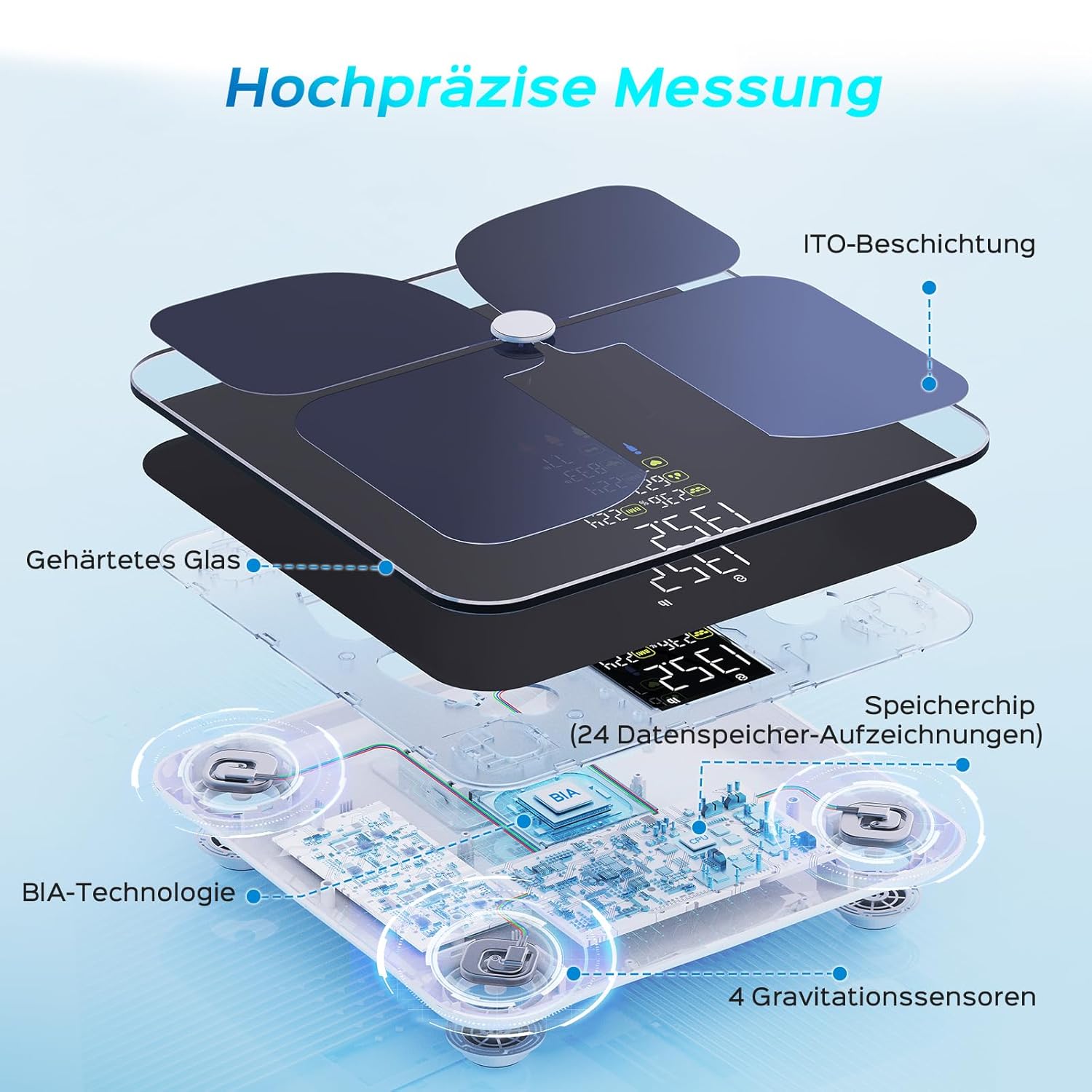
Image: The Fitdays app displaying trends in body data changes, including weight and body fat percentage over various periods.
Çoklu Kullanıcı Yönetimi
The Fitdays app allows you to create up to 24 user profiles, making it suitable for the entire family. The scale is intelligent enough to automatically recognize who is stepping on it, and each user's data is recorded in their respective profile.

Image: A family using the scale, with the app showing individual profiles and weight readings for each member.
Compatibility and Sharing
The Fitdays app can integrate with popular fitness applications such as Apple Health, Google Fit, and Samsung Health. You can also share your progress on social media platforms directly from the app.

Image: The Fitdays app interface highlighting its synchronization capabilities with various health apps and options for sharing data.
Bakım
- Temizlik: Yumuşak bir bezle ölçek yüzeyini silin.amp cloth. Do not use harsh chemicals or abrasive cleaning agents.
- Depolamak: Tartıyı serin ve kuru bir yerde saklayın. Aşırı sıcaklıklardan ve doğrudan güneş ışığından kaçının.
- Pil: Tartı uzun süre kullanılmayacaksa, sızıntıyı önlemek için pili çıkarın.
Sorun giderme
Yanlış Okumalar
- Terazinin sert ve düz bir zemin üzerinde olduğundan emin olun.
- Step on the scale barefoot and stand still.
- Check if your profile information (gender, age, height) in the Fitdays app is correct.
- Calibrate the scale by stepping on it briefly, then stepping off and waiting for it to display '0.0'.
Ölçek Açılmıyor
- Pilinin doğru takılıp takılmadığını kontrol edin.
- Pil bitmişse değiştirin.
App Not Connecting/Syncing
- Akıllı telefonunuzda Bluetooth'un etkinleştirildiğinden emin olun.
- Fitdays uygulamasının açık ve ön planda çalıştığından emin olun.
- Restart your smartphone and the scale.
- Ensure the scale is within Bluetooth range of your smartphone.
- Check app permissions to ensure it has access to Bluetooth.
Özellikler
| Model Numarası | Lescale F4 (WFDE-600-03105-00-A03) |
| Boyutlar (U x G x Y) | 27.8x27.8x2.7 cm |
| Ağırlık | 1.9 kilo |
| Malzeme | Temperli Cam |
| Güç Kaynağı | 1 Lithium-polymer battery (included) |
| Maksimum Ağırlık Kapasitesi | 2 Kilograms (Note: This appears to be an error in the source data, typical scales support much higher. Please refer to product packaging for actual maximum capacity.) |
| Görüntü Türü | Digital, Color AV Display |
| Özel Özellikler | Automatic shut-off, Heart Rate measurement, Body Fat analysis, Large display, BMI calculation |
| Bağlantı | Bluetooth (iOS 10.0+, Android 5.0+) |
Garanti ve Destek
For warranty information and customer support, please refer to the documentation included with your product or contact Lepulse customer service directly. You can also find electronic versions of the manual and support resources online.

Image: A QR code providing access to multi-language electronic manuals and instructions for app pairing.
Access electronic manuals here: http://qr.hotlnk.cn/79835148687