
1. Giriş
The G-MARK G4000IEM is a professional UHF wireless in-ear monitor system designed for stage performances, studio recording, band rehearsals, and live events. It provides reliable, high-quality audio monitoring with features such as broad frequency response, low latency, strong anti-interference capabilities, and stable signal transmission over a wide coverage area.
Temel Özellikler:
- Premium Monitoring System: Offers a broad frequency response of 50Hz-20KHz and less than 5ms latency for real-time audio monitoring.
- Güçlü Anti-Parazit: UHF receiver with PLL phase-locked frequency synthesis, covering 550 MHz-580 MHz with 100 adjustable frequencies.
- Stable Signal & Broad Coverage: Dual-antenna receiver with advanced digital signal processing for enhanced signal and extended range up to 160-320 feet.
- Practical & Durable Design: Constructed with high-quality brushed metal for longevity, featuring an intuitive LCD display and operation buttons.
- Genişletilebilir Sistem: Designed to be an expandable wireless monitoring system.
- Gürültü Engelleme: Built-in noise cancellation for focused audio monitoring.
2. Güvenlik Bilgileri
Lütfen bu cihazı çalıştırmadan önce tüm güvenlik talimatlarını okuyun ve anlayın. Bu kılavuzu ileride başvurmak üzere saklayın.
- Güç Kaynağı: Use only the specified power adapter for the transmitter. Ensure the voltage cihaz gereksinimleriyle eşleşiyor.
- Piller: The bodypack receiver requires two AA batteries (not included). Ensure correct polarity when inserting batteries. Do not mix old and new batteries, or different types of batteries. Remove batteries if the device will not be used for an extended period.
- Nem: Do not expose the device to rain, moisture, or extreme humidity.
- Sıcaklık: Cihazı radyatörler, ısıtma petekleri, sobalar veya diğer ısı üreten cihazlar gibi ısı kaynaklarından uzak tutun.
- Havalandırma: Ensure proper ventilation for the transmitter unit, especially if rack-mounted. Do not block ventilation openings.
- Temizlik: Sadece kuru bir bezle temizleyin. Sıvı temizleyiciler veya aerosoller kullanmayın.
- Servis: Bu ürüne kendiniz servis vermeye çalışmayın. Tüm servis işlemleri için kalifiye servis personeline başvurun.
- İşitme Koruması: Prolonged exposure to high volume levels can cause permanent hearing damage. Set the volume to a comfortable level before placing earphones in your ears.
3. Paket İçeriği
Carefully unpack your G-MARK G4000IEM system and verify that all items listed below are present and in good condition.
- G-MARK G4000IEM Transmitter Unit
- 2 x G-MARK G4000IEM Bodypack Receivers
- 2 x Kulak İçi Kulaklık
- 2 x Transmitter Antennas
- Verici için Güç Adaptörü
- Audio Cables (e.g., 1/4" to 1/4" or XLR to 1/4")
- Kullanım Kılavuzu (bu belge)

Figure 3.1: G-MARK G4000IEM System Product List
4. Ürün Bileşenleri Üzerindeview
4.1. Vücut Paketi Alıcısı
The bodypack receiver is a compact unit designed for personal monitoring. It features an antenna for signal reception, a frequency display, IR pairing window, battery compartment, volume adjustment knob, and a 3.5mm earphone input.

Figure 4.1: Bodypack Receiver Components
- Anten: Receives wireless signals from the transmitter.
- Frekans Göstergesi: Mevcut çalışma frekansını gösterir.
- IR Pairing Window: Used for infrared synchronization with the transmitter.
- Pil Bölmesi: Holds two AA batteries (not included).
- Ses Ayar Düğmesi: Controls the output volume to the earphones.
- 3.5mm Giriş: Connects to the included in-ear earphones.
4.2. Transmitter Unit
The transmitter unit is the central hub of the system, sending audio signals wirelessly to the bodypack receivers. It features input jacks for audio sources, controls for channel selection, and a dampayar düğmesi.

Figure 4.2: Transmitter Unit Front Panel
- Damping Adjustment Knob: Reduces clicking sounds and provides a softer button feel.
- LCD Ekran: Frekans, kanal ve diğer operasyonel bilgileri gösterir.
- Channel Controls (CH-A, CH-B): Buttons for selecting and adjusting frequencies for each channel.
- Ayarlama düğmesi: Enters adjustment state for frequency selection.
- IR Penceresi: For infrared synchronization with bodypack receivers.
- Güç Düğmesi: Turns the transmitter unit on or off.
- Anten Bağlantı Noktaları: Connect the included antennas for signal transmission.
- Ses Girişleri: (Typically XLR or 1/4" combo jacks on the rear, not visible in this image) Connect audio sources like mixing consoles.
5. Kurulum Kılavuzu
5.1. Transmitter Connection
- Connect the provided antennas to the antenna ports on the rear of the transmitter unit.
- Connect the power adapter to the transmitter's DC input and plug it into a suitable power outlet.
- Connect your audio source (e.g., mixing console, audio interface) to the audio input jacks on the transmitter using appropriate cables.
- Vericiyi açmak için Güç düğmesine basın.
5.2. Bodypack Receiver Setup
- Open the battery compartment on the bodypack receiver.
- İki adet AA pili, doğru kutuplara dikkat ederek takın.
- Pil bölmesini kapatın.
- Connect the included in-ear earphones to the 3.5mm input jack on the bodypack receiver.
5.3. IR Pairing (Frequency Synchronization)
To ensure the bodypack receiver receives audio from the transmitter, you must synchronize their frequencies using the IR pairing function.

Figure 5.1: IR Match Process
- Verici üzerinde, tuşuna basın. AYARLAMAK button to enter the adjustment state for the desired channel (CH-A or CH-B).
- Kullanın ▲ (yukarı) veya ▼ (down) buttons to select the desired frequency.
- Turn on the bodypack receiver.
- Align the IR pairing window on the bodypack receiver with the IR window on the transmitter.
- Hold them in alignment until you hear a beep sound, indicating that the frequencies of the transmitter and the bodypack receiver are successfully matched. The frequency displayed on the bodypack should now match the transmitter.
6. Operasyon
6.1. Güç Açma/Kapatma
- Verici: Basın GÜÇ button on the front panel. The display will illuminate.
- Vücut Paketi Alıcısı: Çevir AÇIK/KAPALI/Ses Düzeyi knob clockwise to power on. The display will illuminate. Turn counter-clockwise until it clicks to power off.
6.2. Frekans Seçimi
The G4000IEM system offers 100 adjustable frequencies within the 550 MHz-580 MHz range to avoid interference.
- Verici üzerinde, tuşuna basın. AYARLAMAK button for the channel you wish to adjust (CH-A or CH-B). The frequency display will blink.
- Kullanın ▲ (yukarı) veya ▼ (down) buttons to cycle through available frequencies.
- Once the desired frequency is selected, press AYARLAMAK again to confirm, or wait a few seconds for it to automatically save.
- After changing the transmitter frequency, re-perform the IR pairing process (Section 5.3) to synchronize the bodypack receiver.
6.3. Ses Ayarı
Adjust the monitoring volume using the Ses Ayar Düğmesi on the bodypack receiver. Start with a low volume and gradually increase it to a comfortable listening level to prevent hearing damage.
6.4. Wireless Range and Performance
The system provides a stable signal range of 160-320 feet (approximately 50-100 meters) in optimal conditions. Obstacles such as walls and other wireless devices can affect performance.

Figure 6.1: Wireless Range and Dual Antenna System
6.5. Bluetooth İşlevselliği
The G4000IEM system supports wireless Bluetooth transmission, allowing for additional connectivity options. Refer to the transmitter's display for Bluetooth pairing indicators.
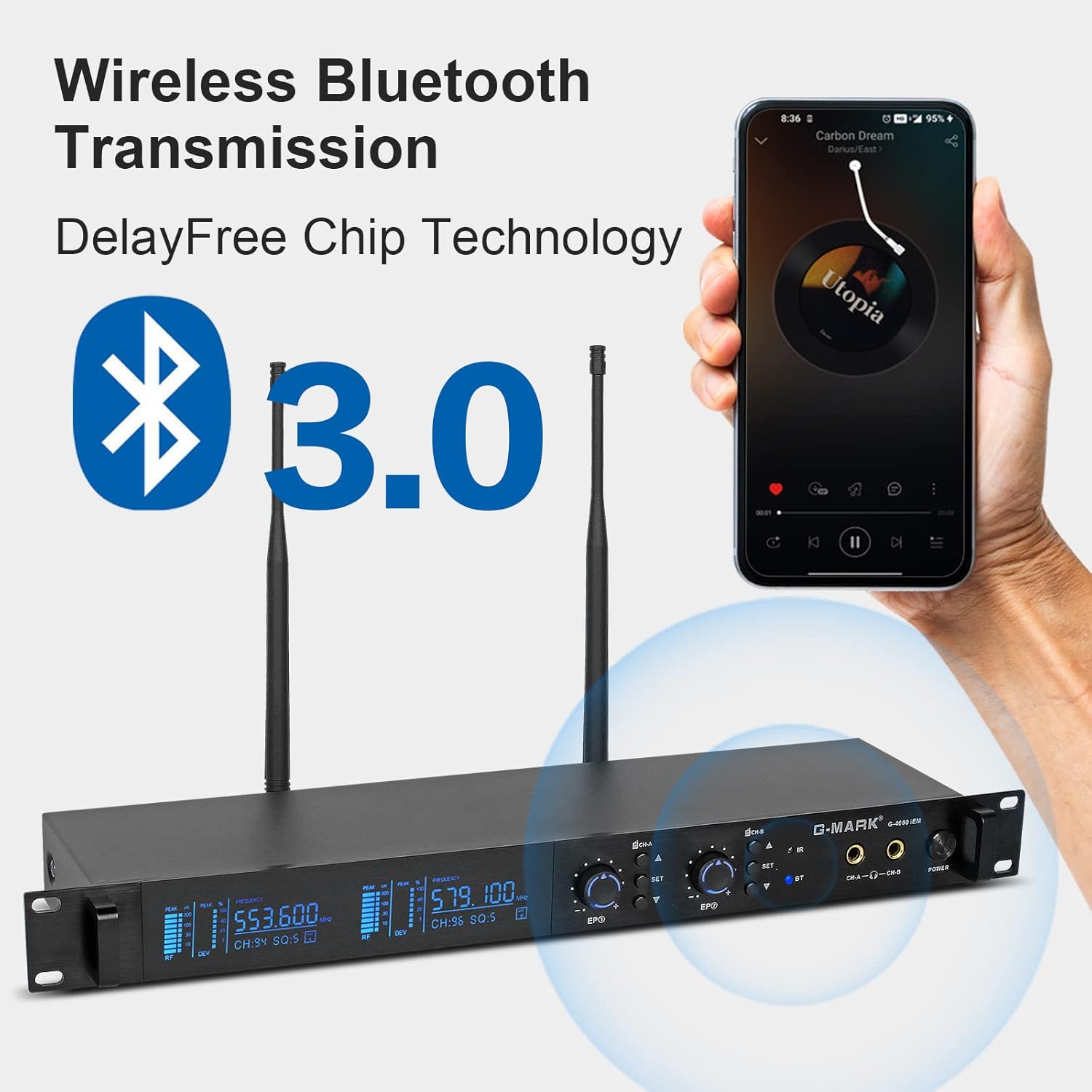
Figure 6.2: Wireless Bluetooth Transmission
7. Bakım
- Temizlik: Use a soft, dry cloth to clean the surfaces of the transmitter and bodypack receivers. Do not use abrasive cleaners, solvents, or chemical sprays.
- Depolamak: Sistemi kullanılmadığı zamanlarda serin, kuru ve doğrudan güneş ışığından ve aşırı sıcaklıklardan uzak bir yerde saklayın.
- Pil Bakım: Remove batteries from the bodypack receivers if they will not be used for an extended period to prevent leakage and damage.
- Kablo yönetimi: Avoid sharp bends or kinks in audio and power cables to prevent damage.
8. Sorun Giderme
If you encounter issues with your G-MARK G4000IEM system, refer to the following common problems and solutions:
- Kulaklıklardan ses gelmiyor:
- Ensure the bodypack receiver is powered on and has fresh batteries.
- Check that the earphones are securely plugged into the 3.5mm jack.
- Verify the bodypack receiver's volume knob is turned up.
- Confirm the transmitter is powered on and receiving an audio input signal.
- Perform IR pairing again to ensure frequencies are synchronized (Section 5.3).
- Parazit veya Statik:
- Change the operating frequency on the transmitter (Section 6.2) and re-pair the bodypack.
- Ensure the transmitter and receiver antennas are fully extended and unobstructed.
- Move the transmitter and receiver away from other wireless devices, Wi-Fi routers, or large metal objects.
- Güçlü yerel RF parazit kaynaklarını kontrol edin.
- Kısa Kablosuz Menzil:
- Ensure antennas on both transmitter and receiver are properly connected and oriented.
- Verici ve alıcı arasındaki engelleri en aza indirin.
- Vücut tipi alıcı cihazın pil seviyelerini kontrol edin.
- Verici Açılmıyor:
- Verify the power adapter is securely connected to both the transmitter and a working power outlet.
- Elektrik prizinin çalışır durumda olduğundan emin olun.
9. Teknik Özellikler
| Özellik | Şartname |
|---|---|
| Model Numarası | G4000IEM |
| Marka | G-İŞARETİ |
| Bağlantı Teknolojisi | Kablosuz (RF) |
| Kablosuz İletişim Teknolojileri | RF |
| Frekans Tepkisi | 50Hz - 20KHz |
| UHF Frequency Coverage | 550 MHz - 580 MHz |
| Adjustable Frequencies | 100 |
| Gecikme | 5ms'den az |
| kablosuz Menzil | 160FT - 320FT (approx. 50-100 meters) |
| Kulak Yerleşimi | Kulakta |
| Form Faktörü | Kulakta |
| Gürültü Kontrolü | Aktif Gürültü Önleme |
| Kulaklık girişi | 3.5 mm Jak |
| Vücut Paketi Güç Kaynağı | 2 x AA Pil (dahil değildir) |
| Muhafaza Malzemesi | Metal (Transmitter) |
| Öğe Sayısı | 2 (Bodypacks) |
10. Garanti ve Destek
Genuine G-MARK audio products come with a 1 yıllık üretici garantisi. This warranty covers defects in materials and workmanship under normal use. For troubleshooting, replacement of discontinuous/defective parts, or any other customer service inquiries, please contact G-MARK customer support through your retailer or the official G-MARK webalan.