
1. Giriş
This manual provides essential information for the proper use and maintenance of your HP USB 2.0 V212W 64GB Flash Drive. Please read these instructions carefully before using the device to ensure optimal performance and longevity.
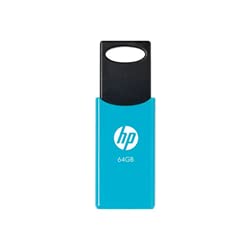
Image of the HP USB 2.0 V212W 64GB flash drive, showcasinkompakt ve hafif tasarımı sayesinde.
2. Ürün Özellikleri
- Depolama Kapasitesi: 64 Gigabytes for ampdosya veri depolama.
- Arayüz: USB 2.0 for reliable data transfer. Compatible with USB 3.0 ports.
- Okuma Hızı: Up to 20 MB/s, enabling quick access to your files.
- Tasarım: Hafif ve kompakt yapısıyla kolay taşınabilir.
- Dayanıklılık: Engineered for high performance and reliability.
3. Kurulum
- Bilgisayara Bağlan: Insert the HP USB 2.0 V212W flash drive into an available USB port on your computer. The device is plug-and-play, requiring no additional drivers for most modern operating systems.
- Cihaz Tanıma: Your operating system (Windows, macOS, Linux) will automatically detect the new hardware. A notification may appear, indicating that the device is ready for use. The flash drive will typically appear as a removable disk in 'My Computer' (Windows) or 'Finder' (macOS).
4. Kullanım Talimatları
4.1. Aktarma Files
- Kopyalama Files To: Open the flash drive's folder. Drag and drop files or folders from your computer into the flash drive's window, or copy and paste them.
- Kopyalama Files From: Sürükle ve bırak files or folders from the flash drive's window to a location on your computer, or copy and paste them.
4.2. Safely Removing the Device
Veri bozulmasını önlemek için, flash sürücüyü fiziksel olarak ayırmadan önce daima güvenli bir şekilde çıkarın.
- Pencereler: Click the 'Safely Remove Hardware and Eject Media' icon in the system tray (bottom-right corner of the taskbar), then select the HP USB device. Wait for the 'Safe to Remove Hardware' message before unplugging.
- MacOS: Drag the flash drive icon from the desktop or Finder sidebar to the Trash icon, or right-click (Control-click) the icon and select 'Eject'. Wait for the icon to disappear before unplugging.
- Linux: Right-click the device icon on your desktop or file manager and select 'Eject' or 'Unmount'.
5. Bakım
- Fiziksel Bakım: Keep the flash drive clean and free from dust and moisture. Avoid exposing it to extreme temperatures or direct sunlight.
- Veri Koruma: Flash sürücünüzde saklanan önemli verilerinizi düzenli olarak başka bir depolama ortamına yedekleyin.
- Konnektör Koruması: When not in use, ensure the USB connector is protected from damage.
6. Sorun Giderme
- Cihaz tanınmadı:
- Try plugging the flash drive into a different USB port on your computer.
- Bilgisayarınızı yeniden başlatın.
- İşletim sisteminizin güncel olduğundan emin olun.
- Yavaş Transfer Hızları:
- Ensure you are using a direct USB port on your computer, not a USB hub.
- Sistem kaynaklarını kullanabilecek diğer uygulamaları kapatın.
- Çok sayıda küçük files can transfer slower than a single large file aynı toplam büyüklükte.
- Veri Bozulması:
- Always use the 'Safely Remove Hardware' function before unplugging the drive.
- Avoid disconnecting the drive during a file Aktar.
- If data appears corrupted, try running a disk check utility on your computer.
7. Özellikler
| Özellik | Detay |
|---|---|
| Marka | HP |
| Model Numarası | V212W (HPFD212LB-64) |
| Depolama Kapasitesi | 64 GB |
| Arayüz | USB 2.0 (USB 3.0 ile uyumlu) |
| Okuma Hızı | 20 MB/sn'ye kadar |
| Renk | Gök mavisi |
| Ağırlık | 0.02 kilo |
| Menşei ülke | Almanya |
| ASIN | B096YSHFCZ |
8. Garanti ve Destek
For warranty information and technical support, please refer to the official HP website or contact HP customer service directly. Keep your purchase receipt as proof of purchase for warranty claims.
Daha fazla bilgi ve destek kaynağına resmi HP web sitesinden ulaşabilirsiniz. webalan: www.hp.com