
giriiş
This manual provides essential information for setting up, operating, maintaining, and troubleshooting your CyberpowerPC Gamer Xtreme Gaming PC. This system is designed for high-performance gaming and multitasking, featuring an AMD Ryzen 7 3700X processor, NVIDIA GeForce RTX 3060 graphics, 16GB DDR4 RAM, and a combination of SSD and HDD storage, running on Windows 10 Home 64-Bit.
1. Kurulum
1.1 Paketin açılması
Carefully remove the PC from its packaging. Ensure all accessories, including the power cable, keyboard, and mouse, are present. Retain the original packaging for future transport or service needs.

Şekil 1: Ön view of the CyberpowerPC Gamer Xtreme, highlighting its design and RGB lighting.
1.2 Çevre Birimlerini Bağlama
Connect your monitor, keyboard, mouse, and other peripherals to the appropriate ports on the rear and top of the PC. Ensure all connections are secure.
- İzleme: Connect your monitor to the graphics card's HDMI or DisplayPort output.
- Klavye ve Fare: Connect to any available USB ports (USB 2.0 or USB 3.0).
- Güç: Connect the power cable to the PC's power supply unit (PSU) and then to a grounded electrical outlet.
- Ağ: Kablolu internet için LAN bağlantı noktasına bir Ethernet kablosu bağlayın. Kablosuz internet için Wi-Fi anteninin (eğer varsa) takılı olduğundan emin olun.

Şekil 2: Açısal view of the CyberpowerPC Gamer Xtreme, highlighting the front panel design and side ventilation.

Şekil 3: Üst view of the PC, illustrating the accessible front I/O ports and top ventilation.
1.3 İlk Açılış ve Windows Kurulumu
Press the power button located on the top panel of the PC. The system will boot up. Follow the on-screen instructions to complete the Windows 10 Home setup, including language selection, network connection, and user account creation.
2. Kullanım Talimatları
2.1 Güç Açma/Kapatma
- Açmak İçin: Üst paneldeki güç düğmesine basın.
- Kapatmak için: Windows'ta Başlat düğmesine tıklayın, ardından Güç > Kapat'ı seçin.
- Yeniden başlatmak: Başlat düğmesine tıklayın, ardından Güç > Yeniden Başlat'ı seçin.
- Uyumak: Click the Start button, then select Power > Sleep.
2.2 Bir Ağa Bağlanma
Your PC supports both wired (Ethernet) and wireless (Wi-Fi) network connections.
- Kablolu: Connect an Ethernet cable from your router/modem to the LAN port on the rear of the PC.
- Kablosuz: In Windows, click the network icon in the taskbar, select your Wi-Fi network, enter the password, and click Connect.
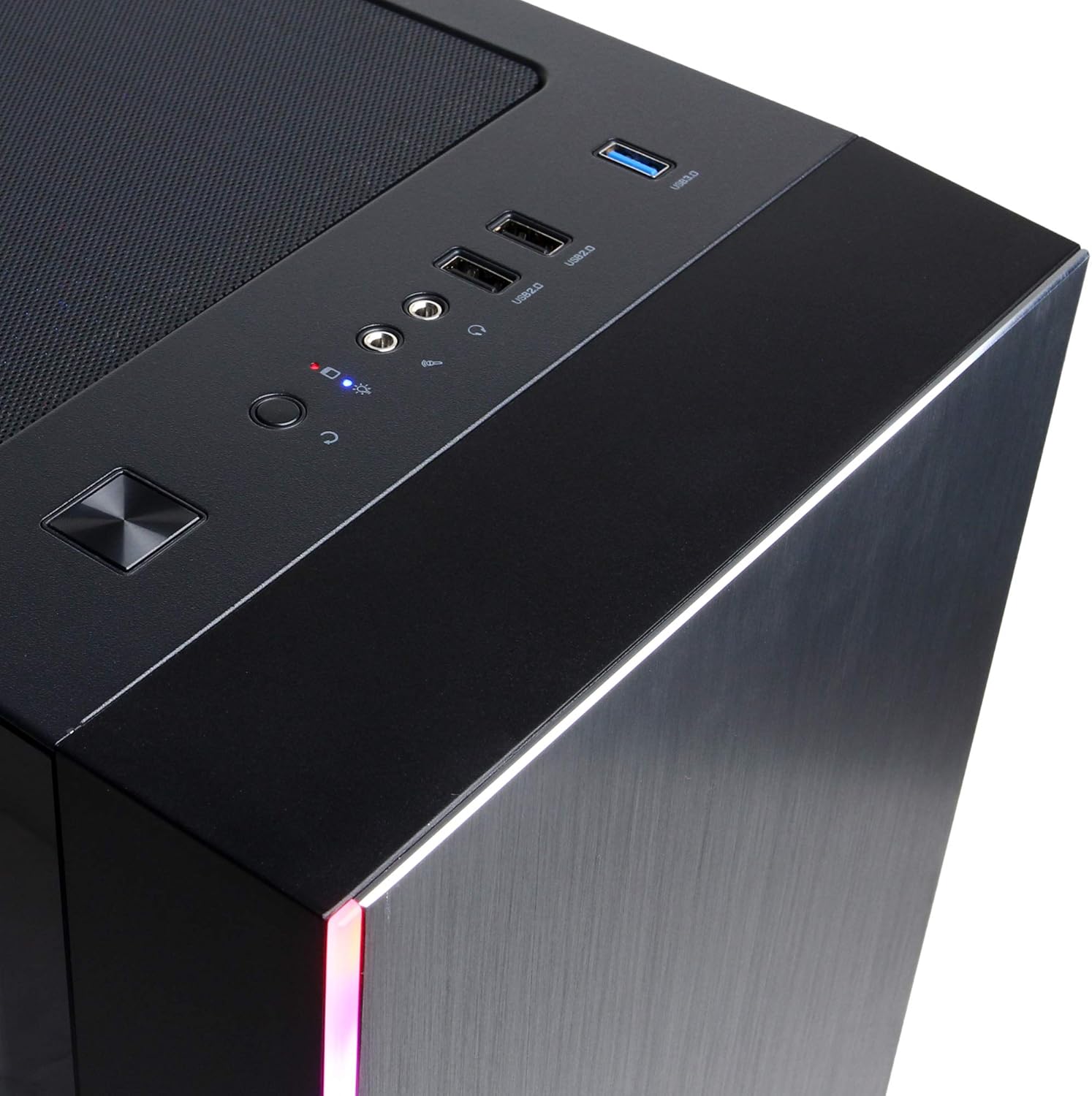
Figure 4: Detail of the top I/O panel, providing easy access to USB and audio connections.
3. Bakım
3.1 Temizlik
Regular cleaning helps maintain optimal performance and extends the lifespan of your PC.
- Dış: Yumuşak bir d kullanınamp cloth to wipe down the exterior. Avoid harsh chemicals.
- Toz: Periodically use compressed air to clear dust from ventilation grilles and internal components. Ensure the PC is powered off and unplugged before cleaning.
3.2 Yazılım Güncellemeleri
Keep your operating system, drivers, and applications updated to ensure security, stability, and performance.
- Windows Güncellemeleri: Ayarlar > Güncelleştirme ve Güvenlik > Windows Update'e gidin.
- Grafik Sürücüleri: Download the latest drivers directly from NVIDIA's official webalan.
4. Sorun Giderme
4.1 Güç Yok
- Güç kablosunun hem bilgisayara hem de duvar prizine güvenli bir şekilde bağlandığından emin olun.
- Başka bir cihaz takarak duvar prizinin çalışır durumda olduğunu doğrulayın.
- Check the power switch on the PSU (if present) is in the 'On' position.
4.2 Ekran Yok
- Confirm the monitor is powered on and connected to the graphics card's output, not the motherboard's integrated graphics ports (if applicable).
- Mümkünse farklı bir ekran kablosu veya monitör deneyin.
- Monitörün giriş kaynağının doğru seçildiğinden emin olun.
4.3 Sistem Yavaşlaması veya Donması
- Check Task Manager (Ctrl+Shift+Esc) for high CPU, RAM, or disk usage by specific applications.
- Windows ve sürücülerin güncel olduğundan emin olun.
- Run a virus and malware scan.
- Ensure adequate ventilation and check for excessive dust buildup.
5. Özellikler
| Özellik | Detay |
|---|---|
| Marka | CyberpowerPC |
| Model Adı | Gamer Xtreme |
| İşletim Sistemi | Windows 10 Ev |
| CPU Modeli | AMD Ryzen 7 3700X |
| CPU Hızı | 3.6 GHz (Base) |
| Grafik Eş İşlemcisi | NVIDIA GeForce RTX 3060 |
| Graphics Card RAM | 12 GB GDDR6 |
| RAM Belleği Takılı | 16 GB DDR4 |
| Depolamak | 240 GB SSD, 1 TB HDD |
| Bağlantı | HDMI, Wi-Fi (802.11ab), USB 2.0, USB 3.0 |
| Ürün Boyutları (LxWxY) | 18.6 x 17.4 x 8.9 inç |
| Soğutma Yöntemi | Hava |
| UPC | 811842073769 |
6. Garanti Bilgileri
Your CyberpowerPC Gamer Xtreme Gaming PC is covered by a manufacturer's limited warranty. Specific terms and conditions, including warranty duration and coverage details, are typically provided with your purchase documentation or can be found on the official CyberpowerPC webLütfen garanti talepleriniz için satın alma belgenizi saklayın.
7. Destek
For technical assistance, troubleshooting, or further inquiries, please visit the official CyberpowerPC support website or contact their customer service. You may need your product model number (GMA3088W) and serial number for support.
- Resmi Webalan: www.cyberpowerpc.com
- Destek Bölümü: Look for a "Support" or "Contact Us" link on their webalan.