
1. Ürün Bittiview
The Lexmark MX611DHE is a monochrome laser multifunction device designed for office environments, offering comprehensive capabilities including printing, copying, scanning, and faxing. This robust unit is engineered for high-volume output and efficient document handling.
- Çok işlevlilik: Integrates print, copy, fax, and scan functions into a single device.
- Yüksek Hızlı Performans: Capable of printing and copying at speeds up to 50 pages per minute (ppm).
- Çift Taraflı Yazdırma: Supports automatic two-sided printing to conserve paper.
- Giriş Kapasitesi: Features a standard input capacity of 650 sheets, expandable for larger tasks.
- Bağlantı: Equipped with USB and Ethernet interfaces for versatile network integration.
- Sezgisel Kontrol: Features a touchscreen display for easy navigation and operation.
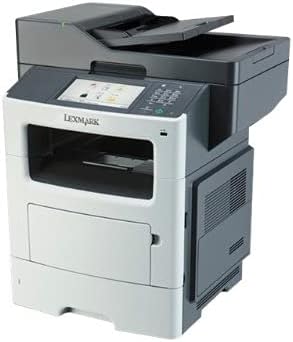
Şekil 1: Ön view of the Lexmark MX611DHE multifunction printer, showcasing its compact design and front-facing paper tray.
2. Kurulum Kılavuzu
Follow these steps to set up your Lexmark MX611DHE printer for initial use.
- Paketin açılması: Carefully remove the printer from its packaging. Remove all protective tapes and packing materials from the exterior and interior of the device.
- Atama: Place the printer on a stable, level surface with adequate ventilation. Ensure there is enough space around the printer for proper operation and maintenance.
- Güç Bağlantısı: Connect the power cord to the printer's power input and then to a grounded electrical outlet. Do not connect to a surge protector or extension cord initially.
- Kağıt Yükleme: Open the paper tray and load the appropriate paper size (up to 8.5 x 14 inches). Adjust the paper guides to fit the paper stack snugly.
- Ağ/USB Bağlantısı:
- For Network (Ethernet): Yazıcının Ethernet portundan ağ yönlendiricinize veya anahtarınıza bir Ethernet kablosu bağlayın.
- USB için: Yazıcının USB portundan bilgisayarınıza bir USB kablosu bağlayın.
- İlk Güç Açma: Press the power button to turn on the printer. Follow the on-screen prompts on the touchscreen display to select language, region, and perform initial setup configurations.
- Sürücü Kurulumu: Install the necessary printer drivers on your computer. Drivers can typically be found on the Lexmark support website or on an included installation CD (if applicable).
3. Kullanım Talimatları
This section provides basic instructions for using the Lexmark MX611DHE's primary functions.
3.1. Baskı
- Yazıcının açık olduğundan ve bilgisayarınıza veya ağınıza bağlı olduğundan emin olun.
- Yazdırmak istediğiniz belgeyi bilgisayarınızda açın.
- Seçme File > Yazdır (veya uygulamanızdaki eşdeğer komut).
- Choose "Lexmark MX611DHE" from the list of available printers.
- Adjust print settings such as number of copies, paper size, and duplex options as needed.
- Tıklamak Yazdır.
3.2. Kopyalama
- Belgeyi tarayıcı camına yüzü aşağı bakacak şekilde veya otomatik belge besleyiciye (ADF) yüzü yukarı bakacak şekilde yerleştirin.
- On the printer's touchscreen, select the Kopyala işlev.
- Adjust settings such as number of copies, lightness/darkness, and paper size.
- Basın Başlangıç kopyalamaya başlamak için düğmesine basın.
3.3. Tarama

Figure 2: The Lexmark MX611DHE with its scanner lid open, revealing the flatbed scanner glass and the automatic document feeder mechanism.
- Belgeyi tarayıcı camına veya otomatik belge besleyiciye yerleştirin.
- On the printer's touchscreen, select the Tarama işlev.
- Choose your desired scan destination (e.g., Scan to Computer, Scan to Email, Scan to Network Folder).
- Çözünürlük, renk modu gibi tarama ayarlarını yapılandırın. file Biçim.
- Basın Başlangıç Tarama işlemini başlatmak için düğmeye tıklayın.
3.4. Faks Gönderme
- Yazıcının telefon hattına bağlı olduğundan emin olun.
- Belgeyi tarayıcı camına veya otomatik belge besleyiciye yerleştirin.
- On the printer's touchscreen, select the Faks işlev.
- Kontrol panelindeki tuş takımını kullanarak alıcının faks numarasını girin.
- Gerekli faks ayarlarını yapın.
- Basın Başlangıç faksı göndermek için düğmesine basın.
4. Bakım
Regular maintenance ensures optimal performance and extends the lifespan of your Lexmark MX611DHE.
- Dış Cephe Temizliği: Yumuşak bir d kullanınamp, lint-free cloth to wipe the exterior surfaces of the printer. Avoid abrasive cleaners.
- Tarayıcı Camının Temizlenmesi: For clear scans, regularly clean the scanner glass with a soft, lint-free cloth and a mild glass cleaner.
- Toner Kartuşu Değişimi: When the toner low message appears, order a new Lexmark toner cartridge. Follow the instructions provided with the new cartridge for proper installation.
- Kağıt Yolu Temizliği: If paper jams become frequent, consult the printer's internal guides or the Lexmark support website for instructions on cleaning the paper path rollers.
5. Sorun Giderme
This section addresses common issues you might encounter with your Lexmark MX611DHE.
| Sorun | Olası Neden | Çözüm |
|---|---|---|
| Yazıcı yanıt vermiyor | Power cable disconnected, network issue, driver problem. | Check power connections. Verify network cable or USB connection. Reinstall printer drivers. |
| Kağıt sıkışması | Incorrectly loaded paper, foreign object in paper path. | Open access covers and carefully remove jammed paper. Ensure paper is loaded correctly. |
| Düşük baskı kalitesi | Low toner, dirty print head/rollers, incorrect print settings. | Replace toner cartridge. Clean internal components as per maintenance guide. Adjust print quality settings in driver. |
| Tarayıcı çalışmıyor | Scanner glass dirty, software issue, connectivity problem. | Clean scanner glass. Restart computer and printer. Check USB/network connection. |
6. Özellikler
Detailed technical specifications for the Lexmark MX611DHE.
| Özellik | Detay |
|---|---|
| Marka | Lexmark |
| Model Adı | MX611DHE |
| Görüntü Türü | LCD (Touchscreen) |
| Baskı Teknolojisi | Lazer (Tek Renkli) |
| Maksimum Baskı Hızı (Siyah Beyaz) | 50 ppm |
| Maksimum Kopyalama Hızı (Siyah & Beyaz) | 50 ppm |
| Çözünürlük | 1200 x 1200 dpi |
| Bellek Depolama Kapasitesi | 1024 MB |
| Levha Boyutu Desteği | Up to 8.5 x 14 Inches |
| Donanım Arayüzü | USB, Ethernet |
| Ürün Boyutları | 22.6 x 23.5 x 26.5 inç |
| Renk | Gri beyaz |
| UPC | 656942073611 |
7. Garanti ve Destek
Your Lexmark MX611DHE (Renewed) product is covered by a limited warranty and support resources.
- Garanti: Bu ürün bir 90 günlük sınırlı garanti. Please refer to your purchase documentation for specific terms and conditions of the Amazon Renewed Guarantee.
- Teknik Destek: For technical assistance, driver downloads, or further troubleshooting, please visit the official Lexmark support websitesine gidin veya müşteri hizmetleriyle iletişime geçin.
- Çevrimiçi Kaynaklar: Additional user guides, FAQs, and firmware updates may be available on the Lexmark support portal.